
Midjourney - What It Is, How It Works, and How Much the AI Image Generator Costs
Midjourney is a paid AI image generator that creates polished graphics in tens of seconds based on text descriptions. This artificial intelligence-based tool turns an ordinary sentence into a finished image, meaning that creating graphics no longer requires knowledge of graphic design software. Midjourney is used by artists and professionals as well as people just starting their adventure with image generation. In this guide, we explain what Midjourney is, how it works, how much it costs, and how to start using this platform for work and business.
What is Midjourney?
What is Midjourney? It is an AI image generator based on artificial intelligence that turns a text description, known as a prompt, into a finished image in tens of seconds. Behind the project is an independent research lab of the same name, led by David Holz, which has been developing successive versions of its model since 2022. With each update, detail quality, adherence to the description, and control over composition increase, and the platform generates increasingly realistic images. Midjourney AI allows users to create graphics and unique illustrations without technical knowledge; the entire image creation process boils down to describing an idea in words.
Unlike stock photo sites or traditional graphic design software, Midjourney does not search for ready-made files or require manual drawing. The model was trained on massive datasets of images and text, allowing it to combine concepts, styles, and compositions into new graphics. The result is a unique image created for the needs of a specific description, and the Midjourney system offers different variations of the same concept every time.
The role of artificial intelligence in image generation
Midjourney AI is based on a diffusion model - an approach where artificial intelligence gradually transforms random noise into a coherent image that matches the description. The results of such work are classified as generative art, where the artwork is created through human collaboration with an algorithm and a partly autonomous system co-creating the composition. In practice, Midjourney AI makes it possible to turn imagination into images and gives artists room to create new works. For many artists, these are new possibilities and a field for experimentation, not a threat.
For the user, however, what matters most is what this technology offers in practice:
- natural language interpretation, so prompts can be written in plain sentences,
- combining multiple styles in a single graphic, such as photorealism with illustration,
- generating several variations of a single idea, from which you choose the best one,
- fast iterations, meaning refining an image without starting from scratch.
If you want to understand the broader context of how artificial intelligence-based models learn to generate content, take a look at our article on machine learning and content creation.
How does Midjourney work? From prompt to image
The principle of operation is surprisingly simple. You provide a description of what you want to achieve, and Midjourney AI suggests a set of images in tens of seconds. You typically receive four low-resolution suggestions, from which you pick one to enlarge (upscale) or request further variations similar to the selected version. All image generation takes place based on text descriptions, without the need to draw or take photos.
The quality of the result is most strongly influenced by the description itself. The more specific description you provide, the more accurate the image you will get, so instead of just "cat," it is worth writing, for example, "ginger cat on a windowsill in the morning light, photographic style." It is also worth knowing that the model understands commands best in English, so descriptions written in English usually produce the most details. The entire process works in two environments: on a Discord server and in a web application.
Generating graphics through the Discord platform
For a long time, Discord was the only way to create graphics in Midjourney, and it remains a fully supported platform. The workflow there is as follows:
- You join the official Midjourney server or add the bot to your own server.
- In a channel, you enter the /imagine command, followed by your description.
- The system generates four suggestions and sends them back in a message.
- You click the U (upscale) or V (variations) buttons to refine the chosen image.
This method of generating graphics can be confusing for people unfamiliar with Discord, but it provides full access to all features and the creator community.
Access through the web application
The answer to the entry barrier associated with Discord is the web application available at midjourney.com. The browser interface resembles a traditional graphic tool: you have a description field, a gallery preview of your works, generation history, and image editing options all in one place. For many users, this is a much simpler way to work than chat commands.
It is also the platform where Midjourney rolls out new features the fastest, such as editing parts of an image or expanding the frame. For teams working on multiple projects simultaneously, this centralization in the browser can be decisive. Discord and the web app use the same account, so you can freely switch between them. Midjourney AI works the same way in both environments, so users choose whichever workflow is more convenient for them.
How to start using Midjourney step by step
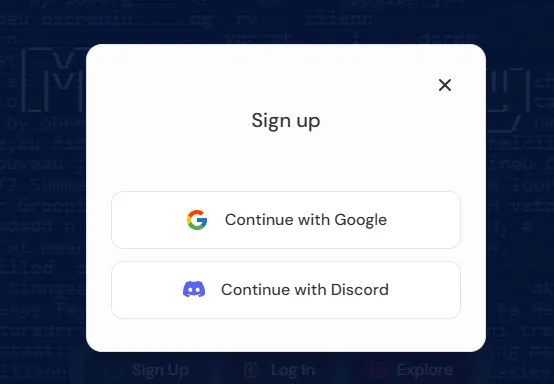
To start using Midjourney, create an account on midjourney.com, purchase a subscription, and enter your first description - getting started takes just a few minutes. Many users start with the web version of Midjourney because it does not require knowledge of Discord. Below, we show how to go through Midjourney step by step, from registration to your first image:
- Go to midjourney.com and complete the registration process by logging in with a Google or Discord account.
- Select and pay for a subscription plan, as the tool requires an active subscription.
- In the text field, enter your first description, preferably in Eng
This simple way of operating makes the platform user-friendly for those without design experience. After signing up, nothing stands in the way of immediately tapping into the full potential of graphic creation and experimenting with different styles. The first contact with Midjourney AI is often surprisingly smooth for users because the interface guides you step by step.
Let's check your website's potential
Share your website and email - we'll get back to you with a real analysis, no strings attached.
Advanced features: working with your own photos
Midjourney is an advanced tool based on artificial intelligence and gives you plenty of control over the output. As an advanced tool, Midjourney proves itself both in creating graphics for the web and generating images for print - hence its virtually limitless capabilities. And it is precisely these limitless capabilities that creators focused on reproducible results appreciate the most. In addition to the text prompt itself, you have options to upload your own photos as a reference point. By using your own photos, the image can adopt the composition, character, or style from the material you provide yourself.
Character Reference and Style Reference
Two features are especially handy when working on a consistent series of graphics. Character Reference lets you preserve the same character across multiple images, which is useful when creating unique illustrations with a recurring hero. Style Reference, in turn, transfers a distinctive visual style to new generations, helping you maintain a uniform aesthetic throughout the entire project.
Both features allow you to experiment with your own material and check out several different versions of the same idea. If you want to achieve a reproducible result, these options give you the most control. On top of that, there is the Personalization profile, which learns your aesthetic preferences based on the images you rate and tailors subsequent generations to your individual taste. All of this combined raises the quality of image generation in longer projects.
Midjourney pricing - subscription plans in 2026
Midjourney pricing ranges from $10 to $120 per month across four plans: Basic, Standard, Pro, and Mega, with annual billing being around 20 percent cheaper. The price therefore depends on the selected plan and billing method. You pay for access to Midjourney AI upfront, and subscriptions are billed in US dollars (USD) on a monthly or annual cycle. The offering includes four tiers that differ mainly in the number of fast generation hours (Fast GPU) and access to Relax mode.
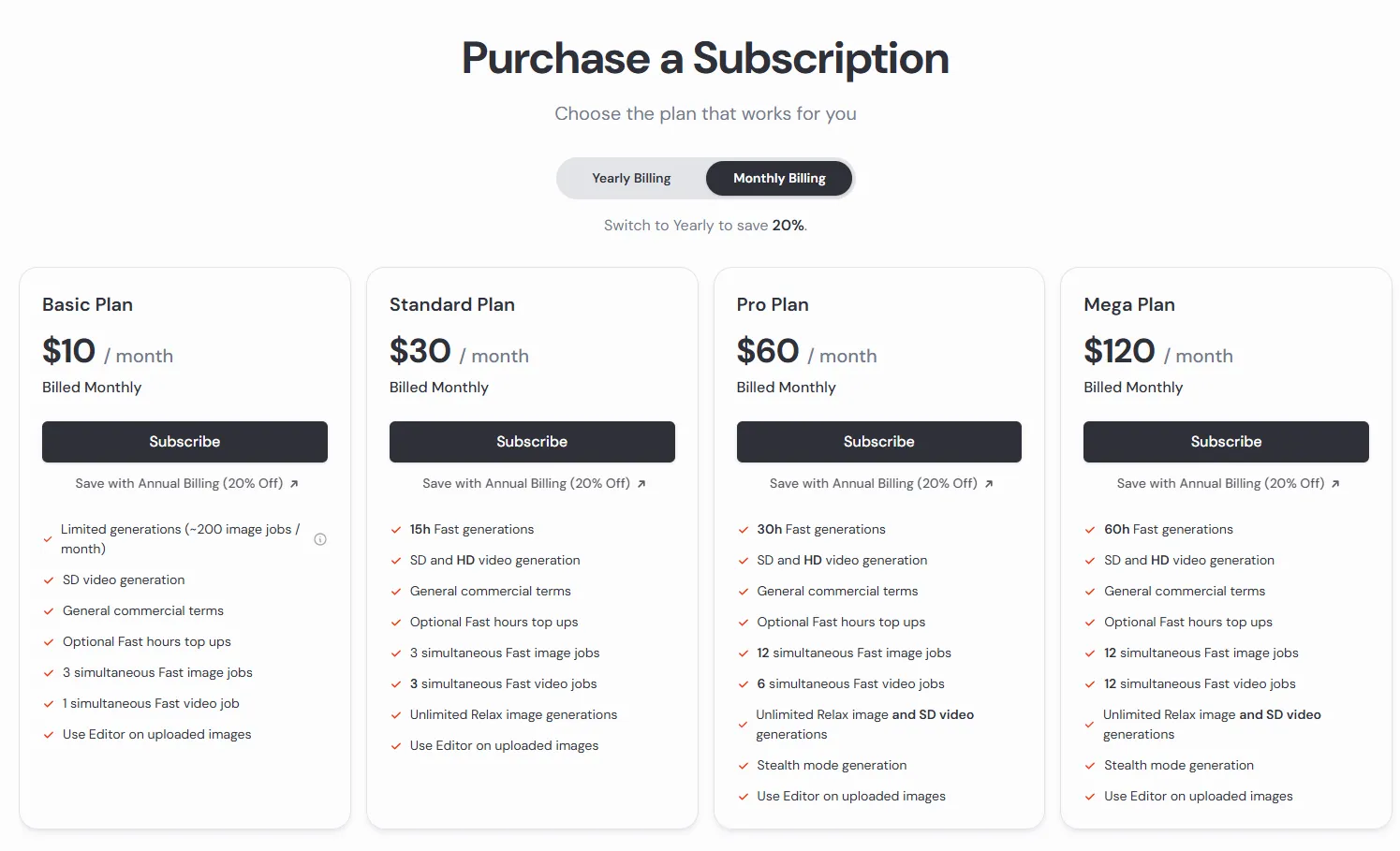
Relax mode lets you generate images without consuming Fast hours, albeit with longer wait times. On the Standard plan, it covers unlimited image generation, and on the Pro and Mega tiers, additionally SD quality video. These two highest tiers, Pro and Mega, also provide Stealth Mode, a private mode that hides your work from the public gallery.
Monthly versus annual billing
The choice of billing cycle affects the final cost. Annual payment is about 20 percent cheaper than the sum of twelve monthly fees, but requires paying the entire amount upfront. This is a solution for individuals and companies who know they will be using the tool regularly.
It is worth remembering that Fast GPU hours do not roll over to the next month, and any unused limit is forfeited. If you generate images irregularly, the Standard plan with unlimited Relax mode often turns out to be more sensible than a higher tier with a large pool of Fast hours.
Does Midjourney have free access?
This question comes up most frequently, and the answer tends to change. Free trials were paused back in 2023, when the scale of abuse and the flood of fake, viral images heavily overloaded the servers. At the time of writing, Midjourney does not offer a free trial either on Discord or in the web app. A limited trial is available exclusively in the associated niji journey mobile app on iOS and Android.
Free access has historically been turned on and off depending on server load, so it is always worth checking its current status on the official website before registering. Do not assume in advance that a trial will be available.
Basic commands and tool features
Regardless of the interface, it is worth learning a few key commands used to control Midjourney AI. These commands are handy for everyday image generation and quickly become second nature, much like in many other AI tools:
- /imagine - the core command creating an image from a text description (prompt),
- /blend - combining two or more uploaded images into a single composition,
- /describe - generating suggested prompt text based on an uploaded image,
- upscale - enlarging and refining a selected image from the four proposals,
- variations - generating further versions similar to the selected frame.
Key parameters and operating modes
You can fine-tune the final result with parameters appended to the end of the prompt. Aspect ratio is set by the --ar parameter, for example --ar 16:9 for widescreen format. The model version is indicated by --v (such as --v 8), styling strength is controlled by --stylize, and --no lets you exclude an unwanted element, such as --no text. Added to this are two operating modes: Fast works immediately and consumes GPU hours, with rapid generation in this mode making sense for urgent projects, while Relax generates slower, but without dipping into the limit on plans that include it.
Content moderation system in Midjourney
Midjourney filters prompts and blocks content deemed inappropriate, and the way it does this changed in May 2023. Previously, the tool relied on a rigid list of banned words that reacted to individual terms regardless of the context in which they were used.
Since May 2023, an AI-based moderation system has been in place, analyzing the context of the entire prompt rather than just catching keywords. The system operates on two tiers: a fast mechanism makes an initial assessment of the query, and its decision can be appealed to a more advanced model. Such an approach is sometimes the subject of debates about censorship and where the boundary of permissible content lies, partly due to false blocks of valid ch descriptions.
Copyright and commercial use
Copyright for generated graphics depends on the plan you have. According to Midjourney's terms, paid subscribers can use their images commercially; however, companies with annual revenues exceeding one million dollars must use the Pro or Mega plan. This is an important distinction for larger organizations and professionals who make a living from visual content.
Additionally, generation privacy, meaning the aforementioned Stealth Mode, is available only in the two highest tiers. Without it, your prompts and images can be visible to other users in the public gallery, which can be an issue when working on client projects. Copyright for AI-generated content is still evolving and varies across countries, so it is a good idea to check the current license with the vendor before any commercial use. This section is for informational purposes only and does not constitute legal advice.
Midjourney in business practice: from concept to campaign
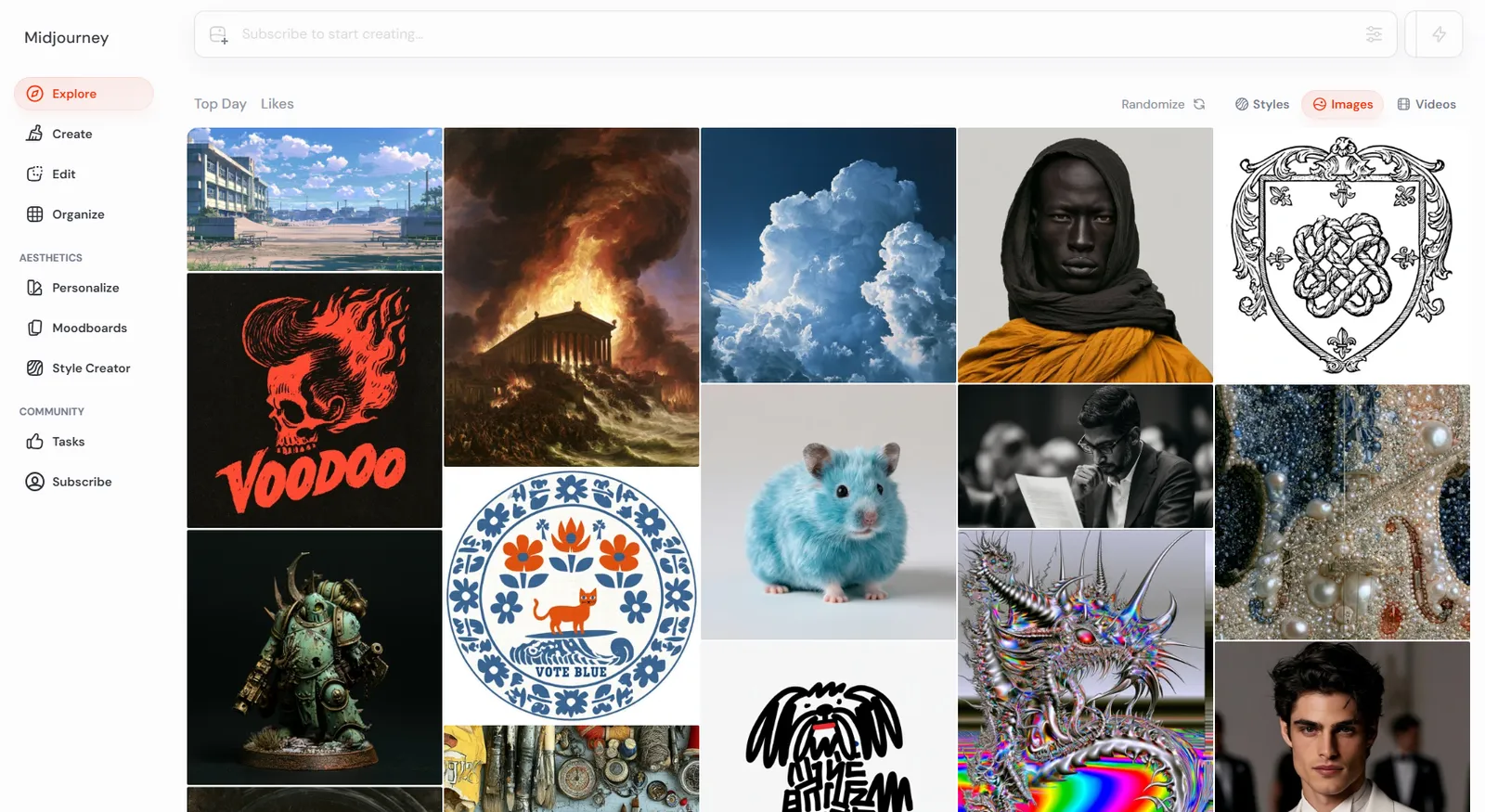
The tool delivers the most value where speed and the number of variants matter. Instead of waiting days for the first drafts, a marketing team can prepare a dozen visual directions in an hour and pick the one that best fits the campaign. For marketing departments, Midjourney AI enables the rapid creation of graphics and visual content, from product visualizations to full campaigns.
Applications in marketing and small businesses
In the everyday work of agencies and marketing departments, Midjourney proves useful across many tasks:
- creating moodboards and concept art before actual production,
- generating graphics and backgrounds for social media posts,
- visualizing ideas for campaigns and client presentations,
- designing unique patterns, prints, and packaging concepts,
- visualizing new collections by fashion designers and apparel brands,
- unique illustrations for blog articles, newsletters, and banners.
You can read more about how visuals affect brand communication in our post on social media marketing trends.
How the tool supports artists and shortens the design process
For many artists and designers, Midjourney is a true revolution in how they approach initial sketches. The tool does not replace a graphic designer, but it genuinely shortens the stage of exploring creative directions. Instead of starting from a blank page, the designer gets source material for discussions with the team and client, meaning conversations about aesthetics begin with concrete images rather than abstract descriptions.
It can also help break creative block, as seeing a few variants on screen often sparks new ideas faster than staring at a blank sheet of paper. Experimenting with form in this way helps artists explore fresh artwork and ideas, while valuable professional time goes where it is needed most: refining the final design. As a result, Midjourney becomes an everyday tool, and generating images in Midjourney noticeably speeds up the entire process. If you are building your own suite of AI tools for work, check out our AI tools hub, where we gather tried-and-tested solutions.
Midjourney versus other AI image generators
Midjourney is not the only AI image generator on the market, and the choice of tool depends on your needs. In a nutshell, here is how the differences look:
| Tool | Key Differentiator |
|---|---|
| Midjourney | consistent, polished aesthetics and high quality of finished graphics |
| DALL-E | ease of use and good integration with the OpenAI ecosystem |
| Stable Diffusion | open model, full control, and a free local option |
| Adobe Firefly | emphasis on licensing safety and integration with the Adobe suite |
What sets Midjourney AI apart is, above all, the quality and consistency of the finished graphics. DALL-E can be more convenient for simple prompts, while Stable Diffusion gives you full control over the process and allows you to generate images and specific objects yourself on your own hardware. Increasingly, image generators are accompanied by video tools, such as the Veo 3 model, as well as AI solutions for presentations.