
Website Sitemap - Basic Information
Have you heard that it is worth having a sitemap file for your website, or did you read in an audit that your sitemap needs improvement, but you do not know what it is? Do not worry! In this article, we will answer basic questions about website sitemaps - what exactly they are, why they are so important in the context of SEO, and how to create and place them so that they fulfill their purpose.
What is a website sitemap?
A sitemap is most often an XML file that contains a list of all important URLs of a website's subpages. It serves as a source of information about the website's structure and is used by search engines. Thanks to the sitemap, web crawlers know which subpages should be included in their index. A sitemap can also contain other information, such as embedded videos and files, alternative language versions of the site, or the dates of the subpages' last updates. By default, you can preview it by adding "/sitemap.xml" or "/sitemap_index.xml" after the domain address. It is also worth mentioning that HTML sitemaps exist. This is a graphical representation of the site's structure, which is especially useful for users of larger websites. However, in this article, we will focus on discussing the sitemap.xml file.
Why is a website sitemap needed?
Having a sitemap is not a direct ranking factor. However, a website sitemap is important in the context of SEO because, thanks to the information it contains about all subpages, it helps search engines index the site faster and more accurately. Therefore, no URLs that are difficult to find or lack internal links pointing to them (so-called orphan pages) will be overlooked. Additionally, a website sitemap allows you to control the indexing process and the updating of information on the site. This is particularly important for websites with many subpages or pages generated dynamically, for example, by content management systems (CMS). An XML sitemap can contain information about the priority and update frequency of individual subpages.
What should a website sitemap contain?
A sitemap should only contain current subpages that are valuable to users. For most websites, these include the homepage, product and category pages, blog, blog articles and categories, and other informational pages. In general, these should be pages that:
- return a 200 status code,
- are canonical,
- are not blocked in the robots.txt file.
What does a sitemap.xml file look like?
Below you can see an example of a sitemap structure.
<?xml version="1.0" encoding="UTF-8"?>
<urlset xmlns="http://www.sitemaps.org/schemas/sitemap/0.9">
<url>
<loc>http://www.example.com/</loc>
<lastmod>2005-01-01</lastmod>
<changefreq>monthly</changefreq>
<priority>0.8</priority>
</url>
</urlset>
A website sitemap consists of several tags. Among them, the required ones are:
- <urlset> - refers to the current protocol standard,
- <url> - the parent tag for each URL,
- <loc> - contains the path to the page's URL; this should be an absolute address, meaning it begins with the protocol (e.g., http or https).
All other tags are optional. Their support may vary depending on the search engine. These include:
- <lastmod> - contains the date of the page's last modification, which should be in W3C Datetime format. This format allows you to omit the time portion and use the YYYY-MM-DD pattern. Thanks to this information, search engine crawlers can easily determine which pages need to be re-indexed.
- <changefreq> - specifies the frequency of changes made to the page. In the example, it is set to monthly, but other values can also be used: daily, weekly, yearly, etc. Keep in mind that the value of this tag is treated as a hint, not a command. Therefore, a page set to yearly might still be indexed more frequently than a page set to monthly.
- <priority> - specifies the priority of the page relative to other pages on the site, given in a range from 0.0 to 1.0, where 1.0 indicates the highest priority. The default value is 0.5.
More information regarding tags and the sitemap schema can be found in the document describing the sitemap protocol.
Let's check your website's potential
Share your website and email - we'll get back to you with a real analysis, no strings attached.
What should not be in a sitemap?
We already know what should be in a sitemap, so it is also worth pointing out what should be avoided. Incorrect or unnecessary information can negatively affect site indexing and, consequently, its position in search results. The sitemap.xml file should not contain URLs that:
- return a 404 error,
- contain 301 or 302 redirects,
- are non-canonical, meaning they contain a different canonical page in the "canonical" tag,
- are blocked from indexing, meaning they contain the "noindex" attribute,
- are blocked in the robots.txt file.
If your sitemap contains such URLs, you should remove them. It is therefore worth regularly monitoring and updating the sitemap.xml file to ensure its accuracy and effectiveness.
How to create a sitemap?
There are various ways to create a website sitemap. Here are a few of them:Dedicated CMS tools: Many popular content management systems, such as WordPress or Magento, offer specialized SEO plugins. They generate the sitemap.xml file automatically. You just need to install and configure them properly. For example, in WordPress, a sitemap can be generated using the Yoast SEO plugin. There are also CMS platforms, such as Shopify, that have a built-in sitemap generation feature, eliminating the need to install additional tools.Website sitemap generators: There are dedicated online tools that automatically generate a website sitemap based on the URLs available on the site. They only require you to enter the homepage address. Keep in mind, however, that free versions of such tools usually have a limit on the number of subpages they can include. An example is Screaming Frog, which in the free version can generate a sitemap of up to 500 subpages.Manually creating a sitemap.x
ml: You can also create a sitemap manually using a plain text editor. In this case, save the file in XML format and include all desired page URLs according to the schema shown earlier.What should you keep in mind when creating a website sitemap?
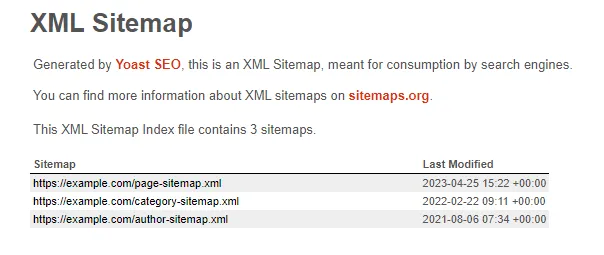
The sitemap.xml file has its own limitations and generation rules. There are also certain factors to keep in mind when creating a sitemap to ensure it works effectively:Sitemap size: there are size limits - an uncompressed file cannot exceed 50 MB or contain more than 50,000 URLs. If it does, the sitemap must be split into smaller ones, whose paths can be placed in a sitemap index. This is a common practice, for example, with the Yoast SEO plugin, which generates several sitemaps for us - separately for products, blog posts, authors, etc. It lists them in an aggregate index, which, for instance, could look like this:
Sitemap location: it is recommended to place the sitemap file in the website's root directory. Many search engine bots automatically look for the sitemap.xml file in the website's root directory. Placing it there allows for easier and faster indexing of all the website's subpages.Informing about the sitemap: it is worth informing search engines, especially Google, where the website sitemap is located. The best approach is to submit its address in Google Search Console. A description of how to do this is provided below. It is also worth indicating the path to the sitemap in the robots.txt file. The "Sitemap:" directive to use is independent of the user-agent line. Therefore, it does not matter where it is placed in the file, but it is usually added at the end. You can also specify multiple sitemap addresses. If you have a sitemap index file, you only need to provide its location.Sitemap: http://www.example.com/sitemap.xmlBasic information on how to prepare and submit a sitemap can also be found in the Google documentation.
How to add a sitemap address in Google Search Console?
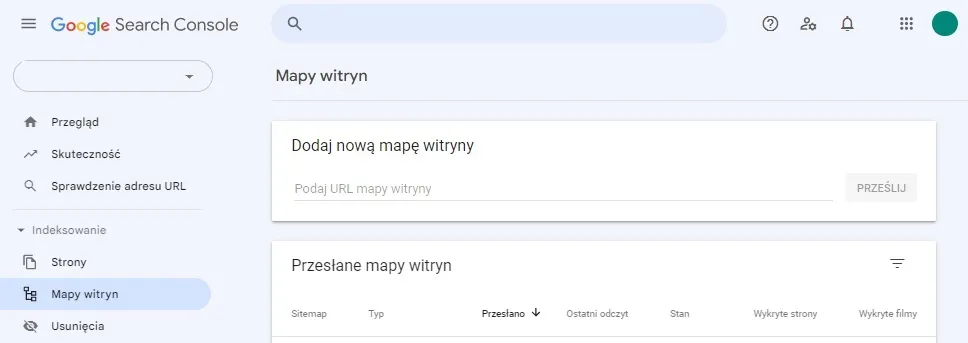
You add a sitemap address in Google Search Console as follows:
- Log in to your Google Search Console account and select the appropriate property.
- Select the "Sitemaps" section from the menu on the left side of the screen.
- Enter the URL of the sitemap.xml file in the text field and click the "Submit" button.
- If the file was submitted correctly, the message "Sitemap submitted successfully" will be displayed.
In the "Sitemaps" section, you can also view more details about the submitted sitemaps - check whether indexing was successful or if errors occurred, how many URLs were discovered, and when the last read was.It is worth remembering that submitting a sitemap in Google Search Console does not guarantee immediate indexing of all subpages on your website. The indexing process depends on many factors.
If you are not sure whether your sitemap is correct and optimized, do not waste time! Take advantage of our website SEO audit service. Our specialists will verify the accuracy of your sitemap, as well as detect and fix potential errors. Contact us today so you can enjoy better rankings in search results and attract more potential customers!
FAQ - quick answers about website sitemaps
What is a website sitemap?
A website sitemap, or sitemap.xml, is a file in XML format containing a list of URLs of website subpages that should be in the search engine index.
How to create a website sitemap?
You can create a website sitemap in several ways. When using popular CMS platforms (e.g., WordPress), it is often enough to install a dedicated SEO plugin that generates the sitemap.xml file automatically. Another way is to use sitemap generators available online, among other places. These tools automatically generate a sitemap.xml file based on the URLs available on the site. A sitemap can also be created manually using a simple text editor. In the file, include all desired URLs according to a specific schema and save it in XML format.
What should be included in a Sitemap?
The sitemap.xml file should contain information about all current and accessible subpages of the site - their URLs along with the date of last modification. Additionally, you can include information about the priorities and update frequencies of individual subpages, embedded videos and files, as well as alternative language versions of the website.