
Robots.txt File - Basic Information
The robots.txt file is one of the most important elements that allows you to control search engine crawler access to content on a website. In this article, we will provide basic information about the robots.txt file and its role in website optimization for search results.
What is a robots.txt file?
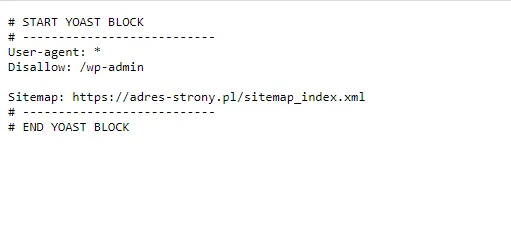
A robots.txt file is a text file located on a web server that informs web crawlers which website resources can be indexed and which cannot. This file should be located in the root directory of the site and accessible at www.website-address.com/robots.txt. The information contained in the robots.txt file can affect how crawlers index content on the site and how it is displayed in search results. Below is an example of a robots.txt file created using the Yoast SEO WordPress plugin:
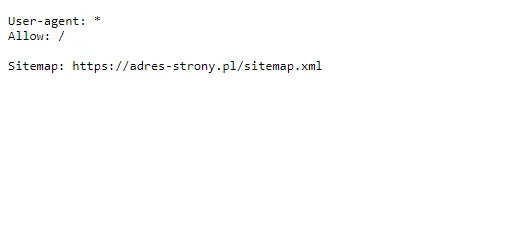
Below, on the other hand, is an example of a robots file created manually in the domain's root directory:
How does the robots.txt file work?
The robots.txt file contains instructions for web crawlers that browse the site. Every crawler that browses a website first checks whether the robots.txt file is available in the root directory of the site. If the file is available, crawlers read the instructions contained within it and apply them while indexing the site. If the robots.txt file is not available, crawlers will index all resources available on the site. If we add "noindex" to a given subpage but do not exclude it in the robots.txt file, crawlers will access that page but will not index it - by doing so, we will unnecessarily waste the crawl budget of bots visiting our site.
What are the basic directives in a robots.txt file?
A robots.txt file can contain various instructions, known as directives, which specify which resources on the site should be indexed or skipped by web crawlers. Here are some basic directives in a robots.txt file:
- User-agent: Specifies which web crawler the directive is addressed to. In the case of Googlebot, you should use "User-agent: Googlebot". Using "*" refers to all available bots. It is worth mentioning that there are also other types of web crawlers, such as:
- Bing bot,
- Yahoo! bot,
- Googlebot-News.
- Disallow: Specifies which resources should not be indexed by crawlers. For example, "Disallow: /private" will exclude all resources from the "private" directory on the site from indexing.
- Allow: Specifies which resources should be indexed by crawlers. The default choice if specific URLs are not excluded.
- Sitemap: Specifies the address of the sitemap, which helps web crawlers index all the subpages it contains within the service.
Let's check your website's potential
Share your website and email - we'll get back to you with a real analysis, no strings attached.
Most common errors when configuring a robots.txt file
Incorrect configuration of the robots.txt file can lead to undesirable consequences, such as excluding important pages or entire websites from indexing. Here are some of the most common errors made when configuring a robots.txt file:
- Blocking the entire website - the most common error is blocking the entire website by adding the entry "Disallow: /" to the robots.txt file. Such an entry will prevent search engine crawlers from browsing any part of the site, causing the site not to be indexed and not to appear in search results.
- Blocking pages with important content - a frequently made error is blocking pages that are essential for website positioning. This may result from a lack of understanding of which pages have value and should be indexed by search engine crawlers.
- Incorrect path - if an entry in the robots.txt file has an incorrect path, it may cause search engine crawlers to be unable to find the website or unable to browse certain pages.
- Syntax errors - the robots.txt file must be written in the proper syntax, and incorrect syntax can cause search engine crawlers to be unable to read it and ignore it.
When excluding pages from indexing in the robots.txt file, keep in mind that this is not a completely foolproof solution. Some search engine crawlers might ignore the Disallow entry and continue browsing pages. Therefore, if we want to fully control the indexing of the site, additional methods should be applied, such as noindex meta tags or blocking via .htaccess.
What areas, then, should Google crawlers not index?
There are certain areas that should typically be excluded from indexing to avoid a negative impact on the website's SEO. Here are some of those areas:
- Administrative files - administrative files, such as configuration files, databases, log files, or server configuration files, should not be indexed by search engine crawlers. These files contain sensitive information that should not be publicly accessible.
- Temporary files - temporary files, such as session files, cookies, or cache files, usually do not contain relevant content for users. Search engine crawlers should be excluded from indexing these files to avoid duplicates in the index.
- Test pages - test pages or staging pages under construction that are not yet ready for public use should be excluded from indexing by search engine crawlers
Additionally, it is worth excluding elements such as: the shopping cart or the internal search engine.
Why is adding the sitemap path to the robots.txt file so important?
Adding the path to the sitemap in the robots.txt file is very important from a website SEO perspective. A sitemap is a file that contains information about the site structure and URLs of individual pages, which makes it easier for search engine crawlers to index the site. If the site owner does not add the sitemap to the robots.txt file, search engine crawlers will have to crawl the entire site to find new pages, which can lead to delays in the indexing process and improper display in search results. Therefore, adding the sitemap path to the robots.txt file facilitates the work of search engine crawlers, which translates into better search rankings for the site. This way, search engine crawlers can quickly index the entire site, and individual pages will be displayed in search results in the right context. The robots.txt file directly impacts the crawl budget, which is the time and resources that search engines dedicate to crawling and indexing a website. Proper configuration of the robots.txt file allows you to optimize the crawl budget and improve the site's visibility in search results.

What are the benefits of using a robots.txt file?
The robots.txt file allows website owners to control which site resources are indexed by web crawlers and which are not. This helps avoid indexing unwanted resources, such as internal files that should not be publicly accessible, like sensitive data or test files. Proper use of the robots.txt file can affect the site's ranking in search results, as it allows you to control how search engine crawlers index site content. The robots.txt file is particularly important for websites with a large number of resources, such as e-commerce stores or news portals. Owners of such websites often have a large number of pages that should not be indexed by crawlers, such as outdated information or temporary test pages. The robots.txt file enables effective management of these resources and controls crawling by bots. It is important to remember that the robots.txt file is not a tool for securing website content against access by unauthorized users. This file is only intended to control search engine crawlers' access to site resources. Therefore, it is important that sensitive data and files are secured with appropriate access rules and user authorization.
Summary
As you can see, the robots.txt file is an important element of an SEO strategy and should be configured with attention to detail. It is also worth remembering that adding the sitemap path to the robots.txt file is extremely important, as it helps crawlers find new pages across the website and index them properly. We encourage you to contact SEO professionals who will ensure the optimal use of the robots.txt file for your website.
FAQ Section
How to check the robots txt file?
To check the robots.txt file, you can use various tools available online. These include:
- Google Search Console - a tool from Google that allows you to manage websites and analyze their appearances in search results. Within Google Search Console, you can check whether the robots.txt file is properly configured.
- Robots.txt Tester - a tool available in Google Search Console that allows you to test the robots.txt file and verify whether search engine crawlers can freely crawl the site.
- Google Search - you can also type the website address followed by "/robots.txt" into Google search to check whether the file is publicly accessible and contains correct instructions for search engine crawlers.
- Robots.txt Checker - an online tool that allows you to test the robots.txt file and check whether it contains errors or incorrect instructions.
- Web Developer - a Chrome and Firefox browser extension that allows you to easily view the website structure, including the robots.txt file.
Where is the robots.txt file located?
The robots.txt file is located on the web server that hosts the website. It can be found at the URL: https://website-address.com/robots.txt, where "website-address.com" is the website's address. To access the robots.txt file, enter the above URL into a web browser. If the file is publicly available, it should be displayed as plain text. If, however, the file is not publicly available or contains errors, an appropriate error message should appear. It is worth remembering that the robots.txt file may be hidden or secured against public access, so its content may only be visible to site administrators. . In such a case, access to the robots.txt file can be obtained by logging into the administrator account and viewing the file using dedicated software or tools available in the admin panel.
Maximum robots.txt file size
There is no official limit on the maximum size of a robots.txt file. However, it is recommended to keep this file as small as possible, because search engine crawlers need to download it every time they crawl a website, which can affect page load times. It is generally accepted that a robots.txt file should not exceed 500 KB in size. However, many popular search engine crawlers, such as Googlebot or Bingbot, support files of much larger sizes, and some even up to 10 MB. It is important that the robots.txt file is optimized and contains only essential instructions for search engine crawlers, rather than random information or page copies. This helps reduce its size and speed up page loading times.