
Best ChatGPT Prompts - Ready-to-Use Templates for Marketers (and More)
The Best Prompts for ChatGPT - Ready-to-Use Templates for Marketers (and More)
Prompts for ChatGPT are instructions that directly determine the quality of this artificial intelligence model's responses. A good prompt includes a role, context, task, constraints, and output format - giving the marketer material ready for editing, not a generic draft that needs rewriting. What matters here is the clarity and completeness of requirements, not the sheer length of the instruction.
This guide is practical: we provide ready-to-use prompt templates for immediate deployment, show how to tailor them to the funnel stage, and cover the most common mistakes along with ways to test queries. Each template contains variables in brackets [...] that you swap out with your own data. If you are looking for the basics - how an effective prompt is structured and what prompt engineering involves step by step - we cover that in a separate article. This material is aimed at marketers, business owners, and teams that want to use artificial intelligence tools - such as ChatGPT or Claude - deliberately and repeatably. If you are interested in how generative models support the entire content creation process, also check out the article on machine learning and content creation.
The Funnel Stage and ChatGPT Prompts: TOFU, MOFU, BOFU
Before you reach for the ready-made templates, set the single most important piece of context - the stage of the sales funnel. In the templates below, the "funnel stage" field appears for good reason: reader expectations and text intent depend directly on where the audience is on the buyer's journey. The exact same topic - "email marketing" - is covered differently in an article for someone hearing about it for the first time than in an email closing a sale. It is worth defining the funnel stage as early as the content plan level, and only then translating it into individual prompts.
- TOFU (Top of Funnel - awareness) - the audience is just encountering the topic and does not yet know the brand or the solution. Typical formats at this stage include "how-to" guides, "what is?" articles, overviews, and listicles. ChatGPT prompts at the TOFU level should generate educational content and answer general questions - without aggressive selling. Example: "Write an article explaining what prompts are and how they work, for someone using ChatGPT for the first time."
- MOFU (Middle of Funnel - consideration) - the audience knows they have a problem and is looking for a solution. Comparisons, case studies, detailed guides, and webinars work well at this stage. In the prompt, specify that the text should assist in making a decision, and provide the criteria relevant to the given customer.
- BOFU (Bottom of Funnel - decision) - the audience is ready to take action and needs a final argument, a guarantee, or social proof. Typical BOFU formats include product pages, emails with CTAs, sales-closing sequences, and testimonials. ChatGPT prompts at this stage should focus on a specific benefit and a call to action.
Specifying the stage in the prompt ensures that the model knows what actions you expect from the reader and with what intent to write. "Write an article about email marketing" will yield a generic result. "Write an article about email marketing for the TOFU stage - the reader is hearing about the topic for the first time, we are writing for small e-commerce store owners" will produce a specific, targeted article.
Ready-to-Use ChatGPT Prompts for Marketers
Below you will find a set of ready-to-use ChatGPT prompt templates grouped by typical marketing tasks. You can copy each one and replace the variables in brackets [...] with your own data. Treat them as a starting point, not a rigid formula: you will achieve the best results by adapting the tone, length, and constraints to your specific brand and channel. Do not hesitate to modify them to fit your own needs and consider which variant works best for your campaign - and then see for yourself in practice how much time you can save on repetitive tasks. Even a simple instruction like "Write a product description for a children's toy store" will work better once you add context and constraints. Treat each template in this set as a foundation for further experimentation.
Templates for Content Creation and Optimization
ChatGPT prompts for content creation should always define the role, target audience, and goal of the text - these determine the relevance of the output. Before you assign a text to the model, however, determine the search intent of the keyword you are writing for - it dictates whether the content will meet the real need of the audience. An overly broad prompt yields a generic article, while a precise one delivers material ready for publication. The templates below cover planning, writing, and optimizing the most common content formats.
If you are just establishing guidelines for these elements, check out our guide on what a meta title is and how to construct it properly. We describe more about tools supporting the writing process itself in a separate article.
Templates for social media campaign planning
Social media prompts require specifying the platform, format, and post goal, because communication on LinkedIn is governed by different rules than on Instagram. The templates below support planning and creating content for social channels.
Templates for email marketing and newsletters
Email marketing prompts should define the customer journey stage and the message goal - a welcome email serves a different purpose than an abandoned cart reminder. The templates below cover single emails and full sequences.
Templates for Competitor and Persona Analysis
Analytical prompts in ChatGPT are used to organize and interpret the information you provide yourself - not to obtain market data the model does not know. Without web browsing enabled or provided sources, ChatGPT has no access to up-to-date data about your competitors. It analyzes what it receives - it cannot replace market research, but it can extract patterns from the materials you paste into it. Paste the analyzed materials directly into the prompt text, include the date they were gathered, and treat them as input data: analyze, but do not copy anyone else's structure or wording, because the goal is original communication for your brand, not duplicating a competitor's text.
Let's check your website's potential
Share your website and email - we'll get back to you with a real analysis, no strings attached.
Most Common Mistakes When Crafting Prompts
The most common mistake is an overly generic prompt. "Write something about our product" forces the model to guess the context; the output is flat and requires a rewrite. Always include a role, target audience, goal, and constraints - even if it makes the query longer.
The second mistake is failing to specify format and length. Without this information, the model decides on the structure itself, making the output harder to use. The third is expecting a perfect result on the first attempt instead of treating the conversation as an iterative process with follow-up revisions. The fourth, and most risky, is uncritically trusting data and statistics provided by the model without verifying them. A longer prompt does not mean a better one - what matters is whether each instruction actually changes the output, not how many there are.
A separate category of mistakes is packing too many tasks into a single prompt. When you ask the model to simultaneously devise a strategy, write copy, and plan a schedule, none of them turn out well. It is better to break the work down into a sequence of shorter, related prompts. Leaving out negative constraints works similarly: if you do not tell the model what to avoid, it will likely resort to cliché phrases and predictable formulas.
And the trap that is easiest to overlook: lacking definitions for key terms. If you use an industry abbreviation, an internal product name, or a term that means something different in your company than standard usage, define it in the prompt. The model does not know your jargon and will fill the gap with its own interpretation, which might differ completely from yours.
Tools and Methods for Testing Prompts
Testing prompts in ChatGPT involves comparing results of the same instruction across different variations and selecting the version that yields the best outcome. The primary environment remains the Chat GPT interface itself, where you run successive versions of a prompt and observe how minor phrasing adjustments affect the response. This is the simplest way to build your own library of proven templates. Keep in mind, however, that tools like ChatGPT or Claude can interpret the same prompt differently - which is why a prompt that works well in one model should also be tested in another, evaluating the output against consistent criteria.
OpenAI Playground - Testing and Comparing Prompts
OpenAI Playground (platform.openai.com/playground) is a no-code API testing environment with full control over model parameters. Unlike the "standard" ChatGPT interface, you manually set every variable - model, response format, reasoning mode, reasoning effort (low/medium/high), verbosity. This gives you an accurate view of what actually influences the result and what does not.
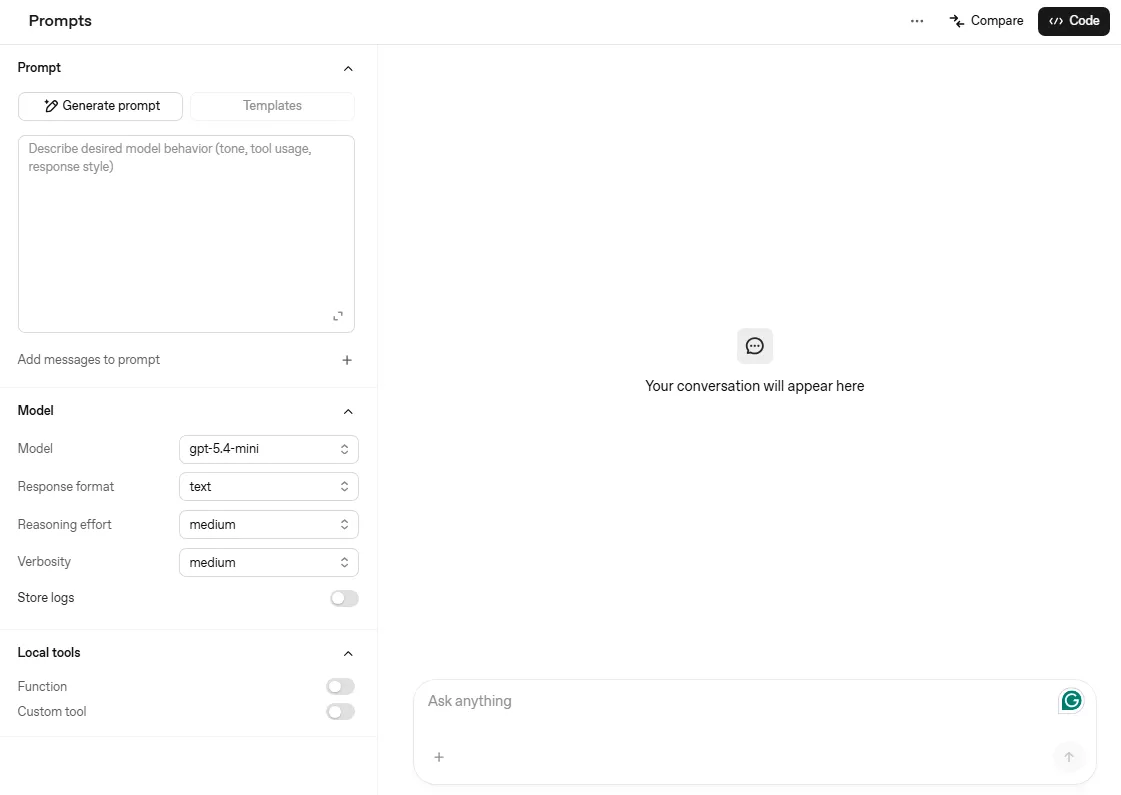
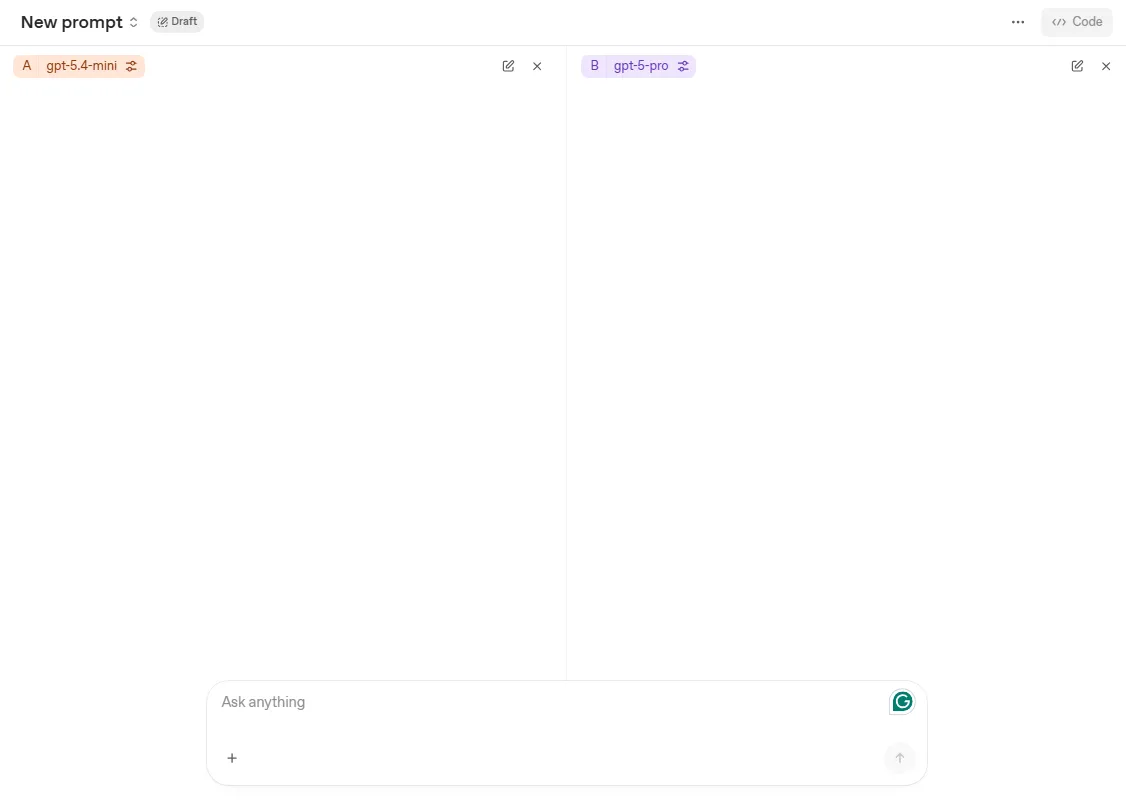
A key feature for prompt testers is the Compare mode (button in the top right corner). The interface splits into two columns - A and B. The same query is sent to two setups simultaneously: different model, different parameters, different system prompt. The results appear side by side, which removes the need to remember responses from a previous session and makes the impact of a single change on response quality instantly clear without any guesswork.
For everyday template work, two extra features come in handy. Variables allows you to define fill-in fields directly inside the prompt body - Playground highlights them and asks for values before running, which simplifies testing the same template with different inputs. Store logs saves your test history along with parameters and outputs; this documentation is essential for team collaboration when multiple people rely on a shared template library and want to track which configurations actually deliver.
For more advanced work, additional tools noticeably speed up iterations. Browser extensions and plugins allow you to save favorite prompts, trigger them with shortcuts, and organize them into categories, saving time on repetitive tasks. For teams, prompt managers that allow sharing vetted templates across team members and maintaining communication consistency can be especially useful.
Testing itself only makes sense with consistent evaluation criteria. Check whether the response achieves the goal, includes all required elem ents, does not make up unverified facts, fits the target audience and brand tone, and stays within the specified format and length. When working in a team, record the prompt version, the model used, the test date, and the result evaluation - only such documentation turns a collection of instructions into a repeatable process.
A good practice is to maintain your own prompt database with a note on what each template is used for and what result it delivers. Such a library grows with every project and quickly becomes a real asset for the marketing team. We have compiled a more comprehensive list of AI tools useful in the daily work of a marketer in a separate place.