What Is the ALT Attribute? Where and How to Add It? Guide
What is the alt attribute and why is it so important?
The alt attribute, also known as alternative text, is an image description contained within HTML code. It is an essential component of modern websites, invisible to regular site visitors, but playing a key role in many aspects. A properly constructed alt attribute should concisely and accurately describe the content of the image. If a key phrase is included in the alt attribute content, Google crawlers can help boost your site's rankings for those keywords. Alt attributes are also a content element that can include keywords, helping Google better understand the context of your page as well as supporting the process of ranking in Google Images search results. In addition, Google has confirmed that alt tags are considered on-page text. This is a great opportunity to include keyword-rich phrases related to your offer that help both users and Google better understand your website. One of the most important graphics that must have an alt attribute is the site's logo.
How to create alt attributes properly?
Creating effective alt attributes requires following a few rules:
- Concisenss: The description should be short yet informative. It is important to use simple language. You can also use all standard characters.
- Context: The alt attribute should describe the image within the context of the page it is on.
- Keywords: It is worth including a keyword if it fits naturally into the description.
- Avoiding over-optimization: You should not stuff the alt attribute with keywords.
- Skipping phrases like "image of" or "photo": Screen readers automatically announce that an element is an image.
How does the ALT attribute affect your website's SEO?
A properly structured alt attribute influences site rankings in several ways:
- It helps Google understand the content of the graphic.
- It enables images to be indexed in Google Images search results.
- It can include keywords, supporting overall page optimization.
- It improves site accessibility, which is an increasingly important ranking factor.
Keep in mind that keyword stuffing in alt attributes can be considered spam and negatively impact your site's rankings.
Let's check your website's potential
Share your website and email - we'll get back to you with a real analysis, no strings attached.
The alt attribute and website accessibility
Website accessibility is a key aspect of modern web design. The alt attribute plays a vital role in this context:
- It allows blind and visually impaired users to understand image content.
- It helps screen reader users navigate the site.
- It provides context when an image cannot be displayed.
Proper use of the alt attribute significantly improves the user experience for people with disabilities, which is not only ethical, but also beneficial for SEO and compliance with digital accessibility regulations.
Comparison of alt and title attributes - key differences and usage
Although the alt attribute and title attribute are often confused, they serve different functions and have different uses in HTML code. It is worth understanding these differences to use both attributes effectively on your website.The alt attribute:
- Is critical for website accessibility and SEO.
- Displays when an image cannot be loaded.
- Is read aloud by screen readers.
- Should contain a concise description of the image content.
- Carries greater importance for search crawlers.
The title attribute:
- Displays as a tooltip when hovering the cursor over the image.
- Can contain additional information about the image.
- Is not as crucial for SEO as the alt attribute.
- Is not read by most screen readers.
- Can be used to provide context or fun facts.
Remember that while both attributes can be used at the same time, the alt attribute is far more important from an accessibility and SEO standpoint. The title attribute can be treated as an optional add-on that enriches user interaction with the page.
Length and uniqueness of the alt attribute - the key to effective optimization
The length and uniqueness of the alt attribute are two key aspects that significantly impact the effectiveness of image optimization. The right approach to these elements can notably improve your site's SEO and accessibility.Optimal alt attribute length:
- Conciseness: The alt attribute should be short yet informative. It is recommended not to exceed 125 characters.
- Readability: Overly long image descriptions can be difficult for screen readers and users to understand.
- Relevance: Focus on the most important elements of the image, omitting irrelevant details.
- Context: The length can depend on the context - more complex graphics may require a slightly longer description.
Alt attribute uniqueness:
- Individual description: Every image on your site should have a unique alt attribute.
- Avoiding duplication: Do not copy the same alternative text across different images.
- Contextual variety: Even if images are similar, try to describe them within the context of their placement on the page.
Remember that both the length and uniqueness of the alt attribute matter for web crawlers and screen reader users. Well-optimized, unique alt attributes can contribute to better website rankings in search results, especially in image search. It is worth regularly auditing alt attributes on your site to ensure they are adequately long, informative, and unique. This approach will not only improve SEO, but also increase your website's accessibility, which is an increasingly important aspect of search experience optimization.
Is an image alt tag always necessary?
The alt attribute, while extremely important for accessibility and SEO, is not always necessary or appropriate. There are situations where its use may be redundant or even inadvisable. Understanding these cas
cases allows for more effective image optimization on a website. In the case of purely decorative images that serve solely an aesthetic purpose and do not convey any important information, an empty alt attribute can be used. Such an entry informs screen readers that the image can be skipped, which streamlines website navigation. Similarly, when an image has a visible caption that fully describes its content, you can consider using a short or empty alt attribute to avoid information redundancy.Adding an image alt attribute - how to do it?
When manually coding an HTML page, adding an alt attribute is relatively simple. Just add it to the <img> tag as follows: <img src="path/to/image.jpg" alt="Image alternative text"> For example, for a photo showing a red sports car, the code might look like this:

<img src="images/red-sports-car.jpg" alt="Red Ferrari sports car on a race track">
How to add an ALT attribute in popular CMS platforms?
Want to add an image alt attribute in popular CMS platforms? It is simpler than you think! Whether you use WordPress, Wix, Shopify, or another platform, the process is intuitive and does not require coding knowledge. When using popular CMS platforms, the process of adding an alt attribute is usually integrated into the user interface.
How to add an image alt attribute in WordPress?
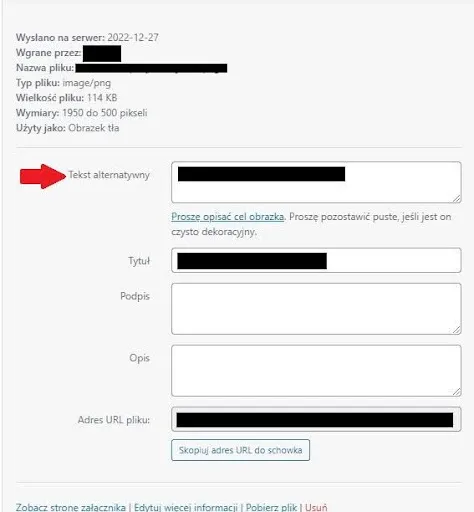
In WordPress, the most popular CMS platform, adding an alt attribute is intuitive. After uploading an image to the media library or while adding it to a post, the "Alternative Text" field appears. Simply enter the appropriate image description there. WordPress will automatically add this descriptive text as the alt attribute in the HTML code.
How to add image alternative text in WIX?
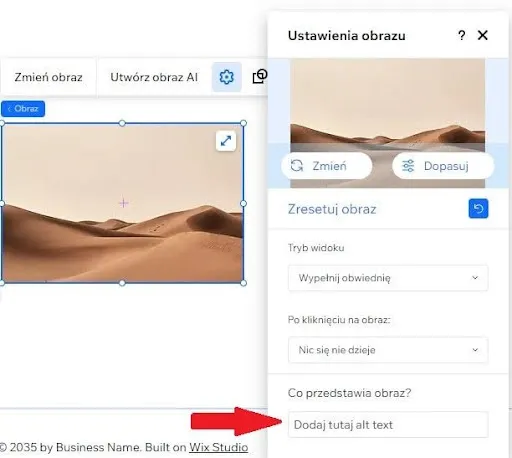
For Wix platform users, adding an alt attribute is done by clicking on the image on the page and selecting the "Accessibility settings" option in the editing panel. There you will find the "Alternative text" field, where you can enter the appropriate description.
How to add alternative text in Shopify?
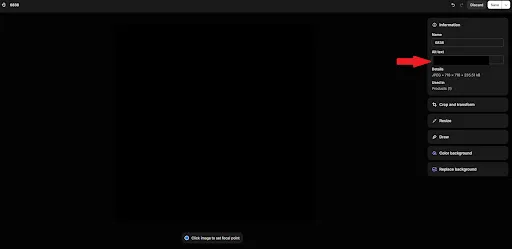
In the case of online stores powered by Shopify, the alt attribute can be added while adding or editing a product. In the product media section, there is an "Alt text" field where you should enter the alternative description.