
Veo 3.1 - Using AI Video Generation in Marketing and ROI Analysis
How much does it really cost to produce a video designed to increase campaign conversion - and can an AI generator cut that cost without sacrificing quality? Veo 3.1, Google's latest video generation model, allows you to create advertising assets based on text or a photo in just a few minutes, eliminating the shooting stage and traditional video editing. This is a real game-changer for marketing departments: less budget spent on production, more creative iterations tested for CTR and ROI.
Google Veo 3.1 is not just another AI video generator to play around with - it is a production-grade tool that integrates with the ad content creation process and lets you measure the effectiveness of every generated version. In this article, we show how to generate an AI video that aligns with brand guidelines, how to use image-to-video AI generation for ad personalization, and how to calculate the real ROI of using Veo 3.1 in marketing compared to other AI video creation tools available in Polish.
What is Google Veo 3.1 and how does it revolutionize video generation in marketing?
Google Veo 3.1 is Google DeepMind's generative model for high-fidelity video generation from text, an image, or a combination of both - featuring native audio and integration with the Google ecosystem (Flow, Gemini API, Vertex AI), which enables marketing departments to replace the shooting phase with prompting and creative iteration.
The model generates video footage directly from a text description (text-to-video) or based on a reference photo (image-to-video), maintaining scene and character consistency across consecutive shots - capabilities further expanded by Extend, Ingredients to Video, and Frames to Video, described in the following sections. Access to the model is provided through three channels: the Gemini app and Flow platform for creative work, and the Gemini API/Vertex AI for production-scale generation tailored to marketing campaigns. For an advertising agency, the practical difference is simple: the exact same text prompt that once required a brief, casting, and a video shoot now turns into a clip ready for A/B testing within minutes.
The cost of implementing Veo 3.1 in an agency - Gemini API pricing analysis and ROI calculation
Google publishes a reference rate of $0.40 per second of video in the Gemini API for the Standard tier - this is the starting point for budget calculations: $3.20 for an 8-second ad clip and $24 for a full 60-second commercial. Alongside the Standard tier, a more affordable Fast tier is available (approx. $0.15/sec), optimized for speed and cost - the same 60-second video costs around $9 in this tier, which is significant when generating creative variations at scale. The cost grows linearly with video length rather than the number of generated creative variations, which is why agencies must calculate budgets precisely as early as the campaign planning stage, keeping in mind that actual billing occurs within the Vertex AI compute unit model, which may vary depending on the region and plan.
Implementing Veo 3.1 cuts video production costs by more than 70% compared to a traditional video shoot and reduces turnaround time from weeks to minutes. The classic production model is weighed down by film crew fees, location rentals, casting, post-production, and client revisions - each phase generates costs independent of the final creative result. The Gemini API eliminates most of these line items, leaving only the per-second fee for generated footage as the main variable cost.
| Production model | Cost (60 s commercial) | Turnaround time |
|---|---|---|
| Traditional video shoot | approx. 3x the cost of Veo 3.1 (crew, location, editing) | 1-3 weeks |
| Veo 3.1 (Gemini API, Standard) | approx. $24 (reference rate of $0.40/s × 60 s) | a few minutes to a few hours |
| Veo 3.1 (Gemini API, Fast) | approx. $9 (approx. $0.15/s × 60 s) | a few minutes |
| A/B creative iterations (Veo 3.1) | linear cost depending on the number and length of variants | in parallel, without an extra schedule |
ROI calculation for Veo 3.1 should take into account not only the generation cost, but also the value of the creative team's saved time. Marketing workflow automation here relies on shifting the budget from production logistics to testing multiple video variants across different audience segments. An agency can generate five versions of the same spot with different CTAs and check which one delivers a higher conversion rate before investing in a full media buying campaign. In traditional production, such a number of variants would be economically unjustified - each shooting session carries its own fixed costs.
Billing in the Gemini API operates on a pay-as-you-go basis for actually generated footage, with no subscription required for production-level use of the model's full power. This sets this access channel apart from the Gemini app or the Flow platform, where limits apply under subscription plans. Agencies serving multiple clients can therefore bill video generation costs directly to a project - similarly to a media budget or AI SEO as part of a broader video marketing strategy.
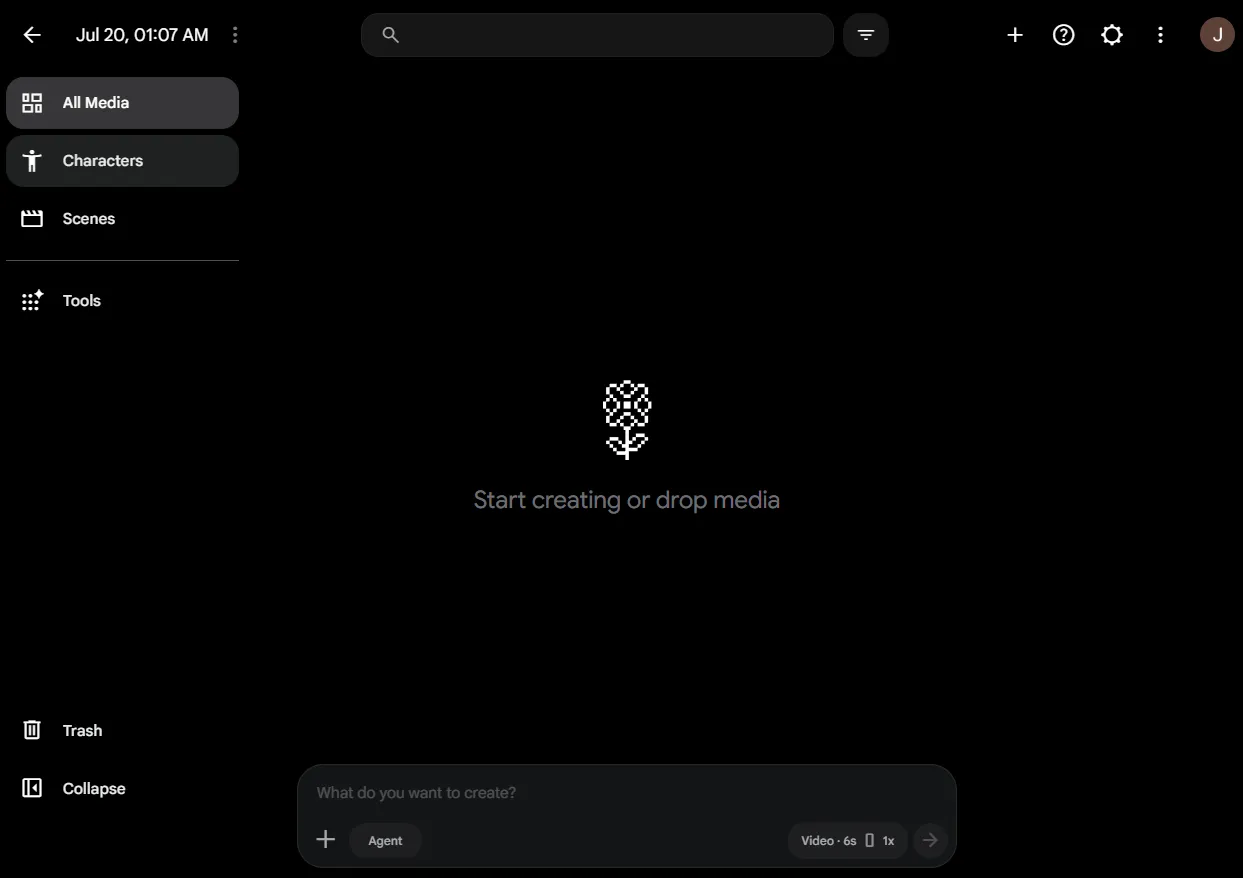
The Flow environment as a professional AI video post-production studio
The Flow platform (labs.google/flow) gives professionals full control over the timeline, sequences, and visual consistency of video. It is Google's official interface for working with Veo models in production conditions - not a simple text-to-video generator. Flow addresses the needs of creative teams that manage multiple shots within a single advertising campaign, rather than generating standalone clips.
Flow's key feature is precise shot sequencing. The creator arranges scenes on a timeline, sets frame order and transition points between them, maintaining the narrative consistency of the entire spot. A campaign composed of several scenes - product introduction, usage demonstration, ending with a CTA - is thus created as a single continuous project, not a collection of randomly generated fragments.
Flow integrates with external editing tools. The generated material serves as raw footage for further post-production, not a finished product locked within Google's environment. Editing teams export sequences and refine them in standard editing applications - adding audio tracks, color grading, brand graphics - while maintaining visual fidelity to the style established at the prompting stage.
The environment generates footage in various aspect ratios, including vertical and classic horizontal, which facilitates parallel production of content for social media and display formats. Built-in upscaling brings video generated natively at a lower resolution to publication-ready quality - the agency delivers the final material without an additional image enhancement stage outside the platform.
Flow extends scenes based on the last second of the preceding clip, which becomes the reference point for the next segment. This mechanism preserves narrative consistency across longer advertising sequences; their total runtime depends on the current model limits provided within a given environment, rather than a rigid, predetermined boundary.
Let's check your website's potential
Share your website and email - we'll get back to you with a real analysis, no strings attached.
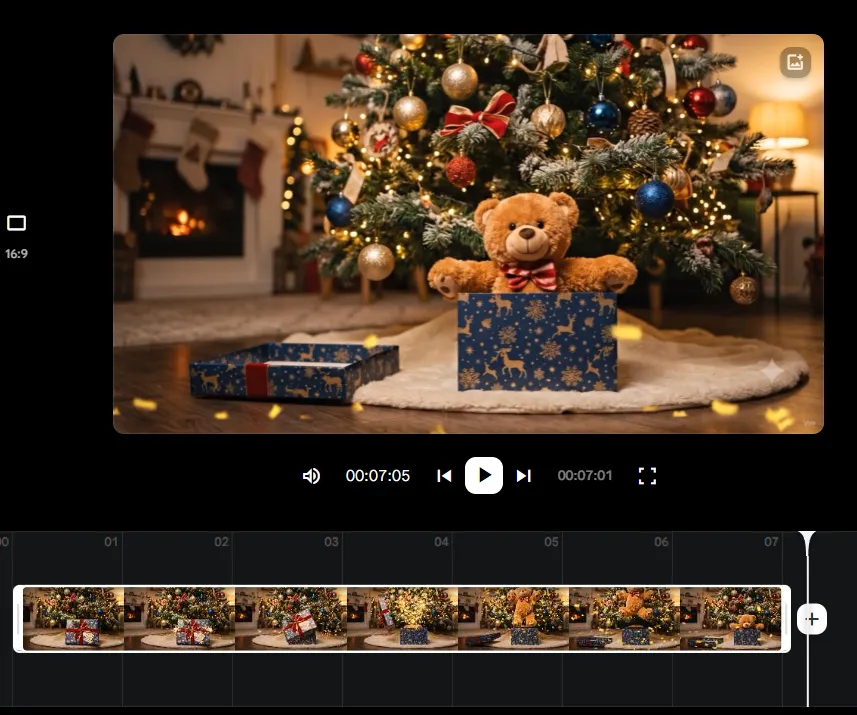
And here is the result you can achieve with just one prompt and two previously prepared images:
Advanced editing features: Ingredients to Video and Frames to Video
Ingredients to Video and Frames to Video are two distinct editing mechanisms in Veo 3.1 that expand on text-based video generation. The first merges independent reference images into a coherent scene, while the second animates smooth motion between specified keyframes.
Ingredients to Video - combining brand assets into a single scene
Ingredients to Video takes several independent images as input - a product photo, a location background, a character image - and blends them into one consistent video scene. The model treats each "ingredient" as a distinct compositional element, not as a reference image for style mimicry. This sets the feature apart from a classic text prompt.
- E-commerce application - the agency provides a package photo, a generated store background, and a model image, and Veo 3.1 assembles them into an ad scene without a photo shoot.
- Brand control - reference images ensure consistency of colors, logos, and packaging shape with brand assets. This is crucial when generating AI videos from an image for multi-channel campaigns.
- Limiting the number of variants - more independent input images require a more precise description of the spatial relationships between them (e.g., "product in the foreground, background blurred") to avoid compositional inconsistencies.
The feature eliminates the need to generate sets from scratch. The creative team retains control over which specific assets - previously approved by the client - make it into the final footage, making it easier to comply with brand safety guidelines.
Frames to Video - smooth transitions and frame animation
Frames to Video generates motion and transitions between specified keyframes, turning static reference points into a continuous sequence. The creator defines the scene's starting and ending points as two reference images, and the model fills the gap between them with in-between frames.
- Keyframe generation - the user specifies at least two frames (e.g., product closed and open), and Veo 3.1 creates a natural transition animation between the states.
- Narrative precision - unlike pure text-to-video generation, this method provides direct control over the beginning and end of a scene, reducing the risk of unexpected results.
- Advertising applications - the feature animates product transformations, switches from close-up to wide shots, or creates "before and after" sequences typical for social media creatives.
The combination of both features - ingredients to video for building set designs from ready-made assets and frames to video for animating transitions between them - allows agencies to assemble complex commercial sequences from elements already approved during the branding stage, without starting generation from scratch with every revision.
How to Maintain Brand Consistency and Create 60-Second Commercials with the Extend Feature?
The Extend feature lengthens generated video clips up to 60 seconds while maintaining full consistency in characters, style, and lighting. This solves the fundamental problem of short, fragmented AI clips that are difficult to piece together into a single convincing commercial. The creative team does not generate five independent, few-second fragments and artificially stitch them together in editing - they develop a single scene into a natural sequence of events.
The operating mechanism differs from simple appending of new footage. Extend analyzes the last second of the preceding clip and generates a continuation of the action based on it - the model "knows" what the character looked like, what the lighting was, and which way the camera was moving, so the next segment does not start from a stylistic zero. The length of the final sequence depends on the current limits of the model and environment (Flow or Gemini API), not on a rigid, top-down limit. In practice, however, this allows building materials reaching a full minute - the standard commercial runtime on television or YouTube.
Brand consistency is ensured by advanced object tracking and visual context analysis across consecutive frames. The model recognizes key elements of the scene - the logo on the packaging, background colors, the presenter's facial features - and ensures they remain unchanged in each subsequent segment. For an advertising agency, this is a tangible benefit: the product at the 45th second of the spot looks identical to how it looked at the 5th second, without discoloration, shape deformation, or altered proportions - frequent problems with earlier video generators operating on short, isolated shots.
Visual fidelity becomes especially significant in scenes featuring human characters. Object tracking encompasses not only static scenery, but also movement - gestures, facial expressions, eye direction - which preserves the natural feel of the transition between segments. The viewer does not notice the point where one clip ends and the other begins, because continuity of motion and light is maintained at the model level, rather than patched together in post-production.
Narrative consistency is the second dimension protected alongside visual fidelity. The developing scene continues the logic of the action - if the product in the first segment sits on a table in a brightly lit room, subsequent segments do not arbitrarily move it to another location or time of day. For an advertising script composed of three acts - product introduction, demonstration of use, and a call-to-action ending - this means the ability to plan the entire spot as one evolving story, rather than a set of separate micro-scenes requiring manual alignment in a video editor.
Creative Strategy: Where Veo 3.1 Performs Best in the Production Process
Veo 3.1 delivers precise control and consistency in professional commercials, making it a natural choice for hero assets that require repeatable compliance with brand guidelines. The Ingredients to Video, Frames to Video, and Extend features provide control over details, while integration with the Google ecosystem (Flow, Gemini, Vertex AI) makes it possible to scale production without losing consistency across consecutive shots.
| Criterion | Veo 3.1 (Google) |
|---|---|
| Main application | Professional commercials, brand production |
| Control over details | High - Ingredients/Frames to Video, Extend |
| Tool integration | Flow, Gemini, Gemini API/Vertex AI |
| Image style | Photorealistic, controlled |
| Typical target channel | YouTube, multichannel campaigns, vertical social media formats |
The generative video market is growing fast, and alongside Veo 3.1, other tools are available - including Runway and Luma Labs, developed independently of Google. Freelancers and smaller studios choose them more often for editing tasks (video extension, motion brush) rather than for generating full commercials from scratch. Because the availability and capabilities of individual models can change from month to month, agencies review the current state of offerings before selecting a tool for a specific brief. Marketing teams that want AI-generated video to reach search engines and language models as part of a broader visibility strategy must properly describe and tag the material - an issue tied to AI SEO as an element of video content distribution.
The choice of approach comes down to the campaign funnel stage. Hero material - a product in a TV commercial or on a landing page - requires the predictability and control provided by the Standard variant of Veo 3.1. Test content, published in multiple variations tailored to social media algorithms, benefits from the generation speed and low unit cost of the Fast variant, making it affordable to test many creatives before scaling the best one.
How to Write Prompts for Veo 3.1 to Get Photorealistic Video Ads
Photorealism in Veo 3.1 requires a precise description of the camera, lighting, motion, and set design in the prompt - the model understands professional filmmaking terminology much better than generators based on everyday language. It recognizes commands regarding camera movements (pan, tilt, zoom, dolly) and specific lighting styles (volumetric lighting, cinematic lighting, golden hour). Anyone looking to generate an AI video close in quality to a studio production must therefore use cinematography terminology rather than generalizations like "pretty light" or "interesting shot."
An effective prompt for Veo 3.1 relies on a five-element structure, which is worth using in every creative brief:
- Main subject - an accurate description of the product, character, or central object, along with appearance details (material, color, texture) that the model must maintain throughout the shot.
- Environment - the spatial context of the set design: type of interior or exterior, time of day, and background elements relevant to the advertising narrative.
- Camera movement - a specific cinematography instruction (e.g., slow pan left, tracking shot, static wide shot) that determines the frame's dynamics and guides the viewer's eye.
- Visual style - lighting and aesthetic style (cinematic lighting, soft diffused light, high contrast), giving the footage a look close to a specific film or commercial reference.
- Technical parameters - aspect ratio (16:9, 9:16, 1:1) matched to the target channel, as well as expected output quality; the model generates natively in 720p and scales up footage to 1080p or 4K via integrated upscaling.
The order of elements affects how faithfully the model adheres to the prompt: the earlier the main subject and key product detail appear, the greater the chance they will remain consistent throughout the shot - especially in longer scenes expanded with the Extend feature. It is best to avoid overloading a single prompt with too many equally important instructions, as the model prioritizes elements listed at the beginning of the structure.
For Polish agencies looking for an AI video generator in Polish, one key issue stands out: the prompting interface runs on English as the model's primary training environment. Descriptions in other languages are recognized with varying degrees of terminological accuracy, and precise English filmmaking vocabulary for key parameters (camera movement, lighting type) yields a more predictable result than translating these terms into Polish.
Multimodal prompts combining text with reference images provide stronger control over photorealism than a text description alone. A product photo, brand color palette, or reference frame with a similar lighting setup allows the model to reproduce details that are difficult to describe in words - material texture, corporate color shade, or a characteristic lighting angle from an earlier campaign. This workflow corresponds to the Ingredients to Video and Frames to Video features, where the image serves as a visual anchor for the generated scene, while the prompt text refines the motion, pacing, and narrative context.
Using Veo 3.1 in Social Media Campaigns: TikTok, Instagram Reels, and Personalization
Video automation and personalization at scale with Veo 3.1 enable brands to mass-produce engaging vertical formats tailored to social media algorithms. The model natively generates a 9:16 aspect ratio optimized for TikTok, Instagram Reels, and YouTube Shorts. Integration with the Gemini API allows generating thousands of personalized video variants based on real-time user data. This shifts video content creation from a single universal commercial model to a model of multiple parallel variants tested in performance campaigns.
Best Practices for Vertical Formats (TikTok and Instagram Reels)
The 9:16 vertical format generated natively by Veo 3.1 eliminates the need to crop horizontal footage - the model immediately composes the set design, camera movement, and product position within the central, narrow frame. This is crucial for dynamic close-up shots. Video comes out of the generator at 720p resolution, and the target quality of 1080p or 4K for publishing on TikTok or Reels is delivered by integrated upscaling - without a separate quality post-production step.
Sound plays a key role in short formats to hook attention in the opening seconds. Veo 3.1 generates video with richer native audio: AI sound effects tied to on-screen action (an impact, opening packaging) and ambient sounds matched to the setting (street noise, coffee shop buzz, outdoor wind). Google does not publicly confirm full, guaranteed support for realistic lip sync in generated dialogue. For formats featuring a talking character in the foreground (the "talking head" setup popular on TikTok), it is best to assume that the speech layer may require additional verification or editing - rather than treating it as fully automated, matched lip-sync.
Effective creatives for short-form video platform algorithms rely on the first 1-2 seconds as a visual hook, following the prompting logic described earlier (main subject first in the prompt structure). Short scenes stitched together using the Extend feature let you build sequences without a rigid length limit imposed by the model. Actual duration depends on the current limits of the Flow environment or Gemini API, so shot length should be tested for each specific campaign, without assu assume a single time limit in advance.
Generating personalized video ads at scale
Integrating Veo 3.1 with the Gemini API makes it possible to generate personalized video ads based on user data segments - location, purchase history, interest categories - without manual rendering of each variant by an editing team. Brands maintain a single narrative template (product, environment, camera movement) and swap out dynamic elements within it: a background tailored to the region, a product color variant, or voice tone in the audio layer. Thousands of unique clips emerge from the exact same prompt structure.
This scale works best when the creative team first establishes a fixed "core" for the video using Ingredients to Video or Frames to Video (described in the context of brand consistency), restricting personalization to variable parameters in the prompt - city name, recipient's name in on-screen text graphics, product variant. Such a division maintains quality control across hundreds of versions simultaneously, without the risk of the model generating off-brand details in subsequent iterations.
The practical limitation of this method stems from the billing model: the rate of $0.40 per second, cited earlier as a reference point for budget estimation, is not a fixed, guaranteed price. Google bills generation under the Gemini/Vertex AI pricing scheme based on compute units, which vary by region and plan. For campaigns generating thousands of video variants, this requires ongoing budget calculations based on the provider's current price list rather than an assumed, fixed unit rate - especially since scaling across thousands of personalized clips quickly exposes discrepancies between reference estimates and the actual invoice.
Legal aspects, licensing, and measuring AI video campaign performance
Commercial use of video from Veo 3.1 requires an understanding of Google's licensing terms, and campaign success depends on deploying measurable conversion metrics - without them, an agency cannot distinguish genuine sales growth from the novelty effect of the format.
Commercial licensing and copyright for generated videos
Materials generated using Veo 3.1 via the paid Gemini API are covered by a commercial license. This allows them to be used safely in advertising campaigns, paid media, and client materials without extra fees for generating the clip itself. This holds practical significance when billing agency client projects: the agreement with Google covers the rights to use the output video material, but it does not absolve you of responsibility for the prompt content.
- Paid access as a licensing condition - access to Veo 3.1 in the app is currently tied to paid Google AI plans (Google AI Pro and Google AI Ultra); the former name "Gemini Advanced" is being phased out. The principle remains the same: full commercial rights to the video come with paid API or app access, not the free tier.
- Source materials as a separate legal matter - if the Ingredients to Video workflow uses images previously generated by an image model like Nanobanana, the creative team must maintain documentation of the rights to those input assets independently of the license for the Veo 3.1 video itself.
- Artifacts during fast motion - the primary technical limitation of the model is occasional visual artifacts appearing during very fast in-frame motion (e.g., rapid camera pans, swift character gestures). This requires reviewing footage prior to publication, especially in large-scale campaigns.
- Prohibition on generating protected trademarks - the model includes built-in restrictions against generating logos, packaging, and other protected trademarks without the rights holder's consent. For brand-specific campaigns, proprietary graphic assets must therefore be brought in via image references (Frames to Video), rather than relying on the model to generate them from scratch.
How to measure performance and conversion in AI-driven video campaigns
Measuring AI-generated video campaigns requires the same performance metrics as traditional video marketing, evaluated against the cost of generating the variants. Only this reveals the true return on investment of automation.
- Clip-level metrics - CTR, view-through rate (percentage watched to completion), and cost per view, compared across variants generated from a single prompt template, help identify which variations of camera movement, lighting, or scene length (built with the Extend feature) genuinely hold viewer attention.
- A/B testing at variant scale - the Gemini API enables mass generation of personalized clips, allowing agencies to run A/B tests on dozens of variants simultaneously, measuring conversion per audience segment (location, product variant, messaging tone) rather than relying on a single, universal ad.
- Pre-publishing post-production stage - raw output from Flow or the Gemini API often requires final editing: adding text overlays, subtitles, or branding elements. CapCut Desktop is one of the tools used at this stage to assemble Veo 3.1 clips into the final version published across social channels - this should be factored into campaign time and cost calculations.
- Video content search visibility - beyond paid metrics, videos published on brand-owned channels (YouTube, product pages) impact organic visibility. It pays to align video strategy with a broader approach to AI SEO, which evaluates how video assets and their accompanying descriptions influence brand presence in AI-generated search results.
- Generation cost vs conversion - given the variable per-second video rate in the Gemini API (billing based on compute units from the Vertex AI pricing sheet), campaign ROI must be calculated as the combined cost of generating and post-producing a set of variants divided by the number of conversions, rather than as the average cost of an individual clip.
Frequently asked questions about Veo 3.1 in video marketing
Is Google Veo 3.1 free?
Google Veo 3.1 is not an entirely free tool. While select testing features may be accessible for free in Google AI Test Kitchen or the Flow environment for limited trials, professional commercial use and bulk generation run through the paid Gemini API, where the baseline reference rate is roughly $0.40 per second of video on the Standard tier, with actual billing handled under the compute-unit-based Vertex AI pricing model.
How much does it cost to generate an ad spot in Veo 3.1?
At the reference Standard rate (approx. $0.40/s), an 8-second clip comes to around $3.20, and a 60-second spot around $24. The cheaper Fast variant (around $0.15/sec) lowers the cost of the same 60-second asset to around $9. The actual price depends on the model variant, resolution, region, and plan, which is why it is best to calculate the budget based on the current Gemini/Vertex AI pricing rather than a fixed unit rate.
Can video generated in Veo 3.1 be used commercially?
Yes. Assets generated via the paid Gemini API are covered by a commercial license, allowing you to use them in advertising campaigns, paid media, and client deliverables without extra fees for generating the clip itself. However, the license does not waive responsibility for prompt content or rights to input assets (such as images used in Ingredients to Video).
How long of a video can you generate in Veo 3.1?
A single clip is short, but the Extend feature lets you expand a scene to a minute or longer while maintaining consistency in characters, style, and lighting - each subsequent segment is built on the final second of the previous one. The actual limit depends on the current constraints of the model and environment (Flow or Gemini API), rather than a rigid, predetermined ceiling.
What formats and resolutions does Veo 3.1 generate in?
The model generates natively in various aspect ratios, including horizontal 16:9 and vertical 9:16 (for TikTok, Instagram Reels, and YouTube Shorts). The footage is produced natively in 720p, and built-in upscaling brings it to 1080p or 4K for publishing - without a separate external image enhancement step.