
Search Console Shows Traffic from Instagram, TikTok, X, and YouTube in One Place
On July 7, 2026, Google launched a new type of property in Search Console - platform properties. Thanks to this, creators and publishers can check how their social media and video content performs in Google Search and Discover. Four platforms are supported at launch: Instagram, TikTok, X, and YouTube. Most importantly, however, the data is also available for accounts that do not have their own website. This is the first time Search Console has opened up to individuals and brands operating exclusively on social media.
The change was announced by Moshe Samet, Product Manager Lead for Search Console, in an official post on the Google Search Central blog. The feature is being rolled out gradually, so if you don't see it in your account yet, that is normal - the rollout will take several weeks.
What are platform properties?
Platform properties are a new type of property in Search Console, alongside the already familiar domain and URL-prefix properties. The difference is that instead of verifying your own website, you connect an account from one of the supported social platforms. Once connected, Search Console begins collecting data on how your posts appear and get clicked in Google results.
In practice, you will see two things that were previously missing. First, which specific queries lead users to your content on Instagram, TikTok, X, or YouTube. Second, how audiences interact with that content after finding it through the search engine. This changes the way we look at social media, because until now, reach analytics were mainly viewed within the platforms themselves, detached from what happens on Google.
It is worth noting an interesting technical detail highlighted by industry commentators. Until now, Search Console required proof that you own the domain. Now, you can verify a property that formally isn't your domain, but rather a profile on someone else's platform. This is a significant expansion of who can access Google data in the first place.
What reports will you see?
Each platform property offers a set of reports familiar from the classic Search Console, but tailored to social and video content. You have three main views at your disposal, each answering a different question.
The Performance report is the heart of the tool. It shows the total number of clicks, impressions, and other metrics you know from performance reports for websites. The data can be filtered and sorted, allowing you to quickly spot which specific posts and queries generate the most traffic. This makes it possible to move away from guesswork and realistically evaluate which topic or format attracts users from Google. If you prefer working in a different environment, the entire report can be exported and transferred to a spreadsheet or an external analytics tool.
The Insights report is a more general view, designed as a quick overview of the situation. Inside, you will find traffic trends from the recent period, a list of top-performing posts, and information on how users discover your account on Google. It is a great starting point if you want to assess at a glance whether visibility is growing or declining, and which content is driving results upward.
Achievements is a section focused on motivation and tracking progress. It records milestones, such as crossing a new threshold of total clicks from Google Search over the past 28 days. For creators building reach step by step, it is a straightforward way to see that the work put into content genuinely translates into search engine visibility.
How to add a platform property in GSC step by step?
Configuration follows the standard verification process in Search Console and does not require technical knowledge. Below is an example of adding a YouTube channel as a platform property.
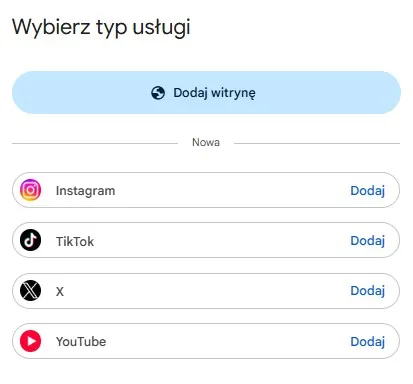
Open Search Console, navigate to adding a property, and select the property type. In the case of a YouTube channel, click "Add" next to YouTube.
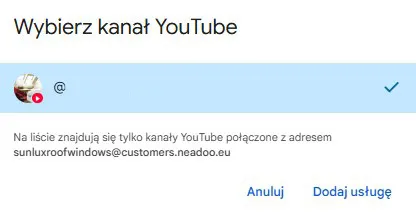
Select the YouTube channel connected to the Google account you use for Search Console, and then click "Add property".
Once the property is successfully added, Search Console will display a confirmation. You can complete the process by clicking "Done" or go straight to the new property.
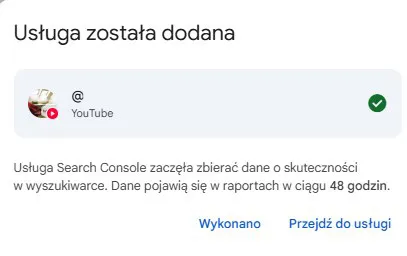
After navigating to the property, the report may not contain data yet. Search Console will inform you that it is processing data and that statistics should appear within 48 hours.
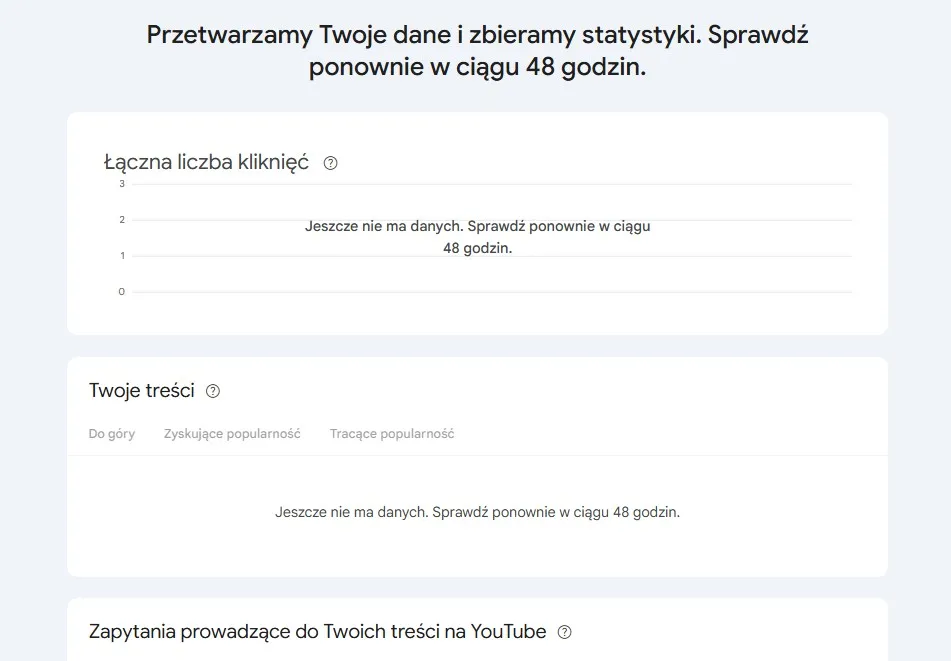
The entire procedure simply comes down to selecting the platform and authorizing access. Once completed, data will start flowing into the reports described above. There are also cases where a profile appears in the account automatically without manual verification - this was reported, among others, with an X profile. So if you check Search Console and see your profile already connected, you don't need to do anything else.
Let's check your website's potential
Share your website and email - we'll get back to you with a real analysis, no strings attached.
How does this differ from Sear
ch profiles?It is easy to confuse this new feature with Search profiles, which Google introduced a month earlier, in June 2026. However, these are two completely different things, and it is worth separating them to avoid misunderstandings.
Search profiles are public profile pages for eligible creators and publishers. Their purpose is to gather a creator's content in one place and share it with audiences - it is a showcase element, facing outward. Platform properties work the opposite way. They do not display anything publicly; instead, they provide analytical data exclusively to you. In other words, Search profiles are a storefront, while platform properties are a dashboard with numbers. One is used for presentation, the other for measurement.
Where did this come from?
Platform properties did not appear out of nowhere. The feature builds upon a December 2025 experiment called "Social channels in Search Console Insights," which first began bringing data from social channels into Search Console. The new feature is therefore a more mature and broader version of this concept, moved from the testing phase into full-fledged reports.
An interesting detail is how the topic came to light. A few weeks before the launch, Google accidentally published and then quickly removed a help document regarding platform properties. The industry caught it before it disappeared, and that was precisely when it became clear that Search Console was about to expand to social and video channels. Today, the documentation is officially available.
What does this change in practice?
For creators without their own website, this is the most important change in a long time. Until now, this group had no access to Search Console data at all, because there was nothing to verify. Now, they get their first real look at how their content performs on Google, rather than just inside social apps.
For marketers and SEO specialists, the benefit is different, but just as tangible. You can finally compare results from social media and video alongside website data in a single tool, without jumping between different dashboards and exports. This makes it easier to build a coherent picture of brand visibility across the entire Google ecosystem, covering both Search and Discover. Data export adds flexibility to this, as it allows you to combine Search Console information with other sources in reports for clients or management.
The rollout is also slowly reaching Poland. As of July 14, 2026, we are receiving the first signals that the feature is already available on Polish accounts, including those of several employees at our company. So if you haven't seen it yet, it is worth checking again, as the chance that the option has just appeared in your dashboard grows every day.
If you run active accounts on Instagram, TikTok, X, or YouTube, it is worth checking Search Console over the coming days and adding a platform property as soon as the option becomes available. It is the simplest way to finally see how much real traffic from Google your content published outside your own website brings in.
FAQ
Which platforms are supported at launch?
Four: Instagram, TikTok, X, and YouTube. Google announces a gradual rollout of the feature, and expansion to additional platforms is possible in the future, although it has not been confirmed yet.
Do I need my own website to use platform properties?
No. This is a key difference compared to classic Search Console. The data is also available for accounts that do not have any website and base their entire presence on social profiles.
How do platform properties differ from Search profiles?
Platform properties are an analytical tool that shows you how content performs in the search engine. Search profiles are a public profile page presenting the creator's content to audiences. The former is used for measurement, the latter for presentation.
What data will I see in the reports?
In the Performance report, you will find clicks, impressions, and other metrics with the ability to filter by posts and queries as well as export data. The Insights report provides an overview of trends and top posts. Achievements tracks milestones, such as a click threshold over the last 28 days.
I don't see this option in my account. Why?
The feature is being rolled out in stages over several weeks following the launch. If you do not yet have the option to add a platform property, simply wait and check again later.
Do I need to verify the profile manually?
Usually yes, by going through authorization after selecting the platform in the "Add property" window. However, sometimes a profile, for example on X, appears in the account automatically, without manual verification.
Does the data cover only Google Search?
Not only that. Platform properties show content performance in both Google Search and Discover.
Is the feature already available in Poland?
Yes, the rollout is slowly reaching Polish accounts as well. As of July 14, 2026, we have the first signals that the feature is appearing for Polish users, including several employees at our company. However, the release is gradual, so not everyone will see it right away.
Factual basis: official post on Google Search Central for Developers, "See how content from social and video platforms performs on Google Search", developers.google.com.