
Page Pagination: Definition, SEO Impact, and Implementation Best Practices

Properly implemented pagination reduces website load times, optimizes DOM structure, and makes it easier for crawlers to index deep subpages. When poorly configured, it creates duplicates, dilutes ranking signals, and hides parts of the catalog from the index.
This article focuses on the digital meaning of pagination: we explain what pagination is, how it affects SEO and UX, and how to implement it in an online store, on a blog, and in a content archive.
What is pagination and why websites divide content
Page pagination is a technique for splitting large datasets - such as product listings, blog posts, search results, or comments - into smaller, linked chunks instead of displaying everything on a single page. The term comes from the Latin word "pagina" and originally refers to numbering the pages of a publication, meaning pagination in a book, magazine, or catalog (alongside foliation, which numbers entire leaves).
Websites divide content into subpages to reduce load times, make it easier for users to navigate a large collection, and allow search engine bots to reach deeper URLs. However, this technique also has an older, print-related meaning.
Online pagination vs. traditional documents and print
In print, pagination has a narrower meaning. In bibliography and publishing, pagination refers to numbering individual pages, which distinguishes it from foliation, or the numbering of entire leaves. With foliation, the number appears only on the leaf, and its two sides are distinguished as recto and verso (front and back).
Pagination covers all written pages of a publication, including unnumbered ones, marked with the abbreviation "unpag." Two layouts are distinguished:
- Continuous pagination - a single numbering sequence running uninterrupted through an entire work or physical volume.
- Multiple pagination - each part of a volume, such as a subsequent work or issue of a periodical, has its own numbering starting from the beginning.
The impact of content splitting on load speed and DOM structure
Pagination shortens website load and refresh times because the browser loads only a limited portion of data at once. However, this is not an automatic guarantee of faster performance: the outcome depends on the implementation, server queries, and response size. A query with LIMIT and OFFSET can still be slow on a large database without proper indexing.
The second benefit concerns the DOM structure. A page with several hundred product cards or comments creates thousands of nodes, which increases memory usage, prolongs rendering, and slows down scripts operating on the document tree. Keeping a few dozen items per subpage keeps the DOM smaller and easier to handle, especially on lower-end mobile devices.
Splitting content also affects visibility. Each subpage is a distinct address in search results and a separate document for crawlers to read, making it easier to reach deeper items. In the context of e-commerce SEO, this means that how the catalog is divided determines which products are accessible through links at all.
Classic pagination, infinite scroll, or a load more button
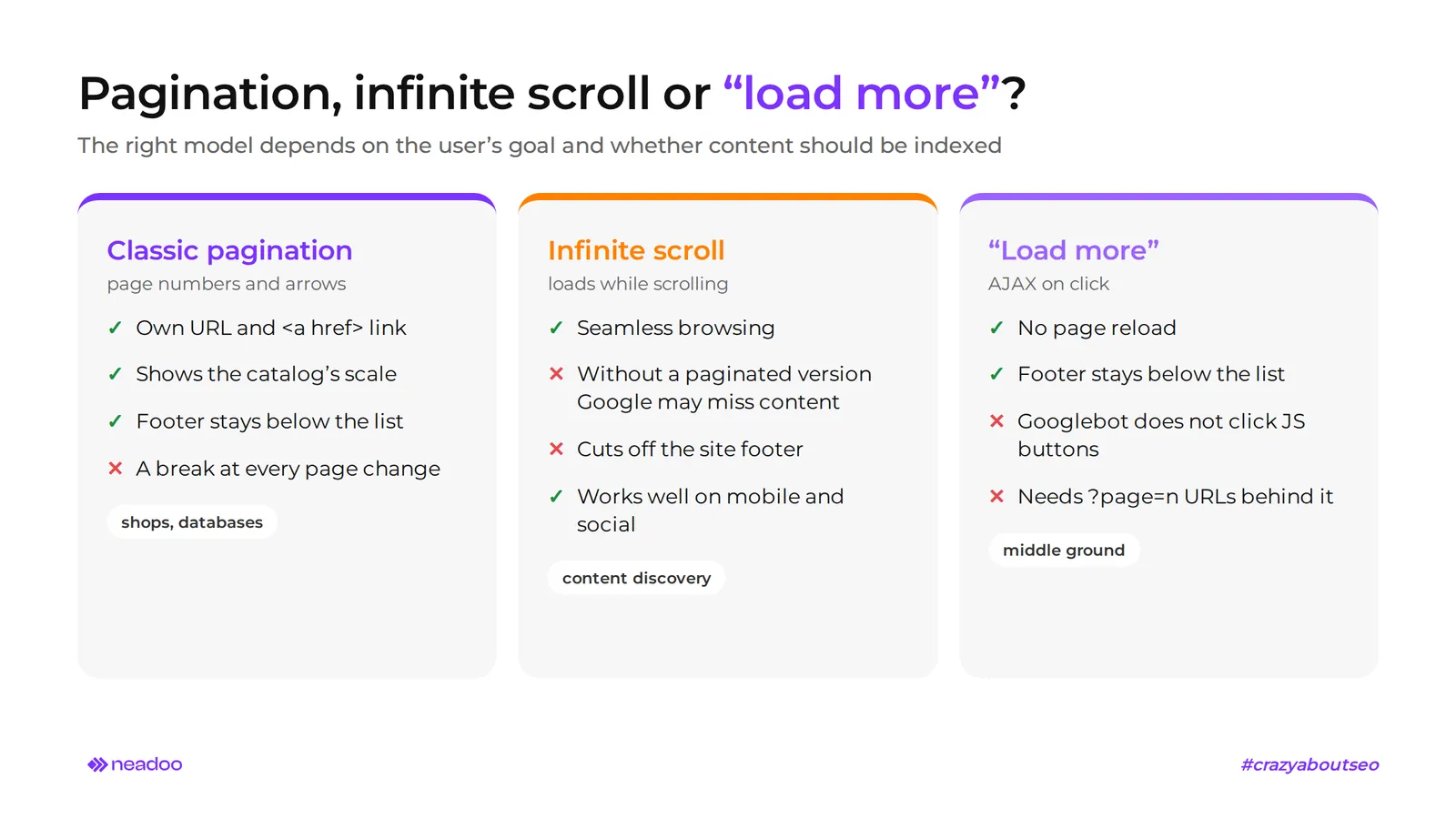
The three primary browsing models for large lists are classic numeric pagination, infinite scroll, and a "load more" button. Which one to choose depends on the user's goal and whether the content needs to be indexed by search engine bots.
Pros and cons of popular browsing models
Classic pagination works best for goal-oriented stores and databases, while infinite scroll encourages exploration but requires advanced architecture for search engines. The "load more" button sits right in the middle.
- Classic numeric pagination with arrows. Each chunk has its own URL and a standard
<a href>link, making the paginator fully crawlable. The user sees the scale of the catalog and can return to a specific page. The downside is the interruption in browsing with each transition. - Infinite scroll. Content loads automatically as the user scrolls down, which is popular on social media and mobile devices. Without the proper architecture, Google may not crawl all of it, which is why an accessible paginated version is recommended.
- "Load more" button. Additional items load via AJAX on click, without reloading the page. Googlebot does not click buttons controlled solely by JavaScript, so loading on click alone does not provide indexability.
Infinite scroll cuts the user off from the website footer (contact, terms, shipping costs), because every scroll down loads more items. Classic pagination and the "load more" button leave the footer below the list, making them a safer choice for online stores where users look for shipping policies before buying. If you stick with infinite scroll, move key footer links to the header or a sticky bar.
With large datasets, the choice of model also affects the backend: classic page numbers typically rely on offset-based pagination, while continuous loading often uses cursor-based pagination, which does not slow down on deep pages. Offset forces the database to skip all preceding records, so the load increases with the page number. A cursor fetches the next batch starting from the last returned record, keeping query cost similar at any depth. However, cursor pagination does not provide a stable URL with a page number, so for content meant to be indexed, keep separate ?page=n URLs with HTML links. Too many pages, filters, and sorting variants waste crawl budget and burden the database with queries, so limit them to what has real value for the index.
Hybrid content loading using the History API
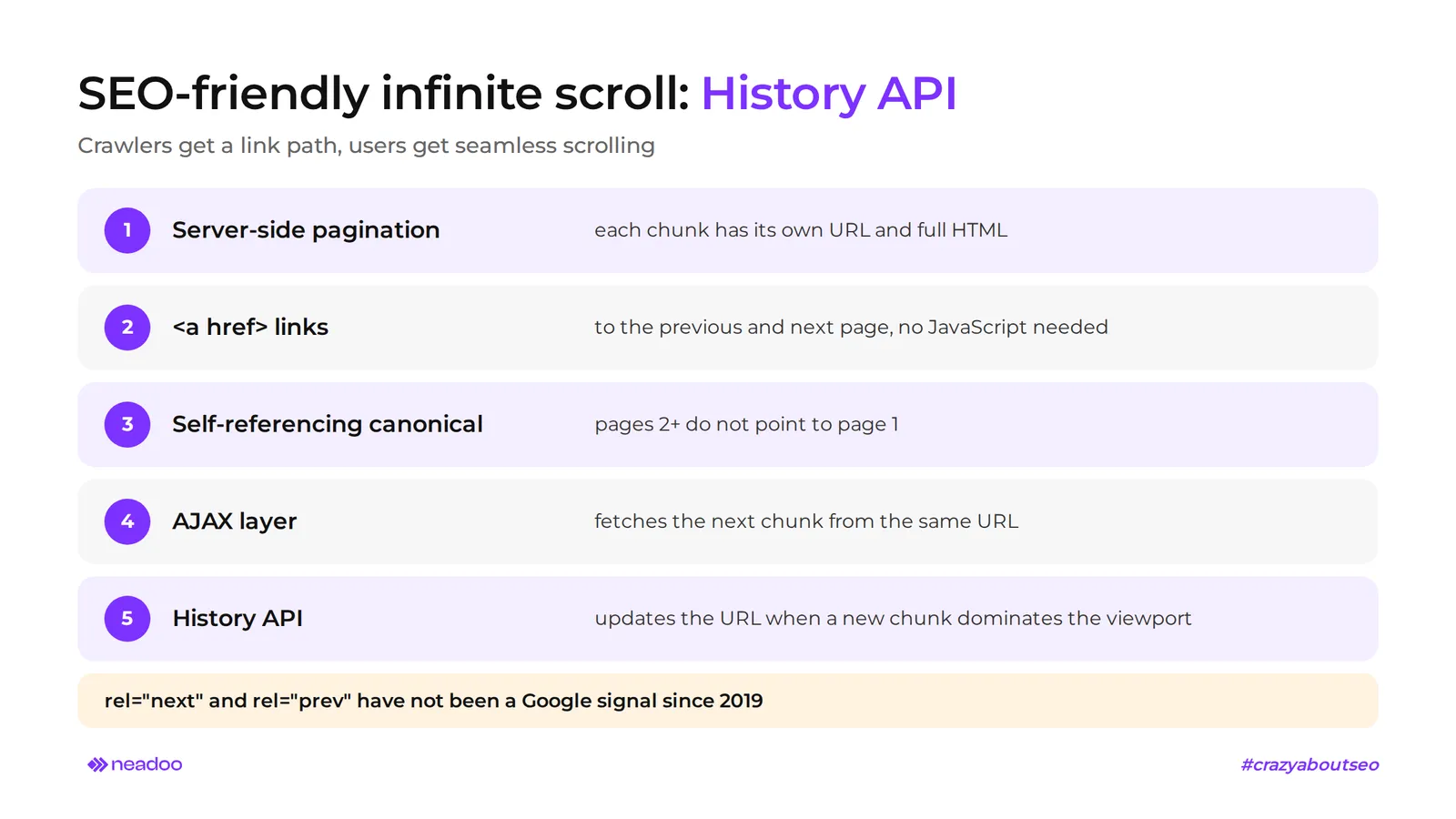
Pagination elements must rely on standard <a href> links, because Googlebot does not trigger JavaScript click events. Implementing the History API with infinite scroll makes it possible to dynamically update the URL in the browser, allowing users to refresh, share, and reopen a specific batch of data.
How to combine scrolling with search engine requirements - step by step:
- Build server-side page pagination: each chunk has a unique URL with a page number and returns full HTML.
- Add sequential
<a href>links to the previous and next pages, visible without JavaScript. - Give each indexable page a self-referencing canonical link; do not canonicalize pages 2+ to the first page.
- Layer on AJAX that intercepts clicks or scrolls and pulls in the next chunk from that same URL.
- When a new chunk dominates the viewport, update the URL using the History API.
The rel="next" and rel="prev" attributes are no longer an indexing signal in Google, so they do not replace steps 2 and 3. This setup provides bots with a link path and users with smooth scrolling, without guaranteeing a specific ranking outcome.
Technical Pagination Optimization for Google Bots
SEO-friendly pagination relies on four elements: unique URLs (parameter or path), self-referential canonical links, index status, and standard HTML links. Each subpage in a series requires a directly accessible URL, e.g., ?page=2 or /page/2/. Google treats them as separate pages in a sequence, and well-configured pagination makes it easier for bots to reach deeper subpages.
Canonicalization and Indexing
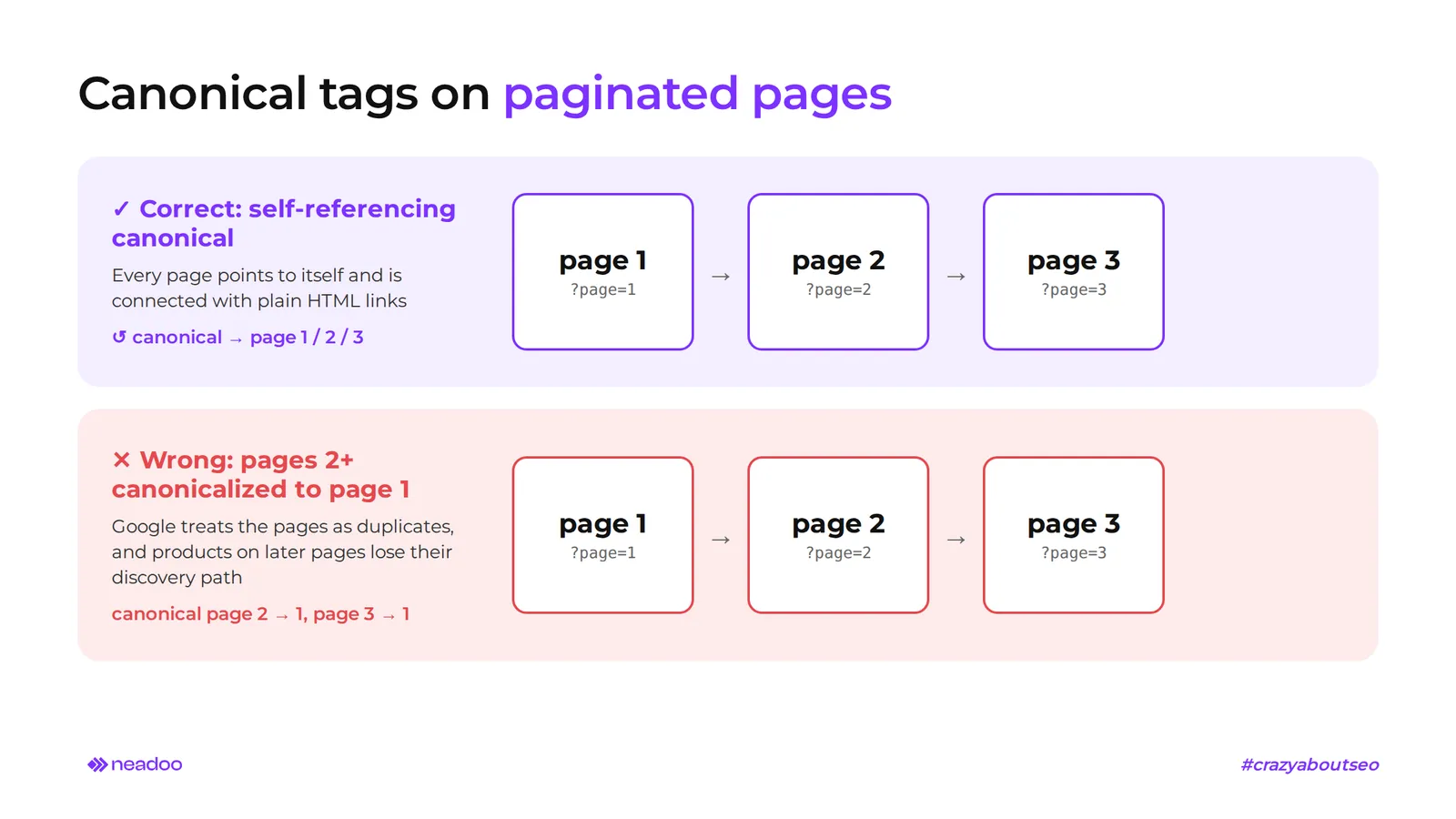
Pagination requires using self-referential rel="canonical" tags on each subpage in the series rather than canonicalizing to the first page. Canonicalizing pages 2+ to the first page prompts Google to treat those subpages as duplicates of page one, and products accessible only from them lose their discovery path. Google discontinued using the rel="next" and rel="prev" attributes: it announced this in March 2019, adding that it had not used them for years. They are still processed by Bing, among others, which uses them for page discovery and understanding site structure.
Additional rules:
- If /category?page=1 duplicates /category, set up a permanent 301 redirect to the main URL.
- Add an identifier to the title and meta description of subsequent subpages, e.g., "- Page 2".
- Display expanded SEO text and category descriptions only on the first page of the series.
- Do not block subpages with valuable product links using a noindex tag or in robots.txt; connect them with standard HTML links and include the key ones in sitemap.xml.
- Exclude sorting variants and filter parameters that offer no search value from the index using the noindex tag. If your main goal is saving crawl budget, block them in robots.txt, but do not combine both methods on the same URL: Google will not crawl a blocked page, so it will not see the noindex tag on it.
- Choose a single URL format: a parameter (?page=2) and a path (/page/2/) are equivalent for Google, but use one pattern consistently across the entire site.
- Do not base pagination on URL fragments: URLs with # (e.g., #page=2) are ignored by Google.
- Generate parameters in a consistent order. When combined with filters and sorting, ?page=2&sort=price and ?sort=price&page=2 are two different URLs with the same content.
Verification
The URL Inspection tool in Google Search Console shows rendered HTML, discovered internal links, and the canonical URL declared and selected by Google. Screaming Frog SEO Spider audits HTTP status codes, canonical tag accuracy, and broken pagination links.
Checklist
- [ ] Each subpage has a unique, accessible URL.
- [ ] Each subpage has a self-referential rel="canonical".
- [ ] /category?page=1 redirects via a permanent 301 to /category.
- [ ] Pages in the series are connected by standard HTML links.
- [ ] Subpages with valuable links do not have noindex or a block in robots.txt.
- [ ] Sorting and filters are excluded from indexing or crawling (noindex or a block in robots.txt, not both at the same time).
- [ ] A single URL format is used across the entire site, and pagination does not rely on # fragments.
- [ ] Parameters in URLs (page, sort, filters) appear in a fixed order.
- [ ] Titles and meta descriptions include a unique identifier.
- [ ] SEO copy is present only on the first page of the series.
- [ ] Key paginated pages are included in sitemap.xml.
- [ ] Canonical tags, HTTP status codes, and internal linking have been checked in Google Search Console and Screaming Frog.
Let's check your website's potential
Share your website and email - we'll get back to you with a real analysis, no strings attached.
Designing an E-commerce Paginator for Usability
A usable paginator shows users where they are in the catalog, meets digital accessibility requirements, and displays as many products as can be comfortably scanned visually for a given product range.
Digital Accessibility of the Navigation Component
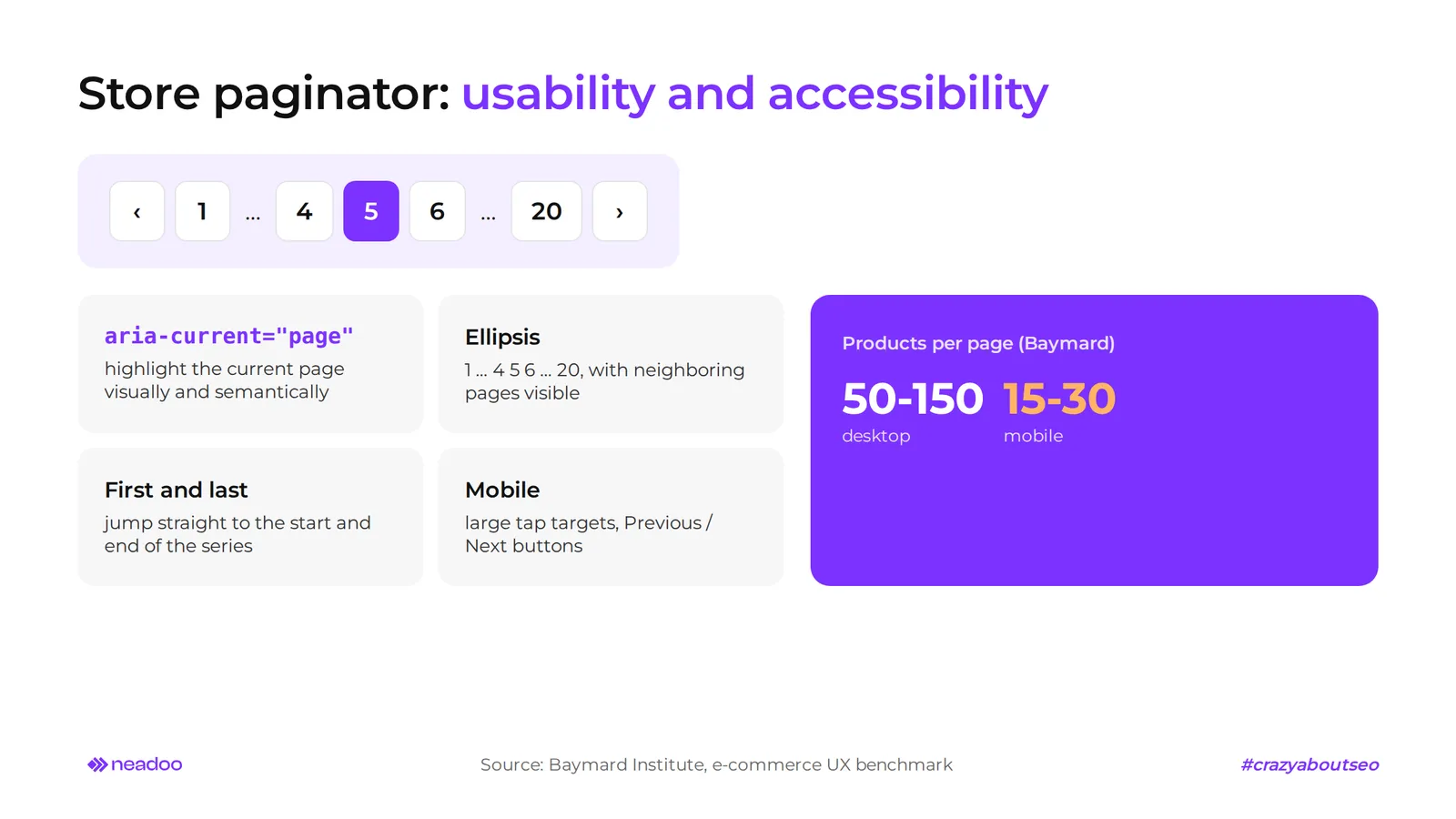
The paginator highlights the current page visually (contrast, bolding, background) and semantically, using the aria-current="page" attribute from the WAI-ARIA specification. The screen reader will then announce the current page number rather than just "link, 3". Color alone is not enough for people with color vision deficiencies.
Additional design rules:
- Omissions. For long series, use a navigation ellipsis (e.g., 1 ... 4 5 6 ... 20), but always keep links to adjacent pages visible.
- Jumps. Provide direct access to the first and last page of the series.
- Mobile. Implement a responsive component with large touch targets; on narrow screens, reduce the number of page links in favor of "Previous" and "Next" buttons.
- Code. Every element should be a standard HTML link, which also benefits search bots.
Number of Items in Visual vs. Technical Product Views
According to the 2020 UX benchmark by Baymard Institute, 52% of desktop e-commerce sites display either too few or too many products by default on listing pages. The key is finding a balance between loading speed and ease of scanning and comparing products. A page that is too long increases load times and wastes crawl budget, while one that is too short forces constant clicking.
| Criterion | Visually Driven Products | Spec-Driven Products |
|---|---|---|
| Examples | clothing, home decor, furniture | electronics, tools, parts |
| Selection method | visual, based on photos | reading and comparing specs |
| Items per page | higher | lower |
| Scanning | quick thumbnail browsing | analyzing specs on product cards |
| Risk of overload | slow image loading | reduced comparison readability |
Baymard provides approximate guidelines: 50-150 products per page for desktop e-commerce and 15-30 on mobile devices.
An items-per-page selector allows users to change the default value, but the baseline setting should be based on the product catalog type. In 2024, Baymard updated its recommendation from "avoid items-per-page selection" to "acceptable for pagination, though likely rarely used."
FAQ
Should paginated pages have a noindex tag?
Usually no. If component pages contain links to products or posts, noindex can over time reduce their crawling, because Google visits pages excluded from the index less frequently. The popular "noindex, follow" setting does not solve the problem. Google confirmed that a page excluded from the index for a long time is eventually treated as "noindex, nofollow," meaning product links on deeper paginated pages stop passing link equity and may stop being followed altogether. Use noindex for sorting and filter variants instead, not for the core numbered series.
Where should the canonical tag on paginated pages point?
To the page's own URL (a self-referencing canonical). Page 3 points to page 3, not to page 1 or to a "view all" page, unless that version actually exists and performs efficiently.
What should you do with the URL of the first paginated page?
The first page should be accessible under a single URL, e.g., /category. If the ?page=1 or /page/1/ version also works and duplicates the content, 301 redirect it to the main URL. Direct internal links, including "go to first page," to the clean version.
Does Google still use rel next and rel prev tags?
No. Google stopped using them as an indexing signal, which it announced in March 2019. They can remain in the code because other search engines, such as Bing, and certain tools can still read them, but they do not replace standard HTML links between pages in a series.