
Page and Domain Redirection - Types, Implementation, and Impact on SEO

A website redirect is a technique that routes users and search engine bots from one URL to another. Before you begin, you need to know one thing: not every redirect works the same way, and their behavior depends on the response code and where they are configured. The server sends the browser an instruction with a 3xx code and the new address, and the automatic redirect happens before the visitor sees the old address. Proper configuration protects the site's visibility in search results and prevents 404 errors during migrations, domain changes, or URL structure redesigns. The type of redirect you choose determines whether ranking signals and link equity pass to the new address. For permanent changes, a 301 redirect is used; for temporary changes, such as maintenance work or A/B testing, a 302 redirect is used.
A domain redirect, just like a redirect for a single subpage, can be configured using an .htaccess file, in the server configuration, in the hosting control panel, or at the domain registrar. Redirects are divided into permanent and temporary, as well as server-side and client-side (meta refresh, JavaScript). The 3xx codes are defined by RFC 9110, and their impact on indexing is described in the Google Search Central documentation.
Types of HTTP redirects - comparison of response codes and request methods
Types of redirects differ in two aspects: whether the change is permanent and whether the browser preserves the request method (GET, POST) after moving to the new address. The response code, along with the Location header, tells the browser and the search engine what to do. An improperly chosen code can harm SEO because the wrong address will remain in the results.
| Code | Name | Permanence | Request Method Behavior | Typical Use Case |
|---|---|---|---|---|
| 301 | Moved Permanently | Permanent | May change POST to GET | Domain migration, URL structure change |
| 302 | Found | Temporary (long-maintained may be treated as permanent) | May change POST to GET | A/B testing, temporary maintenance |
| 303 | See Other | Temporary | Forces GET regardless of input method | Form redirect (Post/Redirect/Get) |
| 307 | Temporary Redirect | Temporary | Strictly preserves method (e.g., POST) | APIs, forms requiring request data preservation |
| 308 | Permanent Redirect | Permanent | Strictly preserves method (e.g., POST) | Permanent migration while preserving POST semantics |
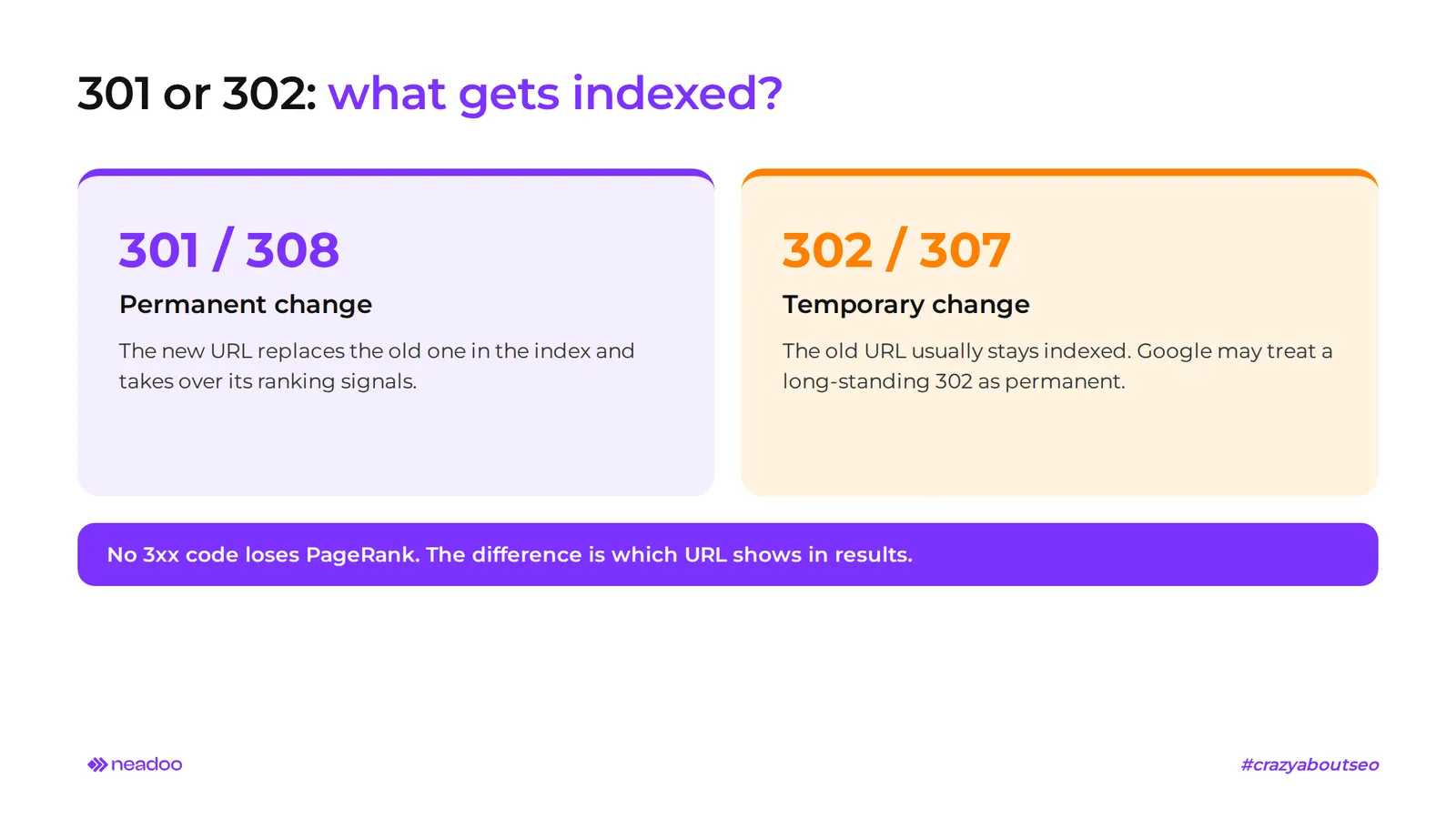
A 301 redirect informs that a page has been permanently moved. Google treats it as a permanent replacement of the address: the old URL disappears from search results, and its place is taken by the target one. That is why 301 is essential when merging domains, switching to HTTPS, and restructuring URL paths.
A 302 redirect indicates a temporary relocation of content. For search engines, this is a weak signal that the target address should become canonical, so the old URL usually remains in the index. The popular claim that a 302 passes no SEO value at all is inaccurate: since 2016, Google has stated that no 3xx code causes a loss of PageRank. The difference comes down to which address you will see in search results. If a "temporary" redirect remains active for months, search engines may treat it as permanent. It is therefore important that the code reflects the actual plans for the address.
Codes 303, 307, and 308 are primarily relevant for forms, APIs, and web applications. They have less impact on site visibility, but they are crucial for application stability. Code 303 implements the Post/Redirect/Get pattern: after submitting a form via POST, the browser fetches the next page using the GET method, so refreshing does not resubmit data. Code 307 is a more precise counterpart of 302 that always preserves the request method. Code 308 does the same for permanent changes, and Google treats it just like a 301.
Impact of redirects on SEO, PageRank, and crawl budget
Transfer of domain authority and ranking signals (Link Juice)
A 301 redirect passes nearly all the SEO strength of the old address - known as link juice - to the target URL. The value of external and internal links pointing to the old URL goes to the new one, along with its assigned PageRank. This allows the new subpage to inherit the ranking positions built over the years.
A redirect works differently from a canonical tag. Rel="canonical" is a hint: both versions of the page remain accessible, and the algorithm decides which one to index. A 301 redirect physically moves the user to a different address, and the old version is no longer accessible. Canonical tags are used for duplicates that should remain live (e.g., URLs with parameters), while redirects are used when the old address should disappear entirely. A configuration error after a migration can wipe out months of effort, which is why in website SEO we check the redirect map before any structural change.
Optimization of crawl budget and TTFB
Every unnecessary redirect is an extra request Googlebot must make before reaching the content. This increases load times and consumes the crawl budget - the number of URLs Googlebot can visit on a domain within a given timeframe. Googlebot follows a maximum of 10 consecutive redirects. If the chain is longer, the bot gives up the attempt and never reaches the content. For the user, every hop represents another delay, worsening user experience by increasing the time to first byte (TTFB) of the target subpage.
The absence of a redirect for a deleted resource results in a 404 error. Such addresses drop out of search results, and users clicking old links hit a dead end. Redirecting to a subpage that is not thematically related to the old address is just as dangerous. Google may treat it as a soft 404 - a page that technically works but does not provide what the user was looking for. The subpage then loses visibility despite a valid 301 code.
This problem particularly affects multi-location businesses. In local SEO, redirecting a closed branch to the home page instead of the nearest branch in the region usually leads to lost visibility for search terms containing the city name.
Most Common Use Cases for URL Redirects
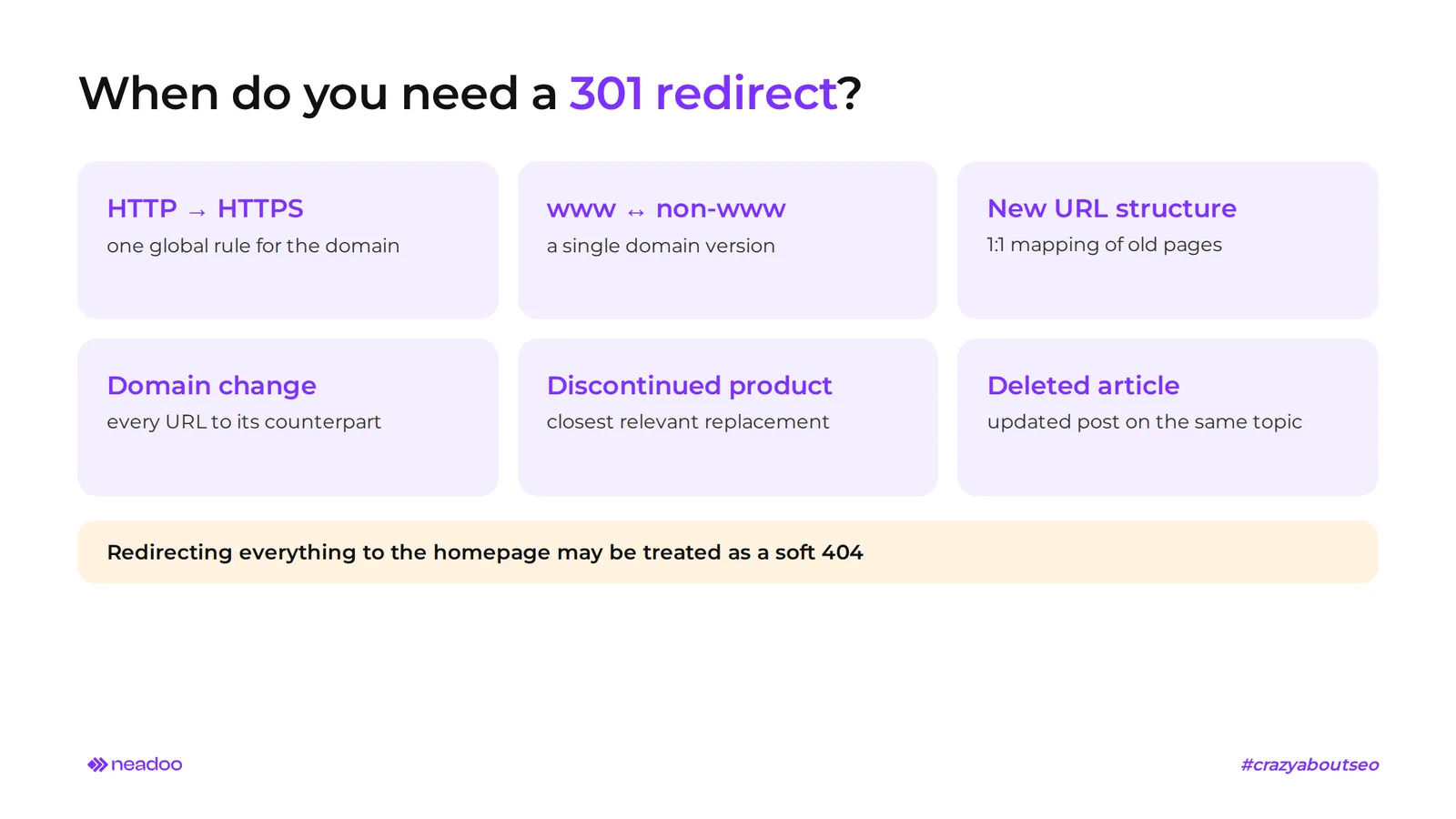
Redirects are essential during website migrations, domain changes, SSL implementation, and cleaning up URLs after content removal. A URL redirect must reflect the nature of the change - permanent or temporary - and maintain topical relevance between the old and target URLs.
- HTTP to HTTPS migration. After installing an SSL certificate, implement a global 301 redirect for all URLs across the domain, without exceptions. Without this rule, two versions of the protocol remain in the index, diluting ranking signals. Also consider HSTS preloading: the browser connects directly via HTTPS, eliminating an extra hop and reducing the risk of downgrade attacks.
- Unifying www and non-www versions. A single rule enforces one version of the domain address. Without it, the server responds with identical content under two URLs, and the search engine sees a duplicate. It is worth keeping the website's canonical tag, but it is the 301 redirect that physically removes the duplicated version from circulation.
- URL restructuring in an online store. Changing categories, such as during a migration to a new e-commerce platform, requires 1:1 mapping of each old URL to its new counterpart. Create rules individually or in bulk using regex patterns. Bulk redirection to the category homepage lowers relevance and the value of passing signals.
- Product discontinuation or article removal. When a subpage permanently loses its purpose, point it to the most relevant equivalent: a substitute product from the same category or an updated article. Redirecting to the homepage risks being classified as a soft 404. When consolidating subpages with similar content, the principle is the same: point weaker URLs to the strongest one.
Every new redirect is a signal to also update internal links so they lead straight to the destination address. A redirect saves external traffic, but within the site, there is no reason for crawlers and users to make an extra jump.
Let's check your website's potential
Share your website and email - we'll get back to you with a real analysis, no strings attached.
How to Set Up a Server-Level Page Redirect
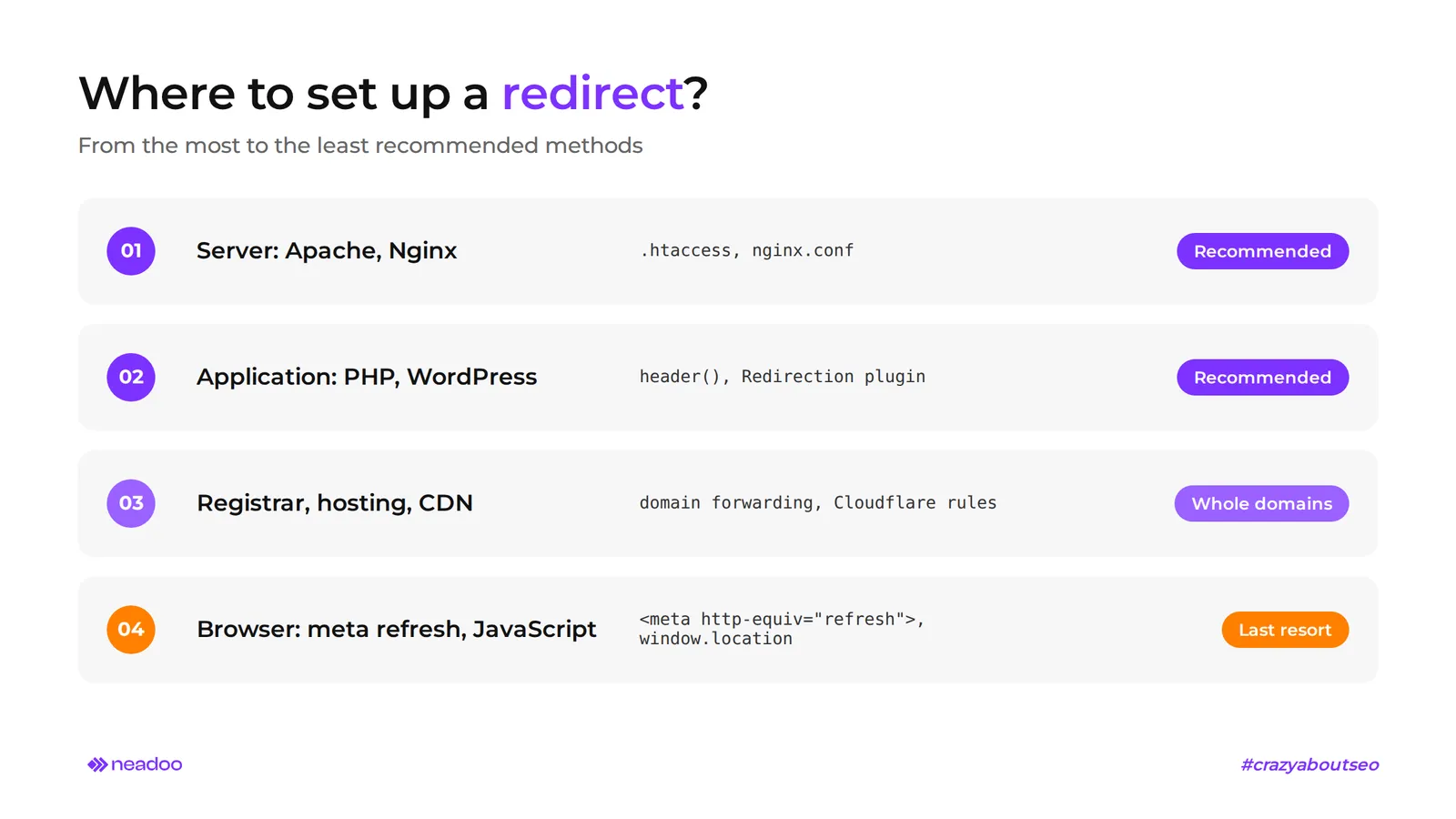
Server-level redirects are the recommended method, specifically using status code 301 for permanent changes. A rule in Apache, Nginx, or PHP executes before the browser or search engine crawlers receive any page content. Therefore, it is the fastest and most reliable approach, as confirmed by Google Search Central migration guidelines.
Apache Server Configuration in the .htaccess File
The .htaccess file is crucial for configuring redirects on an Apache server. A 301 redirect relies on the mod_rewrite module and RewriteRule directives. The block of rules begins with the line RewriteEngine on, without which Apache ignores all configured rules. A basic redirect from one URL to another looks like this:
RewriteEngine on
RewriteRule ^stara-strona\.html$ /nowa-strona.html [R=301,L]
The R=301 flag enforces a permanent redirect, and L (Last) stops processing further rules. Without it, Apache attempts to match the address against subsequent patterns, which in extensive files leads to unexpected chains. Conditions, such as redirecting only unencrypted traffic, are defined by the RewriteCond directive:
RewriteCond %{HTTPS} off
RewriteRule ^(.*)$ https://%{HTTP_HOST}%{REQUEST_URI} [R=301,L]
With hundreds of website URLs, such as after rebuilding store categories, writing rules manually is time-consuming. A 301 redirect generator creates a block of rules based on a list of old and new URLs, reducing the risk of errors in regular expressions. Remember that a single misconfigured redirect in .htaccess can block access to the entire site, so make a backup of the file before deployment.
Rewrite and Return Redirect Rules in Nginx
Nginx does not support .htaccess files. Rules are defined centrally in nginx.conf or within the server block of a given site. Simple redirects are handled by the return 301 directive, which does not require regex parsing and performs faster than rewrite:
server {
    listen 80;
    server_name stara-domena.pl;
    return 301 https://nowa-domena.pl$request_uri;
}
The rewrite directive, the equivalent of mod_rewrite, is required when you need to rewrite part of a URL while preserving the rest of the path:
rewrite ^/stara-kategoria/(.*)$ /nowa-kategoria/$1 permanent;
The word permanent corresponds to status code 301, and redirect corresponds to code 302. The choice must reflect the actual nature of the change. After every change in nginx.conf, check the syntax using the nginx -t command and reload the configuration. Apache reads .htaccess on every request, while Nginx requires a reload.
Implementing Redirects in WordPress and PHP Scripts
For WordPress-based sites, you do not need to edit server files. Plugins such as Redirection, Rank Math, or Yoast SEO Premium allow you to add a redirect in the admin panel and provide easy management of hundreds of rules. This solution is especially useful for site owners who do not have server access, as well as for blogs and corporate sites where editors frequently change post URLs. Under heavy traffic, however, server rules are more efficient because they do not require launching WordPress.
In pure PHP, redirection is handled by the header() function, called before any content is sent to the browser. Even a single space output earlier will result in a "headers already sent" error:
<?php
header('Location: https://przyklad.pl/nowa-strona', true, 301);
exit();
The third argument of the PHP header sets the response status code. A value of 301 indicates a permanent redirect, and exit() halts further script execution.
How to Set Up Domain Redirection at the DNS and Hosting Panel Level
Setting up domain redirection without maintaining hosting for the old URL is done at the registrar level (forwarding), in the hosting control panel (cPanel, DirectAdmin), or via Cloudflare rules. DNS records do not redirect anything on their own: they only indicate where the traffic should go, and the 301 status code is sent only by the destination machine or the registrar service. The choice of method depends on the project's specifics: whether the old domain should disappear from the infrastructure or simply point to a new resource. Redirecting a domain to another domain at the registrar requires the least amount of work, while redirecting a domain through your own server provides the most control.
- Domain forwarding at the registrar. This service routes traffic to the destination address without a separate hosting package. You only need to enter the target domain name or a specific URL and select the redirection type (301 or 302). How you set up these options varies between registrars, but the principle remains the same. Some registrars offer URL masking in the browser, but this option is unsuitable for SEO because it operates using frames. This is the simplest path when domain redirection to another site is meant to be permanent.
- DNS A record pointing to an IP address. An A record points the domain to the server IP address where you set up the redirection rule in Apache or Nginx. The entry requires a hostname (usually @ for the root domain) and an IPv4 address, and the TTL value determines how long DNS servers cache it. This method works well when the domain redirect is to be handled by your own server.
- DNS CNAME record as a hostname alias. A CNAME points a subdomain (e.g., shop.example.com) to another provider's hostname, such as an e-commerce platform. It requires an alias name and a target hostname, not an IP address. It cannot coexist with other records for the same name - which you must know before attempting to configure it - so it usually cannot be set for the root domain. This is a solid solution when the provider changes IP addresses without notifying the client.
Client-Side Redirections - The Meta Refresh Mechanism, JavaScript, and Frame Risks
Client-side redirections are executed by the browser, so they only work after the source page has loaded. Search engines do recognize them, but Google recommends using them only when server-side redirection is impossible, such as on hosting environments without configuration access.
How Meta Refresh Works and How Google Interprets Delay Times
A meta refresh is an HTML-level redirection: a meta http-equiv="refresh" tag placed in the head section, which reloads the browser to another URL after a specified amount of time:
<meta http-equiv="refresh" content="0; url=https://przyklad.pl/nowa-strona">
The number in the content attribute dictates how it is interpreted. Google treats a 0-second delay as a permanent redirect, similar to a 301. A value greater than zero, such as content="5; url=...", is treated by search engines as a temporary redirect, even if the administrator intended to permanently move the resource.
Meta refresh is not a recommended redirection method for SEO. It works more slowly because the browser must first download and parse the source page, and delayed refreshing degrades user experience.
A JavaScript redirect is a browser-side script-driven redirection, for example, using window.location. Search engine bots execute it only after rendering the page, and rendering can be delayed or fail altogether, making this the last option on the list. Frame forwarding carries the highest risk: the address bar displays the original URL while the content loads from a different location. The search engine does not see a redirect to another page, but rather an empty page containing an iframe, meaning the destination content builds no visibility in Google under either address.
Troubleshooting Errors - How to Detect and Eliminate Redirect Loops and Chains
Redirect chains and loops slow down page loading, waste crawl budget, and can completely block indexing. Troubleshooting boils down to verifying whether each redirection establishes a single, direct relationship between the old URL and the destination URL.
Two primary errors have distinct causes and consequences:
- Redirect chain. A sequence of multiple hops (e.g., A → B → C → D) before reaching the content. It usually arises when subsequent migrations stack new rules on top of old ones. Each hop is an extra request that slows down the page and consumes crawl budget.
- Redirect loop. The destination address sends the request back to the source address (e.g., A → B → A), causing the request to cycle indefinitely. When a domain is redirected to itself or conflicting rules exist, Chrome displays the ERR_TOO_MANY_REDIRECTS error, also known as network error 310. A loop prevents both users and bots from accessing the content, causing the page to lose rankings over time.
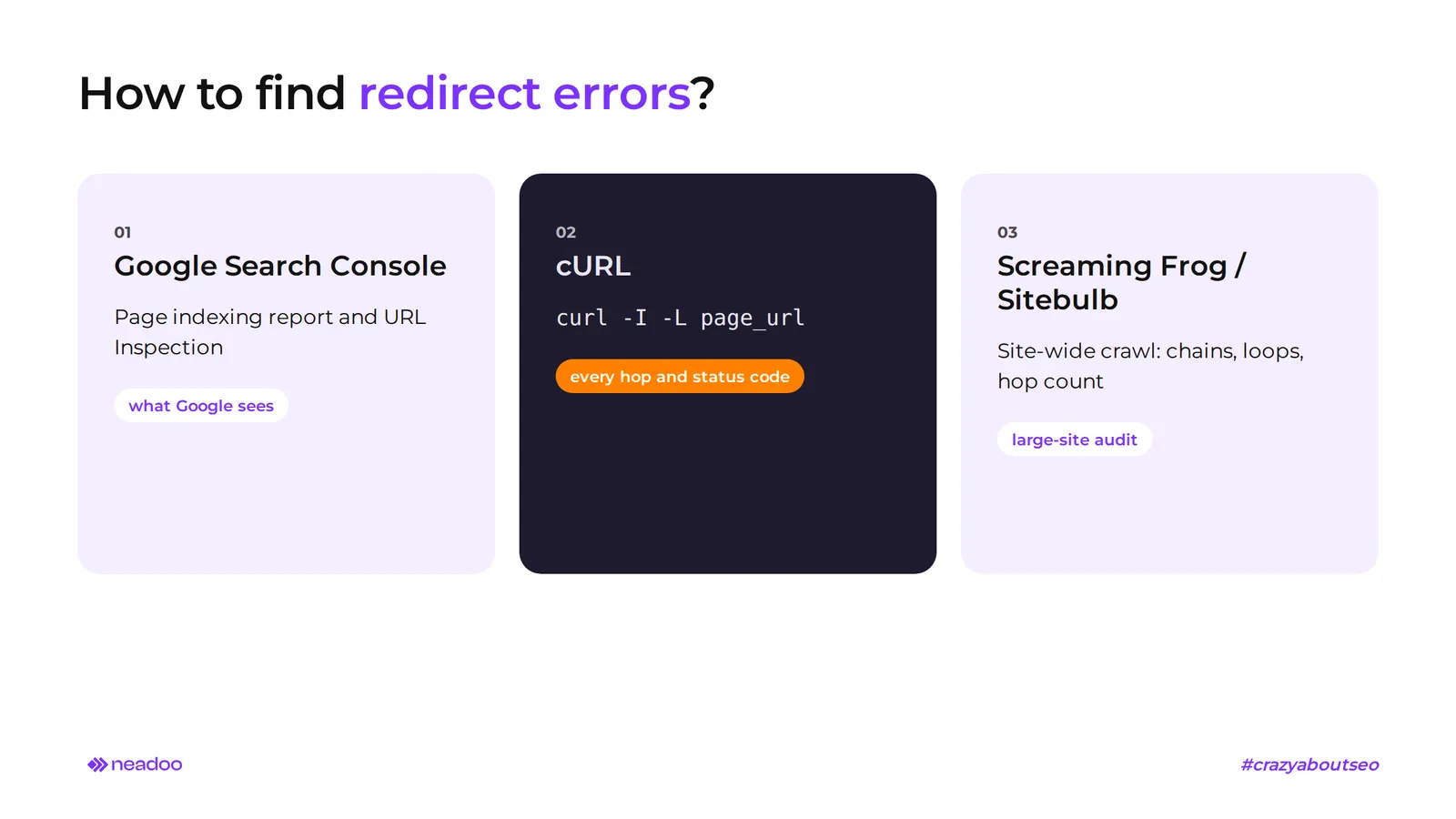
You can check status code validity and chain length using several tools:
- Google Search Console. The Page indexing report and the URL Inspection tool show whether Googlebot encountered a redirect error, as well as which URL and status code were recorded during the last crawl.
- cURL. The command curl -I -L url_address returns the HTTP headers of each hop in the chain along with its status codes (301, 302, 200). This is the fastest way to pinpoint the rule breaking the path.
- SEO crawlers (e.g., Screaming Frog, Sitebulb). A full domain crawl detects all chains and loops at once and reports the number of hops for each address. This is the primary tool for audits of large e-commerce stores.
Before adding a new redirect, ensure the source URL is not already the target of another rule. Shorten every detected chain into a single, direct redirection: URL A should point straight to D, skipping B and C. Redirect troubleshooting should be a standard component of any technical website audit. The most common errors we find during audits are rules from past migrations that everyone forgot about, and redirections between www and non-www versions that went unnoticed until the first drop in search visibility.
FAQ
What is the difference between a 301 and a 302 redirect in terms of SEO?
A 301 redirect informs Google of a permanent address change: the new URL replaces the old one in the index and inherits its signals. A 302 redirect is used for temporary changes, such as A/B testing or maintenance work, and the old address usually remains in the index.
What is a 308 status code and how does it differ from a 301?
A 308 code is a permanent redirect introduced in 2015 (RFC 7538, now part of RFC 9110). Google treats it the same way as a 301. The difference is technical: a 308 always preserves the request method (POST remains POST), while a 301 may change it to GET.
How long should a 301 redirect be maintained after a domain migration?
Google recommends keeping domain redirects after a migration for as long as possible, usually at least one year. Moving a website requires patience: during this time, the search engine transfers ranking signals, and users from old links and bookmarks land on the correct address. It is worth renewing the old domain even longer to prevent anyone else from claiming it.