
Make.com - What Is It and How to Automate Marketing Processes?

How many hours a week does your marketing team spend manually transferring leads from forms to your CRM, copying data between spreadsheets, or publishing the same content across multiple channels? Make.com is a no-code platform (formerly Integromat, a competitor to Zapier) that connects applications and CRM systems into automated scenarios, eliminating these repetitive tasks without writing any code. The direct answer to "what is it and how to get started" is straightforward: it is a tool for building workflows between over 3,000 integrations - from Gmail and Slack to Salesforce and WooCommerce - that you can set up on a free tier of 1,000 operations per month and scale as your business grows.
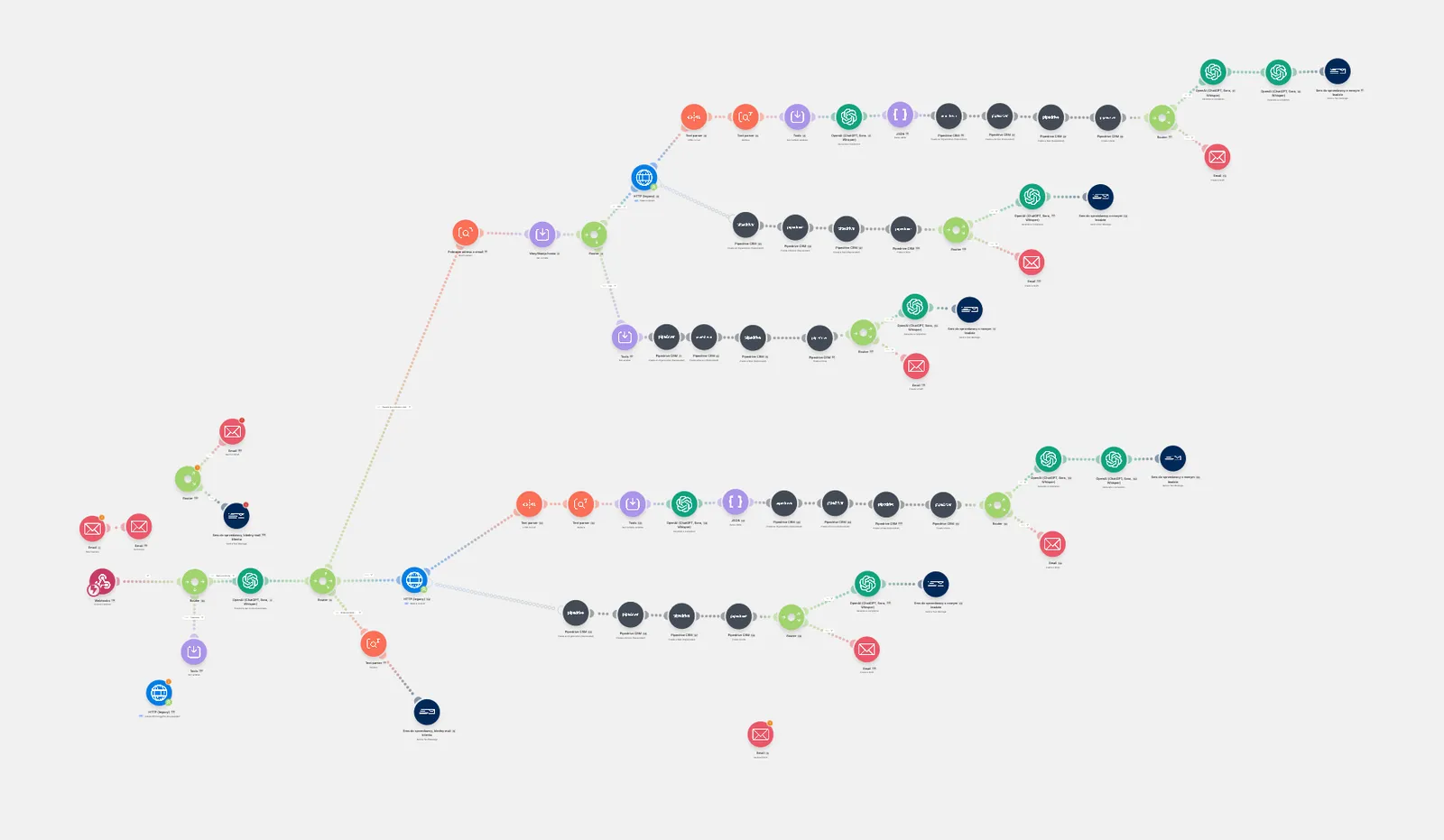
In practice, automating marketing processes in Make.com means that the system segments contacts, generates campaign reports, or synchronizes sales data on its own, while you design the logic behind these actions in a visual editor rather than in code. Below, we show how to build your first automation scenarios, which modules to use for integrating marketing and CRM applications, and what to look out for when choosing a pricing plan, taking into account the credit billing updates introduced in 2025.
What is Make.com and how does this no-code automation platform work?
Make.com is an enterprise-grade iPaaS (Integration Platform as a Service) no-code platform for connecting apps, integrating databases and CRM systems, and automating business processes - all without writing code. Any two systems - such as a contact form and a spreadsheet, an online store and an accounting system, or a chatbot and a customer database - exchange information automatically through it, according to rules previously defined by the user. As a no-code automation tool, Make.com solves a key problem for digital companies: data fragmentation across disconnected applications, which previously required writing custom API integrations or hiring developers.
The platform is used by virtually every department in an organization. IT synchronizes systems and monitors infrastructure, marketing automates campaigns and segments leads, customer service routes inquiries and creates tickets, logistics tracks orders and updates delivery statuses, sales syncs CRM data, and production integrates warehouse systems with incoming orders. This versatility makes Make.com often serve as a central component of an organization's integration architecture - bringing business software from different vendors together into a single, cohesive data ecosystem.
At the heart of the platform is a clean visual editor where automation scenarios are built as visual diagrams. Users connect modules representing specific applications or actions (e.g., "add a row in Google Sheets," "send a message on Slack"), while the arrows between them determine the direction of data flow and the sequence of operations. This approach to workflow automation design sets Make.com apart from traditional integration development - business logic is built by dragging and configuring elements, not by writing code. The platform is therefore accessible to users with no technical background, while still allowing the creation of complex, multi-step workflows. Effective automation of internal processes is also often complemented by AI SEO efforts when a company wants to connect data from analytics systems with search engine visibility initiatives.
From Integromat to Make.com - rebranding history and key changes
Make.com was not built from scratch as a standalone project - it is the result of a thorough rebranding of Integromat, one of the first popular no-code process automation platforms, known to users since 2012. Integromat gained recognition among companies looking for an alternative to manually transferring data between systems. In 2020, the company was acquired by Celonis, a firm specializing in process mining - and it was this injection of capital and resources, not just the limitations of the old interface, that made it possible to rebuild the architecture and launch a new brand. The name change to Make.com, announced in February 2022, meant much more than a new sign above the door - the entire user experience and the product's technical foundations were redesigned.
The rebranding introduced a refreshed, more intuitive scenario editor, making life easier for both beginners and experienced automation builders. The expanded technical infrastructure increased the platform's scalability when handling high volumes of operations and complex, multi-module workflows. The integration library was also broadened - Make.com continuously adds new modules and apps, maintaining its position as one of the market leaders in no-code tools and competing directly with Zapier and other iPaaS solutions.
For existing Integromat users, one detail was crucial: all scenarios, app connections, and account data were migrated without any loss of functionality, and the name change did not require reconfiguring existing automations. The Make.com brand continues to evolve actively - regular product updates, new integration modules, and changes to the billing model currently have the biggest impact on current and new platform users.
New billing model and Make.com pricing for 2026
Starting in August 2025, Make.com changed its billing foundation: credits took the place of traditional "operations." As of November 2025, additional credit packs - purchased manually or added automatically once a limit is exceeded - have a standardized price with a 25% markup compared to credits included in the subscription. This is a significant shift from the previous model, where pricing depended directly on the number of monthly operations (e.g., $30 for a pack of 10,000 operations). Today, that same volume on the Core plan costs roughly $10.59 per month (billed annually), and buying an additional 10,000 credits with the 25% markup comes out to about $13.
The Free plan remains the entry point for companies testing automation: it provides about 1,000 credits/operations per month, but comes with notable limitations - a maximum of two active scenarios running in parallel and a minimum execution interval of 15 minutes. As a result, it works well for simple, low-frequency automations (e.g., a single workflow syncing a form with a spreadsheet), but is not suitable for integrations that require real-time responses or running multiple processes simultaneously - including connected s with the CRM based on current sales data.
For small and medium-sized businesses, the typical monthly cost of using Make.com ranges from $0 to $70. The most frequently chosen option is the Core plan (~$10.59/month with annual billing) with 10,000 credits - a volume sufficient for most simple marketing automations and CRM integrations: lead segmentation, updating customer statuses, or publishing content across multiple channels simultaneously. Core alone lifts both limitations of the Free plan - the number of active scenarios is unlimited, and the minimum execution interval drops from 15 minutes to 1 minute. Higher plans (Pro, Teams, Enterprise) add features essential for scaling: priority operation execution in the system queue, team roles for access management, and protection against workflow disruption when credit limits are exceeded.
| Plan | Credits/operations per month | Estimated price | Key limitations/features |
|---|---|---|---|
| Free | ~1,000 credits | $0 | max 2 active scenarios, min. 15 min interval |
| Core | 10,000 credits | from ~$10.59/mo (annual billing) | unlimited active scenarios, interval from 1 min |
| Pro | depending on the selected package | higher than Core | execution priority, more active scenarios |
| Teams/Enterprise | packages tailored to scale | depends on volume and features | team roles, dedicated support, higher limits |
| Additional credits | packages of 10,000 operations | approx. $13 | approx. 25% premium compared to plan credits (from Nov 2025) |
The new credit model requires more accurate estimation of the number of operations when planning an automation budget - especially for scenarios with multiple modules or iterations, which consume credits faster than simple, single-step flows. In our opinion, this is a model that penalizes inattention: a team that fails to monitor usage may wake up halfway through the month with stopped production scenarios, not just a higher bill.
Let's check your website's potential
Share your website and email - we'll get back to you with a real analysis, no strings attached.
How to Get Started with Marketing Automation Using Make.com - A Step-by-Step Guide
Getting started with Make.com comes down to three elements: defining the goal, choosing the source and target applications, and connecting them into a logical, visual scenario. The setup process follows several repeatable steps - regardless of whether it involves marketing automation, customer service, or data analysis.
- Defining the automation goal - before opening the editor, write down what process is to be automated and what business result it should deliver. Typical use cases: customer service (ticket routing, ticket creation), data analysis (generating reports and summaries), and marketing and advertising (creating and analyzing content, publishing across multiple channels).
- Account registration and plan selection - the free tier of Make.com provides about 1,000 credits per month - enough to test one simple scenario. For real marketing needs, a paid plan is usually required.
- Choosing the trigger application - the first module in the scenario defines what initiates the entire flow: a new form submission, a new lead in the CRM, or a published social media post.
- Adding action modules - subsequent modules define what happens to the data after it is retrieved: saving it to a spreadsheet, sending an email, updating a record in a sales system, or publishing content to another channel.
- Configuring data mapping - between modules, you need to specify which fields from one application correspond to the fields in the other. This step is critical to the correct operation of the entire scenario.
- Testing the scenario - Make.com allows you to run a single test execution before activation, making it easier to detect mapping errors without the risk of sending incomplete data to production systems.
- Activation and monitoring - once enabled, the scenario runs according to the set schedule or responds to events. The execution history in the dashboard allows you to track credit usage and quickly identify errors.
A typical first scenario for marketing teams is automatically transferring leads from a website form to a spreadsheet or CRM along with an instant notification to a sales rep. Such a setup lets you gauge the rate of credit consumption under real traffic and serves as a safe entry point before building more complex, multi-module flows. The next stage of developing competence is optimizing scenarios that are already running: removing unnecessary modules, limiting the number of iterations, and consolidating actions into fewer steps. This directly translates into lower credit usage within the chosen plan.
Another, slightly more advanced example is retrieving data from a database (e.g., a Google Sheet), processing it using artificial intelligence, and automatically saving the result. This type of architecture is a massive productivity leap for teams working with large datasets.
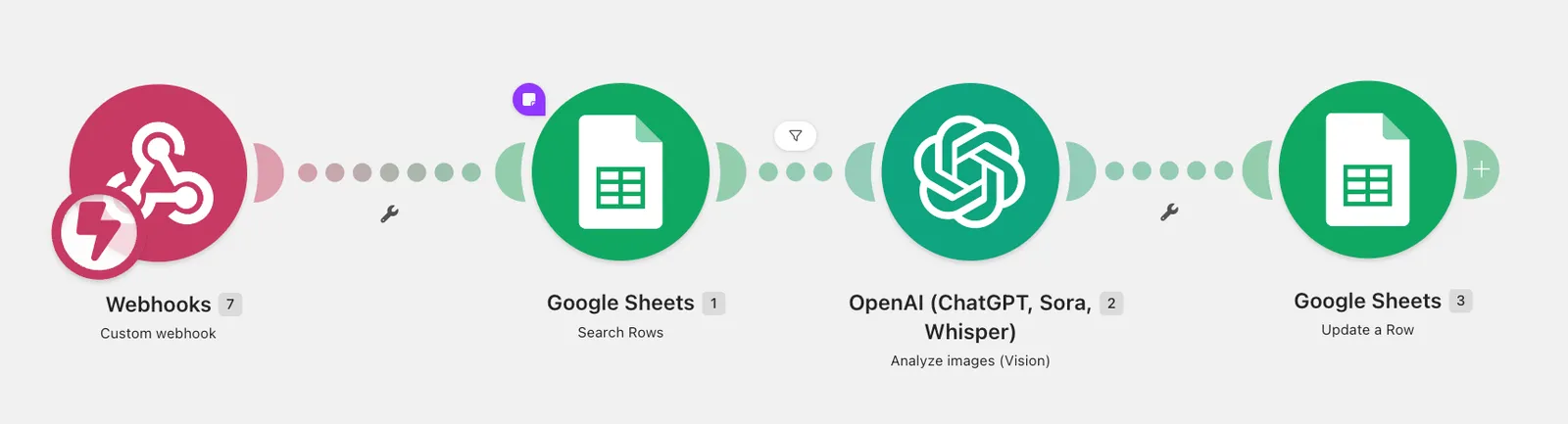
In the diagram below, we show a flow that illustrates this perfectly. The process is initiated by a Webhook, which means it starts immediately after an external event occurs. Next, the Google Sheets module (Search Rows) searches the database to find a specific record. The key element of the operation here is the OpenAI module (Vision), which analyzes the provided visual data. Finally, the conclusion or description generated by artificial intelligence returns to the database via Google Sheets (Update a Row), updating the appropriate row.
Examples of Using Make.com in Marketing and Sales
Make.com connects advertising systems, databases, mailing platforms, and CRMs into a single automated workflow - without writing code. The following scenarios show how to connect specific marketing tools - from Google Ads and Meta Ads to Salesforce, Slack, Trello, WooCommerce, and WordPress - using solely the pre-built API integrations available in the app modules.
Facebook Ads and Google Sheets Integration
A classic Make.com scenario connects Meta Ads (lead ads forms from Facebook and Instagram) with a Google Sheets spreadsheet as a lead database.
- Trigger - a new lead submitting an ad form in Meta Ads.
- Action 1 - automatically saving contact details (name, email, phone) to a row in Google Sheets.
- Action 2 - simultaneously notifying the sales team via Slack or Gmail.
- Extension - the Google Ads module allows you to compile data from both advertising platforms in a shared spreadsheet and automatically report campaign performance without manual exports from each dashboard separately.
The scenario eliminates manual lead copying and reduces sales rep response time from hours to minutes. This is crucial for no-code lead generation in high-volume campaigns.
Newsletter Automation and CRM Synchronization
Email marketing automation in Make.com connects opt-in forms, databases, and CRMs into a single continuous flow - without manual mailing list exports.
- A new signup in a form on a WordPress site goes to the newsletter subscriber list and simultaneously creates a new contact record.
- The CRM integration with Gmail sends personalized transactional emails without logging into the CRM dashboard: Make.com pulls the contact details and populates the message template automatically.
- Synchronization with Salesforce updates the lead status (e.g., "subscribed to newsletter," "opened email") in the customer record, making it easier for the sales team to segment the database by buyer's journey stage.
- The ChatGPT module generates email content or a split-test variant (A/B) based on recipient segment data before the message reaches the sending module.
- Follow-up tasks after the newsletter is sent are automatically created in Trello and assigned to a specific marketing team member.
The entire chain functions as a single scenario: a change in one system (e.g., a new contact) triggers a cascade of actions across several applications simultaneously - without separate point-to-point integrations built for each pair of systems.
Automati social media post publishing
Make.com also automates content publishing: it schedules and distributes a post across multiple channels simultaneously from a single source.
- Content source - a new entry in a Google Sheets spreadsheet, a Trello card, or an article published on WordPress.
- Generating variants - the ChatGPT module trims text to fit character limits of individual platforms.
- Distribution - a single scenario publishes content in parallel across multiple channels, eliminating the manual copy-pasting of the same material into each dashboard separately.
- Team notification - once a post is published, Make.com sends a confirmation to a Slack channel, keeping the team informed about the campaign's status.
- E-commerce - in WooCommerce stores, a new product or promotion automatically generates a social media product post, without having to manually prepare descriptive graphics each time.
The effectiveness of such automations depends not only on the publishing schedule, but also on the quality of the content reaching search algorithms. In this context, AI SEO naturally complements automated content distribution.
Advanced platform capabilities: routers, filters, and HTTP modules
Make.com stands out from the competition with its ability to create multi-path scenarios and connect to any external API using HTTP modules and webhooks. It is the router, filter, and HTTP modules that set the platform apart from simpler integration tools limited to linear, single-path automations. Beyond over 3,000 ready-to-use integrations with cloud applications - Google Workspace, Microsoft 365, CRM systems, marketing tools, and messengers - Make.com provides a technical layer that lets you build logic comparable to classic code, without writing it line by line.
Routers, filters, and data parsing
A router splits a single scenario into multiple independent paths. One trigger, several directions. Data from a single trigger can simultaneously flow to different systems or undergo different processing logic. For example, a new lead from a form can concurrently go to a CRM, a reporting spreadsheet, and a notification module - with each path operating independently from the others.
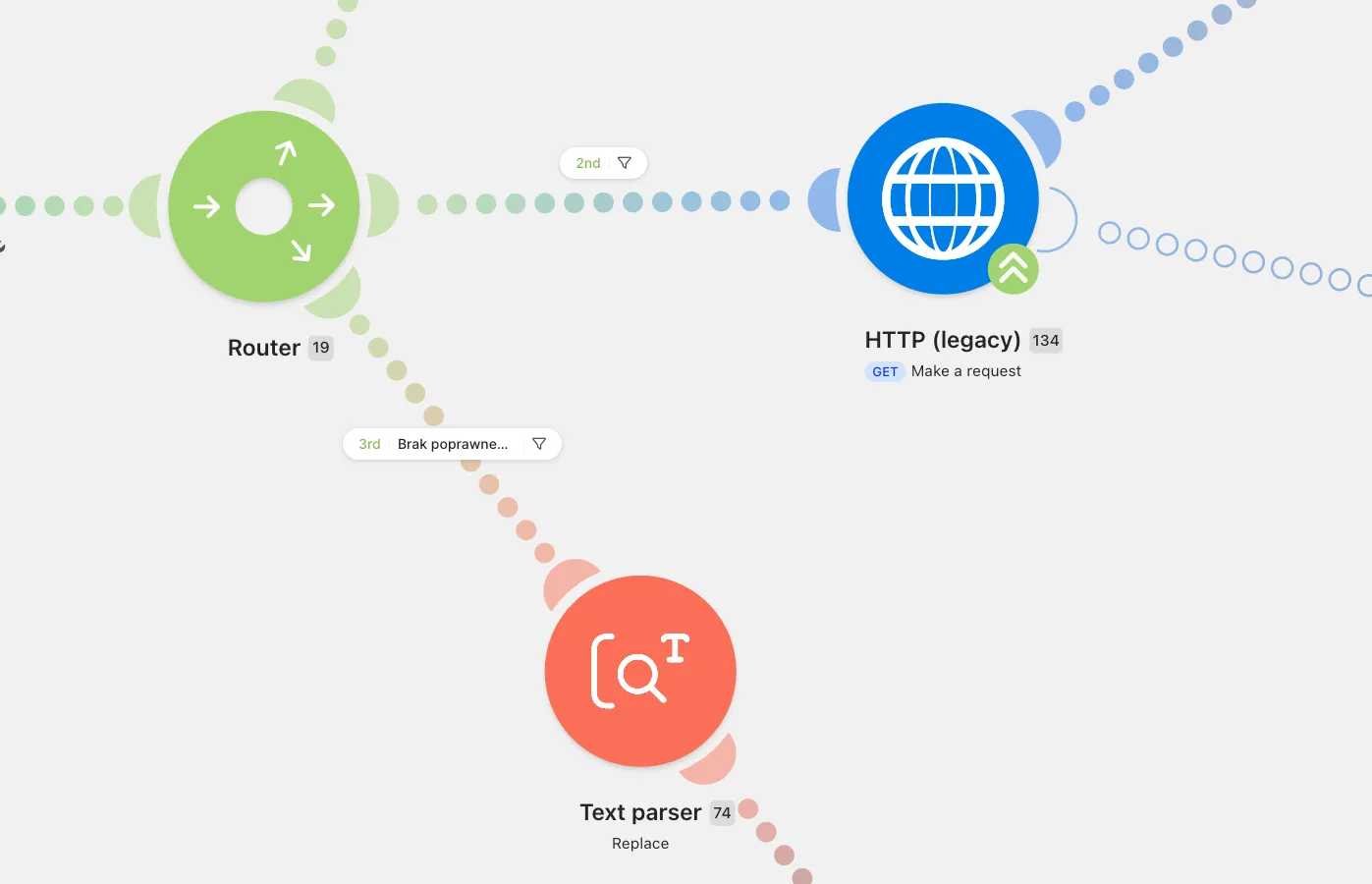
A filter is a logical condition placed on a router path or directly between two modules. It only passes through data that meets defined criteria - such as transaction value above a specified threshold, a specific lead status, or customer region. Without filters, a scenario would perform the same actions for all records regardless of their business value, generating unnecessary credit consumption under the selected pricing plan.
The third element of this layer is data parsing, including JSON parsing - an essential feature when an API response arrives as a complex, nested JSON structure. The parsing module breaks down such a structure into individual fields that can be used in downstream data mapping between applications. Proper field mapping determines whether data ends up in the right columns in the target system - errors at this stage are one of the most common causes of failed app integrations in no-code environments.
Using HTTP modules and Webhooks for custom APIs
When the required integration is missing from the library of over 3,000 ready-made apps, the HTTP module lets you connect to any external API. It enables sending GET, POST, PUT, or DELETE requests to an external system, configuring authorization headers, and passing parameters in JSON format. As a result, the scenario can communicate with internal company systems, niche industry software, or APIs without an official module in Make.com.
Webhooks work in the opposite direction. An external system initiates the data flow by sending a notification to a unique URL generated by Make.com the moment an event occurs (a new payment, order status change, record update). A webhook-based scenario responds immediately, without polling the API at regular intervals - this distinguishes it from schedule-based modules and helps keep the number of operations down.
Combining HTTP modules, webhooks, and a router requires planning for error handling - handling situations where an external API returns an invalid response, times out, or denies authorization. Make.com lets you add dedicated error handling paths that catch failed module executions and, for example, send an alert to the scenario administrator or automatically retry the request after a set period, instead of breaking the entire data flow.
In practice, this element is often skipped at the start, because a scenario without error handling works fine too - until the first external API outage in the middle of the night. It pays to build it right away, rather than after the first disaster.
Make.com vs Zapier - which tool should you choose for process automation?
Choosing between Make.com and Zapier mainly comes down to two factors: the scale of your automations and your tolerance for a learning curve. Zapier wins on simplicity - an intuitive interface optimized for linear "trigger → action" flows allows beginners to quickly deploy their first automations. Make.com requires more effort upfront, but in return it offers real-time visual scenario execution previews, native loops, routers, and HTTP modules, along with a vastly more favorable pricing model as the number of operations grows.
The cost difference is visible right from the free tier. Zapier limits monthly tasks and only allows simple, single-path Zaps - with no conditional logic. Make.com gives you more breathing room - the same Free plan terms described earlier (around 1,000 credits, 2 scenarios, 15-minute interval), but without blocking conditional logic. When scaling automations, Make.com's pricing advantage grows - the Core package starts at around $10.59 per month for 10,000 operations (billed annually), and additional 10,000-operation packs cost around $13 (a ~25% markup compared to credits included in the plan). Zapier generates a higher unit cost at comparable volume, especially on team plans with additional users.
| Criterion | Make.com | Zapier |
|---|---|---|
| Billing model | Credits/operations, Core/Pro/Teams/Enterprise plans | Tasks, Starter/Professional/Team plans |
| Free plan | approx. 1,000 credits/mo, max 2 scenarios, 15 min interval | limited number of tasks, no multi-step logic |
| Conditional logic | routers, filters, loops, natively built-in HTTP modules | available on higher tiers, less flexible |
| Scenario visualization | full view of data flow on a timeline | list of steps without graphical visualization |
| Learning curve | steeper, requires understanding modules and data mapping | lower, interface optimized for simplicity |
| Cost at scale | lower unit cost per operation | higher cost as task volume grows |
Zapier works well for micro-businesses with simple, single-step automations (e.g., "new email -> new spreadsheet row"), where the number of integrations is small and does not require branching. Make.com takes the lead when multiple source systems are involved, conditional data processing is required, or when integrating with custom APIs via HTTP modules and webhooks.
If no one on your team has the time or desire to understand data mapping and credit consumption, recommending Make.com "because it is cheaper" can be bad advice - a lower list price does not make up for hours spent debugging a scenario that quietly stopped working in the middle of the month. Both platforms are iPaaS (Integration Platform as a Service) - they connect cloud apps without code. However, Make.com targets technical users and operations teams needing precise control over every stage of data flow, while Zapier focuses on deployment speed and a minimal entry threshold.
FAQ
Is Make.com free?
Yes, Make.com offers a Free Plan that provides up to 1,000 operations (credits) per month with no time limit, allowing you to test and deploy simple scenarios at no cost.
How does Make.com differ from the former Integromat?
Make.com is a rebranded and upgraded Integromat. It features a new, more intuitive graphical interface, higher performance, a new credit-based billing system, and access to over 3,000 ready-to-use integrations.
Do I need coding skills to use Make.com?
No, Make.com is a no-code platform where processes are built visually in a drag-and-drop editor. Basic knowledge of APIs and JSON format is only helpful for highly advanced, custom integrations.