
Local AI Models - How to Run a Language Model on Your Own Computer
As of September 10, 2026. Model versions and their requirements were verified on that day in the manufacturers' model cards. The open-source model market changes every few weeks, so check the current cards on Hugging Face before deploying.
Local AI models are language models run on your own computer or company server, without sending data to an external provider. It is a solution for companies that process customer data, campaign briefs, or documentation covered by trade secrets and do not want this content to end up on someone else's infrastructure.
Deployment relies on two tools: Ollama (command line, API server on port 11434) or LM Studio (graphical interface with a model manager). The choice of model depends on the memory you have available. Thanks to quantization, you can fit an 8B-class model onto an 8 GB VRAM card, while with 24 GB you can run variants that genuinely replace a cloud assistant in daily editorial work.
Below is a step-by-step installation guide for Windows, macOS, and Linux, hardware-to-model matching, and connecting the local API to automation workflows.
Why Business and Marketing Are Switching to Local Language Models
Running a model locally changes the risk model, not just the cost breakdown. Not a single fragment of text leaves the company's infrastructure, eliminating the need to sign a data processing agreement with an AI provider and concerns over where the servers are physically located.
The decision to switch to a local model usually stems from five factors. The table below organizes them in comparison to a typical cloud subscription.
| Factor | Local Language Models | Cloud Model (Subscription) |
|---|---|---|
| Data privacy | Data never leaves the company computer or server | Data is sent to an external provider |
| Costs | No subscription fees, one-time hardware cost | Monthly fee or per-token billing |
| Request limits | Limited solely by hardware | Plan limits, extra charges for overages |
| Availability | Works offline, independent of internet connection | Requires an active internet connection |
| Customization | Full access to weights, fine-tuning is possible | Usually no access to model weights |
| Version control | Downloaded file works unchanged for years | Provider can modify or deprecate the model |
The last row is, in our opinion, the most underrated. A prompt fine-tuned for a specific model stops working after a silent update on the provider's side, whereas a GGUF file on a company drive behaves identically in a year or three years. This matters anywhere content generation is a repeatable process rather than a one-off experiment.
Fine-tuning is the second thing the cloud usually does not provide. A model can be trained on an internal knowledge base, brand tone of voice, and industry terminology, which translates into the quality of content automation and AI SEO conducted on your own data.
Hardware Requirements: Dense Models, MoE, Apple Silicon, and CUDA
Memory requirements come down to a simple calculation: the number of parameters multiplied by the number of bits per parameter, plus overhead for the attention cache. An 8B model quantized to 4 bits is about a 4.5 to 5 GB file, a 14B model is about 9 to 10 GB, and a 35B model is about 20 GB. On top of that comes memory for the context, which can dominate the calculation with large context windows.
Practical thresholds we use when selecting hardware for ourselves and our clients:
- 2B to 4B - about 8 GB RAM and integrated graphics. An office laptop without a dedicated graphics card.
- 8B to 14B - 16 GB RAM and a card with 8 to 12 GB VRAM. The most common choice in marketing: content generation, summaries, document analysis.
- 27B to 35B - 32 GB RAM and a 16 to 24 GB card. The threshold where a local model starts being sufficient for daily editorial work.
- 100B and more - an 80 GB server card or a workstation with very large unified memory.
Why the MoE Architecture Changed These Ranges
Until recently, the number of parameters told you everything about hardware requirements. Today, Mixture of Experts (MoE) dominates, where only a fraction of the network is activated when generating each token. Qwen3.6-35B-A3B has 35 billion parameters in total and 3 billion active per token (model card, Hugging Face). Llama 4 Scout has 17 billion active out of 109 billion total, and Maverick has 17 billion out of around 400 billion (The Llama 4 herd, Meta AI).
The consequence has two parts and is easy to confuse:
- All parameters must fit into memory. A 35B model in 4 bits still takes up around 20 GB.
- Speed is determined by the number of active parameters. The same model generates tokens at a pace similar to a 3B model.
MoE thus offers the quality of a large model at the speed of a small one, but it requires a lot of memory. If you have 64 GB RAM and a weak GPU, an MoE model will be a better choice than a dense model of the same size. With an 8 GB card and 16 GB RAM, you are better off sticking with dense 8B to 14B models.
Apple Silicon, CUDA, and AMD Cards
Apple Silicon uses unified memory shared between the CPU, GPU, and Neural Engine, so there is no split between RAM and VRAM. A Mac with 16 GB can handle medium models, while 32 GB opens the door to the 27B to 35B class. For large MoE models, this gives Apple an advantage over consumer cards with 8 or 12 GB VRAM.
On Windows and Linux, NVIDIA's CUDA remains the best-supported environment. AMD users have two paths: ROCm, the official AMD stack, and Vulkan as a universal backend that also works on Intel Arc cards and integrated graphics. Both are supported by llama.cpp, and consequently also by Ollama and LM Studio (llama.cpp, backend documentation). DirectML, mentioned in older guides, has lost ground to these two.
How Quantization and the GGUF Format Work
What Quantization Is and How to Choose the Model Size
Quantization reduces the precision of parameter storage, most often from 16 bits (FP16 or BF16) to 4, 5, or 8 bits. This shrinks file size and memory requirements, and at the Q4_K_M and Q5_K_M levels, the quality loss is barely noticeable in marketing use cases. The standard storage format is GGUF, designed for fast loading on consumer hardware. It replaced the older GGML and became the default model carrier on Hugging Face.
When downloading a model, you will encounter three quantization variants.
- Classical quantization (Q4_K_M, Q5_K_M, Q6_K) The most popular and universal, available for virtually every model in GGUF.
- Quantization with an importance matrix (imatrix, IQ variants) Uses real activation statistics to protect the most important weights. At the same file size, it delivers better quality than classical Q4, especially when compressed down to 3 bits and below.
- Native quantization (MXFP4) Some models are published directly in 4 bits. This is the case with gpt-oss, where the 20B version fits in 16 GB of memory, and the 120B version fits on a single 80 GB card (Introducing gpt-oss, OpenAI). The model was not compressed after the fact, so there is no quality loss typical of quantization.
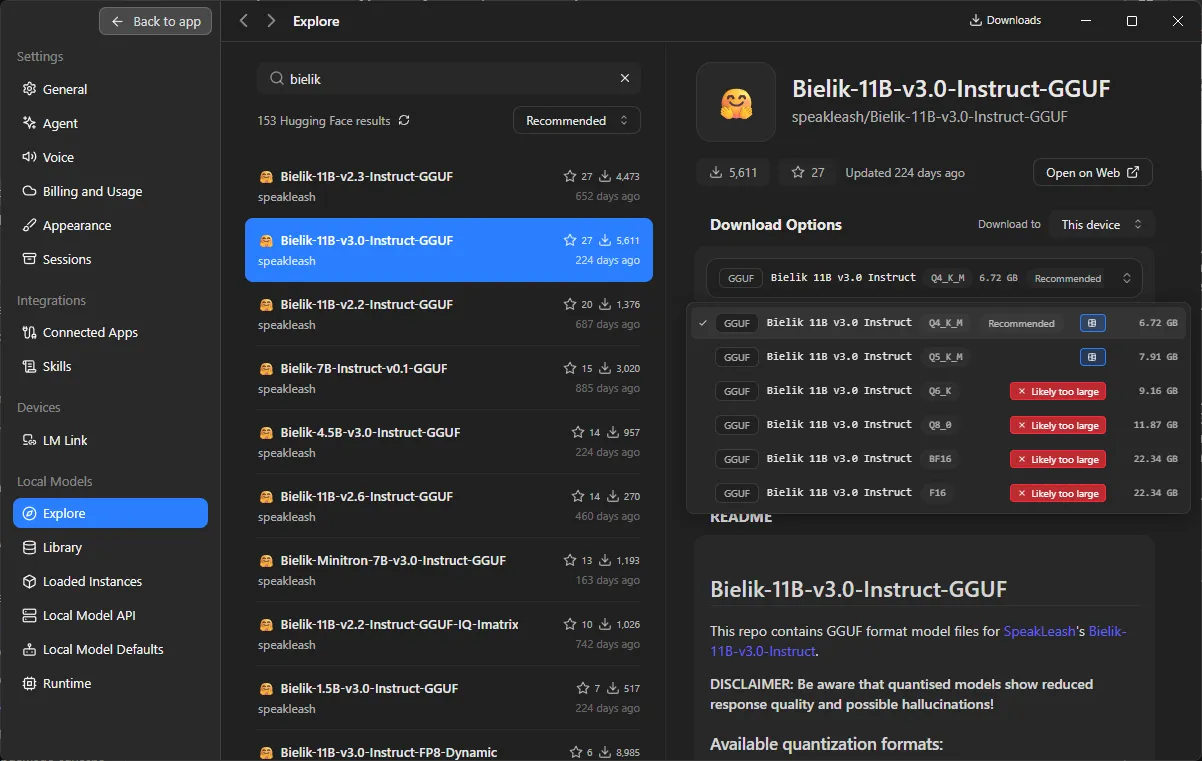
The context window adds to the total footprint and, with new models, can easily dominate it. Qwen3.6 natively supports 262 thousand tokens (model card, Hugging Face), and Gemma 4 up to 256 thousand (Gemma 4, Google blog). A fully filled window of this size uses more memory for the attention cache than the weights themselves consume. Dropping the context from 32 thousand to 8 thousand tokens is often the only way to fit a larger model without lowering the quantization level.
How Offloading Works Between CPU and GPU
Offloading distributes the model layers between the processor and the graphics card when VRAM is not enough for the whole thing. The GPU computes some layers, and the CPU handles the rest using system RAM. This mechanism is supported by llama.cpp, the engine powering both Ollama and LM Studio, so the rules are the same regardless of your chosen interface.
The more layers that run on the GPU, the faster the response, because parallel computing on the card is much faster than sequential processing on the CPU. With full offloading, generation runs smoothly; with partial offloading, every layer on the CPU adds latency caused by transferring data back and forth between system memory and VRAM.
In our experience, one rule holds true: the performance drop from full offload to partial offload is sharp, not linear. If a model fits ninety percent into VRAM, it is better to step down one quantization level or reduce the context window than to settle for offloading a few layers. Slightly lower text quality hurts far less than generation that is several times slower.
Let's check your website's potential
Share your website and email - we'll get back to you with a real analysis, no strings attached.
Ollama and LM Studio: step-by-step installation
Installing Ollama on Windows, macOS, and Linux
Ollama is a free command-line framework available for all three systems, with an optional windowed app. It installs natively, without a container, and after installation exposes a local API server at 127.0.0.1:11434 (Ollama documentation).
- macOS - official app from the project's website, includes a GUI and CLI. Homebrew also installs just the CLI with the command
brew install ollama. - Linux - installation script
curl -fsSL https://ollama.com/install.sh | sh. The service starts under systemd, so the API server boots up along with the system. - Windows - installer with a graphical interface, after which Ollama runs in the background and provides the same API as on the other systems.
Downloading a model:
ollama pull qwen3:8b
Running it in the terminal:
ollama run qwen3:8b
Two commands are enough to have a working model without any graphical interface. It is also handy to know ollama list (what is downloaded and how much space it takes), ollama ps (what is loaded into memory), and ollama rm (removing a model that takes up over a dozen gigabytes).
LM Studio as a graphical alternative
LM Studio is a free desktop app for macOS, Windows, and Linux for people who prefer not to work in the terminal. It runs on llama.cpp, and on Apple Silicon also on MLX, providing a local API server compatible with the OpenAI standard, by default on port 1234 (LM Studio documentation).
The built-in model manager pulls directly from Hugging Face and supports GGUF natively. Searching, downloading, and switching quantization versions happens right from the panel, and the interface itself indicates which variants will fit into the computer's memory. This is the fastest way we know to pick a quantization without doing mental math.
Open WebUI, Jan, and vLLM
Open WebUI is a web overlay most often paired with the Ollama API. It provides a chat interface similar to cloud services, but running locally: chat history, document support, and model switching. In companies, it is sometimes run as a service alongside Ollama so that multiple people can use a single model via an internal network address.
With such a deployment, there is one thing to keep in mind: the Ollama API server does not have its own authentication. Exposing it beyond localhost without a reverse proxy requiring login means that anyone with network access can use it.
Beyond these three, there are three other tools worth knowing. Jan is an open-source desktop app for people who want to work without telemetry. Bionic is a newer desktop client with its own model manager pulling from Hugging Face, which is where the screenshot of quantization variants in the GGUF section comes from. vLLM is a server engine for corporate deployments that supports multiple concurrent users. It is not a tool for a laptop, but when a model needs to serve an entire team, it is a better choice than Ollama.
Best Local Language Models for Working in Polish
For working in Polish, we use Instruct versions - that is, models fine-tuned for conversation and following instructions. Base versions require additional fine-tuning and are not suitable for content editing. The following overview reflects the state as of September 2026.
- Bielik 11B v3 - a Polish model developed jointly by the SpeakLeash project and ACK Cyfronet AGH, trained on Polish text corpora, evolved from the Mistral-7B-v0.2 model (model card, Hugging Face). There is a separate
Bielik-PL-11B-v3.0-Instructvariant with a tokenizer optimized for Polish (model card) and a smaller Bielik-Minitron-7B for lower-spec hardware. It handles inflection and register better than models trained primarily on English, which shows in product descriptions and business communication. The aisight.pl portal reports that v3 took fourth place in the EuroEval ranking among multilingual base models (aisight.pl); this is a media report, not a result we verified independently. - Qwen3 and Qwen3.6 - Alibaba's family, currently the default answer to the question of what to run locally. The Qwen3 8B and 14B variants fit typical hardware, while Qwen3.6-35B-A3B under the Apache 2.0 license supports text, image, and video with a 262k token context window (model card, Hugging Face). Polish quality is decent, though more technical than Bielik's.
- Gemma 4 - Google's family released on March 31, 2026, in E2B, E4B, 26B A4B, and 31B variants, supplemented on June 3, 2026, with the 12B Unified model (release history, Google AI for Developers). Apache 2.0 license, context up to 256k tokens, over 140 languages, image support across all variants, and audio support in E2B, E4B, and 12B (Gemma 4, Google Blog). In our opinion, the E2B and E4B variants are currently the best choice for a computer without a dedicated GPU.
- gpt-oss 20B and 120B - OpenAI's open weights under the Apache 2.0 license, published natively in MXFP4. The 20B version fits into 16 GB of memory, while 120B requires an 80 GB GPU (Introducing gpt-oss, OpenAI). Step-by-step reasoning models, strong in analysis, stylistically weaker in Polish than Bielik.
- Llama 4 - Meta's family based on the MoE architecture, natively multimodal: Scout (17B active, 109B total, 16 experts) and Maverick (17B active, around 400B total, 128 experts) (The Llama 4 herd, Meta AI). Contrary to what you might think, this is not a model for a high-end consumer GPU, but for a workstation, because even Scout in 4-bit requires several dozen gigabytes. Older Llama 3 and 3.3 models still work, but we do not choose them for new projects.
- Mistral - a French family valued for quality at a low parameter count and for permissive licensing. In Polish content work, it sometimes serves as an alternative to Bielik, with a different stylistic profile.
- DeepSeek R1 and reasoning models - a separate category where the model generates an explicit chain of thought before responding. This costs significantly more tokens and time, making it overkill for product descriptions. It works well for data analysis and multistep inference.
The starting recommendation depends solely on memory. Laptop without a dedicated GPU: Gemma 4 E4B or Bielik-Minitron-7B. GPU with 8 to 12 GB: Qwen3 8B and Bielik 11B, compared on your own texts. GPU with 24 GB or a Mac with 32 GB: Qwen3.6-35B-A3B or gpt-oss 20B.
Bielik vs Gemma: the Same Prompt, Two Answers
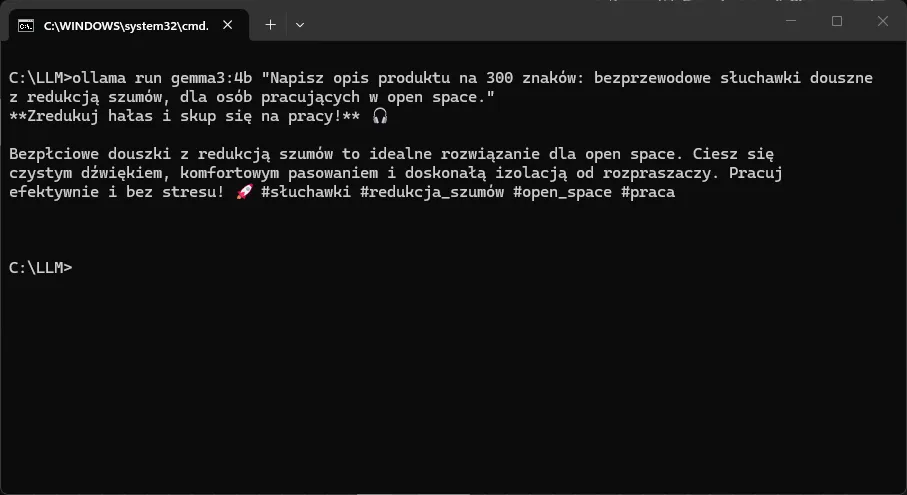
Below is the result of a test from September 10, 2026, conducted on a laptop with 16 GB RAM and integrated graphics, without a dedicated GPU. Both models were run via Ollama, received the exact same prompt, and operated on default settings, making this a comparison of style rather than a benchmark of performance.
Prompt:
Write a 300-character product description: wireless in-ear headphones with noise cancellation, for people working in an open space.
Bielik 11B v3.0 Instruct, Q4_K_M
Bezprzewodowe słuchawki douszne z zaawansowaną redukcją szumów idealne dla osób pracujących w otwartych przestrzeniach biurowych. Zapewniają czysty dźwięk i wygodę użytkowania przez cały dzień. Lekkie, ergonomiczne i łatwe w obsłudze. Długi czas pracy na baterii i szybkie ładowanie. Idealne do pracy, muzyki i rozmów. Odporność na pot i wodę (IPX4). Doskonałe rozwiązanie dla profesjonalistów ceniących ciszę i koncentrację.
Gemma 3 4B
Zanurz się w ciszy! Bezpłciowe douszki z redukcją szumów to idealne rozwiązanie dla pracy w open space. Ciesz się czystym dźwiękiem i komfortem dzięki intuicyjnemu sterowaniu i długiemu czasowi pracy na baterii. Skup się na tym, co ważne! 🎧 #słuchawki #redukcjeszumów #open space
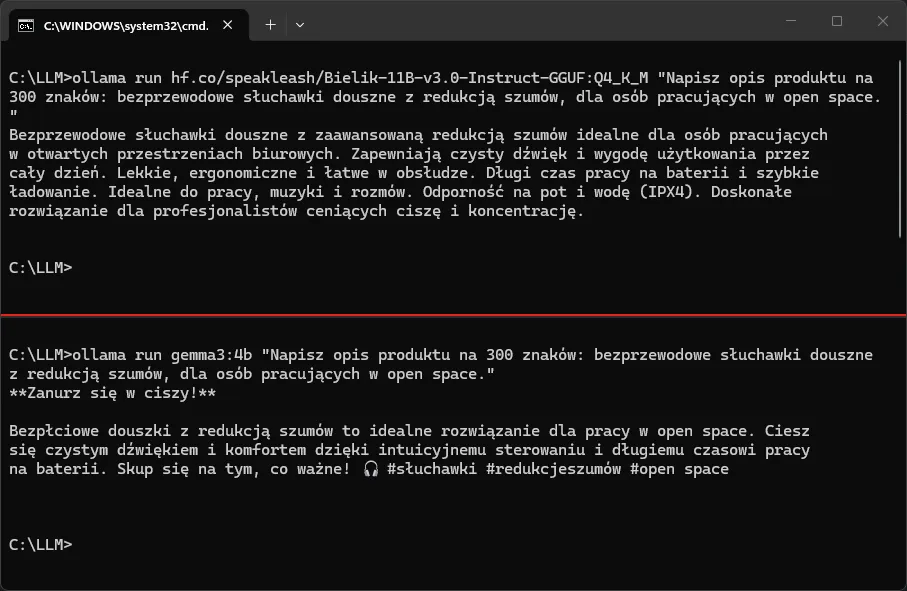
The difference is visible in the very first words of the description. Gemma wrote "Bezpłciowe douszki" ("Genderless ear-things") instead of "Bezprzewodowe" ("Wireless"): it swapped the word for another that starts similarly but means something completely different, and it did so in a spot that cannot be missed. This is not awkward word order or a calque from English, but an outright word-level error.
We repeated this prompt twice, and the exact same word came out every time, even though the rest of the description was different on the second run. This is not a one-off slip, but reproducible model behavior on this prompt. Bielik wrote "Bezprzewodowe" in both attempts, and that is precisely the advantage that training on a Polish corpus provides.
Bielik also translated "open space" into "otwarte przestrzenie biurowe" [open office spaces] instead of keeping the loanword. In ad copy, this can be debatable, as the industry says "open space", but it shows that the model operates on Polish semantics rather than just rearranging English building blocks.
However, each of the models failed in a different way, so neither can be recommended without reservations.
Gemma stayed within the limit, but added things nobody asked for. 275 characters, counting the headline, description, and hashtags without emojis, meaning the instruction was followed. In addition, though, it included a headline, emojis, and hashtags that were not mentioned in the prompt, and two of these hashtags are broken: "#redukcjeszumów" is an awkward compound without proper inflection, and "#open space" with a space in the middle ceases to be a hashtag on any platform.
Bielik wrote better Polish, but ignored the limit and fabricated a spec. 425 characters instead of 300, which is an overshoot of 125. What is worse is that it added "Sweat and water resistance (IPX4)", and there was not a single word about the IPX4 standard in the prompt. The model made up a technical spec and presented it with complete confidence. In an e-commerce product description, this is a much more costly mistake than a typo, because it involves a feature the customer pays for.
The takeaway for marketing is straightforward. A local model is good for a draft, not for publishing without review. The smaller model gets words wrong, the larger model hallucinates data and disregards formal constraints, and both issues only surface upon careful reading. If generating descriptions is to become a process, verifying technical specs must be a part of it, regardless of how well the model writes in Polish.
Does a local model work without content filters?
There is a common belief that running a model locally removes all restrictions. This is a misconception, and it is better to dispel it before making a purchasing decision. Running locally eliminates three things: rate limits, API-side moderation, and content logging on the provider's end. It does not eliminate the alignment trained directly into the weights. Instruct models, including Bielik, Qwen, Gemma, and Llama, will refuse offline exactly the same things they refuse via an API, because the propensity to refuse is part of the trained parameters, not an external filter.
The real advantage is different and compelling enough: no content is sent to third-party moderation or third-party logs. Competitor analyses, campaign briefs, and client data stay on your hardware. This is an argument for privacy, not for a lack of restrictions.
Integrating Local APIs with Automation Tools
Ollama and LM Studio expose OpenAI-compatible APIs, so you can simply redirect a scenario built for a cloud API to a local address. You change the endpoint and enter any arbitrary value as the key, because the local server does not require cloud authentication.
You need to distinguish between these addresses, as this is the most common source of errors during initial integration:
- OpenAI-compatible (Ollama):
http://127.0.0.1:11434/v1/chat/completions - Native Ollama:
http://127.0.0.1:11434/api/chat- a different request and response structure; it will not work as a drop-in replacement for an integration written for OpenAI - LM Studio:
http://127.0.0.1:1234/v1/chat/completions
Also available are /v1/embeddings for semantic search and /v1/models to check whether the server is responding at all.
Make, Zapier, and the Localhost Problem
Make and Zapier run in the cloud and have no access to your localhost. This applies equally to both platforms. To connect a local model to them, you need to expose the port through a tunnel: Cloudflare Tunnel or ngrok. In Make, this is handled by the HTTP module, and in Zapier by the Webhooks by Zapier action, pointing your request to the tunnel's public address rather than 127.0.0.1.
If nothing should leave your local environment, an alternative is self-hosted n8n. It runs on the same network as the model and references it directly, without a tunnel and without a public address. For sensitive data, this is a much safer setup, and it is the one we use ourselves.
MCP: Connecting the Model to Tools
Model Context Protocol (MCP) is a standard describing how a model interacts with external tools: databases, files, and APIs. In practice, a local model does not just generate text; it retrieves data and performs actions. Support on the local tools side is already mature - MCP is supported by LM Studio, among others - and on the model side, tool calling is available in Qwen3, Gemma 4, gpt-oss, and newer Llama models.
For marketing, this represents a qualitative shift compared to classic automations. Instead of building a scenario step by step, you connect the model to a spreadsheet with product data and a database containing editorial guidelines, and it retrieves what it needs on its own. The use cases remain the same: product descriptions generated after adding a row to a spreadsheet, ad variants based on a brief, lead scoring. The difference is that this happens without token fees and without sending client data outside.
Company Document Analysis and Model Fine-Tuning
Analyzing contracts, procedures, and reports requires an architecture where not a single fragment leaves the organization. RAG and fine-tuning are two complementary methods, both feasible locally.
How to Connect a Local Model to Your Own Documents
Before generating an answer, RAG feeds the model the document fragments most closely related to the prompt, retrieved from a local vector database. Implementation is simplified by AnythingLLM: importing files (PDF, DOCX, CSV, web pages), chunking, generating embeddings, and storing them in a database. Open WebUI offers similar capabilities today, so with an existing installation, there is no need to add another tool.
AnythingLLM connects directly to the Ollama or LM Studio API on localhost, so the entire chain - from indexing to generation - stays on a single machine. The answers are then based on the actual content of the documents rather than the general knowledge of the model.
A tip from real-world deployments: RAG quality depends more on the embedding model and the document chunking method than on the size of the chat model. Before reaching for a larger model, check whether your documents are being cut off at random points.
Fine-Tuning Models on Company Data
Fine-tuning permanently alters weights based on a dataset of examples. Unlike RAG, which injects context with every prompt, fine-tuning embeds style, terminology, and tone of voice directly into the parameters. You need a dataset of question-and-answer or instruction-and-output pairs built from real company materials.
This is done using LoRA or the more memory-efficient QLoRA technique, which trains on a quantized model. This modifies only a small fraction of the parameters, lowering the hardware threshold compared to full fine-tuning, while tools like Unsloth or Axolotl reduce the process to preparing the data and running a script.
Choosing between the two comes down to a simple distinction: RAG answers the question of what the model should know. Fine-tuning answers the question of how the model should speak. Keep facts that change weekly in a vector database; store the brand's tone of voice and permanent terminology in the weights.
The entire process - from data through training to deployment in Ollama or LM Studio - runs locally. For companies processing personal data or trade secrets, this is the only way to combine the quality of a large model with full control over data flow.
Frequently Asked Questions About Local AI Models
1. Does running a local model require a constant internet connection?
No. An internet connection is only needed to download the model using the ollama pull command or via the manager in LM Studio. The inference itself runs fully offline, which is one of the main advantages of this solution.
2. What are the minimum hardware requirements for working with text?
For reasonable work with Polish text, 16 GB of RAM and a graphics card with 8 GB of VRAM are enough for an 8B model at 4 bits. Without a dedicated card, 2B to 4B models are usable, such as Gemma 4 E4B, which run on integrated graphics and 8 GB of RAM.
3. Ollama or LM Studio to start with?
LM Studio, if you do not work in the terminal and want to see which quantization variant will fit on your hardware. Ollama, if you plan integrations with scripts or automations, because it exposes an API without extra configuration and is easier to run as a service. Both tools use the llama.cpp engine, so the output quality will be the same.
4. Which model is best for writing in Polish?
Bielik 11B v3, because it was trained on Polish corpora, and the Bielik-PL variant features a tokenizer optimized for Polish. As a secondary model, it is worth keeping Qwen3 8B or 14B, which is better at analytical tasks and data structuring, although its Polish is more technical.
5. Does a local model match the quality of ChatGPT?
For content generation, summaries, classification, and document analysis, 27B to 35B class models are more than enough. For the most demanding reasoning tasks and working with very long context windows, the top cloud models remain more powerful.
6. Can I use a local model commercially?
It depends on the model license, not the tool you use to run it. Qwen3.6 and gpt-oss are under Apache 2.0, which allows commercial use. Llama has its own license with conditions regarding very large scale. Check the license on the model card on Hugging Face before production deployment.
7. Does the MoE architecture mean that a 35B model will fit on weaker hardware?
No. All parameters must fit into memory, so a 35B model at 4 bits still takes up around 20 GB. MoE improves generation speed because it only activates part of the network per token, but it does not reduce memory requirements.
8. Is the data entered into a local model saved anywhere?
Chat history is saved locally in the chosen application and can be deleted. The model does not learn from your prompts and does not send them anywhere. The only exception is when the API server is intentionally exposed outside localhost without security, which is why you should use a reverse proxy with authentication when working in teams.
9. What should I do if the model responds very slowly?
The most common reason is partial offloading, a situation where the model does not fit into VRAM and some layers are computed by the CPU. Reduce the context window, drop down a quantization level, or choose a smaller model. It is better to run a smaller model entirely on the GPU than a larger one halfway.