
Leonardo AI - What It Is, How It Works, and Pricing for the Image Generator

As of September 25, 2026. Leonardo replaces models and changes pricing several times a year, so check the current list of engines and prices at leonardo.ai before purchasing. We are neither a partner nor a representative of Leonardo; we write from the perspective of an agency that tests such tools on its own assets.
Leonardo AI is a platform for generating images, videos, and 3D textures from a text description or a photo, built by Leonardo Interactive Pty Ltd from Sydney and acquired by Canva on July 30, 2024 (Canva Newsroom). Its core premise is not a single model, but a single panel where Leonardo's proprietary engines sit alongside models from Google, OpenAI, and Black Forest Labs.
Basic access is free, in the browser as well as via iOS and Android apps. Paid plans start at $12 per month and unlock generation privacy, training your own models, and higher token limits.
Creating graphics based on text descriptions has ceased to be a differentiator in 2026, as every major AI tool does it. What makes the difference is what surrounds the generator: editing, consistency, and rights to the output.
Below, we describe what working in the panel looks like, which models are available today, how much regular graphics production realistically costs, and where, in our view, the tool holds up - and where it falls short.
Leonardo AI - What It Is and How Its Multi-Model Architecture Works
Leonardo AI is a cloud-based design studio where a single subscription provides access to over a dozen generative engines switched within the same window. The company was founded in December 2022 in Sydney, and in July 2024, it was acquired by Canva, which declared that Leonardo would continue to be developed as a standalone platform. In the acquisition announcement, Canva shared two figures: over 19 million users of Leonardo products and a team of 120 people (Canva Newsroom, 07/30/2024). Neither Leonardo nor Canva publishes newer data on the platform's scale, and the numbers circulating in AI tool rankings lack an identified source, so we do not repeat them.
On the home screen, you can see that image generation is just one of the modules. Alongside it are Video, Audio, 3D, Upscaler, as well as Blueprints and Agent. Blueprints are pre-made workflows that bundle several steps into a single form: Leonardo launched them with over fifty templates, some of which fall outside the daily free tier pool due to token cost (Leonardo Help Center). Agent is marked as beta. This article focuses on images, video, and 3D textures, as these are the ones that have practical application for our agency work; we have not tested the audio module and do not cover it based on third-party sources.
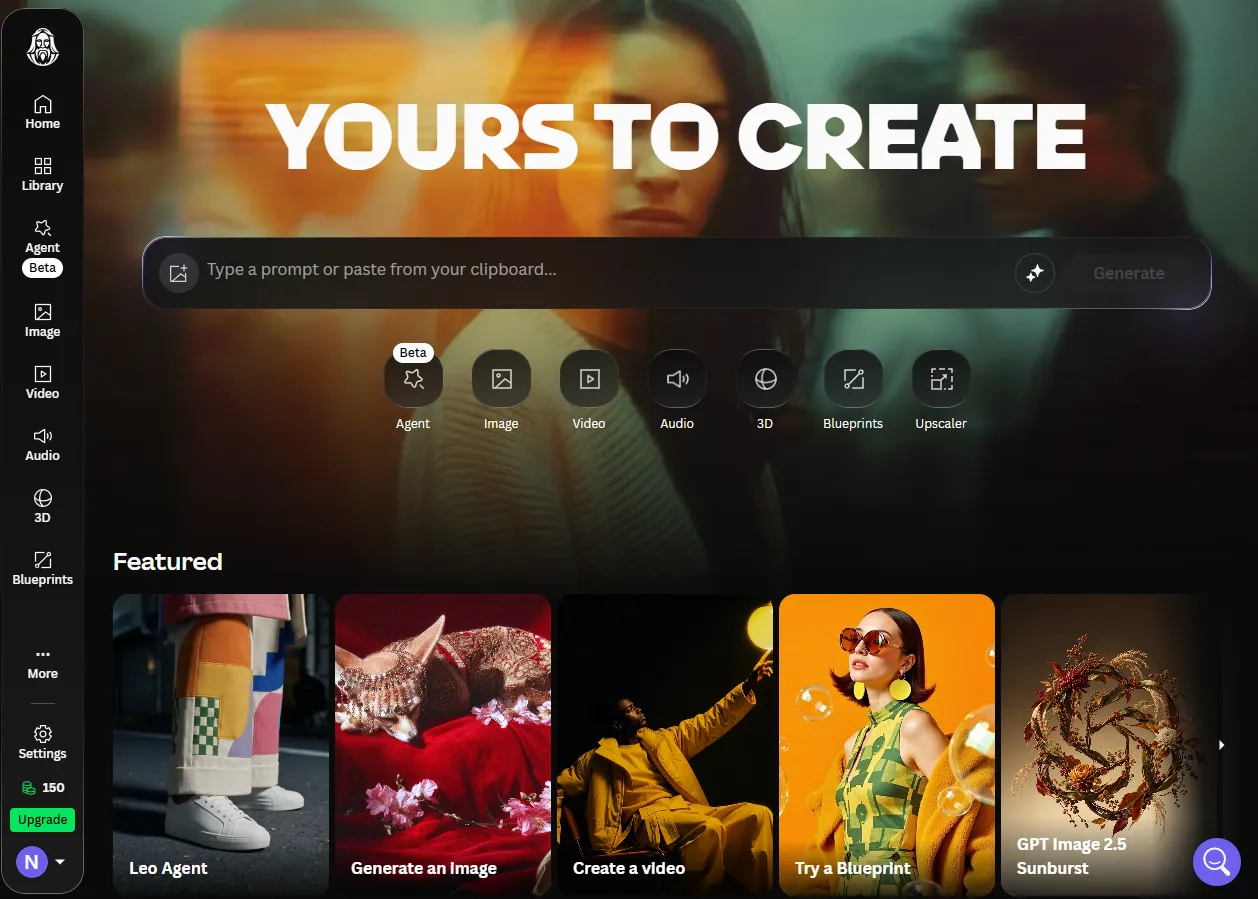
Home screen, September 22, 2026. Selecting a module precedes selecting an engine: the model selector opens only after entering Image. The counter in the lower left corner shows 150 tokens, which is the daily free plan allowance.
The proprietary core today is the Lucid family: Lucid Origin as a general-purpose model and Lucid Realism focused on photorealism and analog texture. Phoenix 1.0, Leonardo's first in-house foundational model from 2024, is still on the list, but in the role of an engine for strict instruction following rather than a flagship (Leonardo, AI Image Models Guide).
Beside them in the same selector are third-party models. Below is a screenshot of the list from the panel, because that - not the documentation - shows what is available today.
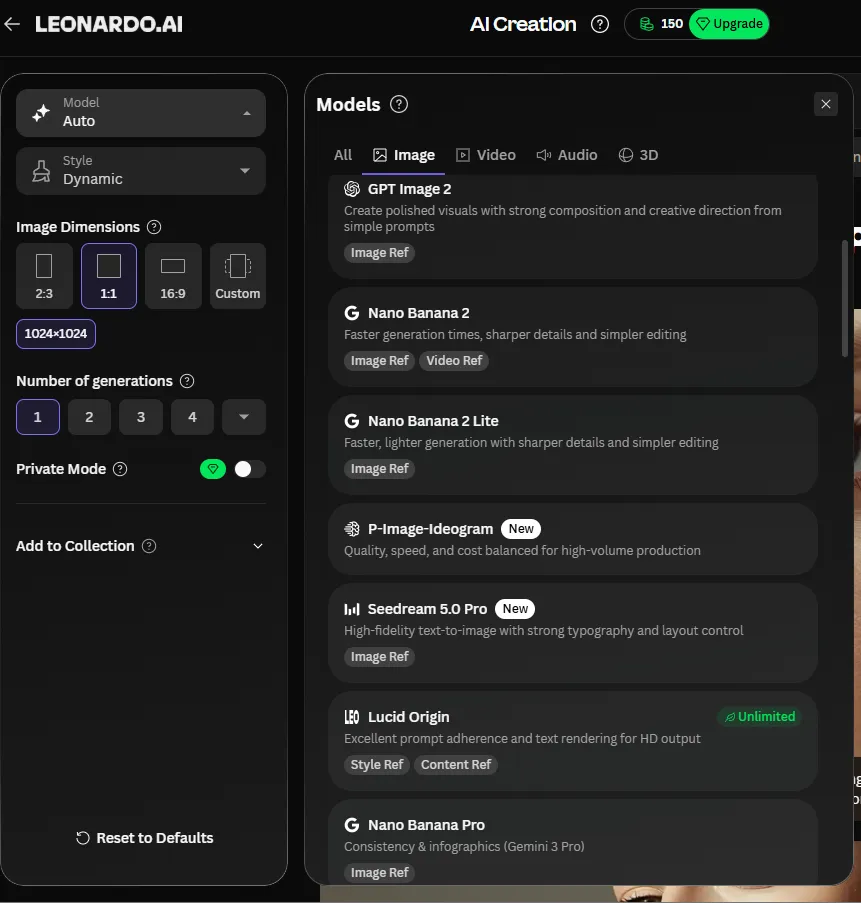
Model selector, September 22, 2026. The list is longer than the visible excerpt and is divided into tabs for image, video, audio, and 3D. On the left are generation settings: model, style, aspect ratio, number of variants, and the private mode toggle.
From Google, there are Nano Banana 2, Nano Banana 2 Lite, and Nano Banana Pro, described in the panel as an engine for consistency and infographics built on Gemini 3 Pro. From OpenAI comes GPT Image 2, recommended for polished compositions from short prompts. Added to that are Seedream 5.0 Pro with an emphasis on typography and layout, P-Image-Ideogram for high-volume production, and Lucid Origin labeled as Unlimited, meaning it is covered by the unlimited mode.
This excerpt shows how quickly such overviews become outdated. The model guide on Leonardo's website, updated on March 9, 2026, still lists GPT Image 1.5, Seedream 4.0, and Ideogram 3.0. In the panel in September, GPT Image 2, Seedream 5.0 Pro, and P-Image-Ideogram are already present. When the vendor's documentation diverges from the interface, trust the interface, and check the date on every tutorial.
It is worth knowing what is no longer on this list. Kino XL and Stable Diffusion models, described in tutorials from two years ago as Leonardo's foundation, have vanished from the list of generation engines. SDXL remains solely as a base for training custom Elements, as discussed below. If you come across a step-by-step guide featuring Kino XL, it is outdated.
The platform operates as a web service without installation and via mobile apps. The iOS and Android versions are released by Leonardo Interactive Pty Ltd and sync with the same account, so a project started on a computer can be continued on a phone (App Store, Google Play).
How Does the Leonardo AI Image Generator Work in Practice? A Step-by-Step Guide
Working with the generator involves four stages: choosing the module and engine, configuring technical parameters, entering the prompt along with a negative prompt, and iteratively refining the result. The Image Generation module turns a text description into an image, while style presets handle depth of field, lighting, and color schemes for you.
Configuring Generation Parameters and Engine Selection
Before generating an image, you set up a collection of parameters in the sidebar that determine the character and reproducibility of the output:
- Generative engine - the choice of model shapes the style more than anything else. Leonardo itself suggests selections tailored to the task: Lucid Realism for product mockups and portraits, Nano Banana Pro for infographics with text, Flux Dev for training custom styles, and Flux Schnell for quick sketches before fine-tuning.
- Guidance Scale - defines how literally the model follows the prompt's content. Lower values give the model more interpretative freedom, while higher values enforce strict adherence to the description.
- Seed - the starting number for generation. The same seed with the same prompt and identical settings allows you to reproduce an identical or very close result, which is crucial when working on a consistent series.
- Number of variants and resolution - determine how many proposals are created in a single request and at what quality. These have the greatest impact on token consumption.
To demonstrate how much the choice of engine truly changes, we ran the exact same prompt through four models on September 22, 2026. The prompt was verbatim: product photo of a matte black ceramic coffee mug on a concrete surface, side light from the left, shallow depth of field, small printed label reading „NEADOO" on the mug, studio photography, 4k. There were no changes between runs other than the model.
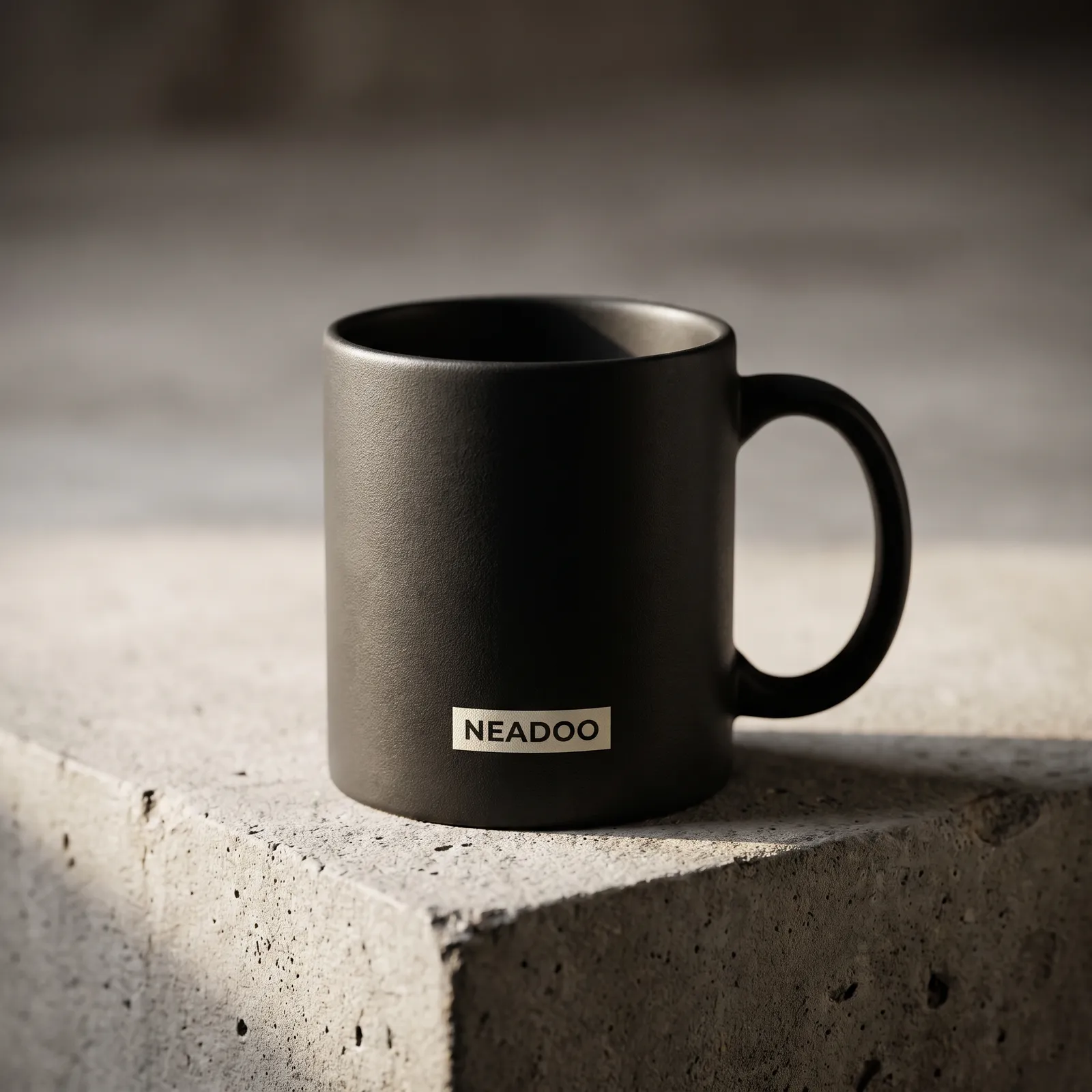
Nano Banana Pro. Closest to the prompt: hard side light, concrete with visible aggregate and a chipped edge, the label rendered as a print on a rectangular patch. Result in 2048 by 2048 pixels.
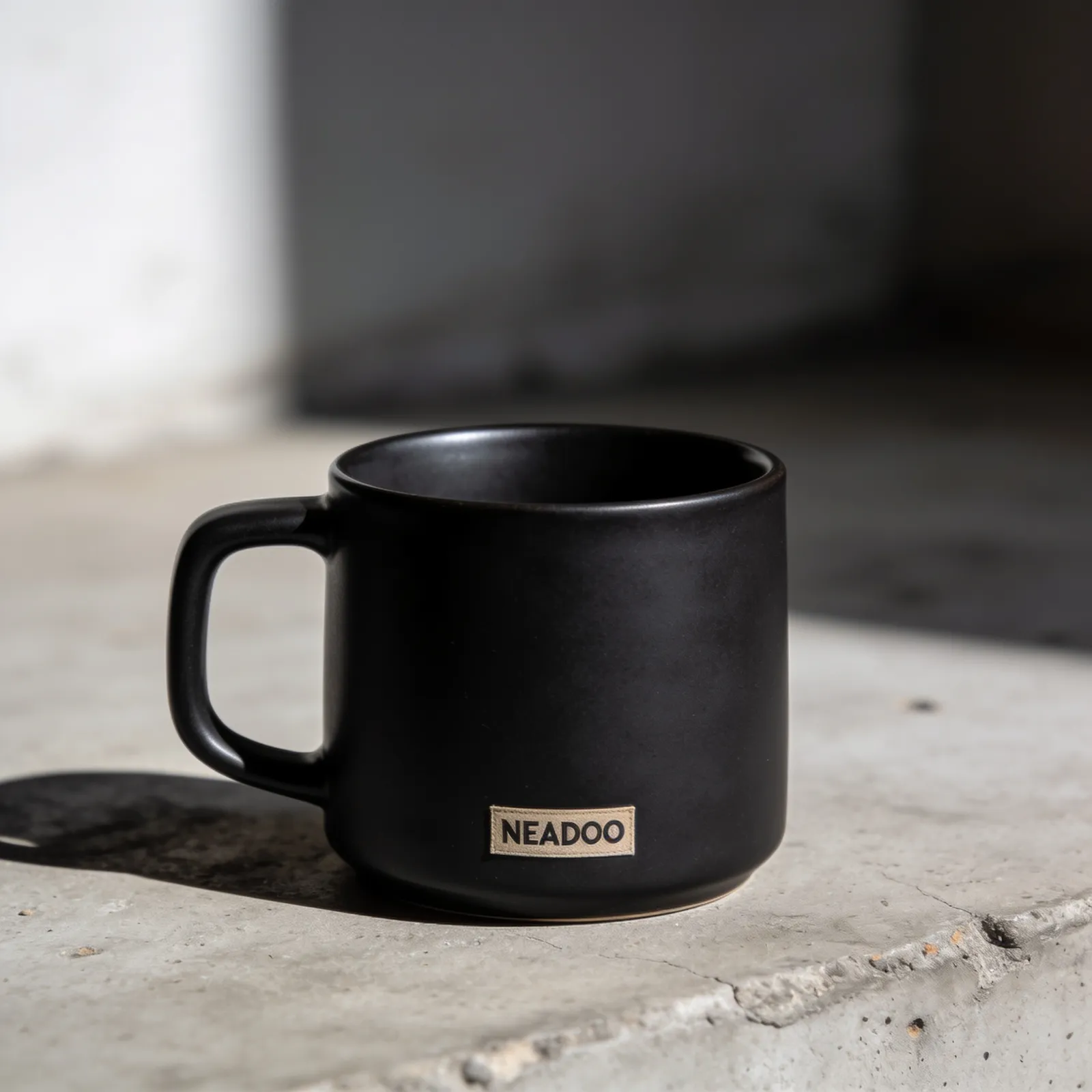
Seedream 4.5. The same 2048 by 2048 resolution, but "printed label" was interpreted as a fabric patch, complete with stitching and textile texture. Sharper contrast and a clear light direction.
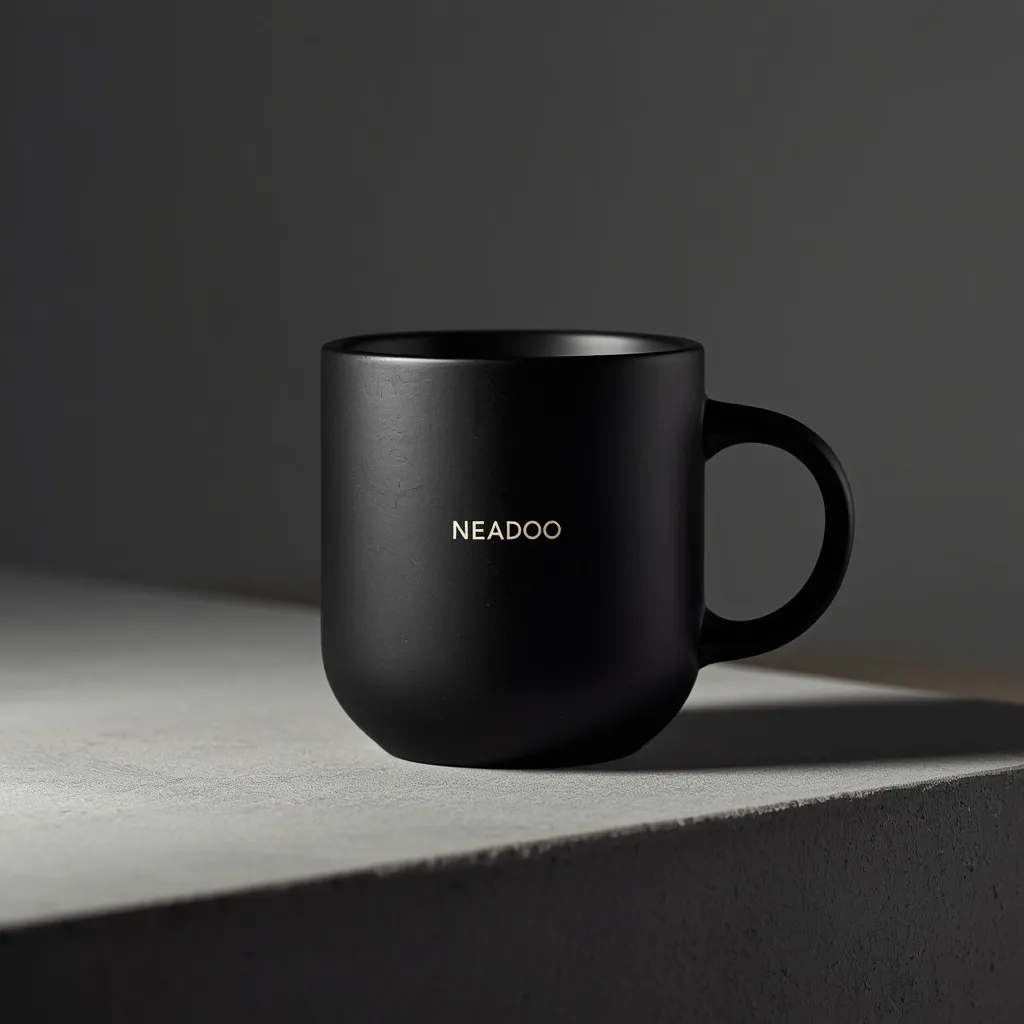
Lucid Origin. No label at all, just a gilded inscription directly on the ceramic. The most studio-like shot of the four, but also the furthest from the brief, since the prompt requested a label. Resolution: 1024 by 1024.
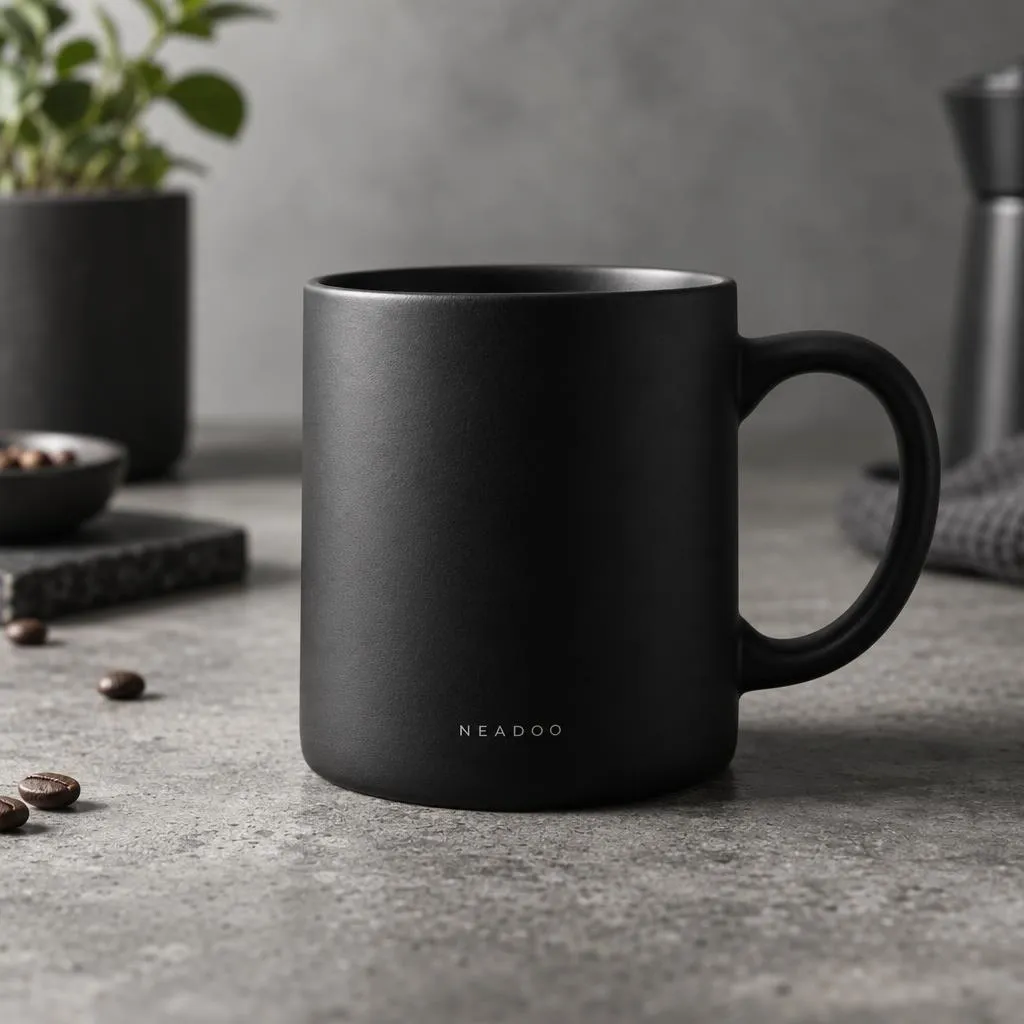
GPT Image 2.5. The only result that added props beyond the prompt: a plant, coffee beans, a moka pot, and a cloth. A nice lifestyle shot, except no one asked for it, and the concrete turned into a kitchen countertop.
There are two takeaways from these four outputs, and both run counter to what we expected. First, all four spelled NEADOO correctly. Rendering short text on a product is no longer a differentiator among models and is no longer a valid argument when choosing an engine, even though most tutorials still sell them that way.
Second, the differences lie in prompt interpretation, not image quality. All four images are technically sound. They diverge on what the model considered a "small printed label": once as a print, once as a fabric patch, and twice as text alone without any label. In commercial product photography, this exact difference determines how many revision cycles you burn through before getting an approved shot. Our takeaway for commercial work: the more closely the output must match a specific brief, the less sense it makes to pick a model that adds its own flair.
A separate mode is Flow State, designed for quickly exploring directions rather than fine-tuning a single shot. You enter a prompt, scroll through a stream of images, and click "More Like This" on the one you like to generate variants. It costs 1 token per generated image, works on free accounts as well, and the "Scroll to Generate" toggle limits the batch to eight images at a time so you do not burn through your pool in minutes (Leonardo Help Center).
Prompting in Practice: English Language and Negative Prompts
A predictable result depends on a precise description of the subject, style, lighting, and shot composition. Models interpret English phrases best because they were trained on English-language data. Prompting in Polish works, but tends to be less accurate with complex technical descriptions and the names of artistic styles. In our practice, it is simply easier to write prompts in English than to figure out later why the model produced something else.
Negative prompts eliminate unwanted elements:
- anatomical distortions, such as incorrect numbers of fingers or limbs,
- unwanted graphic artifacts and noise,
- colors or textures that conflict with the intended style.
Practical tip: negative prompts do not work the same way across all engines. Instruction-based models like Nano Banana or GPT Image respond better to instructions written into the main prompt rather than a separate list of exclusions.
Post-Production in Leonardo AI: Canvas Editor and Universal Upscaler
The Canvas Editor and Universal Upscaler remove your need to open external graphic software for standard adjustments. Inpainting, outpainting, and resolution upscaling all take place directly in the dashboard.
The Canvas Editor supports inpainting - brushing over an area to replace it with new content without altering the rest of the image - as well as outpainting, which generates additional scene details beyond the original frame, a handy feature when converting a square format into a banner. On top of that, there is an Img2Img mode, where an uploaded image serves as the baseline for stylistic changes, and Sketch to Image, where the starting point is a hand-drawn sketch. The editor distinguishes between masking and erasing: masking preserves part of what lies underneath, while erasing clears the area completely. The documentation itself warns that upscaled images are harder to edit, so make your adjustments before enlarging, not after (Leonardo Help Center).
Background removal in Leonardo is a standalone tool, not a Canvas feature. This is worth knowing because the remove.bg API, also owned by Canva, is migrating to Leonardo on December 1, 2026, and existing remove.bg credits will expire then (Leonardo, remove.bg API is Moving to Leonardo.Ai, 28.08.2026). If you have an active remove.bg integration, this is a deadline to note regardless of whether you use Leonardo for graphics.
Realtime Canvas is a separate editing mode. It is an Image to Image tool where you sketch inside a window while the model recalculates each brushstroke in real time using a Latent Consistency Model. The Creativity Strength slider determines how closely to stick to the sketch, style presets replace lengthy prompts, and Instant Refine boosts the output up to 1024 by 1024 pixels. You can also upload a sketch from your drive instead of drawing it inside the dashboard (Leonardo Help Center). In agency practice, this is the quickest route from a paper sketch to a rough visualization - for example, when locking down banner composition prior to the final generation.
The Universal Upscaler boosts resolution and generates micro-details, sharpness, and textures when scaling graphics for print formats. It works both on images from the dashboard and on files uploaded from your drive (Leonardo Documentation). One note from experience: the upscaler reconstructs detail, meaning it adds information that was not in the original. With product photos, where fidelity to the actual merchandise matters, you need to verify this frame by frame.
High-resolution graphics are also useful in content prepared for AI SEO, because visual assets enter the index alongside text. This is an argument for file quality, not for flooding an article with images.
Let's check your website's potential
Share your website and email - we'll get back to you with a real analysis, no strings attached.
Building Brand Consistency: How to Train Your Own Model and Maintain Character Consistency
Leonardo allows you to fine-tune a model on your own dataset of graphics, ensuring a campaign preserves a single aesthetic and a series character looks identical across every asset. Today, this feature is called Elements (LoRA) and Datasets, and the number of custom models is capped by your plan: 10 in Essential, 20 in Premium, and 50 in Ultimate (Leonardo Pricing).
The documentation outlines specific guidelines for the training dataset, differing from the "10 to 20 images" commonly cited in basic tutorials:
- Number of shots - minimum of 10 images. The maximum depends on the base model: 50 for Flux Dev, 40 for SDXL.
- Training base - Flux Dev for photorealism, cinematic shots, and character likeness; SDXL for stylized characters. The documentation explicitly advises against Lightning XL.
- Diverse lighting and framing - when training for character likeness, Leonardo recommends 8 to 12 close-up face shots with varying lighting, angles, and facial expressions. This is crucial because intuition suggests the opposite: a dataset with uniform, identical lighting teaches the model the lighting rather than the character.
- Consistent format - unified style, format, and file dimensions, ideally 1024 by 1024 pixels.
Training takes anywhere from roughly 30 minutes to several hours, depending on the image count and settings (Leonardo Help Center).
The practical benefit mainly applies to a recurring brand character: a mascot, virtual ambassador, or the face of a creative campaign series. Without a fine-tuned model, each new generation of the same character introduces subtle variations in facial features, proportions, and eye color. Across a handful of assets, that is negligible; across dozens of banners and posts, it turns into visual inconsistency that stands out in a feed.
The same logic applies to sets of product graphics. A fine-tuned model maintains uniform lighting and styling across an entire campaign, ensuring ad banners and social media posts look like a cohesive collection rather than a random assortment of generations. This proves particularly valuable in e-commerce, where the same product must be presented across a dozen different angles and formats.
Animation and marketing video: Motion 2.0, Veo 3.1, and the rest of the field
The video module turns a static graphic or an uploaded photo into a short clip. The input material can be an image generated inside the panel or your own photograph, and the engine adds motion to it while preserving the original composition.
Leonardo's proprietary model is called Motion 2.0 and is designed for speed and control: it provides specific camera controls, namely pan, zoom, and tilt, making it suitable for short, catchy loops and shot testing. The default video model on the platform today is Hailuo 2.3, praised by Leonardo for handling movement physics (Leonardo, video models guide).
Google's models are in Leonardo, but in a newer version than most guides repeat: they are Veo 3.1 and Veo 3.1 Fast, recommended for commercial work where the product must look consistent throughout the entire shot. Alongside them stand Kling 3.0 and 3.0 Turbo with multi-plane shots, Seedance 2.5 with motion transfer and 4K support, FLUX 3 Video generating up to 20 seconds of multi-scene footage with audio, and LTX-2 for calm, cinematic shots. Sora 2 and Sora 2 Pro were removed from Leonardo in July 2026 following a change on OpenAI's end, and Leonardo specifically points to Veo 3.1 as the replacement.
Vertical clips lasting a few seconds fit right into TikTok, Instagram Reels, and YouTube Shorts formats. Honestly: this is material for a teaser, a cutaway, or a test variant, not for a brand campaign where the client will easily tell that nobody actually filmed anything.
Texturing 3D models from OBJ files
Leonardo accepts 3D meshes in OBJ format and wraps them in a generated texture. The documentation sets two hard requirements: only files with the .obj extension are accepted, and the model must have unwrapped UV mapping - without it, the texture will not generate (Leonardo documentation). You can generate multiple textures for a single model and compare variants.
Texturing works on the same principle as generating 2D graphics: you describe the material, for example, "matte leather with visible scuffs" or "polished metal with traces of corrosion," and the algorithm generates a map that matches the model's UV layout.
There are two use cases, and both are niche. In game dev, a procedural texture speeds up prototyping before anyone even opens Substance Painter. In e-commerce, it lets you display material variations of the same product - such as a single shoe silhouette in leather, suede, and technical fabric - without photographing every version. The caveat is the same as with the upscaler: this is a conceptual visualization, not a precise reproduction of a specific production batch, so it only belongs on a store product page after proper verification.
Leonardo AI or Midjourney? A comparison of capabilities, convenience, and control
The difference between these platforms is smaller today than guides written in 2023 suggest, and it lies somewhere else. Leonardo wins on the sheer number of engines available under a single subscription and the ability to train models on your own files. Midjourney wins on default aesthetics: from a short prompt, without fiddling with settings, you get an image that looks better.
Two arguments circulating around the web are outdated and shouldn't be used to make your decision. First, Midjourney no longer requires Discord: the web application has been running since August 2024 and features its own editor with inpainting, outpainting, and re-framing. Second, Midjourney does have video: the Video V1 model has been animating images via an Animate button since June 2025. The current image model line is V8, developed throughout 2026, with a separate image-editing model added in August 2026 (Midjourney changelog).
The real differences look like this:
| Criterion | Leonardo AI | Midjourney |
|---|---|---|
| Engine selection | Over a dozen image and video models, proprietary and third-party, within a single selector | Exclusively its proprietary model, the V8 line |
| Interface | Web app, iOS and Android apps | Web app and Discord |
| Image editing | Canvas Editor: inpainting, outpainting, Img2Img, Sketch to Image | Web editor: inpainting, outpainting, re-framing |
| Custom models | Elements (LoRA) and Datasets trained on your files, 10 to 50 models depending on the plan | Profile Personalization and moodboards, no LoRA training on your own dataset |
| Video | Motion 2.0, Veo 3.1, Kling 3.0, Seedance 2.5, Hailuo 2.3, and others | Video V1, image-to-video animation |
| 3D textures | Yes, from OBJ files with UV mapping | No |
The market doesn't end with these two platforms, but the comparisons need to be reframed as well. OpenAI's models, once referenced as an alternative under the name DALL-E 3, are now called GPT Image and are available both in ChatGPT and inside Leonardo. Adobe Firefly remains a genuine alternative, embedded within Creative Cloud and marketed on the basis of licensed training data - which can be a key argument when speaking with a client's legal department.
Leonardo AI pricing, free tokens, and commercial rights
The free account renews 150 tokens per day, and the token bank caps at 150, so the unused pool does not accumulate over the week. Generations on the free plan are public. Privacy, higher limits, and training your own models start at 12 USD per month (Leonardo pricing).
A token is a billing unit consumed during generation, upscaling, and model training. On the free plan, the pool renews daily; on paid plans, it is monthly and supplemented by a token bank.
Overview of individual plans
The prices below come from the Leonardo pricing page and are quoted without tax, billed monthly. Annual billing lowers them by up to 20 percent.
| Plan | Monthly price | Tokens per month (bank) | Generations | Custom models |
|---|---|---|---|---|
| Free | 0 USD | 150 per day (bank 150) | public | none |
| Essential | 12 USD | 8,500 (bank 25,500) | private | 10 |
| Premium | 30 USD | 25,000 (bank 75,000) | private | 20 |
| Ultimate | 60 USD | 60,000 (bank 180,000) | private | 50 |
Tiers also differ in the number of concurrent generations: 2 on Essential, 3 on Premium, 6 on Ultimate, as well as the queue, which Essential lacks entirely. Relaxed mode, which means unlimited generation at a slower pace on selected models, only starts from Premium and covers images exclusively there. Unlimited video in this mode is only available on Ultimate. This is important, as this clause is the most frequently confused in comparisons: the 12 USD plan does not have unlimited generations in any form.
For teams, Leonardo offers separate plans: Starter at 72 USD per month at 24 USD per seat, and Growth at 144 USD per month at 48 USD per seat, both with a token pool shared across the team. Training models using team tokens is only available in Growth. For integrations, an API is also available on a pay-as-you-go model.
The old plan names - Apprentice, Artisan, and Maestro - still appear in guides and comparison tables. They correspond to the Essential, Premium, and Ultimate plans, respectively. If you see Apprentice or Maestro in a text, you are looking at material from before the naming change, and the rest of the numbers in it may also be outdated.
Copyright, image privacy, and commercial use
This is where the most critical line is drawn between the free and paid plans, and it is not the right to sell itself.
On a free account, you can create and download images for commercial purposes. The catch lies elsewhere: generations go into the public gallery and this cannot be turned off, while Leonardo reserves a perpetual, worldwide right to use, copy, process, and create derivative works from public content. Other users can see your designs and remix them (Leonardo Help Center, Commercial Usage).
Paid plans offer private mode, and with private generations, the user retains full ownership and full commercial rights to the results. This is the real reason why client work requires a paid plan: not so much the license itself, but the privacy of the projects. A design prepared for a campaign cannot sit in a public gallery before the client sees it, and in the free version, this cannot be turned off.
The third thing to remember, regardless of the plan: the responsibility for the prompt and for ensuring that the result does not infringe on third-party rights rests with you. Entering the name of a living illustrator or someone else's brand name into a prompt does not become safe just because the tool executed it.
Frequently asked questions about Leonardo AI
1. Is Leonardo AI completely free?
No. It operates on a freemium model: the free account gets 150 tokens per day, but generations are public, and it lacks custom model training as well as higher quality settings. Full features are unlocked by subscriptions starting at 12 USD per month, and the mobile apps additionally offer in-app purchases.
2. Can I legally sell images generated in Leonardo AI?
Yes, commercial use is also permitted on the free account. The difference lies in ownership and privacy: images from the free plan are public, and Leonardo retains broad rights to use and process them. With private generations on paid plans, full rights remain with the user, which is why we recommend at least the Essential plan for client work.
3. How does Leonardo AI differ from Midjourney?
Leonardo provides access to over a dozen image and video engines under a single subscription, including models from Google and OpenAI, and allows you to train your own model on your files. Midjourney runs on a single proprietary model from the V8 line and wins on default aesthetics with a short prompt. However, the claim that Midjourney requires Discord or lacks video is outdated: the web app has been running since 2024, and the Video V1 model since 2025.
4. Which video models can be used in Leonardo AI?
The default model is Hailuo 2.3, the proprietary engine is Leonardo Motion 2.0 with camera control, and available third-party models include Veo 3.1 and Veo 3.1 Fast from Google, Kling 3.0 and 3.0 Turbo, Seedance 2.5, FLUX 3 Video, and LTX-2. Sora 2 was removed from the platform in July 2026.
5. How many images are needed to train a custom model in Leonardo AI?
The minimum is 10 images; the maximum depends on the training base: 50 for Flux Dev and 40 for SDXL. When training for character likeness, the documentation recommends 8 to 12 photos closely cropped to the face, in varying lighting, from different angles, and with different facial expressions. Training takes from about 30 minutes to several hours.
6. Does Leonardo AI work in Polish?
The interface and prompts accept Polish, but the models were trained primarily on English-language data, so for complex technical descriptions and style names, an English prompt yields more predictable results. This is a difference in precision, not feature availability.
7. Does Leonardo AI belong to Canva?
Yes. Canva announced the acquisition on July 30, 2024, and stated that Leonardo would continue to operate as an independent platform with its own product development. In practice, this remains true today: the subscription, dashboard, and Leonardo models are independent of a Canva account.
8. What should not be uploaded to Leonardo AI?
On a free account, do not upload anything you do not want strangers to see, because generations go into the public gallery with no option to turn it off. Regardless of the plan, the following should never leave your possession: unpublished client materials covered by an NDA, photos of individuals who are unaware that their likeness is being fed into a generator, personal data in prompts, and third-party graphics uploaded as training references. When working for a client, it is worth asking whether their contract allows materials to be processed in external AI tools at all, as some industries explicitly prohibit it.
Sources
- Leonardo.Ai, pricing for individual, team, and API plans
- Leonardo's AI Image Models Explained, updated 03/09/2026
- AI Video Generation Models: What to Use & When, updated 08/10/2026
- Upscale with Universal Upscaler - Leonardo.Ai documentation
- Welcome to Canva, Leonardo! - Canva Newsroom, 07/30/2024
- Leonardo.ai - Wikipedia entry, founding date and list of co-founders
- Leonardo.Ai - Image Generator, App Store
- Leonardo.Ai - Image Generator, Google Play
- remove.bg API is Moving to Leonardo.Ai - Leonardo.Ai, 08/28/2026