
How to Rank Your Website on Google Yourself (Even for Free)
How to rank a website on Google without an agency and without a budget? It is possible, but instead of money, you will pay with your time: a few hours a week for the first few months, mainly spent on content creation. Free website SEO relies on four pillars: free Google measurement tools, keyword research, dedicated subpages with unique content, and building credibility through a Google Business Profile, reviews, and links. Doing SEO on your own requires consistency, but anyone who wants to rank a website themselves can start with free tools.
Google SEO encompasses actions that boost your website's visibility in Google search results and make it easier to find via specific keywords. It is worth pursuing because about 9 out of 10 online searches in Poland occur on Google (StatCounter data), and website SEO is one of the most cost-effective sources of traffic in the long run. This is a step-by-step guide on how to rank a website on Google for free: from analytics and keyword selection, through website and content optimization, to reviews, links, and mistakes to avoid.
Free Tools for Website Analytics and Audits
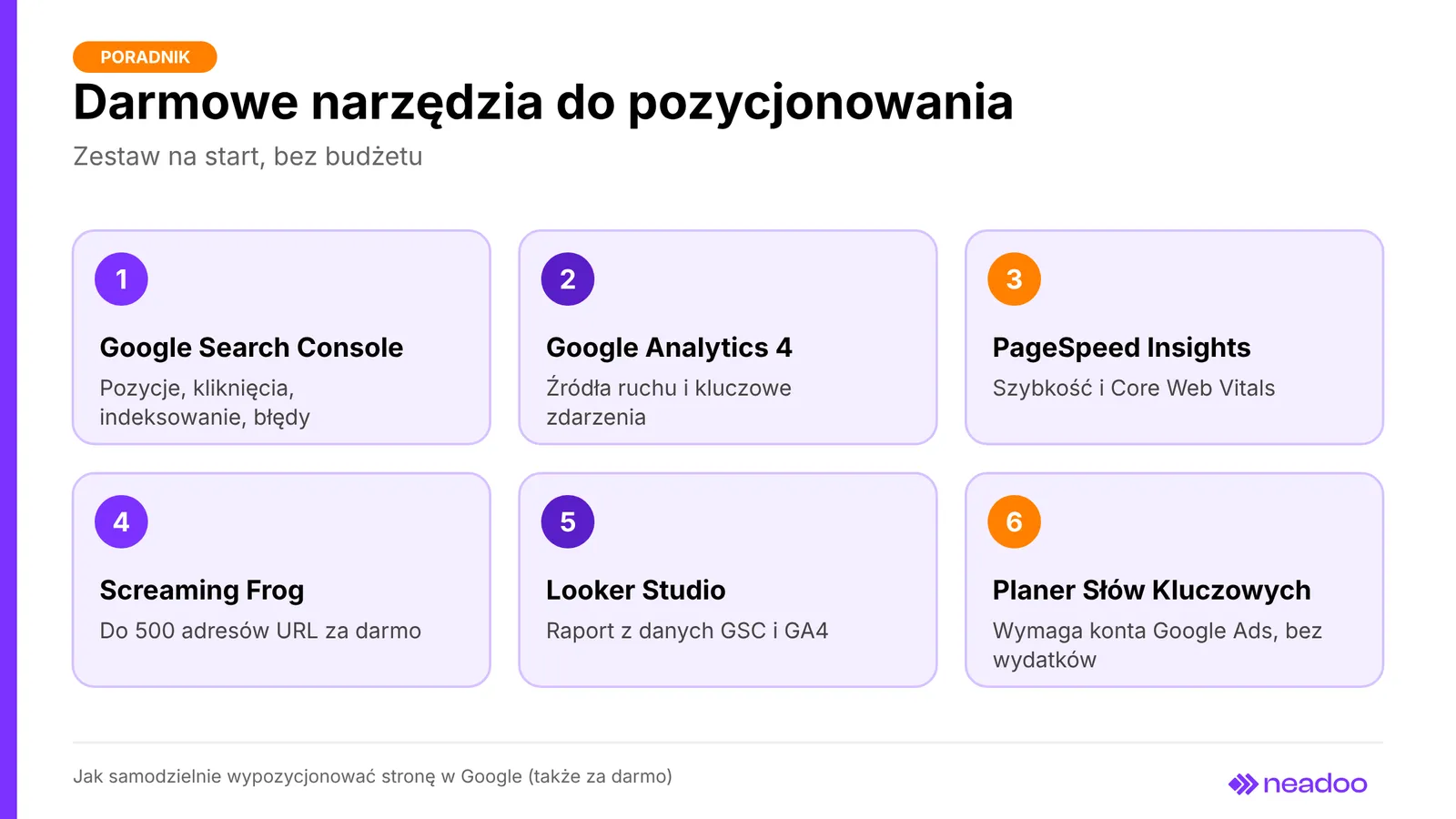
Free website SEO requires a suite of Google SEO tools, complemented by a free technical crawler and Bing Webmaster Tools. Google Search Console displays keyword positions, clicks, impressions, index coverage, and errors, as well as Googlebot activity and whether your page URL has made it into Google's index. Add your domain, verify ownership (via a DNS record or HTML tag), submit your sitemap.xml URL, and check the "Pages" report to review indexing. Google Analytics 4 tracks user behavior and traffic sources, so configure key events like form submissions or phone number clicks, allowing you to analyze user behavior after arriving from Google search results.
PageSpeed Insights measures website loading speed on mobile and desktop devices based on Core Web Vitals metrics and suggests how to improve user experience. The free version of Screaming Frog SEO Spider crawls up to 500 URLs and detects errors, redirect chains, as well as missing or duplicate metadata. Looker Studio combines data from Search Console and Analytics into a single report, while Chrome DevTools helps diagnose code errors. When the 500-URL limit or a lack of time restricts your analysis, you can turn to professional website SEO.
How to Select Long-Tail Keywords
Effective keyword selection - the foundation of keyword research - involves searching for queries with purchasing intent using search engine suggestions and free planners, rather than guessing what customers call a service. If you are wondering how to do SEO for your website for free, start by listing your services in plain language, just as a client would describe them over the phone. Keywords should answer user questions and address the needs of potential customers.
Finding Keywords in Keyword Planner and Google Trends
Add Google autocomplete suggestions (the list under the search bar), the "People also ask" section, and your site's internal search engine, which reveals what visitors are looking for, to your initial list. You can expand your ideas with AnswerThePublic (with a limited number of free searches). Verify search demand in Google Keyword Planner (requires a Google Ads account, but no ad spend), which shows approximate search volumes and related queries. Google Trends allows you to compare two variations of a service name and check seasonality.
Long-Tail Keywords and Customer Purchase Intent
The strategy for smaller websites relies on long-tail keywords that combine a service with a location, such as "washing machine repair Gdynia." They have lower search volume than broad terms, but face less competition and feature clearer intent: the person typing them usually wants to book a service rather than just learn about it.
Assign each keyword to one of your website's subpages. A single subpage should target one topic or a coherent cluster of keywords, which prevents keyword cannibalization - a situation where multiple URLs compete for the exact same query. A simple spreadsheet with columns for "keyword, intent, subpage URL" is all you need.
SEO Plan for the First Three Months
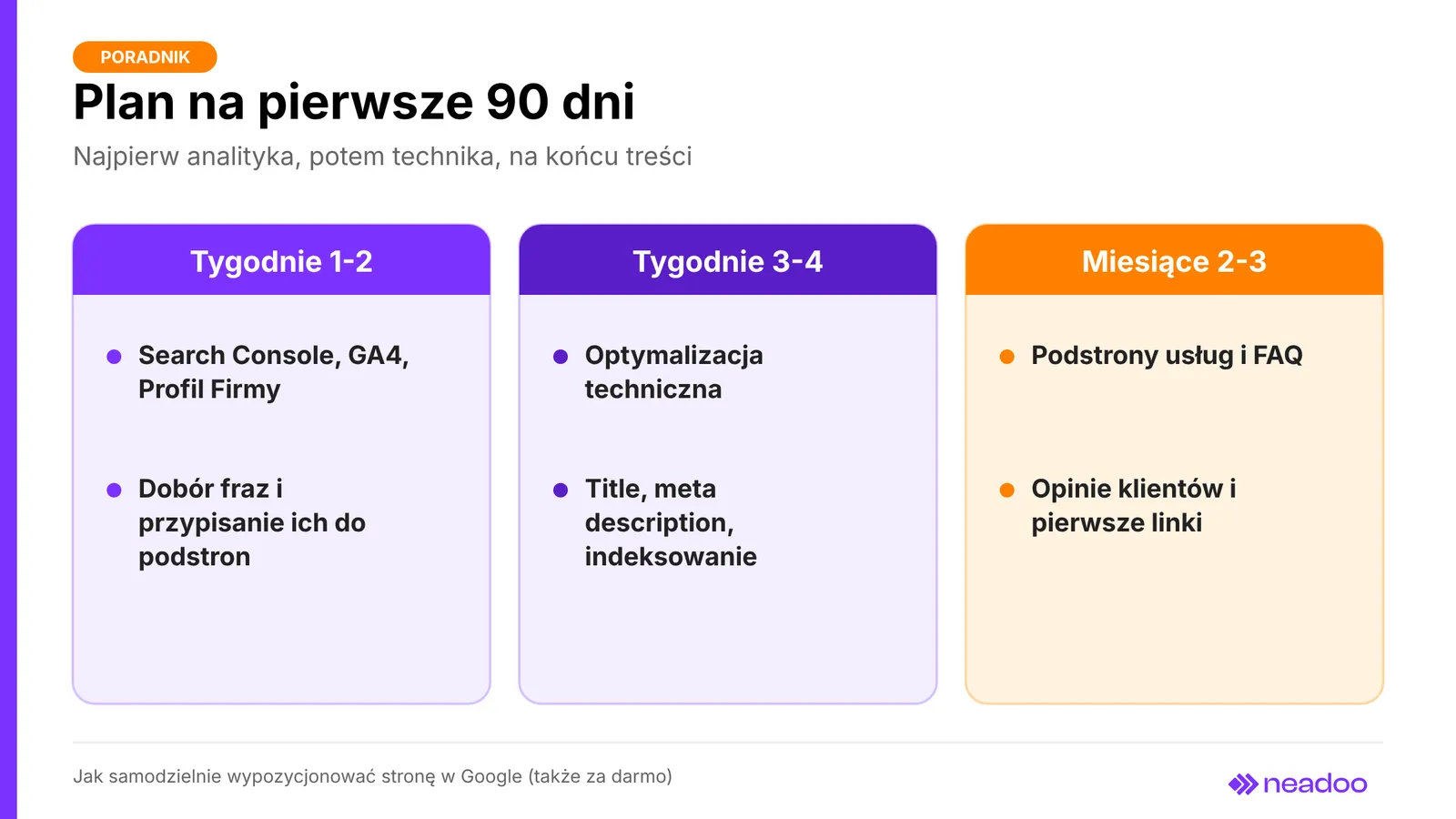
Doing DIY website SEO requires a 90-day roadmap: analytics first, then technical optimization, and finally content expansion. This is website SEO in a nutshell: a few hours per week, with most of that time spent drafting content for service pages.
| Period | Tasks | What to check |
|---|---|---|
| Weeks 1-2 | Search Console, GA4, and Business Profile setup; keyword selection and mapping to subpages | Whether event tracking works and each keyword has a single URL |
| Weeks 3-4 | Technical optimization, title tags, and meta descriptions | Indexing in Search Console, 3XX and 4XX errors |
| Months 2-3 | Service pages, FAQ sections, customer reviews, initial links | Impressions and rankings for the selected keyword |
In months two and three, publish one substantive article per month that solves a genuine customer problem, complete with internal linking and a call to action leading to your offering. Publishing multiple articles centered around a single service builds topical authority - credibility in that specific subject area.
This roadmap demonstrates how to rank a website on Google without rushing: for low-competition keywords, the first ranking shifts are typically visible after 1-3 months, while more noticeable traffic follows later. This plan does not guarantee a top-10 ranking for competitive, broad keywords.
Let's check your website's potential
Share your website and email - we'll get back to you with a real analysis, no strings attached.
How to Create an Effective Service Page
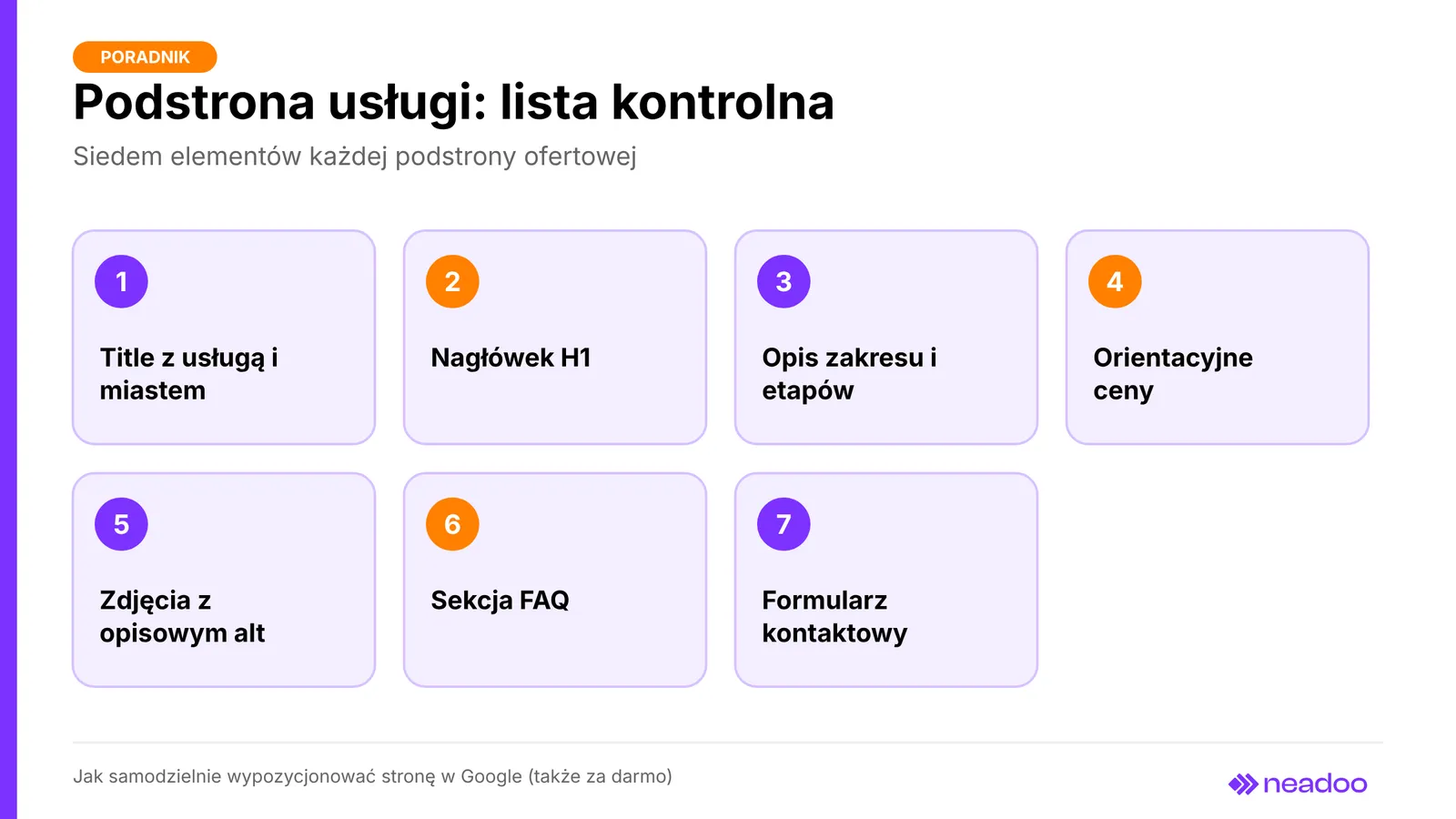
A good service page combines a single intent with a clear structure, pricing, and trust-building elements. This is where on-page optimization and content optimization for a specific keyword take place, and tailoring the page to customer questions increases its usability. It should include: a title tag with the service name and city at the beginning (around 50-60 characters, with the brand at the end), an H1 heading that names the service, a description of the scope and stages of work, estimated prices (a price range or a "starting from" amount), portfolio photos with descriptive alt text, an FAQ section addressing customer questions, and a contact form with a call to action.
Title Links and Headings
The 50-60 character limit is a practical rule of thumb, not a strict Google requirement: the displayed title length depends on screen width, and Google can generate the title link using the title element, headings, and other signals, which is why the title and H1 should cover the same topic. Google focuses on the consistency between the title and the content, and from an SEO perspective, your copy should deliver on the promise made in the title. Structure H2 headings logically, ideally phrased as customer questions. The meta description can appear in search results as a snippet, but Google sometimes generates it from the page content instead, while alt attributes serve primarily for accessibility, so do not stuff them with keywords.
Helpful Content vs. AI-Generated Text
Google recommends helpful, reliable content written using the words that users search for. Creating valuable content relies on your own data and examples, so do not copy content from other websites. ChatGPT works well for drafting, but without firsthand experience, pricing, and real examples, the text will not reinforce E-E-A-T signals (Experience, Expertise, Authoritativeness, Trustworthiness), which are a framework from the Quality Rater Guidelines rather than a direct ranking factor. Mass-producing similar pages that offer no value to the reader can be considered scaled content abuse, so it is better to have one well-crafted page for each service.
DIY Technical Audit and Speed Optimization
Most technical issues that hold a site back in Google search results can be detected without programming skills, and evaluating the technical health of a website takes just a few hours: check the robots.txt file, the sitemap.xml, the SSL certificate, 404 errors, and redirect loops. The table shows where to look and what to fix.
| Element | Where to check | What to fix |
|---|---|---|
| Indexing | "Pages" report in Search Console | URLs excluded by noindex or a server error |
| robots.txt file | domain.com/robots.txt | Disallow: / directive blocking the entire site |
| HTTPS | Browser lock icon | Expired certificate, resources loaded over HTTP |
| 404 errors and loops | Search Console, Screaming Frog | Point deleted URLs to their equivalent using a 301 redirect |
| Canonical tag | Source code (rel="canonical") | Single URL version (with or without www, without parameters) |
Ensure fast page loading and proper mobile performance, and evaluate speed based on Core Web Vitals: LCP under 2.5 s, INP under 200 ms, and CLS under 0.1, rather than relying solely on the Lighthouse score. The most common fixes include compressing images to WebP, lazy loading, caching, removing unused plugins, and specifying image dimensions in the code to minimize layout shifts. On WordPress, the Yoast SEO plugin generates a sitemap, canonical tags, and breadcrumbs, but it is no substitute for creating content or building domain authority.
Free Link Building and Local SEO
The simplest free way to get customers from search engines is to set up a Google Business Profile and build external links. That is where the answer begins when asking how to do SEO for your website for free with zero ad budget.
Google Business Profile and Collecting Reviews
A Google Business Profile is free and drives direct phone calls and inquiries from Google Maps for local service providers. Fill out the listing completely: primary category, address or service area, business hours, phone number, website URL, and photos of your work; ensure your name, address, and phone number (NAP) are identical on your site and in directories. After completing each job, ask the customer for a review using a direct link to the review form, reply to all reviews, including negative ones, and never buy reviews, as this violates Google policies.
Acquiring Valuable External Links Without a Budget
External links are only valuable when they come from reputable websites, so you can earn free links from partner and supplier profiles, local trade organizations, and reliable business directories, as well as from content that others cite on their own, such as a guide, a local data roundup, or an infographic (infographics featuring local data are often widely cited). This type of link building is slower than buying backlinks, but it is safe. Social media and links from social profiles typically have a nofollow attribute, meaning they pass less ranking signal, but they provide visibility and traffic; always mark paid mentions as sponsored. Internal linking between your own pages costs only your time: higher-level pages link to subpages with topical anchor text instead of "click here."
SEO Mistakes That Ruin Your Website's Visibility
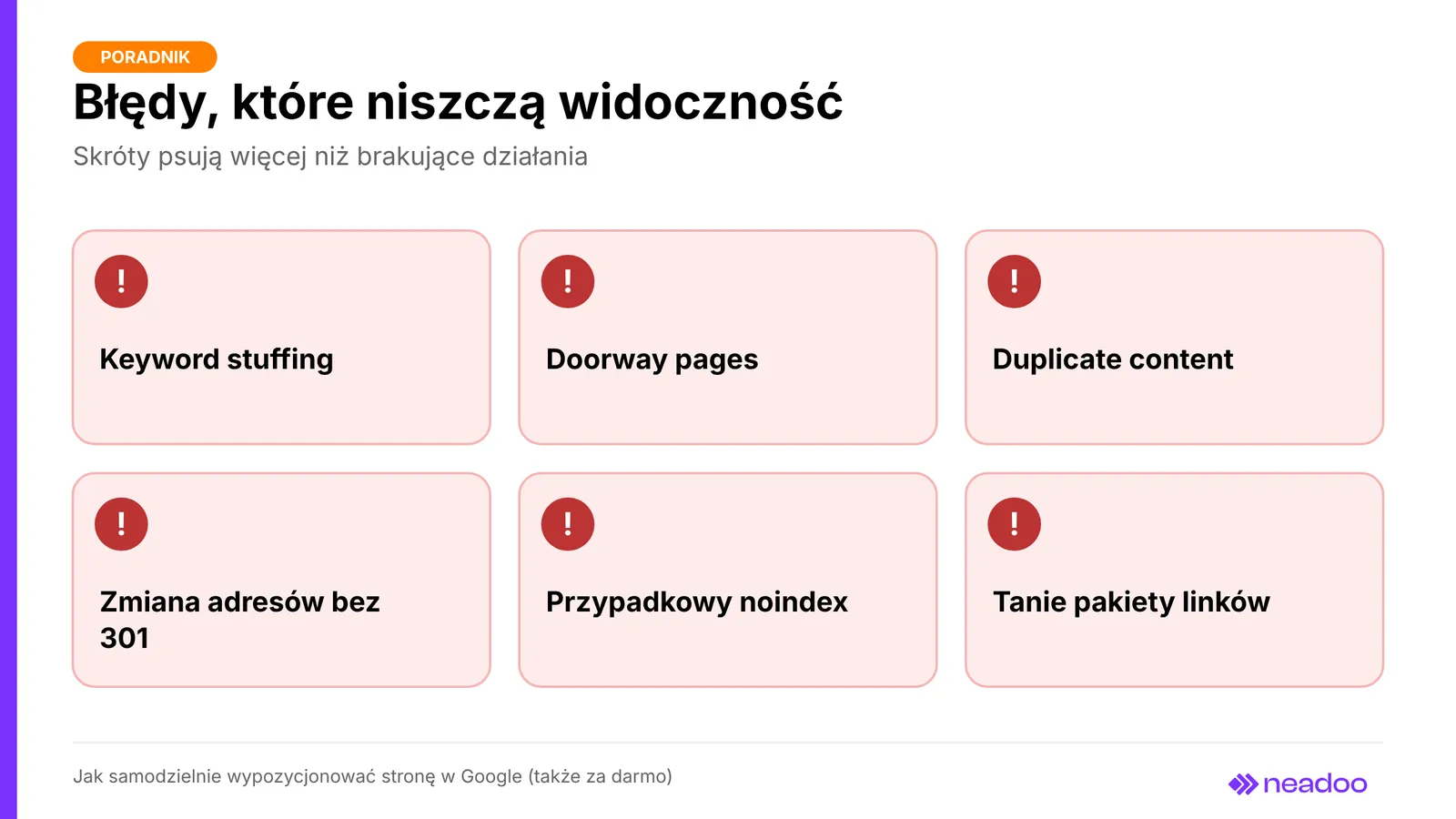
DIY SEO is most often ruined by shortcuts rather than omitted actions, and keywords alone cannot replace an SEO strategy. Keyword stuffing - mechanically repeating search terms in text, headings, and alt tags - violates Google's spam policies and hurts readability. Doorway pages - dozens of copies of an offer with only the city name swapped out - are treated as abuse by Google; a separate URL only makes sense if it includes genuinely local data: project photos, pricing, service area directions, and reviews. Copied or duplicate content dilutes ranking signals because Google selects only one version, which may not be yours.
Changing URLs without a 301 redirect produces 404 errors, causing hard-earned rankings and links to stop working. An accidental noindex left active during development or the "discourage search engines" setting in WordPress can deindex your entire website, so check the "Pages" report after every major update. Cheap link packages from directories and link farms are link spam that can lead to an algorithmic penalty or a manual action, and flawless code can never replace an understanding of your customers and business goals.
DIY SEO vs. Hiring a Marketing Agency
DIY website SEO yields the best results in local and niche markets, as the business owner's industry knowledge far outperforms generic copywriting from a digital marketing agency, and working on content and authority directly improves your website's rankings and remains the most cost-effective source of traffic in the long run.
| Criterion | In-house | Marketing agency |
|---|---|---|
| Time | A few hours a week, results after months | Takes over the execution, but needs time to learn the business |
| Industry knowledge | You know real customer questions and your offerings | Must learn it; copy can be generic |
| Market | Best for service businesses in smaller towns | Useful for large cities and competitive keywords |
| Cost and tools | Free tools, optionally Senuto, SEMSTORM, Ahrefs, Semrush, or Surfer SEO | The retainer usually includes paid tools |
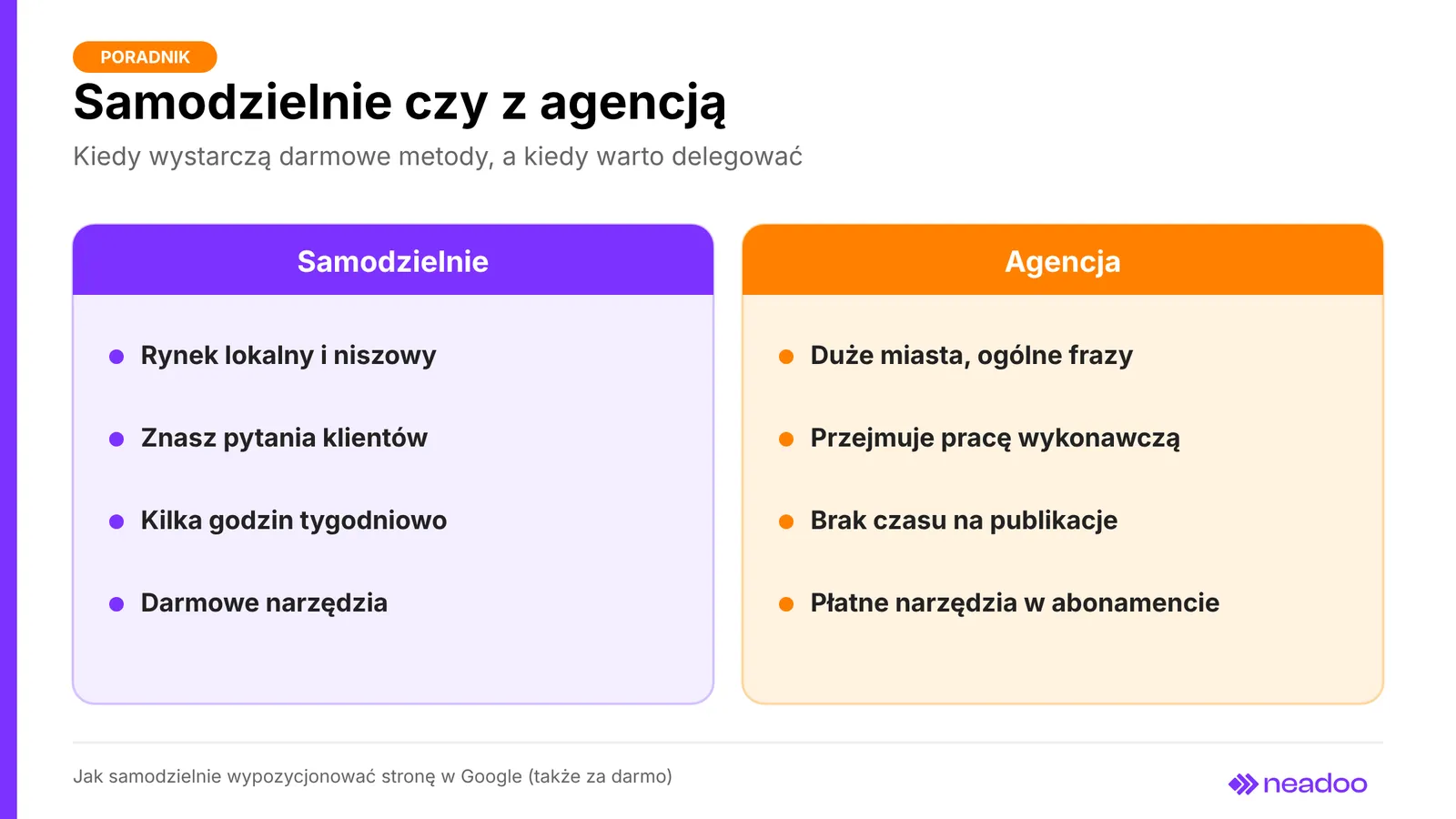
Outsourcing is worth considering when, after several months of consistent work, visibility for key queries does not improve, when industry competition is so fierce that free methods are no longer enough, or when there is simply no time for regular publishing. When comparing agency proposals, check whether they include an SEO audit, content creation, and reporting. Even then, no ranking is ever guaranteed.
FAQ
Is doing your own SEO on Google 100% free?
Not entirely. Google tools (Search Console, GA4, Business Profile) cost nothing, but you pay with your own time, usually a few hours a week for the first few months. Expenses may arise for a domain, hosting, or optional keyword research tools.
How long do you have to wait to see the first results of free SEO?
The first changes that impact website rankings for low-competition keywords usually appear after 1-3 months, with noticeable results arriving in the months that follow. The pace depends on the competition and the regularity of your content publishing.
Can I effectively optimize a website built with a site builder (Wix, Webflow)?
Yes, provided the builder allows you to edit title tags, meta descriptions, headings, URLs, and 301 redirects, and generates a sitemap. Effectiveness depends mainly on content, keyword selection, and credibility, rather than the tool itself.
Is using ChatGPT to write SEO content safe?
Using AI itself is not prohibited, but Google treats mass-produced, low-value content created solely for search engines as spam. Treat the model's output as a draft: enhance it with your own knowledge and examples, and verify the information.
Why does Google display a different page title in search results than the one set in the meta title?
Google may modify the title when it believes another version better answers the query - for example, if the title is too long, repetitive, or keyword-stuffed. In such cases, it usually pulls from the H1 heading or other page elements.