
How to Index a Website on Google? Complete Guide

In today's digital world, search engine optimization (SEO) is essential for the success of any website. Google's algorithms play a key role in how bots analyze and index content, which directly impacts a website's visibility in search results. Understanding these algorithms and technical aspects, such as internal link structure and page load time, is crucial for effective SEO. But how do you get started and index your website in Google? In this article, we explain what the website indexing process looks like in organic search results.
What is website indexing in Google?
Indexing a website in Google is a key process that allows your site to become visible in search results. Googlebots, also known as crawlers, search the web for new and updated pages. They analyze the site's content and structure to assess its value and relevance to users. Thanks to this process, your site can appear in Google search results, increasing its visibility and potential traffic.
How to check if a page is indexed?
To check if your page is indexed in organic search results, you can use several methods:
- The "site:" command in Google search: Type the query “site:yourdomain.com” into the search box. If you see results, it means your site has been indexed. This is a quick and simple way to check if your pages are visible in Google's search engine database.

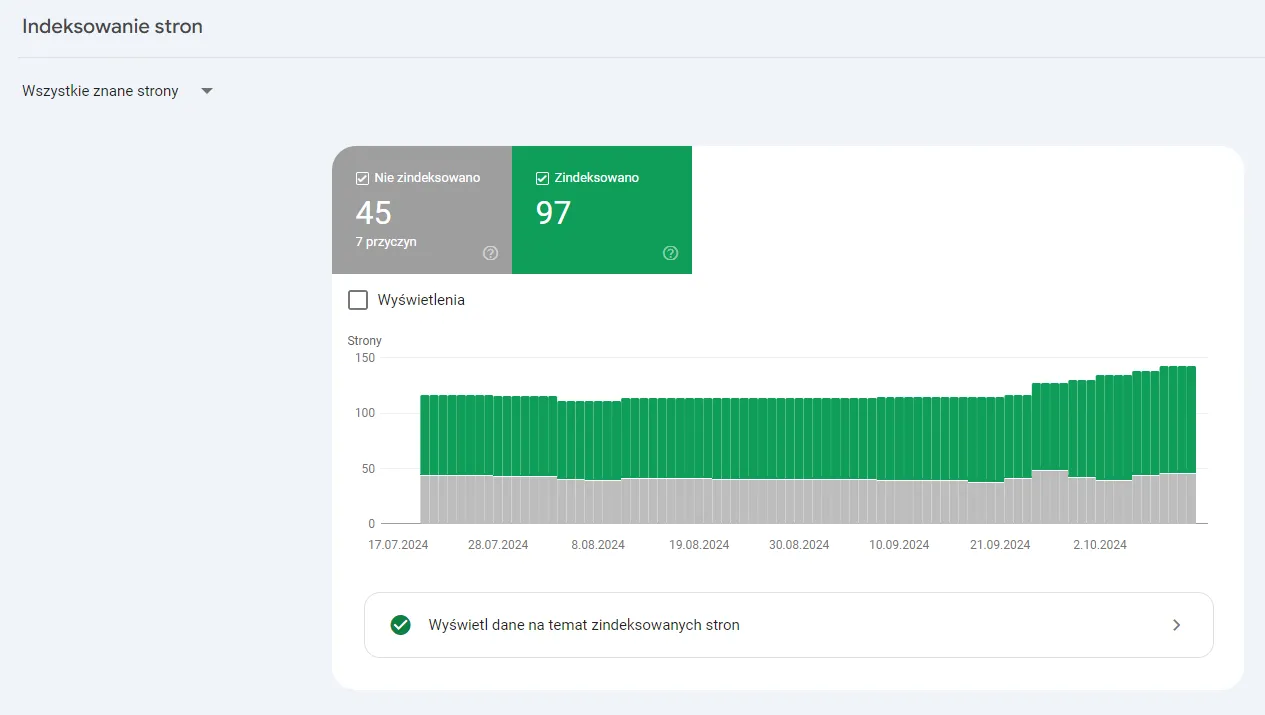
- Google Search Console: Google Search Console is a tool that provides detailed information about Googlebot activity on your site. In the dashboard, you will find the “Page indexing” report, which provides detailed information about Googlebot activity on your site over the last 90 days, including indexing data. You can also use the “URL Inspection” option to see if a given URL is indexed.
- SEO audit tools: There are many SEO audit tools, such as Ahrefs, SEMrush, or Screaming Frog, that can help check if your pages are indexed. These tools offer advanced analysis features that can provide additional information about your site's indexing status.
- Checking server logs: Analyzing server logs can provide insights into how Googlebots crawl your website. You can see which pages have been visited by Googlebots and whether they encountered any issues.
- Checking organic traffic: Monitoring organic traffic in analytics tools like Google Analytics can also provide insight into which pages generate traffic from the Google search engine. If you notice that certain pages are not generating traffic, it may mean they have not been indexed.
How to add a page to the Google index using Google Search Console?
Adding a page to Google is simple thanks to the Google Search Console tool. With it, we can request Google to index the subpage you want to optimize. For this to happen, however, you need to take care of the basic elements. Here are the steps you should take:
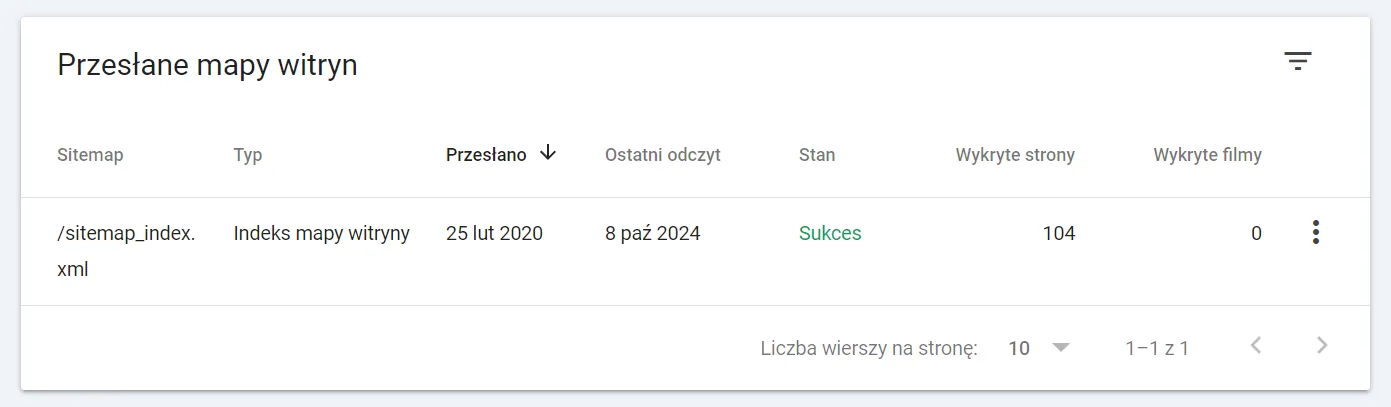
- Submitting a sitemap: A sitemap contains all the subpages you want to be visible in search results. Submitting it to Google Search Console makes it easier for Googlebots to crawl your website. Using sitemaps makes it easier to index a website in Google's index.
- URL Inspection: In Google Search Console, you will find the “URL Inspection” tool, which allows you to quickly request indexing for new blog posts or recently added service pages.
Let's check your website's potential
Share your website and email - we'll get back to you with a real analysis, no strings attached.
Website indexing errors
Sometimes Google does not index a page for various reasons. Here are some of the most common errors:
- Robots.txt blocks: Make sure the robots.txt file does not block access to important pages.
- Poor page quality: Low-quality pages may be ignored by Googlebots.
- Duplicate content: Avoid duplicating content across different pages of your website.
- Missing important URLs in the sitemap: Make sure all key URLs are included in your sitemap.
- Incorrect canonical tags: Check whether canonical tags are properly configured.

Optimizing a website for indexing
To speed up the indexing process, it is worth optimizing your website. Here are several key steps:
- Creating valuable and unique content: Unique content is more attractive to bots
How to speed up page indexing?
If you want your site to be indexed faster, here are a few additional tips:
- Acquiring valuable links: Links from other highly regarded websites can speed up the indexing of your site.
- Avoiding indexing blocks: Make sure your site is not blocked by a robots.txt file or noindex tags.
Monitoring indexing
Regularly monitoring indexing is crucial to ensure that your site is visible in search results. Google Search Console offers many tools that can help monitor your site's indexing status. Here are a few of them:
- "Page indexing" report: Shows which pages have been indexed, which have not, and why.
- "Sitemaps" report: Provides information on the status of submitted sitemaps and the number of indexed URLs.
Conclusions
Indexing a site in Google is a key step in the SEO process. Thanks to this guide, you now know how to check if your page is indexed, how to add it to Google's index, and how to avoid the most common mistakes. Remember that optimizing a website for indexing is an ongoing process that requires regular attention and updates. With the right actions, your website will be more visible in Google search results, translating into more traffic and better business results. If you need help with this or any other issue related to page indexing - contact us. At Neadoo Digital, indexing websites in search results is our daily bread.