
How to Check Website Traffic? Discover the Most Popular Methods!
If you run a blog, an online store, or any other type of website, you are probably interested in how many people visit it. This knowledge allows you to evaluate the effectiveness of your marketing efforts and see how engaging your content is. This, in turn, helps us increase traffic to our site. A growing number of visitors can also serve as motivation for further work. In order to check how large our organic website traffic is, it is worth using website traffic analysis tools. In this article, we present three simple ways you can check how many people visit your website, what its most popular sections are, and what actions visitors take on it. We can also learn more about traffic sources, which can also help us drive more traffic.
Google Analytics - How to Check Website Traffic for Free?
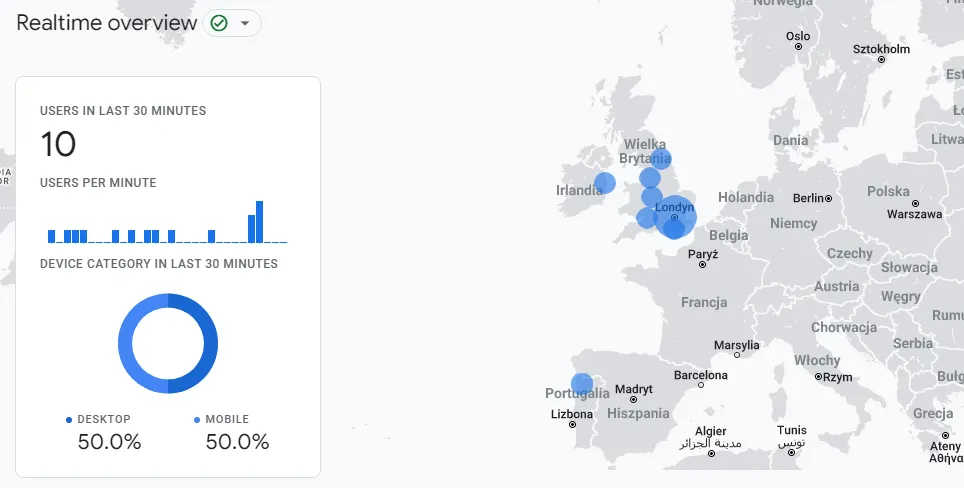
The simplest and most reliable way to check website traffic is to use a free traffic analysis tool - Google Analytics. Even basic reports, such as "Realtime", allow us to see how many people are currently using our website. Additionally, we will be able to discover the devices our users are using and the subpages where they spend the most time.
When it comes to historical data, simply navigate to the "Acquisition" section and then "Overview". Here, we can check how many page views our site or specific subpages generated within a given time range.
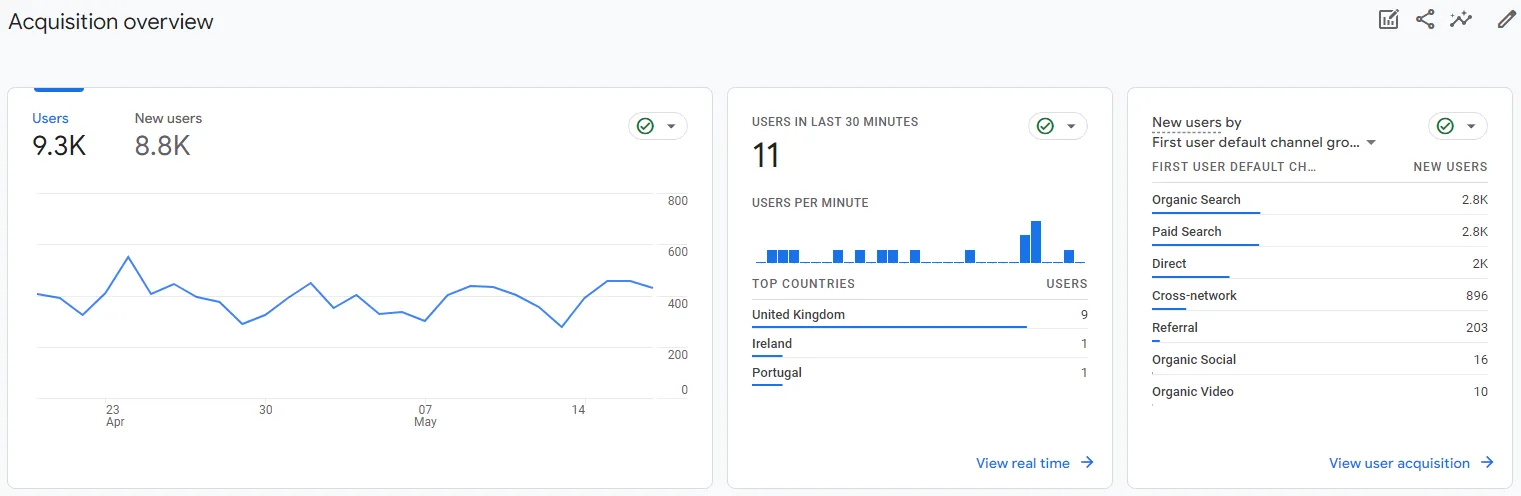
This is also where we find out which channels drive the most traffic to our site. Go to the "View user acquisition" section.
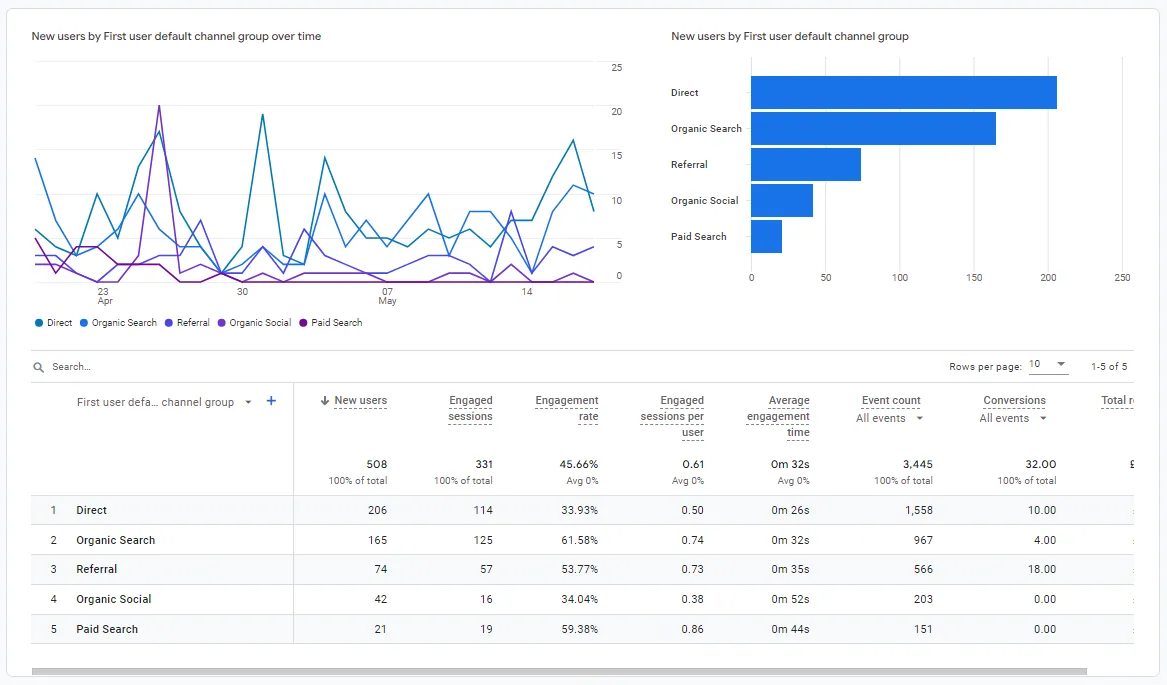
Traffic Acquisition Channels
Let's look into what the channels found there mean:
- Paid Search - traffic generated by clicks on paid ads in search engine results.
- Social - traffic generated by clicks on links in social media networks such as Facebook, Twitter, Google+, and others.
- Organic Search - traffic coming from free, organic search results. If most of your traffic comes from this channel, it indicates strong website visibility, which can be a direct result of SEO.
- Direct - traffic generated by visiting your website directly by typing the address into the address bar. Most often, it is generated by users who already know your offer and return to your site. In this channel, Google Analytics also includes traffic whose sources cannot be identified.
- Referral - traffic generated when users click on links leading to your site from other web pages.
- Display - traffic from ads in the display network, covering not only traffic in the Google search network, but also Bing and other search engines.
- Other - a channel covering traffic from various sources, including Facebook and data from other social platforms.
- Cross-Network - users reaching your site from ads across multiple networks, e.g., display and search.
- Affiliates - covers people arriving via links from affiliate websites.
- Audio - in this case, users reach the website through ads on audio apps, e.g., podcasts.
- E-mail - a channel covering users reaching us through links in email messages.
- Mobile Push Notifications - when clicking links in notifications on mobile devices without using the app itself.
- Organic Shopping - users who reached the website through non-advertising links on shopping platforms, e.g., Amazon.
- Organic Social - users who reached the website through non-advertising links on social platforms, e.g., Facebook.
- Organic Video - users who reached the website through non-advertising links on video platforms, e.g., YouTube.
- Paid Other - traffic coming from ads that do not originate from search engines, shopping platforms, social media, or video platforms.
- Paid Shopping - users who reached the website through ad links on shopping platforms, e.g., Amazon.
- Paid Social - users who reached the website through ad links on social platforms, e.g., Facebook.
- Paid Video - users who reached the website through ad links on video platforms, e.g., YouTube.
- SMS - users reaching us from links in text messages.
Google Analytics offers many reports that allow us to track website traffic. Each of them serves the same goal. Thanks to this tool, we not only discover specific traffic numbers, but also get to know the users visiting our website. It is a treasure trove of knowledge about their intere
interests, demographics, and the devices they use. In other words, you will find plenty of data here that will help increase traffic to your website. You can also check the bounce rate, which is useful in the context of website traffic analysis.How to set up an account?
When it comes to setting up Google Analytics, there is nothing to fear. Creating an account is completely free and only requires having a Google account. You need to log in to the website http://www.google.com/analytics/ and create a new account in the "Admin" section. After entering your domain address, Google will generate a code that you must place on your website and on all its subpages. It is best to place this code in the <head> section of the page, so that it appears in the code of every subpage available within the website. After all, we want to track all website traffic. From then on, data about traffic to our site will be collected.If you do not want to check reports every day, you can use the alert option for changes in website traffic. If traffic to the site drops or spikes suddenly, you will receive an SMS or email notification. Such alerts can be set up according to your own preferences.
Capabilities of Google Analytics
This free tool is a goldmine of knowledge for every analyst. We already know how to check website traffic, but Google Analytics tools allow for much more. Above all, our business should have clearly defined goals that we want to achieve. We can configure these goals directly using the events available in the application. They will allow us to measure conversions and verify whether our efforts are profitable and lead to achieving the set goals.
Google Search Console - another valuable tool from the creators of the Google search engine
With Google Search Console, you can check and analyze organic traffic to your website or online store. In the "Performance" report, you will find information such as:
- number of clicks, which is the number of visits to your site from Google search results,
- number of impressions, which is how many times a user could have seen a link to your site in the SERP (including scrolling),
- CTR - the ratio of clicks to the number of impressions in search results
- average site position for the domain across all phrases for which it was visible during a specific time period.
Google Search Console also allows for a more detailed traffic analysis, covering specific subpages, the devices the traffic comes from, identifying phrases driving traffic to subpages, and the countries where traffic originates.
Let's check your website's potential
Share your website and email - we'll get back to you with a real analysis, no strings attached.
Google Search Console API
We can also retrieve more detailed data using the Google Search Console API. For example, we can pull keywords assigned directly to URLs, along with data on organic traffic and rankings.
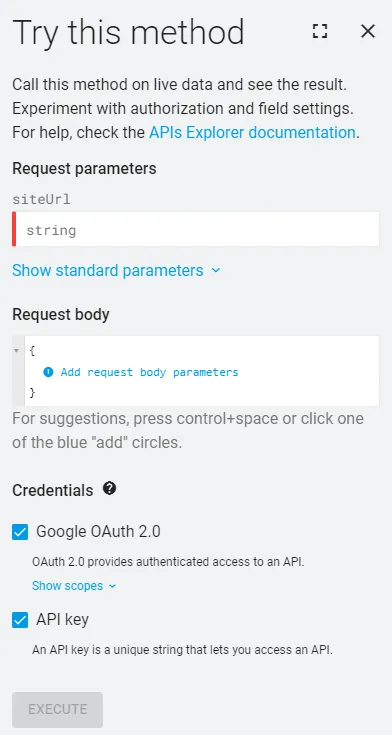
Data obtained from Google Search Console can help you improve traffic to your website, for instance by checking whether traffic is generated by commercial or more generic queries. You can also verify whether the pages that are important to you in terms of sales generate significant traffic, and whether impressions translate into clicks and conversions. With this information, you can make potential improvements to the site structure and the purchasing process if traffic is not driving conversions.
Ahrefs - a powerful tool for traffic analysis and competitor research
Ahrefs is a paid SEO tool that focuses on many aspects of SEO. Among other things, these include: backlink profile analysis, website traffic analysis, and competitor analysis. What exactly can you learn about competitors from it? Among others:
- which subpages generate the most traffic,
- how much traffic comes from mobile devices,
- what the traffic forecasts are for individual subpages,
- which keywords are responsible for traffic growth on the site.
By analyzing traffic in Ahrefs, you can gain valuable insights into competitors' strategies and use them to expand your own website with new service or product pages. We can also plan a link-building strategy, as we will learn how competitive our target keywords are. This is also a key aspect when it comes to traffic building. The tool also provides estimated data on which queries generate the most traffic for competitors' websites. Naturally, these figures are estimates, but many strategies we have implemented confirm that they are reliable and accurate. Competitor traffic analysis should be a critical step when planning an SEO strategy.
Other valuable tools for checking traffic
Of course, there are more paid SEO tools for competitor analysis. The most popular ones include:
- Senuto
- Semrush
- Semstorm
- Surfer SEO
Each of them will allow you to learn more about keywords and will be useful for competitor analysis. Thanks to them, you can check traffic. They are also helpful for comprehensive SEO campaigns. In each of them, you can check keywords for specific competitor subpages. You can plan extensively when it comes to optimizing marketing efforts. They are also helpful for planning links, which can translate into website traffic.
Summary
We already know how to check traffic to your website. Accurate data on organic search results allows us to monitor website traffic better. We can check your website's historical data as well as real-time data. With the help of free tools, we are able y not only check website traffic, but also plan business goals and monitor conversions.It is also worth planning to check competitors' website traffic. This allows us to understand the traffic potential for our business. In addition to free tools, it is worth using paid ones that will help us plan a strategy to generate traffic.Traffic can come from many channels. Therefore, it is worth maintaining several valuable paths that generate traffic to your website. If you care about having a large number of visitors coming from organic results - check out our SEO and website positioning services.