
Google Search Operators - List and Use Cases in SEO

Google Search Operators - List of Commands and Their Application in SEO
A query entered into the Google search engine can be refined using search operators and additional characters that change the way keywords are processed. For SEO specialists, Google search operators are an everyday tool for precise information retrieval. They check website indexing, find duplicate content, and allow you to conduct quick research without reaching for third-party tools. This article organizes the current set of search operators, shows their application in an SEO audit, and separates commands that are still supported from those Google has retired.
What Google Search Operators Are and How They Modify Queries
Google search operators are special text commands and logical characters that modify the default way a query is parsed, precisely filtering the Google search engine index. To fully harness the potential of Google as a research and SEO audit tool, you need knowledge of search operators that go beyond standard searches based on single keywords. At the same time, special Google search operators are not reserved exclusively for advanced users.
A standard search in Google treats a multi-word query as a loose set of terms connected by the default AND operator - the search engine returns pages containing all the specific keywords from the query, regardless of their order in the sentence. A query with an added filtering command works differently: the operator restricts search results to a strictly defined condition, for example, a specific domain, file format, or URL fragment, instead of searching the entire Google search engine index. For a website or store owner, the site: operator in the query site:domain.com is often the first, rough signal of whether the site has made it into the index at all.
To obtain precise results, search operators prove useful in several areas of website management. In SEO audits, they allow you to check the indexing structure and detect technical errors without logging into external tools. In marketing and market research, they make it easier to search for information, analyze competitors, and discover new sources of information, as well as support marketing strategies based on publicly available materials. In analytical work, they show right away whether a given phrase appears in Google search results.
List of Basic and Advanced Google Operators
Google's set of commands allows you to narrow down results to specific technical parameters, metadata, and file types. The breakdown below organizes search operators by function. The summary of operators across two tables helps you select the right command for the task, because precise searching within the index requires the right operator.
Basic Symbols and Logical Operators
The simplest search operators rely on punctuation marks and logical words that allow you to narrow down search results or broaden the default set of results.
| Operator | Syntax | How it works |
|---|---|---|
| Quotes | "phrase" | Forces an exact match of the phrase in its original form, without inflections - especially useful for checking plagiarism and content uniqueness. |
| Minus | -word | Excludes pages containing a specific word, phrase, or domain from search results, helping eliminate irrelevant results. |
| AND | word1 word2 | The search engine's default mechanism - words are combined automatically, so there is no need to type AND. |
| OR | word1 OR word2 | Returns results containing at least one of the specified words, expanding search results to include various possibilities - especially useful for content gap analysis. |
| AROUND(X) | word1 AROUND(3) word2 | Makes it easier to find results where two keywords appear within a maximum distance of X words from each other. |
These special characters work on every page. They are a useful tool both for standard searches for pages on a given topic and for more complex queries that require precise filtering of results.
Searching Within a Specific Number Range
The syntax 2020..2024 returns results falling within a selected numerical range, e.g., a range of years, while a time frame is filtered by the after: and before: operators, e.g., after:2023/01/01 before:2024/12/31. These apply to the document's last update date, not publication date.
Advanced Location and Formatting Commands
The second group of search operators narrows down results to a specific domain, URL fragment, page content, or file format. Advanced Google search operators, such as intitle: or inurl:, allow you to dig deeper than site: alone and check in which element of a specific page the searched phrase appears. The intitle: operator increases the relevance of search results because it requires the phrase to be in the title.
| Operator | Syntax | Function |
|---|---|---|
| Domain | site:domena.pl | The site: operator restricts results exclusively to the specified domain or URL - especially useful for estimating the number of indexed subpages within a given domain. |
| Page title | intitle:word / allintitle:word1 word2 | Limits results to pages with a specific word in the title tag (intitle:) or requires all specified words to appear in the title (allintitle:) - allows you to check whether a selected key phrase appears in the page title. |
| URL | inurl:word / allinurl:word1 word2 | Returns pages with the searched word in the URL (inurl:) or requires all words to appear in the address structure (allinurl:). |
| Page content | intext:word / allintext:word1 word2 | Used to find specific words within the page text (intext:), while allintext: requires all listed words to appear at once. |
| File format | filetype:pdf | Helps find content in a specific format, e.g., PDF, DOC, DOCX, XLS, or PPT. |
The syntax for each of these search operators must be consistent - with no space after the colon, otherwise Google will treat the command as a regular keyword rather than a filter. The all... commands apply to the entire remainder of the query, so in complex queries, it is safer to combine multiple intitle: operators.
The define Operator - Dictionary Definitions
The command define:word displays a dictionary definition of the searched term.
Let's check your website's potential
Share your website and email - we'll get back to you with a real analysis, no strings attached.
Practical Applications of Operators in an SEO Audit
Combining several Google search operators into a single query allows you to identify a website's technical errors without using third-party crawlers. A single command reveals very little, which is why advanced audit techniques rely on combining multiple search operators in one query - that is, query combinatorics. Such a query allows you to narrow search results down to a specific technical issue on a website. For example, site:domain.com intitle:"page not found" checks whether 404 error pages are present in the index.
Indexation Audit and URL Structure Diagnostics
The site: operator, combined with additional filters, allows you to estimate the number of indexed subpages and catch URLs that should not end up in Google's index. If you want to check how many subpages a site has in the index, just a few queries will do.

Checking a Specific Page and a Specific Domain in the Index
- Verifying the number of indexed subpages and subdomains - the query site:domain.com shows the approximate scale of indexation for the entire site, while site:shop.domain.com isolates a specific subdomain.
- Checking a specific page - entering the full URL after the site: operator shows whether that subpage is in the index at all.
URL Errors, Staging Environments, and www Versions
- Detecting unsecured HTTP URLs on a site running on HTTPS - the query site:domain.com inurl:http -inurl:https flags URLs using the unencrypted version of the protocol.
- Identifying test and staging environments in the index - the query site:domain.com inurl:test OR inurl:staging helps find working subpages that accidentally slipped into search results and need to be blocked from indexation.
- Comparing www and non-www versions - the queries site:www.domain.com and site:domain.com -site:www.domain.com show whether both URL versions appear in the index at the same time, as this leads to duplicate content.
Detecting Keyword Cannibalization and Content Theft
Pairing site: with intitle: reveals URLs competing with each other for the same keyword phrase, while quotation marks combined with excluding your own domain help find unauthorized copies of content.
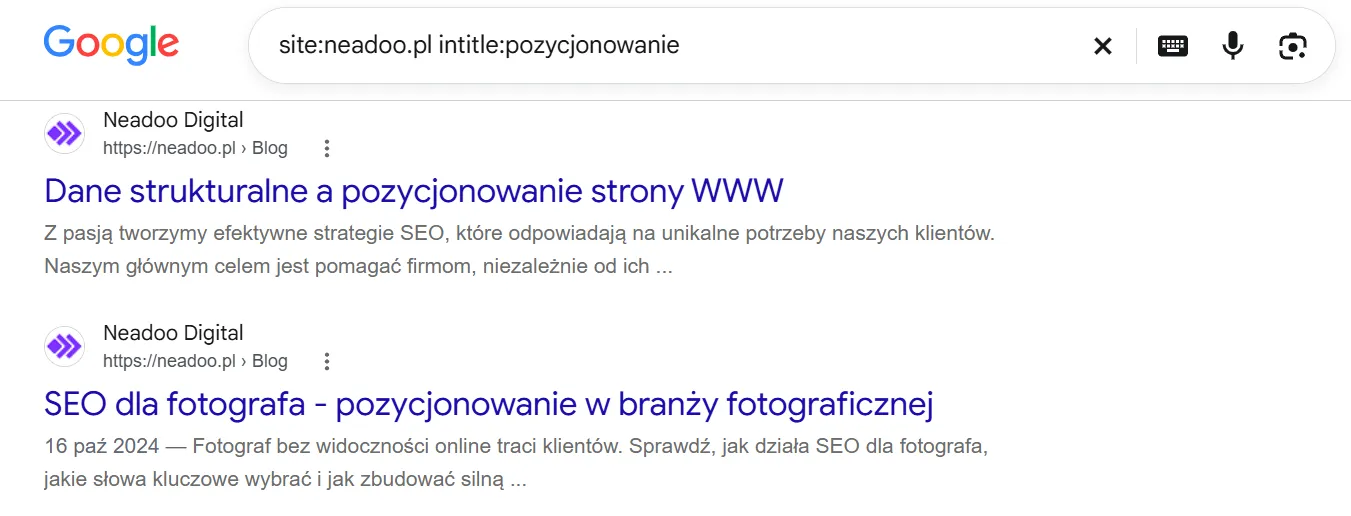
Keyword cannibalization occurs when multiple subpages of the same website compete in search results for the same topic. The query site:domain.com intitle:"service name" displays all indexed URLs containing that specific snippet in the title - if the list is longer than one entry, several subpages are likely competing against each other instead of jointly building visibility for that topic.
Meanwhile, verifying text uniqueness and detecting external plagiarism is made easier by combining quotation marks with an exclusion of your own domain - the query "distinctive phrase excerpt" -site:domain.com shows whether other sites are publishing the same piece of content.
Using Google Commands in Link Building and Research
Advanced search operators streamline searches for backlink profiles, guest posting opportunities, and industry knowledge bases. Simply append filetype:pdf to industry keywords, e.g., filetype:pdf "industry report" given topic, to access reports and summaries in PDF format or XLSX spreadsheets, which rarely appear in standard text results - this is a fast track to concrete numerical data and specialized content.
Looking for Sites That Accept Guest Posts?
Combining intitle: with phrases typical of guest publishing offers helps with this - the query intitle:"sponsored article" given industry points to portals accepting articles in a specific niche, including those covering topics directly related to your offer. The same mechanism works well for discovering new information sources - combining site: with a specific portal's domain and intext: with the target phrase allows you to check whether the portal has already covered a given topic before pitching a collaboration. In competitor analysis, the query intitle:"case study" given industry filetype:pdf narrows results to ready-made case studies that can serve as a benchmark when planning your own content.
Each of these queries can be customized to your needs by changing keywords, the domain, or the file format. Skillful use of search operators shortens the research phase and saves time when planning publications.
Common Mistakes and Limitations When Using Operators
Incorrect syntax, such as adding a space after the colon, breaks how a Google search operator works. The syntax consistency rule applies to every search operator described in this article - Google will treat the query site: domain.com with a space after the colon as two separate keywords rather than a domain filter, so the search result will be entirely different from what was intended. If you want to check whether the syntax is correct, compare the number of results with the spaceless version of the query, and only run a complex combination of operators after testing each piece separately.
Search operators also have a practical limitation related to query volume. Querying the search engine too frequently and too deeply within a short span of time - especially when automating queries via scripts - leads to CAPTCHA blocks; once they appear, Google search services may become temporarily unavailable for that IP address. Therefore, Google search operators do not replace a full technical audit based on Google Search Console data or a crawler - they only allow you to quickly verify an individual website issue.
Deprecated and Ineffective Commands in Modern Search
The cache: operator no longer works in Google Search - the feature was retired in 2024 and removed from Google Search Central documentation, and the related: operator is deprecated and officially unsupported.
The cache Operator and the related Operator: What Has Been Deprecated
Many older SEO guides still describe cache: as a way to view the cached version of a site saved in Google's cache - that is, the last indexed copy of a webpage. This feature has stopped working and has no official replacement within the search engine itself. Historical page content must be checked using alternative sources, such as third-party web archives. A similar fate befell the related: operator, which was used to find pages thematically similar to a specified URL - essentially showing similar websites. Google no longer officially supports it, and the results, if they appear at all, are unreliable.
The summary of operators in terms of current status is shown in the table below.
| Operator | Status |
|---|---|
| site: | Active - in Google Search documentation |
| filetype: | Active - in Google Search documentation |
| before: / after: | Active - in Google Help, filters by the document's last updated date |
| intitle: / inurl: / intext: and "all" variants | Active - works in practice, but missing from Search Central documentation |
| AROUND(X) | Active - missing from Search Central documentation, so test results alongside quoted phrases |
| define: | Occasionally supported - missing from Search Central documentation, of marginal value in SEO |
| cache: | Deprecated - retired in 2024 |
| related: | Deprecated - officially unsupported |
When dealing with older SEO materials, this summary helps you separate search operators that have stopped working from those still supported by Google.
Will AI Replace Google Search Operators?
Google search operators are unlikely to disappear, because AI answers questions, while an operator shows what is actually in the index. AI assistants and generative answers within the search engine itself handle some of the simple queries, so commands are typed manually less often for routine research. However, an operator delivers what an AI response does not: a list of specific URLs from the Google index, with no summaries or guesswork. In AI SEO, available, indexed content still matters, and its status is revealed by site: and inurl:. Quotation marks, in turn, let you check whether an excerpt of text is being quoted by other websites.
Technical SEO and Website Audit Experts
Implementing advanced technical audits and eliminating indexing errors requires an SEO agency's specialized approach. Advanced search operators in Google make it easier to quickly diagnose an isolated issue, but a full website audit requires combining these commands with data from Google Search Console, a crawler, and backlink analysis tools.
At Neadoo, we handle website SEO and advanced visibility analytics, pairing quick operator tests with in-depth on-site and off-site audits tailored to the scale and industry of a specific site. This approach allows us to catch indexing errors, keyword cannibalization, or unauthorized content copies before they impact the entire domain's search performance. Regular check queries paired with Search Console data reveal a sudden drop in indexed pages before organic traffic declines.