
Google Gemini Notebook (Formerly NotebookLM) - A Revolutionary AI Tool for Working with Your Own Sources
How many times have you searched through dozens of PDF files and notes trying to find one specific piece of information, keeping in mind that a standard AI chatbot will start making up facts that aren't in your materials anyway? Google's Gemini Notebook is a free AI tool (powered by the Gemini model) that responds exclusively based on the sources you upload - documents, PDFs, URLs, or audio recordings - thereby eliminating the problem of hallucinations. It works online, without logging in through additional accounts, in a browser on your computer (Windows), and as a native mobile app with over 10 million downloads, while Gemini Notebook in Polish supports full functionality, including generating AI podcasts in our language.
What is Gemini Notebook used for in practice? For chatting with your own files, creating audio summaries, mind maps, infographics, or automated quizzes and flashcards based on materials you specify yourself - making it a real asset in marketing, data analysis, and creative work. Is Gemini Notebook free? The basic version is, free of charge and with no need to look for where to download it outside the official Google website. How much does Gemini Notebook Pro cost? That is an offer with higher limits and additional features, designed for intensive work with large volumes of content - and the pricing details and differences between plans are explained later in this article.
* On July 16, 2026, Google introduced the new name Gemini Notebook. Previously, the tool gained popularity as NotebookLM.
What Gemini Notebook Is and How It Works Based on the Gemini Model
Gemini Notebook is a free, intelligent research assistant created by Google LLC. It is powered by the Gemini model and analyzes only the documents provided by the user. This mechanism - source grounding - means that every response is directly linked to a specific excerpt from the uploaded material, rather than the model's general knowledge gathered from the internet.
Technically, Gemini Notebook utilizes the RAG (Retrieval-Augmented Generation) architecture. The process takes place in two stages: the system first searches the user's document base and extracts the most relevant passages using semantic content analysis, and then Gemini formulates an answer based on them in natural language. Google promotes the tool as a partner for research and analysis grounded in information that the user trusts - not in random data from the web.
The Difference Between Gemini Notebook and ChatGPT - Full Source Grounding
The key difference lies in the knowledge source the model uses when generating responses. ChatGPT and similar general-purpose chatbots respond by default based on knowledge acquired during training on vast datasets from the internet. They can therefore "guess" facts, producing convincing-sounding yet false information - a phenomenon known as AI hallucinations. Gemini Notebook eliminates this problem structurally: the model has no access to its general knowledge when providing factual answers and relies solely on the sources provided by the user.
The practical consequence of this approach is evident in every response: the system automatically attaches citations in the form of numbered links leading to the exact spot in the original document. With a single click, users can verify whether an excerpt actually matches the source content - something standard chatbots do not allow. As a result, Gemini Notebook gains high credibility in research, legal, academic, or journalistic work, where precision and source verification matter more than casual conversation.
The Gemini Engine and Multimodality
Gemini, the engine behind Gemini Notebook, is a multimodal model - it processes and understands not only text, but also images, audio, and video within a single integrated system. This capability translates directly into Gemini Notebook's features: the tool analyzes YouTube videos, audio recordings, scanned documents, or slides with charts, extracting information from them just as easily as from standard PDF text.
Gemini's multimodality also powers one of Gemini Notebook's most recognizable features - the automatic generation of audio podcasts based on uploaded materials, where the model synthesizes the source content into a dialogue between two hosts. The same engine also generates mind maps, infographics, and visual summaries, transforming raw text data into various consumption formats without losing the link to the original source. In the context of broader search visibility strategies, content analysis and structuring mechanisms are also gaining significance in the area of AI positioning, where the quality and credibility of sources affect how information is presented by generative systems.
How to Get Started with Gemini Notebook - Installation, Sign-in, and Pricing
The tool is completely free and accessible online via a web browser, as well as a dedicated mobile app for Android and iOS. Getting started does not require installing any additional desktop software - signing in to Gemini Notebook is done using a standard Google account, the same one used to log in to Gmail or Google Drive.
Gemini Notebook Online or Desktop and Mobile App?
On a computer, Gemini Notebook functions solely as a web application - accessible at Gemini Notebook.google in any browser (Chrome, Edge, Firefox), regardless of the operating system. A separate, native Gemini Notebook Windows client available for download as an installer file does not exist. The question of "how to install Gemini Notebook" on a desktop essentially comes down to opening the website in a browser and logging in with a Google account.
On mobile devices, the situation is different: Google provides a native app, available on Google Play for Android and the App Store for iOS. The Android version has already surpassed 10 million downloads, demonstrating the scale of the tool's adoption beyond the browser environment.
| Access Method | Platform | Installation |
|---|---|---|
| Gemini Notebook online | Browser (Windows, macOS, Linux) | None - sign-in with Google account |
| Mobile app | Android (Google Play) | Download from Google Play, over 10M downloads |
| Mobile app | iOS (App Store) | Download from App Store |
Differences: Free Gemini Notebook vs Gemini Notebook Pro
The answer to the question "is Gemini Notebook free" is clear: yes - the basic version lets you create notebooks, upload sources, and generate summaries, mind maps, and audio podcasts free of charge. The expanded offering, referred to as Gemini Notebook, comes with higher processing limits and is offered as part of the Google AI Pro, Google AI Ultra, and Gemini Notebook Plus plans - rather than as a standalone product with a fixed name and price.
| Feature | Gemini Notebook (free) | Gemini Notebook Pro (Google AI Pro/Ultra, Gemini Notebook Plus) |
|---|---|---|
| Cost | Free | Paid, as part of Google Workspace |
| Notebook and source limits | Basic | Higher limits |
| Features | Chat, summaries, mind maps, podcasts | The same features, larger scale of work |
| Use case | Smaller document collections | Intensive work with large content collections |
Specific limits - the number of notebooks, sources per notebook, or generated podcasts - as well as prices vary depending on the chosen offer, region, and time of purchase. Before deciding on a subscription, it is worth checking the current feature set on Google's website.
Supported file formats and secure source uploading
What file formats does Gemini Notebook support?
Gemini Notebook accepts a wide range of sources and lets you build a notebook from diverse materials without prior conversion. Supported formats include:
- Google Docs and Google Slides - imported directly from Google Drive, without downloading files to your computer.
- PDF files - the foundational format for research work, reports, and scientific publications.
- Text and Markdown files - Gemini Notebook officially supports text in Markdown format, making it easier to work with notes from code editors or technical documentation systems.
- URLs - web pages uploaded as sources without having to copy their content.
- Public YouTube videos - the system generates a video transcript and analyzes it just like any other text-based source material.
- Audio files - recordings of conversations, lectures, or podcasts; the model processes them within the same context window as text documents.
- Copied text - pasted snippets are treated as fully fledged sources on par with files.
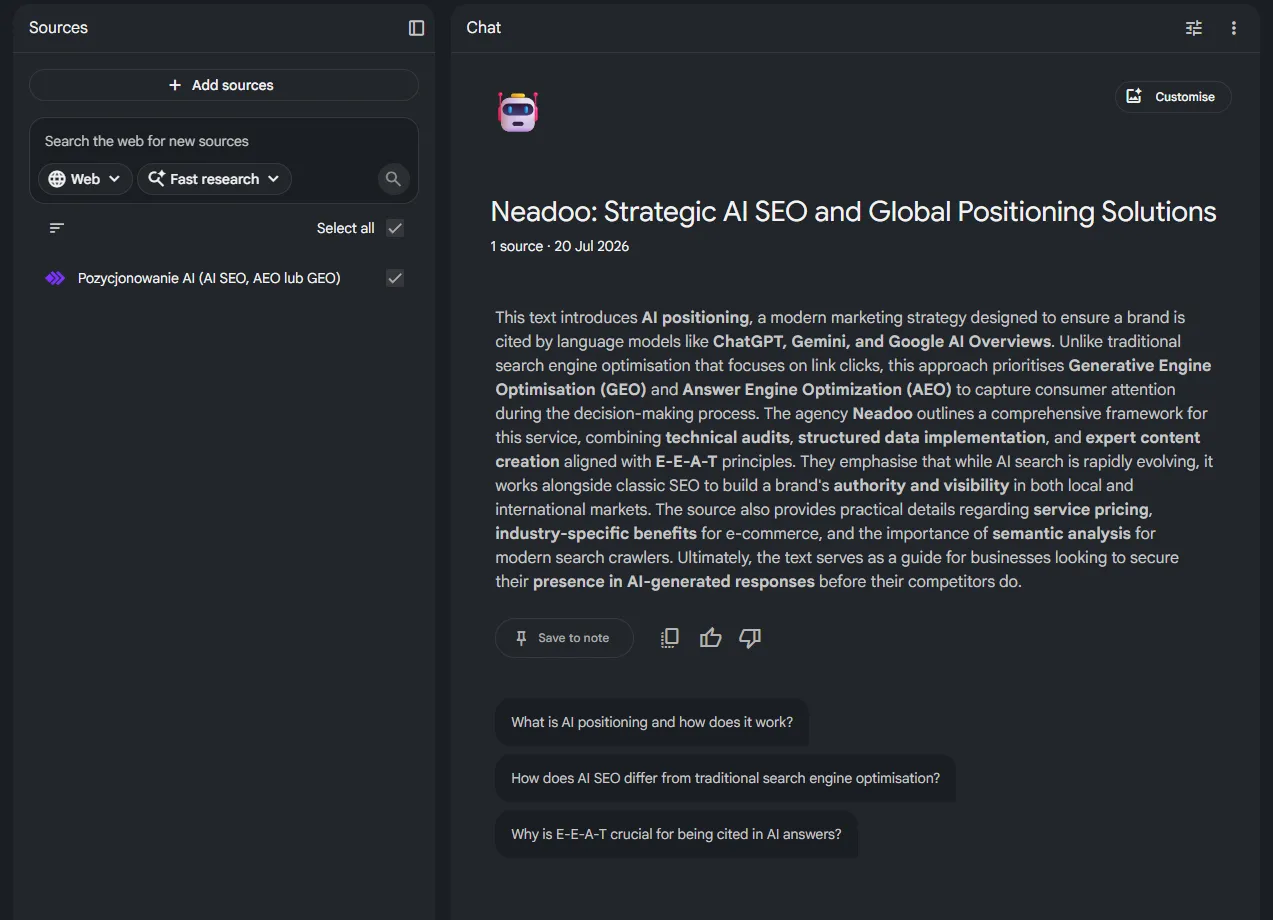
Every source is fed into the notebook's shared context window - a single space within which the model processes all materials at once. Thanks to this, it answers questions based on the combined content of PDFs, video transcripts, audio files, and Google Drive documents simultaneously - not just a single material type.
Data security and business document privacy
Files uploaded to Gemini Notebook remain private and are not used to train Google's public models - a fundamental guarantee that sets this tool apart from many publicly accessible AI chatbots. Notebook data does not feed training sets for Gemini or any other publicly released models.
For companies, this means that strategic documents, financial reports, client interview transcripts, or internal presentations can be uploaded without the risk of content leaking into a model accessible to other users. Privacy covers all listed source formats - from Google Docs and Google Slides to audio files and YouTube video transcripts. Thanks to this architecture, Gemini Notebook is well suited for analyzing business documents, where control over information flow and compliance with data protection policies are prerequisites for adopting the tool in a team's daily work.
Let's check your website's potential
Share your website and email - we'll get back to you with a real analysis, no strings attached.
Key platform features - from chat to AI podcasts
The foundation of working with Gemini Notebook is a chat based solely on user-provided materials - the model does not draw from general internet knowledge. Every answer includes a source citation indicating the document, transcript excerpt, or audio recording from which the information originates. Clicking on a footnote jumps directly to that specific spot in the source, allowing you to instantly verify the model's claim.
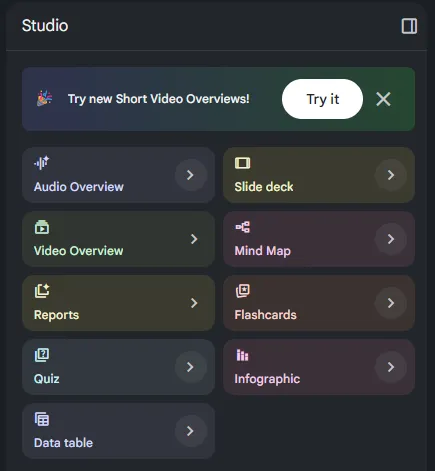
Beyond chat and audio overviews, the notebook provides several distinct ways to work with the same collection of materials:
- Chatting with files - natural language questions and prompts, with responses strictly limited to the content of the uploaded sources.
- Audio overviews (AI podcasts) - conversational audio recordings in the form of a dialogue between two AI hosts.
- Video Overviews - video summaries combining narration with visual elements generated from the sources.
- Infographics and mind maps - visual representations of structure and relationships between concepts from the notebook.
- Tests, quizzes, and flashcards - automatically generated materials for studying and review.
- Notes and outlines - structured summaries ready for further editing by the user.
Audio Overview feature and AI podcasts in Polish
The audio overview feature turns uploaded documents into a conversational podcast: two AI hosts discuss key topics from the sources, engaging in a dynamic exchange of questions and commentary. AI podcasts also work in Polish - the narration and dialogue reflect the source content without requiring manual translation of the material. The feature is also available in Google Workspace plans, making it possible to convert company documents, reports, or meeting transcripts into listenable content - convenient for traveling or multitasking.
Video Overviews, mind maps, and automated tests
Video Overviews extend the logic of audio summaries into a video format. The model generates narration paired with visual material reflecting the structure of the sources, making it easy to quickly digest a large collection of documents without reading each one cover to cover. Mind maps visualize connections between concepts and topics extracted from the notebook, displaying the hierarchy of information in a single diagram.
Automated tests, quizzes, and flashcards turn the notebook into a learning tool - the model generates review questions and study cards directly from the uploaded materials. This is useful when preparing for exams, onboarding new employees, or conducting internal training based on company documentation.
Strategic use of Gemini Notebook in digital marketing
Content repurposing and creating posts based on proprietary knowledge bases
Gemini Notebook brings structure to content repurposing in digital marketing: a company report, a webinar transcript, or a series of customer interviews are added to the notebook as sources, and the model extracts ready-to-use snippets for blog articles, social media posts, and newsletters. Every response is anchored in a specific quotation from the material, ensuring that the generated content remains consistent with actual company data, not the model's general knowledge.
In practice, the content marketing team uploads all existing case studies, industry reports, and client meeting notes into a single notebook. The notebook becomes the company's personal knowledge base - a source from which new formats are repeatedly generated without searching through folders and drives again. In this way, a single webinar recorded as an audio file can turn into an expert article, a shortened LinkedIn version, and a script for the next company podcast - without losing consistency with the original material.
For SEO teams, it is important that Gemini Notebook does not replace search engine content optimization, but speeds up research and drafting. Combining such content with AI SEO techniques makes it possible to move faster from raw source material to a publication optimized for keywords and user intent.
Generating creative briefs and competitor analysis
Gemini Notebook also works well as a tool for competitor analysis and preparing creative briefs based on external materials. You can upload competitors' websites (as URLs), their YouTube video materials, or PDF files with industry reports into the notebook, and then ask comparative questions.
Based on this, the marketing team builds a notebook with the product pages of several competitors, transcripts of their webinars, and public case studies. The chat allows you to ask about differences in product value communication, brand tone of voice, or recurring sales arguments. Each answer points to a specific source excerpt, making it easier to verify conclusions before transferring them into a brief.
Based on such analysis, the notebook generates supporting materials for creative work: mind maps showing the structure of competitor communication, summaries of key messages, and overviews of recurring phrases. A brief based on real source data rather than intuition shortens campaign preparation time and reduces the risk of duplicating communication already present on the market.
Gemini Notebook in advanced qualitative and business data analysis
The tool allows you to securely synthesize PDF market reports and user research transcripts (IDIs) without the risk of data leaks. Uploaded files remain private and do not train Google's public models - thanks to this, the analytics department works on sensitive materials (financial reports, survey results, interview recordings), treating Gemini Notebook as a virtual research assistant rather than an external cloud service with an unclear data purpose.
Rapid synthesis of PDF reports and market data
An analyst uploads several dozen pages of an industry report along with competitor numerical data and board meeting notes into a single notebook, then asks comparative questions in natural language. The model searches the entire collection within its context window and finds connections between data scattered across different pages - without clicking through documents manually. The answers are based exclusively on materials provided by the user, and each statement has a quote pointing to a specific excerpt of the report. As a result, conclusions included in board presentations can be immediately verified against the source, reducing the risk of misinterpreting market numbers.
The tool also works well with reports spanning several quarters or from different data providers uploaded into a single notebook. A query about a change in market share, a price trend, or a deviation from a forecast generates an answer comparing excerpts from different documents - a task that would take an analytics team significantly more time with traditional PDF browsing.
Analyzing transcripts of qualitative interviews (IDIs) and customer feedback
UX researchers and product managers upload IDI transcripts, focus group records, and customer feedback from open-ended surveys to perform semantic analysis of recurring themes without manually coding each response. The model identifies common language patterns, recurring user pain points, and phrases describing expectations for the product - confirming each observation with a quote from a specific transcript excerpt.
Such a process shortens the path from raw qualitative material to a list of insights ready for further work: a mind map categorizing respondent problems or a summary of the most frequently quoted phrases. Each answer is anchored in the source, so the research team can listen to or read the recording excerpt that yielded the conclusion, rather than trusting the model's general interpretation. Teams working on large collections of interviews gain higher material processing limits in paid plans - Google AI Pro, Google AI Ultra, and Gemini Notebook Plus. However, the free basic version is sufficient for analyzing smaller collections of transcripts and individual research projects.
How to write prompts in Gemini Notebook and work creatively effectively
Principles of writing source-oriented prompts
Prompts in Gemini Notebook work best when they refer directly to the uploaded materials rather than the model's general knowledge. This stems from the tool's operating principle: it relies exclusively on user-provided sources, which eliminates the hallucination problem. An effective prompt points to a specific document, section, or data type ("based on chapter three", "compare the data from file A and file B") - it does not formulate a general open-ended question that the model might interpret without reference to the material.
- Precision of reference - a question like "what does the report say about margins in the second quarter" yields a better result than "what is happening with margins", because it narrows the search field to a specific source excerpt.
- Request for a quote - adding "indicate the source excerpt" forces the inclusion of a citation, which makes verifying the answer easier.
- Iterative follow-up - the first answer is rarely final. Following up with "expand on point two" or "compare this with another part of the document" allows you to gradually build a more complete picture of the topic.
- Specifying the output format - a prompt specifying that the answer should take the form of a list, a comparison table, or a short summary reduces the need to manually rewrite the output.
- Multimodality of queries - the notebook accepts text, audio, and video sources, so a prompt can simultaneously refer to a recording transcript and an accompanying PDF document, asking to compile information from both formats.
Brainstorming, mind maps, and creating video scripts
Gemini Noteboo k provides features that support creative work extending beyond document summarization. A prompt like "generate five alternative narrative angles based on these materials" triggers a brainstorming session based on facts from the sources, rather than context-free model associations.
- Mind maps as a starting point - the command "present the structure of the topics in this notebook as a mind map" helps you visualize the hierarchy of concepts before writing an outline for an article, script, or presentation.
- Outlines for various formats - the prompt "prepare a video script outline based on this report, broken down into scenes" lets you move from raw data to a production draft without manually planning the structure.
- Tone and length variants - asking for a "shorter, more informal" version or an "expanded one with examples from the source material" generates alternative variants of the same outline for A/B testing.
- Combining sources into a single script - a prompt referencing both an interview transcript and notes from a creative meeting enables building a video script that weaves respondents' quotes together with internal brand guidelines.
Prompts structured this way let you treat Gemini Notebook as a partner for conceptual work: the model proposes directions, but each one is anchored in the source material. The creative team verifies the idea immediately against the cited excerpt, instead of searching for confirmation elsewhere.
FAQ
Is Gemini Notebook free?
Yes, the basic version of Gemini Notebook from Google is completely free and available to any user with a Google account.
Does Gemini Notebook support Polish?
Yes, Gemini Notebook fully supports Polish - in the interface, document analysis, and when generating audio summaries (Audio Overview).