
Google AI Studio - What It Is and How to Start Building Your Own AI Models
Google AI Studio is a free, cloud-based developer environment (Playground) running in the browser that allows you to test and build applications powered by Gemini models without writing code from scratch. All it takes is a Google account and generating a Gemini API key to gain access to the latest models (currently the Gemini 3.6 series), supporting text, image, audio, and video in a single workflow.
AI Studio is not designed for training models from scratch - it is a platform for configuring existing Gemini models (system instructions, few-shot, RAG) and exporting finished prototypes as working code. The free tier has low request limits and is not suitable for confidential or GDPR-regulated data, because Google may use it to train its models. Below, step by step: first sign-in, prompting modes, and the moment when it is worth switching to the paid Gemini Enterprise Agent Platform.
Google AI Studio - what is it and how does it differ from the Gemini chatbot?
Google AI Studio is a cloud-based Gemini developer environment, accessible in the browser without installing software - a low-code AI prototyping platform. It allows you to configure model behavior, test generation parameters, and inspect responses before any code enters a production application.
The key difference compared to the Gemini chatbot (gemini.google.com) comes down to the intended purpose of both products. The chatbot is a closed consumer product - the user carries on a conversation and receives answers, without any influence on the model's operating parameters. AI Studio works the other way around: the developer independently configures system instructions, selects a model from the Gemini family, tests prompt variations, and observes how changing settings impacts response quality. A configured prompt can be exported as code and integrated into your own system, website, or mobile application - something a standard chatbot does not allow.
Thanks to this flexibility, AI Studio is primarily used by developers, agencies, and tech companies building their own products based on Gemini - such as content generation systems, data analysis, or supporting AI SEO, where precisely tailoring prompts and parameters to a business task matters. The Gemini chatbot does not provide such control - its interface was designed for everyday conversation, not for building and scaling API-based solutions.
Which AI models are available in Google AI Studio? (Gemini 2.5, 3, and 3.5/3.6 Generations)
In 2026, Google AI Studio provides models across three generations: the phased-out Gemini 2.5 series, the Gemini 3 series, and the latest 3.5/3.6 wave. The Gemini API documentation updates the list continuously - at this pace of change, every model table must be treated as a snapshot of the status on a given day, not a permanent setup. Older models, like Gemini 1.0 and the entire 1.5 series, have been completely shut down and return a 404 error when called - this is not a matter of gradual phase-out, but a closed chapter. The name "Gemini Omni" is sometimes used in unofficial materials to describe newer multimodal models, but it is not confirmed as an official model name in Google's documentation - it is worth verifying before referencing it in client materials.
| Model | Generation | Characteristics | Typical use case |
|---|---|---|---|
| Gemini 2.5 Flash-Lite / Flash / Pro | 2.5 | Still available, but Google announced sunsetting for October 16-20, 2026 - no longer worth building new projects on them | Existing integrations undergoing migration |
| Gemini 3 Flash | 3 | Earlier default production model of generation 3, gradually replaced by 3.6 Flash | Production applications requiring fast response times |
| Gemini 3 Pro / Pro Preview | 3 | Reasoning model, preview version with limited access | Expert tasks, prototyping AI agents |
| Gemini 3.6 Flash | 3.6 | Current Google workhorse model (GA as of July 21, 2026) - higher quality in coding and agentic tasks at a lower price than 3.5 Flash | Production applications, coding, agentic tasks |
| Gemini 3.5 Flash-Lite | 3.5 | Lowest latency and cost, sub-agent variant for high-scale tasks | Bulk API calls, simple text tasks |
| Gemini Nano | 2.5/3 | Lightweight model, designed for on-device operation | AI features built into mobile devices and the browser |
The choice between Flash and Pro depends on the cost-to-inference-quality ratio. The Flash and Flash-Lite models optimize response time and cost at high query volumes. Pro variants offer deeper multi-step reasoning, but they consume more tokens and take longer to respond. Gemini Nano runs locally on-device without sending data to Google infrastructure - this is a separate category, used primarily in mobile integrations rather than in a typical Prompt Playground. Before choosing a model for a new project, check the official model list in the Gemini API documentation - the table above may already be partially outdated, especially in the 3.5/3.6 tier, where Google releases new variants every few to several weeks.
How to Get Started with Google AI Studio and Generate a Free Gemini API Key?
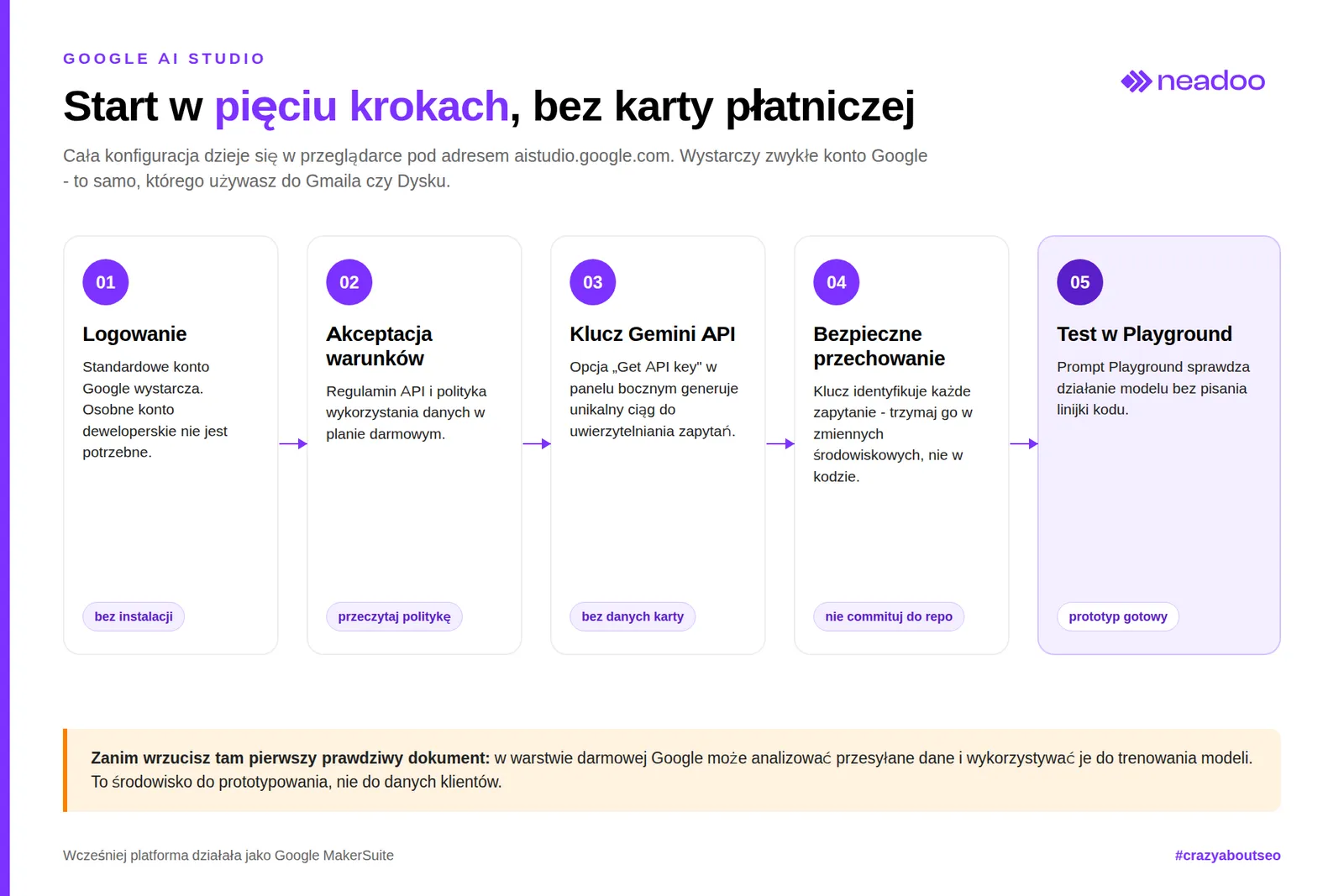
Getting started requires only a Google account - logging in and generating an API key are free and do not require credit card details, unlike many AI platforms that ask for billing information right upon registration.
The platform runs entirely in the browser at aistudio.google.com. It previously operated as Google MakerSuite; after rebranding and integrating with Gemini models, it adopted its current name, retaining the philosophy of rapid prompt prototyping without writing code from scratch.
Practical steps for configuring and testing Gemini models:
- Sign in with a Google account - a standard account (the same one used for Gmail or Drive) is sufficient; a separate developer account is not required.
- Accept terms of service - on the first visit, the system asks you to accept the API terms and the data usage policy for the free tier.
- Generate an API key - the "Get API key" / "Create API key" option in the side panel generates a unique string for authenticating requests.
- Copy and store the key - the key must be saved in a secure location (e.g., in application environment variables), as it identifies every request sent to the model.
- Test in the Gemini API test interface - the Prompt Playground allows you to check model performance without writing code.
The generated key can be connected to your own application, script, or external integration - within the limits of the free tier.
Let's check your website's potential
Share your website and email - we'll get back to you with a real analysis, no strings attached.
Prompting Modes and Practical Multimedia Support
AI Studio enables flexible experimentation through three prompt-creation modes and native support for audio, video, and image files. The choice of mode depends on the stage of work: rapid concept testing, building patterns from examples, and establishing persistent session context require different settings in the Prompt Playground.
Freeform Prompt and Generation Parameters (Temperature, Safety Settings)
A Freeform prompt is an open text field: a single query and model response are modified in real time, allowing you to observe how parameters affect the output. Temperature controls the randomness of word choice - a value close to zero yields predictable, repeatable responses, while a value close to the maximum increases creativity. Top-k limits the selection of the next token to a specified number of the most probable candidates. Top-p (nucleus sampling) narrows the pool to tokens whose cumulative probability does not exceed a set threshold. Low temperature combined with low top-k delivers deterministic responses, useful for classification or generating structured outputs. The Freeform panel also includes Safety Settings - content filters for categories such as hate speech, adult content, or violence, which can be relaxed or tightened independently, making them valuable when testing prompts for sensitive industries.
Structured Prompt and Learning from Examples (Few-Shot Learning)
A Structured prompt replaces the single text field with a table of inputs and outputs, where the developer provides several pairs of sample queries and expected responses. This implements few-shot prompting: the model learns the formatting pattern, tone, and response structure from demonstrations rather than from descriptions of rules in lengthy instructions. This mode works well for tasks with a repeatable pattern.
Advanced Developer Features and Code Export to External Applications
Prompts designed in the graphical interface can be immediately exported as ready-to-use code in Python, JavaScript (Node.js), or cURL - complete with configurations for features such as context caching and function calling. AI Studio generates a complete code snippet in the appropriate Gemini API SDK, sparing the developer from manually retyping prompt configurations, generation parameters, or system instructions into their own application.
The developer panel provides several key mechanisms:
- Function calling - the Gemini model analyzes the user query and determines which developer-defined external function to call (e.g., checking inventory status, retrieving exchange rates, writing to a database). It returns structured call parameters instead of plain text.
- Context caching - long, repeatable context fragments (documentation, system instructions, large reference datasets) are saved in the cache on the API side. This reduces the number of tokens processed with each query and shortens response times.
- Structured output generation (JSON) - enforcing responses in a specific JSON schema eliminates the need to parse freeform text and simplifies integration with backend systems.
- Chat-based coding assistance - a built-in conversational assistant helps write and debug code snippets integrating with the Gemini API.
- Native code editor - a side panel lets you preview and modify the generated code without leaving the browser.
- Exporting prototypes as running code - with a single click, prompt configurations, generation parameters, and few-shot examples turn into a complete script ready to run using the previously generated API key.
The practical value of this toolset lies in shortening the path from concept to deployment: a prototype tested in the Prompt Playground makes its way into the application repository as a functional module, eliminating the step of manually translating prompt logic into API calls.
Integrating Google AI Studio with the Modern Agent Ecosystem
The API key generated in Google AI Studio works directly with the most popular frameworks for building multi-agent AI systems. It serves as a bridge between a prototype and a production agent architecture: the same character string authenticates requests to the Gemini API in external code, without requiring additional configuration in Google Cloud Platform.
Supported libraries include LangChain and LangGraph - which organize agent logic into flow graphs and decision chains. CrewAI coordinates multiple collaborating agents with distinct roles. LlamaIndex indexes and retrieves external data in RAG architectures. The Vercel AI SDK simplifies deploying Gemini models in web applications. All these integrations use a single API key, eliminating duplicate authentication setups between testing and production environments.
A separate form of integration is the Google Drive connection: it allows you to reference cloud documents, spreadsheets, and multimedia files as direct data sources for prompts without manually uploading them to AI Studio - crucial in agent pipelines where the model must access up-to-date reference documents stored outside the application.
Single-key authentication, compatibility with LangChain, LangGraph, CrewAI, LlamaIndex, and the Vercel AI SDK, alongside access to Google Drive files, make Google AI Studio an entry point to the broader generative AI ecosystem. A prototype transitions directly into an advanced agent system capable of handling multiple models, data sources, and decision steps simultaneously.
Fine-tuning feature status: how do you actually make your own AI model?
Google has phased out traditional model fine-tuning from AI Studio and migrated it to the Gemini Enterprise Agent Platform. However, custom model behaviors can still be effectively defined using system instructions and a knowledge base - without training new weights.
Fine-tuning in its original sense means training an existing network on a custom dataset to precisely tailor its behavior to a specific industry task (e.g., classifying support tickets using company jargon). It requires updating the model's weights based on pairs of training examples - technically a different process from prompting or few-shot learning.
Until the retirement of the Gemini 1.5 Flash-001 model, this feature was available directly within the Gemini API and AI Studio. Currently, no active model provided through the Gemini API or AI Studio supports fine-tuning. Fine-tuning Gemini models now operates within the Gemini Enterprise Agent Platform, Google's product tier for enterprise deployments that encompasses dataset preparation, hyperparameter tuning, and model validation - outside the public AI Studio interface.
So how do you make your own AI model without traditional fine-tuning? The answer lies in three mechanisms already available in AI Studio:
- System context (system instructions) - a persistent definition of the model's role, tone, and constraints that remains active throughout the entire session. In many use cases, this eliminates the need to train new weights.
- Few-shot prompting via the Structured prompt section - teaches the model response patterns using input and output examples.
- Retrieval-augmented generation (RAG), built using tools like LlamaIndex - the model queries an external knowledge base represented as distributional vectors (embeddings). Each document chunk is converted into a multidimensional numerical vector, and semantic search compares the distances between these vectors. This way, the model "knows" company data without modifying its internal parameters.
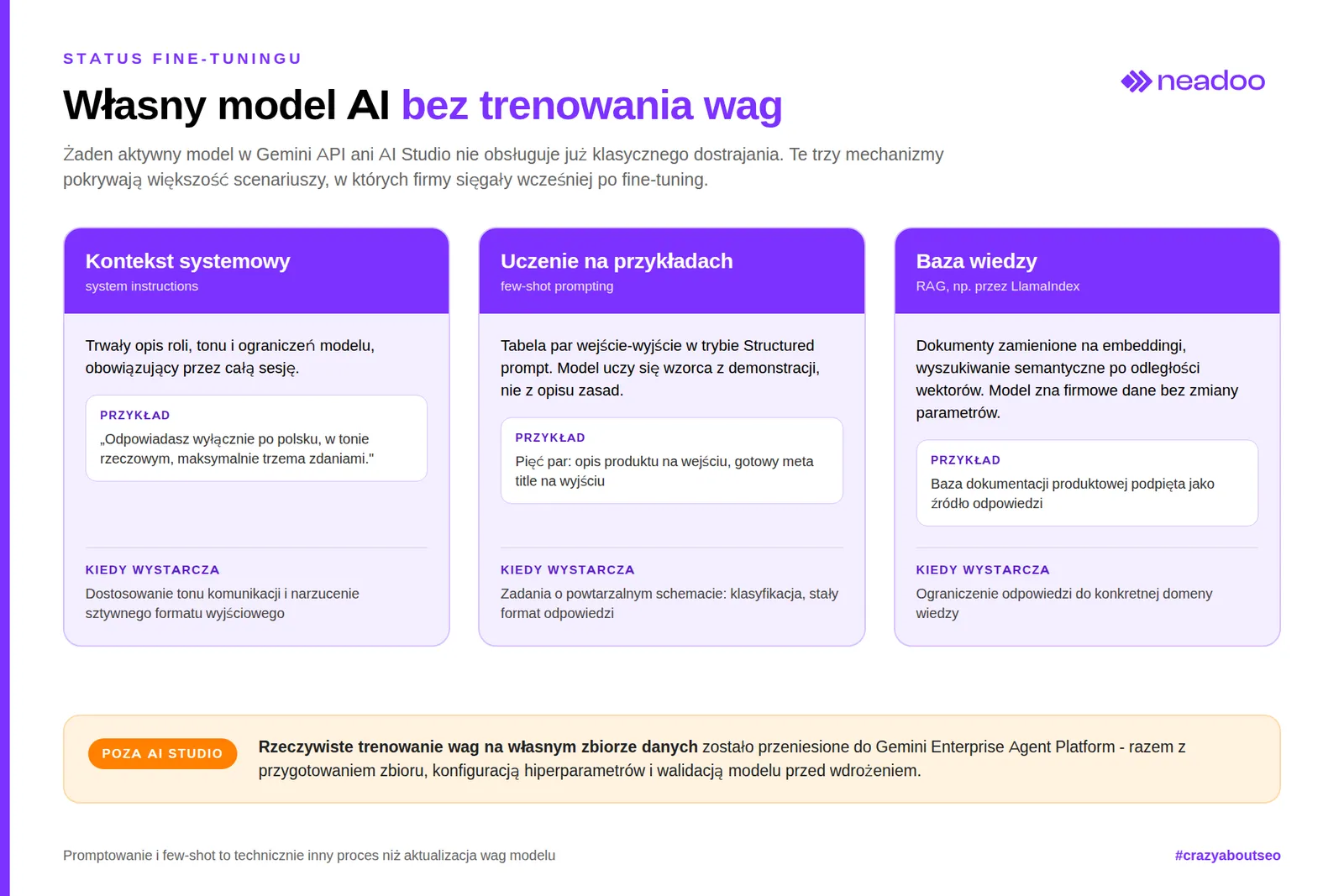
This combination covers most scenarios where businesses previously sought traditional fine-tuning: tailoring the communication tone, restricting answers to a specific knowledge domain, or enforcing a strict output format.
Actual model weight training on a dedicated dataset remains reserved for organizations using the Gemini Enterprise Agent Platform. That platform provides tools for managing training data and evaluating fine-tuned model quality prior to production deployment.
Pricing, free tier limits, and data privacy
Google AI Studio is free: access to the interface and the Gemini API key requires no payment. However, the real cost of the free tier comes down to two limitations - low request limits and the lack of full data privacy. Google reviewers may analyze submitted data and use it to train models, which rules out working with confidential, medical, financial, or GDPR-regulated data unless your company has signed a separate data processing agreement with Google.
The question of "Google AI Studio pricing" has no single numeric answer. In the free tier, the cost is zero, but the real "cost" is throughput. The table below shows estimated values for the free tier; exact figures vary between model versions and are updated in the official Gemini API rate limit documentation.
| Model Type | Requests Per Minute (RPM) | Additional Limits |
|---|---|---|
| Gemini Flash / Flash-Lite | approx. 10-15 RPM | requests per day (RPD) and tokens per minute (TPM) limits |
| Gemini Pro | approx. 2-5 RPM | lower daily request limit than Flash |
Paid plans billed via Google Cloud offer significantly higher RPM, RPD, and TPM limits that increase with the billing tier. The key difference: customer data in the paid API is not used to train Google models.
The free tier limits have direct production consequences. At 10-15 RPM for the Flash model, a content generation pipeline operating at a larger scale - such as SEO automation with bulk generation of descriptions, meta tags, or keyword analysis - quickly burns through available throughput and forces a switch to paid billing. Organizations working with client data or content protected by trade secrets should treat the free AI Studio tier exclusively as a prototyping environment, never for processing real business data. In our practice, this is the most common mistake made by teams starting AI projects - treating the RPM limit as a problem for later, rather than as a parameter that must be factored in alongside the budget before anyone writes the first production prompt.
Choosing between the free and paid tier depends on two factors: the expected number of requests per unit of time and the nature of the processed data. A test project with public, non-confidential data can run entirely within the free limit. A production deployment handling customer data requires migrating to paid billing with a guarantee that data will not be used to train models.
Google AI Studio vs Gemini Enterprise Agent Platform - When to Move to a Production Model?
Before moving on: if you are looking for "Vertex AI" here, you will no longer find that name in the Google Cloud console. On April 22, 2026, Google rebranded Vertex AI to Gemini Enterprise Agent Platform - this is not just a sign change, but a reorganization in which the agent (not the model) has become the top-level object in the platform architecture. For existing customers, the underlying services continue to operate without a forced migration - the name and console layout are changing, not the infrastructure itself.
Google AI Studio remains a prototyping tool. Even after selecting paid billing, the interface itself does not offer formal SLAs, dedicated infrastructure, or a full suite of regulatory compliance certifications. Once a project moves beyond the testing phase and requires predictable response times, guaranteed availability, and documented GDPR compliance at the contractual level, the right step is migrating to Gemini Enterprise Agent Platform.
Gemini Enterprise Agent Platform is the production layer of Google generative AI - designed for scale and contractual accountability that the lightweight, inherently free AI Studio does not provide. The difference is not about access to the Gemini models themselves - the same families are available in both environments, and recently also Claude models from Anthropic via Model Garden. It comes down to inference terms: the platform offers dedicated throughput quotas, regional data processing, control over data residency, and a formal SLA covering service availability. This is critical for companies that must demonstrate compliance with personal data protection regulations before an audit or an enterprise client.
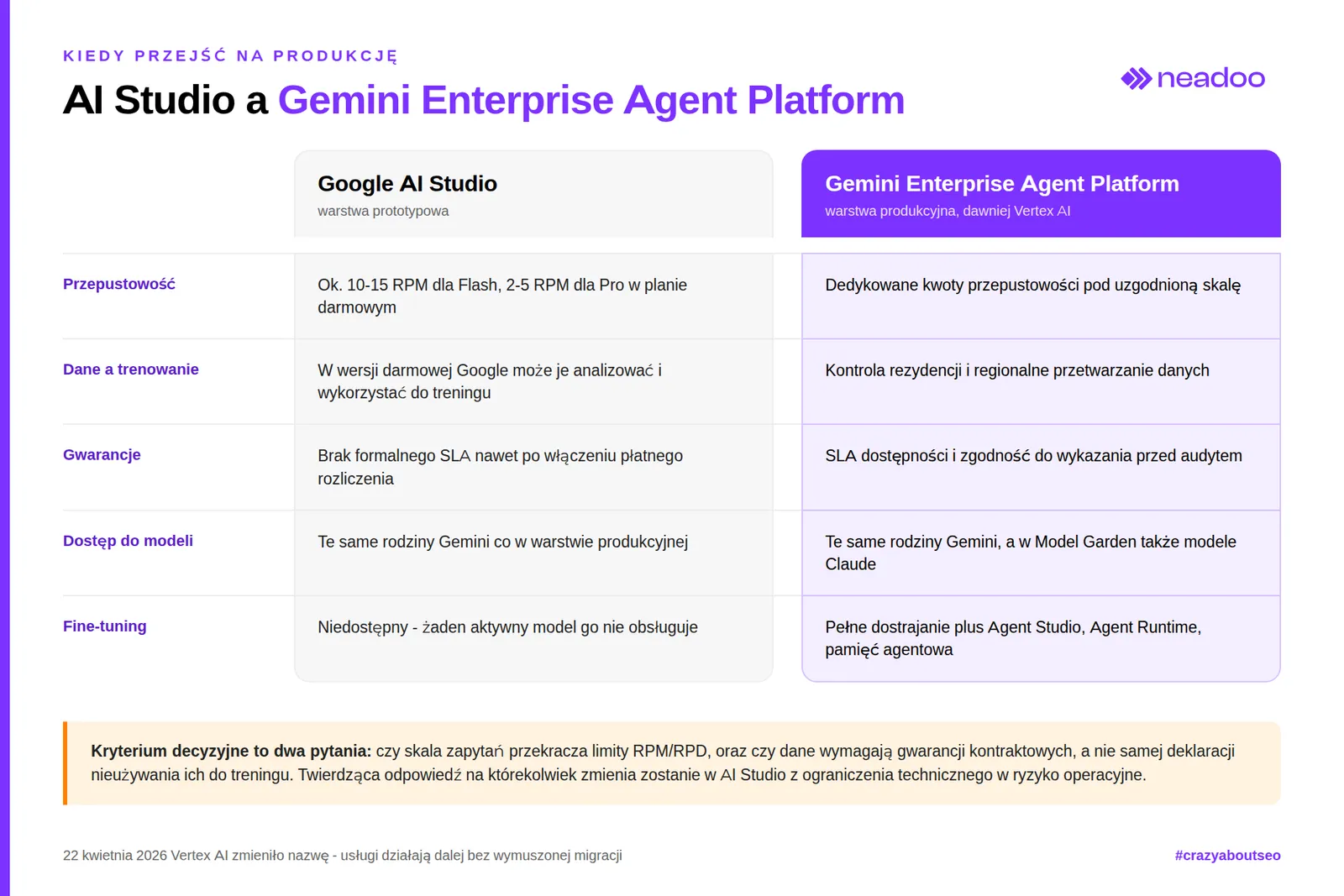
The practical decision criterion comes down to two questions: does the request volume exceed the RPM/RPD limits of the free and entry-level paid access, and does the processed data require contractual guarantees rather than just a policy declaration of not using it for model training? An affirmative answer to either turns keeping the production process in AI Studio from a technical limitation into an operational risk.
For scenarios requiring an even higher level of autonomy - complex agents orchestrating multiple models, data sources, and decision steps - Google recommends migrating to Gemini Enterprise Agent Platform, where true model fine-tuning is available (no longer offered in the public AI Studio), along with modules such as Agent Studio, Agent Runtime, and managed agent memory. This path - from a prototype in AI Studio, through production inference, to fully fine-tuned agents in Gemini Enterprise Agent Platform - matches the natural lifecycle of an LLM-based project, including projects related to AI SEO, where content scale and client data sensitivity quickly exceed the capabilities of a free sandbox environment.
FAQ
Is Google AI Studio free?
Yes, access to the interface and the Gemini API key is free, without requiring credit card details. The limitations of the free tier are low request limits (RPM/RPD) and the lack of a guarantee that data will not be used by Google to train models.
How do I generate an API key in Google AI Studio?
Simply log in to AI Studio with your Google account and use the option to generate a Gemini API key - without providing payment details. The key is used to authenticate requests when integrating with Gemini models.
Is data entered into Google AI Studio secure?
In the free version, data may be analyzed by Google and used to train models, which is why confidential, medical, financial, or GDPR-governed information should not be processed there. Full privacy guarantees are provided only by paid billing or by migrating to Gemini Enterprise Agent Platform (formerly Vertex AI).