
Gamma App - What It Is and How to Create Presentations with AI
As of September 15, 2026. Pricing and credit limits in AI tools change several times a year, so check the current pricing on gamma.app before purchasing. We are neither a partner nor a representative of Gamma; we are writing from the perspective of an agency that tests tools of this type on our own materials.
Gamma App is a web application that generates presentations, documents, webpages, social media posts, or single graphics from a prompt, a Word file, or a PDF. Instead of rigid 16:9 slides, it uses responsive cards that adapt to the recipient's screen, and the brief's language and the final material's language are set independently of each other.
Below, we describe how the tool works, how much generating a single presentation actually costs, where its limitations lie, and in which use cases we believe it holds up - and in which it does not.
What Gamma App Is and Why It Moves Away from Traditional 16:9 Slides
Classic office suites lock content into widescreen slides, which degrades readability on smartphones. Gamma solves this differently: instead of a static grid, it uses a layout of fluid cards that adjust their height to the volume of text, charts, or multimedia. A presentation can be generated from a short prompt, imported from a docx or Markdown file, or built from scratch.
Content generation and translation work in over 60 languages, and the interface can be switched to Polish in the account settings (Gamma Help Center). By default, the panel starts in English, which is how it appears in the screenshots below.
The input and output languages are separated here, and you can take advantage of that. In our test, we wanted an English deck prepared on the basis of a Polish brand, so we wrote the prompt in Polish and left the selector set to English (US). Gamma showed the outline in Polish - that is, in the prompt's language - while the finished presentation came out entirely in English, in accordance with the selector. This means you can formulate your brief freely in Polish, with all the nuances you do not feel like translating, and get the output material in the target market's language, without a separate translation step and without paying extra for it.
This also works the other way around, so if you want a Polish presentation, set Polish in the selector. Writing the prompt in Polish does not guarantee this on its own, and the outline stage can be misleading because it looks exactly as if it has already decided the output language.
In agency practice, this saves an entire step. When preparing materials for foreign markets where we handle international SEO anyway, the brief is created in Polish, and the client deck comes out directly in their language.
A Gamma card works well as a reading document: a proposal sent via a link, onboarding documentation, a report. It only partially translates into a classic slide. If the material must strictly end up on a projector in 16:9 and be edited further in PowerPoint, part of the layout will need to be fixed manually after export.
Gamma 3.0, Agent, and API - What Has Changed Since 2025
In September 2025, Gamma released version 3.0 and stopped positioning itself merely as a slide generator. Today, it markets itself as a platform for presentations, documents, webpages, social content, and standalone graphics. The panel marks this last format as new, and it is not yet available in the API documentation. Three changes carry practical significance.
Gamma Agent is a conversational agent built into the editor. Instead of clicking card by card, you issue commands in natural language: "change the tone to more formal," "add a competitor analysis section," "restyle to a dark theme." The Agent applies the change across the entire document at once. It can also browse the web and add content with source citations, accept screenshots or handwritten notes as input, and critique a finished presentation on demand.
Gamma Imagine, the built-in generator for images, charts, and infographics, launched in March 2026. Previously, the tool relied mainly on stock libraries.
The Gamma API allows you to generate materials programmatically. Access to the API key is available on the Pro, Ultra, Teams, and Business plans. The interface works asynchronously: you send an inputText, set the format (presentation, document, webpage, or social), numCards ranging from 1 to 75, themeId, as well as tone and audience parameters, and then poll for the completed result (Gamma API documentation).
For an agency, this is the most interesting part of the entire tool. The API opens up scenarios that cannot be handled manually: automated monthly reports for an entire client portfolio, generating proposals from CRM data, and producing landing pages from a spreadsheet. For simpler use cases, there are connectors for ChatGPT and Claude that work on all plans and do not require an API key.
How to make a presentation in Gamma AI step by step
All you need to do is import a Word or PDF file or enter a structured prompt, approve the outline, and select a visual theme. The vendor states that generating a complete presentation from a single prompt takes 30 to 60 seconds. This is the vendor's own measurement, not an independent benchmark, and it depends on the number of cards and the quality of the selected graphics model.
Importing source documents (Word, PDF, Google Docs) and notes
You start by uploading the material so you don't have to retype anything manually. Gamma accepts four types of input:
- Raw text or notes. You paste meeting notes, an audio transcript, or a talk outline, and the tool splits them into segments.
- Word (.docx) and PDF files. Gamma reads the structure of headings and paragraphs, so there is no need to copy fragments piece by piece.
- Google Docs. You can transfer a finished specification directly from Google Drive into the editor.
- Ready-made outline. The section hierarchy remains intact, and each section turns into a separate card.
Crafting a business prompt with role, audience, and KPIs
The quality of the output depends on how detailed the brief is. Instead of generic catchphrases, provide operational context:
- Sender role. Specify whether the model speaks as a Chief Marketing Officer, a financial analyst, or a board advisor.
- Target audience. Angel investors, development team, sales directors. This dictates the vocabulary and depth of reasoning.
- Hard metrics. Enter the numbers that should shape the conclusions. When ordering a pitch deck on an AI SEO strategy and visibility in next-generation search engines, include the planned budget and targeted conversion metrics.
- Tone. Persuasive, formal, minimalist, or educational.
In our opinion, this is where the value of such tools is most often lost. A prompt like "make a presentation about our company" results in material that looks like every other generated deck. The difference is made by the context provided at the input stage, not the number of tweaks made to the output.
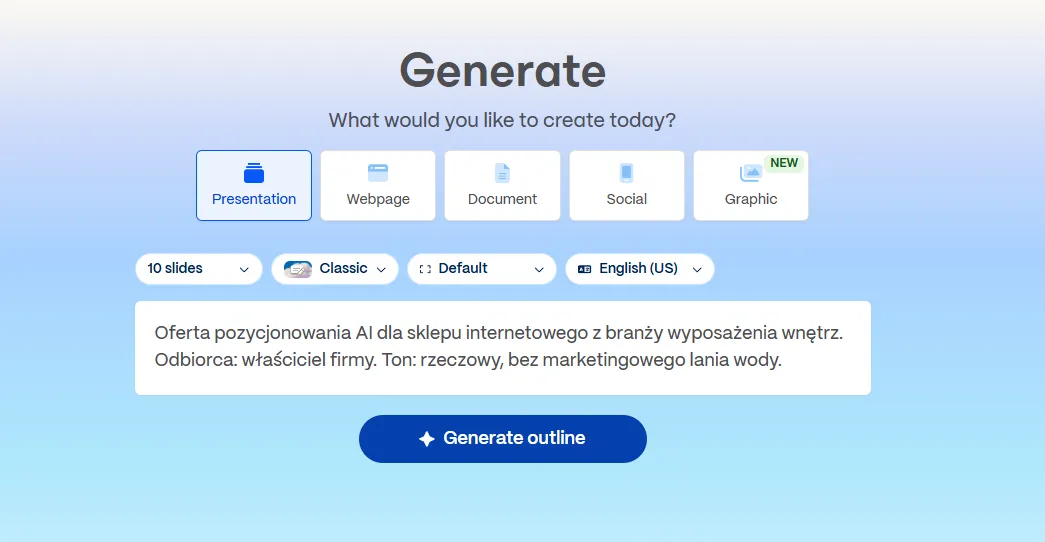
The home screen. The format is selected before the prompt, and the number of cards here is a hard setting, not a suggestion. In the free plan, the maximum is 10 cards per generation.
Choosing a template and generating the card deck
What remains is verifying the structure and visual styling:
- Approve the outline. Gamma displays an editable list of proposed cards with titles and bullet points. At this stage, you can remove, add, and rearrange topics. It is worth spending a minute here, because tweaking the outline is cheaper than reworking a finished deck - literally, in terms of credits as well.
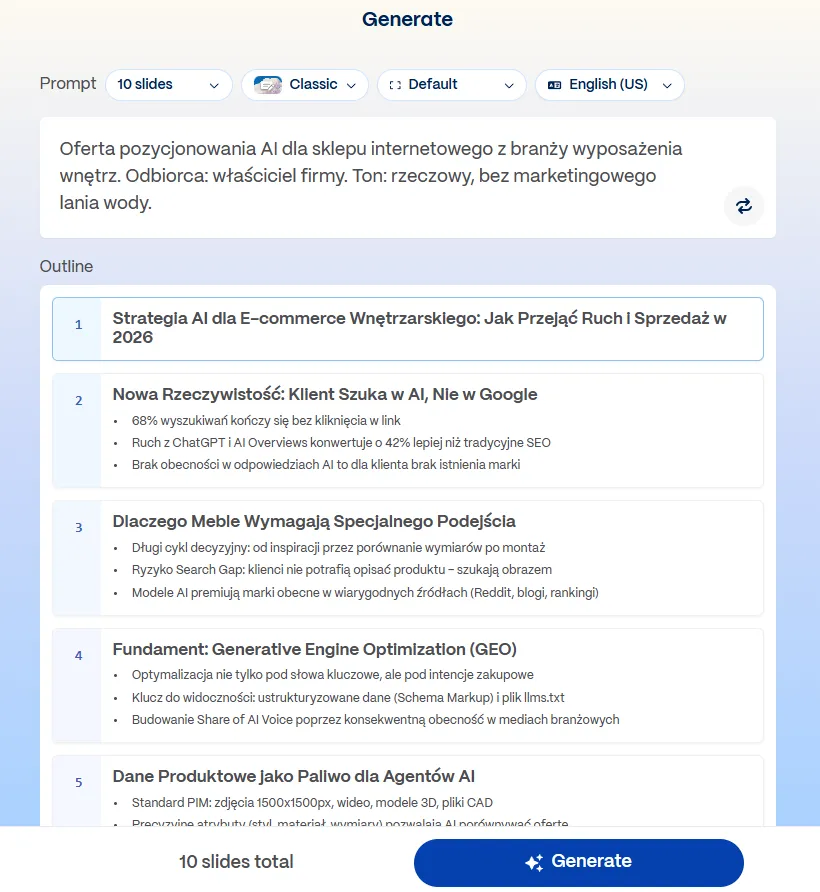
The outline before generation. This is the last moment when changes cost nothing. Pay attention to the bullet points on cards two and three; we return to them in the section on limitations.
- Set the styling. You choose the text volume per card in four steps ranging from Minimal to Extensive, along with the theme and image source. The latter has a direct impact on the bill, as the number of images per card is multiplied by their credit cost.
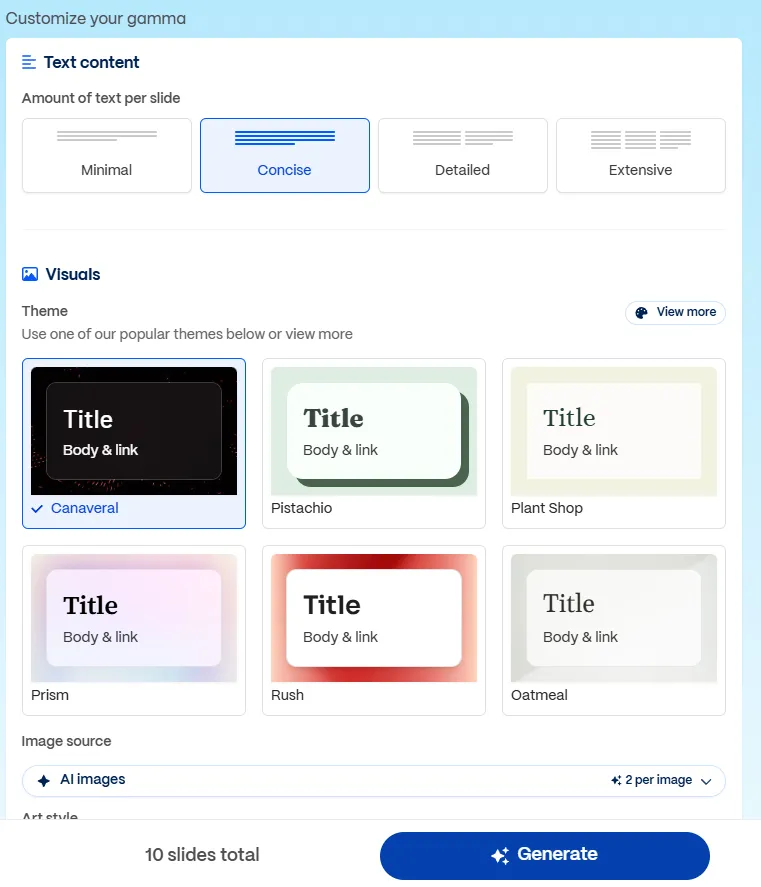
The settings screen before generation. The "Image source" field with the number of images per card is the most expensive toggle here.
- Generate. The engine builds the content layout, selects icons, and generates comparison charts as well as infographics.
- Done. The presentation is fully editable, immediately ready for presenting or further adjustments.
Let's check your website's potential
Share your website and email - we'll get back to you with a real analysis, no strings attached.
Editing cards, interactivity, and brand identity alignment
Editing is done either via text commands or manually. The model understands natural language instructions: it shortens paragraphs, adjusts the tone, and splits text blocks into columns. The template automatically adjusts proportions whenever a new component is added. With a single click, you can improve the style, grammar, translate a passage, or expand and condense it.
Graphics come from the built-in generator as well as Unsplash and Giphy libraries. The theme of the entire presentation can be changed with one click, without disrupting the text layout. Brand guidelines are implemented through the Brand Kit module, which supports custom fonts, HEX codes, and automatic logo placement.
The embed and iFrame support is also worth mentioning separately. Within the cards, you can embed functional widgets: Figma prototypes, Miro boards, Typeform and Google Forms surveys, Airtable sheets, and videos from YouTube, Vimeo, and Loom. The audience can analyze data, fill out a survey, and test a mock-up right within the presentation window. This functionality disappears when exporting to PDF or PPTX, so it only makes sense when sharing via a link.
Export Formats, Transitioning to Google Slides, and Engagement Analytics
Gamma exports projects to PDF, PPTX, PNG, and Google Slides, and publishes content directly to LinkedIn. Sharing a web link provides access to analytics on views and reading time for individual cards, but full data is part of the Pro plan.
When it comes to Google Slides, it is worth clarifying information circulating in most Polish guides. Direct export does exist. We checked this in the panel: in the export window, "Export to Google Slides" stands right next to "Export to PDF" and "Export to PowerPoint", without any workaround. This matches the pricing list, which includes Google Slides among the formats available even on the Free plan, and the changelog, where the feature was announced in February 2025 (Gamma changelog). However, the help center article that still describes only the route via PPTX is outdated (Gamma Help Center), and it is the source of this repeated mistake.
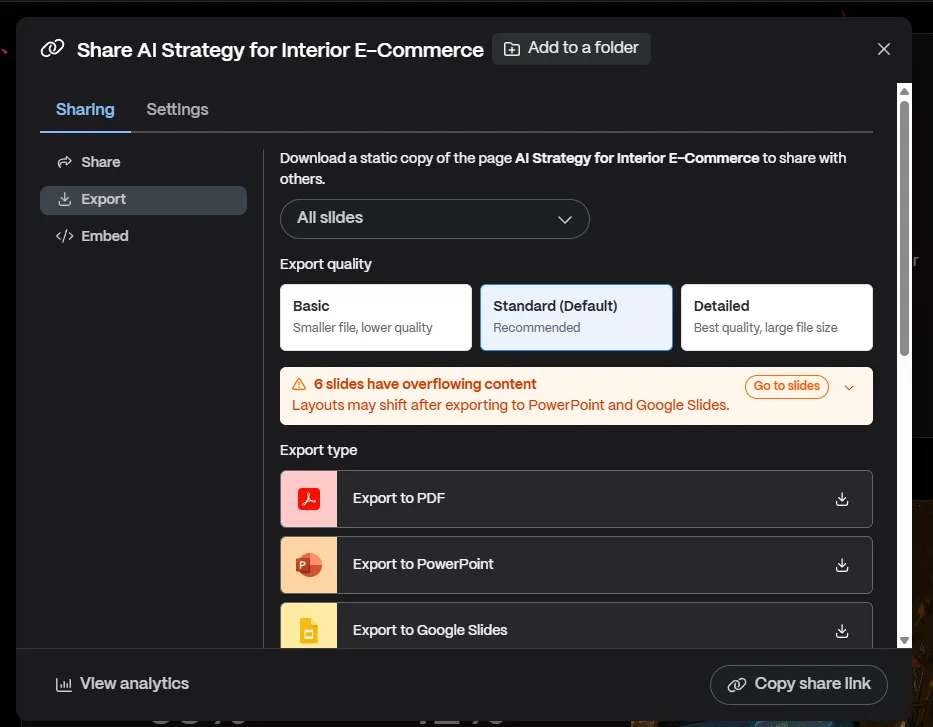
The export window. Google Slides is on the list as a separate option. Above it is a warning that we return to in the limitations section: the developer itself points out that the layout may shift.
Export to PDF, PPTX, and Google Slides
- Export to PPTX. Preserves editable text boxes and graphics. On the free plan, PDF and PPTX files receive a "Made by Gamma" badge, which disappears after upgrading to a paid plan.
- Export to PDF. Generates a static document optimized for printing and sending proposals. It reproduces the design more faithfully than exporting to PowerPoint.
- Export to PNG. Saves individual cards as image files, ready to publish on social media.
- Export to Google Slides. A separate option in the export window, available even on the free plan. If it ever disappears, the workaround also works: download the PPTX, upload it to Google Drive, and open it in Google Slides. It also works in the other direction via embed: you can embed a Google Slides presentation into a Gamma card using the
/slideor/drivecommand. - Three export quality levels. Basic, Standard, and Detailed. Standard is the default and recommended by the developer, while Detailed provides the best quality at the expense of file size. For a proposal sent via email, this makes a noticeable difference in attachment weight.
Web Sharing and Built-in Audience Behavior Analytics
Sending a link eliminates email attachment limits and enables engagement tracking:
- Link access. The recipient views the content in a responsive browser player, without installation or creating an account.
- Views and unique visits. The dashboard reports the number of views, distinguishing new readers from returning ones.
- Time spent on an individual card. The system measures how many seconds the recipient spent on a specific screen. You can immediately see which sections of the proposal grabbed attention and which were skipped. The developer lists detailed analytics as part of the Pro plan, so do not expect this level of data on Free and Plus.
- Permissions. The creator determines the document status: public indexing, password protection, or access restricted to invited email addresses.
If we had to point to a single reason why a sales rep should send a proposal via a link instead of a PDF, this would be it. Knowing that a client returned to the pricing card three times is worth much more than the simple fact that they opened an attachment.
Limitations Worth Knowing Before Implementation
Gamma is not a universal replacement for PowerPoint.
Exporting to PPTX and Google Slides can be lossy, and not just occasionally. Gamma uses scrollable cards rather than 16:9 slides, so content that is longer than a slide has nowhere to go. The developer warns about this right inside the export window. In our ten-card presentation, generated with default settings and untouched by hand, the alert flagged six slides with overflowing content and warned of layout shifts after exporting to PowerPoint and Google Slides. Six out of ten, on material that no one had expanded.
On top of that come custom fonts, gradients, and all the interactive elements, which simply disappear in a static format. If the deck is ultimately going to be edited by a team in PowerPoint, factor in time for fixes and treat the export as a starting point, not as a file ready to send.
Free credits do not renew. The initial 400 credits are a one-time pool, not a monthly allowance. The Free plan additionally has a limit of 10 cards per single prompt, so longer material has to be assembled in pieces.
Analytics and the API are behind the Pro plan paywall. The two arguments that most often make the case for Gamma - measuring viewer engagement and automation via API - only start at $25 per seat per month, or $18 with an annual commitment.
Bulk translation is a paid feature. On the Free and Plus plans, you translate individual cards. Translating an entire document at once is available starting from the Pro plan (Gamma Help Center).
The template effect. When generating from a generic prompt, materials tend to look similar to each other. What makes the difference is a specific prompt and an implemented Brand Kit, not the tool itself.
The model makes up numbers that nobody calculated. We consider this limitation the most serious one, and the only one that could cost you money rather than just time.
It is visible as early as the outline stage, in the screenshot above. We did not include a single number in the prompt about the SEO proposal, yet Gamma independently added to card two that "68% of searches end without a click on a link" and that traffic from ChatGPT and AI Overviews "converts 42% better than traditional SEO." In the finished presentation, there was much more of this: user-generated content supposedly converted four times better than studio photos, a chatbot was expected to handle 70% of repetitive questions, and a separate chart slide showed conversion rate and average order value growth across conservative and optimistic scenarios. None of these values have a cited source, because none come from actual measurement.
The most dangerous part, however, proved to be a slide that no one asked for. The model priced the implementation at 30,000-60,000 PLN and added on its own that the return on investment occurs in 4-9 months, with the first results visible after 21 days. The prompt contained neither price ranges nor timelines. If such a slide had gone out to a client in a proposal, it would have been a quote that no one at the company had approved, inside a document bearing the company logo.
The conclusion is simple and applies to any presentation generator, not just Gamma. Every number, date, and dollar figure in the finished material must be verified against the source or removed before sending. The risk here is greater than with a text editor, because a number set in a large font, on a contrasting background, next to an icon, looks far more verified than the very same sentence in a paragraph.
We are not asking you to take our word for it. The complete presentation from our test is available at the link, in the exact state it came out of the generator, without a single manual edit. The "Investment & Return" slide with the quote and all the other numbers are right where the model placed them. Do not quote any of them, as they do not come from measurement. Along the way, you can also see what the final outcome of the setup described above looks like: a Polish brief, an English presentation.
Tool Comparison: Gamma App vs Canva vs Plus AI vs Beautiful.ai
Gamma wins wherever the path from prompt to finished material, responsiveness on mobile devices, and viewer analytics matter most. It works well for sales proposals, pitch decks, and documentation shared via link. Canva requires more manual work on layout, but offers fuller control over the graphics. Plus AI is the choice for teams that do not want to leave Google Slides and PowerPoint, as it operates as an add-on for those tools. Beautiful.ai enforces more rigid design rules and does not have a Polish interface.
One thing is worth noting, as it dates most comparisons circulating online. Tome, still listed in many comparisons as a competitor to Gamma, shut down its presentation product on April 30, 2025, and is no longer a viable option. The team is now working on a different product, and the brand itself was acquired by AngelList.
| Comparison Area | Gamma App | Canva | Plus AI | Beautiful.ai |
|---|---|---|---|---|
| Layout and format | Fluid, responsive cards adapting to screen width | 16:9 slides and custom dimensions with a vector grid | Native Google Slides and PowerPoint slides | 16:9 format with Smart Slide rules |
| AI Generation and Assistance | Gamma Agent: full document generation and editing via chat, research with citations, Gamma Imagine image generator | Magic Studio: copyediting, graphic creation, format conversion | Prompt-to-Presentation running inside company templates | Automatic proportion adjustments during manual data entry |
| Language support | Polish interface can be enabled in settings, generation and translation in over 60 languages | Full Polish interface, built-in project translation | English interface | English-only interface |
| Interactivity | Native iFrame embeds: Figma, Miro, Typeform, Airtable, Loom | Stock library, limited live app embedding | Limited to Google Slides and PowerPoint capabilities | Charts linked to spreadsheets, no iFrame embeds |
| Export and integration | PDF, PPTX, PNG, Google Slides, LinkedIn publishing, web link with analytics, API starting from the Pro plan | All popular graphic and document formats | Works directly inside Google and Microsoft files | PDF, PPTX, web link |
| Free plan | Yes, 400 one-time credits, up to 10 cards per prompt | Yes, with a limited library | No, free trial only | No, free trial only |
Corporate Data Security and Privacy
Gamma achieved SOC 2 Type II certification in late 2025. The audit report is available upon request, under an NDA. Data in transit is secured with SSL/TLS protocols, and the vendor meets GDPR requirements by signing data processing agreements (Gamma DPA).
The question of model training needs clarification, as it varies across plans and is often presented too optimistically in reviews. Workspaces on Team and Business plans are automatically and permanently excluded from AI training, and this setting cannot be changed. For content in business plans, there is an additional contractual guarantee that it will not be fed into public models. In the free plan and individual plans, this level of protection is not the default.
Practical takeaway: if financial reports or executive materials are going into the tool, that is an argument for a team plan, not just a matter of toggling a switch in the settings.
Collaboration is secured by a permission system. Enterprise plans offer single sign-on (SAML SSO), allowing IT administrators to manage identities centrally and cut off access for former employees. At the workspace level, roles are defined ranging from admin and editor to read-only mode with file download restrictions.
Gamma App Pricing: The Credit System and Paid Plans
Gamma operates on a freemium model based on AI credits. Signing up gives you a one-time allotment of 400 credits and does not require a credit card. Paid plans renew this pool every month.
| Plan | Monthly billing | Annual billing | AI credits | Card limit per prompt | What is included |
|---|---|---|---|---|---|
| Free | $0 USD | $0 USD | 400 one-time | 10 | Import from PDF and PPTX, export to PDF, PPTX, PNG, and Google Slides |
| Plus | $12 USD | $9 USD / mo., $108 USD billed annually | 1,000 / mo. | 100 | Removal of Gamma badge, advanced image models |
| Pro | $25 USD | $18 USD / mo., $216 USD billed annually | 4,000 / mo. | 100 | API access, detailed analytics, custom branding, up to 10 custom domains |
| Ultra | $100 USD | $90 USD / mo., $1,080 USD billed annually | 20,000 / mo. | 100 | Most advanced text, image, and video models, up to 100 custom domains |
The banner above the pricing table promises savings of "up to 28%" with annual billing, and the words "up to" do all the heavy lifting here. Calculated from the amounts in the table: Pro indeed gives 28%, Plus gives 25%, and Ultra gives only 10%. On the most expensive plan, an annual commitment buys significantly less savings than the headline suggests.
Two things from the table are worth noting, as they usually get lost in comparisons. Detailed analytics for page views and reading time only start with the Pro plan, so the argument about measuring audience engagement does not apply to either the Free or Plus plans. API access sits at the same tier. For organizations, there are also separately priced Teams and Business plans offering SSO and guarantees regarding model training.
More important than the price itself is the credit mechanics, as that is what determines the real cost. The vendor states in the API documentation that a card costs between 1 and 3 credits, while an image costs between 2 and 15 credits with the standard model and between 30 and 125 credits with the ultra model. An example from the same documentation: a set of 10 cards with 5 images using the basic graphics model takes about 20-60 credits (Gamma API documentation).
The initial 400 credits are therefore enough for anywhere from seven to twenty presentations, depending on where you land within that range. With the ultra model, they run out after two or three.
Prices are listed in USD, in line with the vendor's pricing sheet. Currency exchange rates and applicable VAT need to be factored into the final bill.
Does Gamma Make Sense for Your Company?
In our opinion, Gamma pays for itself in three scenarios. For sales proposals sent via a link, because analytics reveal what the client actually read. For materials that will be viewed on mobile phones anyway. For repetitive documentation, where speed matters more than custom graphic design. In that third case, if there are dozens of such documents per month, the real savings lie in the API, not in manual clicking.
If your team lives in Google Slides and has no intention of switching, an add-on like Plus AI will make more sense. If a presentation needs to be a graphic masterpiece, Canva remains the way to go.
The way companies are discovered and evaluated by language models today is changing faster than presentation tools themselves. If you want to see how your brand performs in AI-powered search engines, talk to us about a visibility audit.
Frequently Asked Questions About Gamma App
1. Is Gamma App completely free?
No, the platform operates on a freemium model. The starter pool of 400 credits does not renew monthly. According to the API documentation, a set of 10 cards with 5 images uses about 20-60 credits, so the free tier is enough for seven to twenty projects. Regular work requires a subscription, which provides recurring credits and removes the watermark from exported materials.
2. Can Gamma App create a presentation directly from a PDF or Word file?
Yes. The tool supports importing PDF files, Word documents (.docx), and Google Docs. The model analyzes the source text structure, extracts the most important points, and transforms them into a ready-to-use card set with matching layout and visuals.
3. How do you transfer a presentation from Gamma to Google Slides?
Directly, with a single menu item. Open the presentation, click Share, go to the Export tab, and select "Export to Google Slides." This feature is available even on the free plan. Contrary to what many tutorials claim, the workaround via a PPTX file and Google Drive is not necessary, although it still works. Keep in mind that during conversion, slide layouts with overflowing content may shift, which Gamma warns about directly in the export window.
4. Are presentations from Gamma used to train AI models?
It depends on the plan. Workspaces on Team and Business plans are automatically and permanently excluded from training, and this setting cannot be changed. On the free plan and individual plans, this level of protection is not the default, so for confidential materials, you should choose a team plan.
5. What is Gamma Agent?
It is a conversational agent built into the editor, released in version 3.0 in September 2025. It takes natural language prompts and executes them across the entire document at once. It can also search for information on the web with source citations and process input from screenshots and handwritten notes.
6. Does Gamma have an API?
Yes. An API key is available on the Pro, Ultra, Teams, and Business plans. The interface asynchronously generates presentations, documents, web pages, and social media posts, handling from 1 to 75 cards per project. Connectors for ChatGPT and Claude are also available, which work on all plans and do not require an API key.
7. Does Gamma support Polish?
Yes, the interface is fully translated, and content generation and translation work in over 60 languages. On the Free and Plus plans, you translate individual cards; translating an entire presentation at once is available starting from the Pro plan.
Sources
- Gamma, pricing and plans
- What's the easiest way to export my Gamma? - Gamma Help Center
- How do I use Gamma in my preferred language? - Gamma Help Center
- Can I translate a Gamma document? - Gamma Help Center
- Gamma API Documentation
- Gamma Tech, Inc. Data Processing Addendum
- Export to Google Slides - Gamma changelog