
ChatGPT Business Profile: How It Works and How to Win AI Recommendations
Is ChatGPT already talking about your company - and is it doing so accurately? The ChatGPT business profile (officially: Businesses in ChatGPT) is a new feature from OpenAI that works similarly to a Google Business Profile. Your company profile might already exist there, even if you never created it, so the first step is to check what the model displays about you.
You manage a claimed profile in the Business Hub panel (chatgpt.com/business-hub): you update contact and company details and review analytics. The program is in beta, and according to the sources we rely on, it does not require any fees, an advertising account, or a ChatGPT Enterprise agreement. Below, we explain how to claim your profile, what information to fill in, and why the profile alone is not enough to get the model to start recommending you - it is merely the foundation for ChatGPT optimization.
What Is an Official Company Profile in ChatGPT
A company profile in ChatGPT (Businesses in ChatGPT) is a free business listing managed in the Business Hub dashboard that standardizes the official brand data shown to chat users. It does not require an Enterprise subscription or an ad account, and OpenAI charges no fees to claim or add a listing. The feature was announced on November 10, 2026, as officially launched alongside Business Hub. You can find the dashboard at chatgpt.com/business-hub or in the sidebar of the web version.
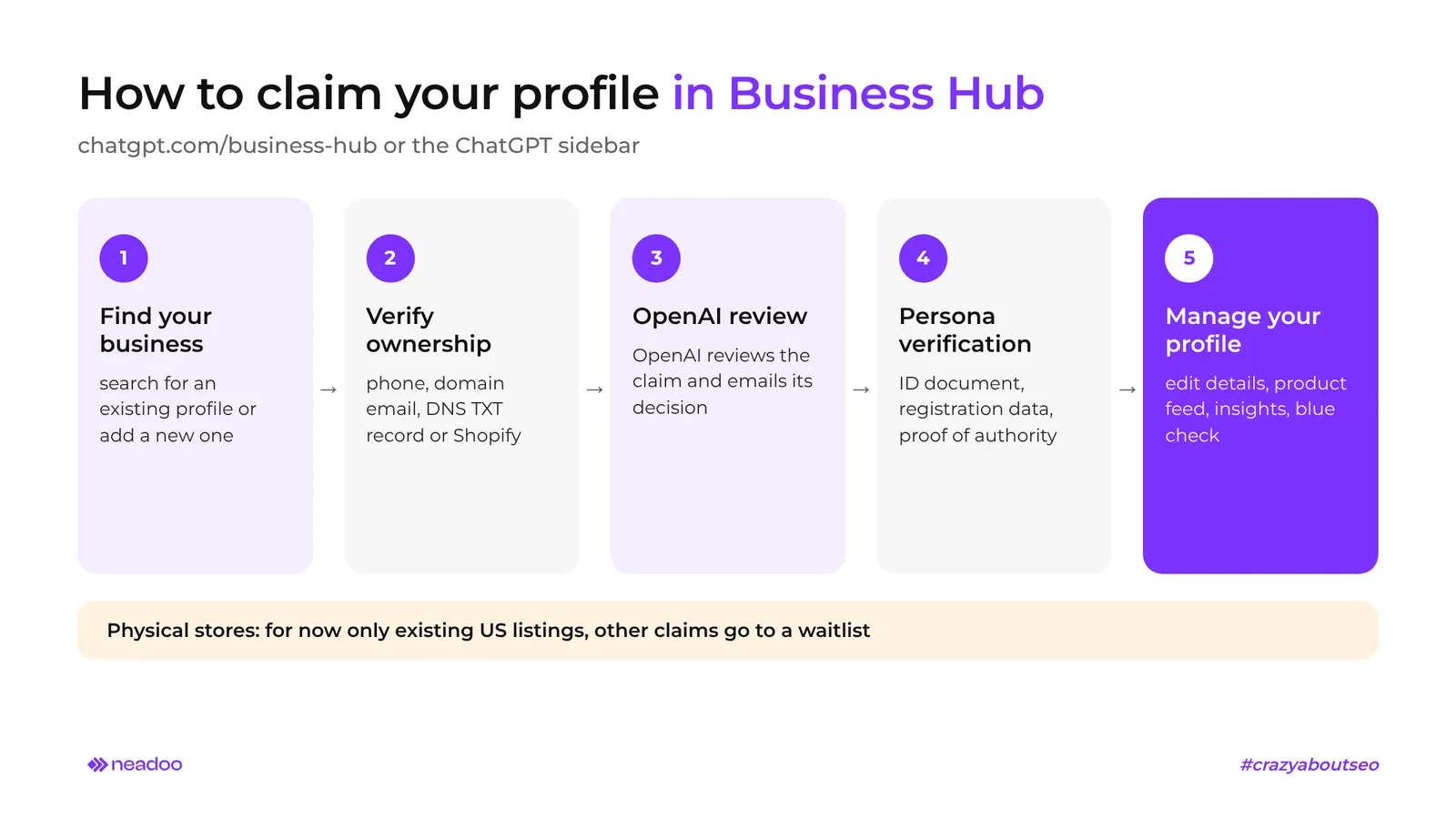
In Business Hub, you can search for an existing profile, claim it, or set it up from scratch - following verification through Persona and approval from OpenAI. Online businesses and e-commerce stores with a website can apply right away. Brick-and-mortar locations can currently only claim existing listings in the US, while applications from other countries are placed on a waitlist.
For algorithms, it serves as a structured source that facilitates entity extraction and organizes your brand's entity knowledge graph. It is the foundation for AI SEO, not a substitute for it.
What Data You Can Edit in the Business Hub Dashboard
Once the claim is approved and Persona verification is complete, as the owner or authorized representative you can edit:
- website URL,
- company description,
- product or service category,
- logo and background image (make sure to compress images before uploading),
- shipping and return policies.
You can also connect a product feed and view aggregated analytics. A blue verified profile badge appears next to the name once identity verification is approved in Persona.
Business Listing vs. Paid Plans and Ads in ChatGPT
A business listing is not the ChatGPT Business plan for teams. That product is a workplace tool for your employees; the profile is your brand's public presence in the chat interface.
ChatGPT Ads operate in a separate system: labeled sponsored boxes, a distinct registration process, and campaign tools. Paid formats do not alter organic profile data - and vice versa.
A separate feature is the Business Agent: an assistant that answers customer questions about your offerings and policies based on the data you provide. It is available to eligible e-commerce and online service businesses in the US that have a website.
ChatGPT Profile vs. Google Business Profile
The ChatGPT listing resembles a Google Business Profile only in appearance. It differs in its verification procedure, how mentions are counted, and the fact that simply claiming a profile does not directly affect your ranking in model responses. If you are familiar with the Google dashboard, you can carry over some habits, but not your expectations.
A ChatGPT business profile requires identity authentication of the representative via the Persona platform: an ID document, proof of authorization, and business registration details (such as tax ID, REGON, CEIDG, or KRS in Poland), whereas Google relies primarily on a postcard, phone call, or video.
| Parameter | ChatGPT Profile (Businesses in ChatGPT) | Google Business Profile |
|---|---|---|
| Identity verification | Persona: government ID, proof of authorization, NIP/REGON/CEIDG/KRS | Profile owner verification (method depends on the business) |
| Analytics | Aggregated data from the last 28 days: website clicks, discovery topics, mentions | Profile insights in the Google dashboard |
| Mention definition | Counted only when a response directly references the business's website (rule applies to online businesses); the brand name alone does not increase the counter | Not applicable |
| Brick-and-mortar locations in Poland | Regional restrictions, submissions are placed on a waitlist | Standard location support |
| Impact on results | No direct impact on ranking in responses | The profile directly powers local search results |
The most common trap is analytics. In Business Hub, a mention of an online business is counted only when a ChatGPT-generated response includes a direct URL link to the verified domain. The model could describe your brand across five conversations, and the counter will still show zero. The dashboard measures clicks and links, not total brand citations in AI.
Claiming and verifying a profile alone does not guarantee a higher ranking, recommendations, or sales, as the model synthesizes multiple sources autonomously. Being recommended comes down to the rest of the signals within LLM optimization.
When and How to Create a Company Profile in ChatGPT
Online stores and web-based companies can apply in Business Hub right away, but every application undergoes a review. Brick-and-mortar businesses in Poland are currently placed on a waitlist, and some non-US applications are also queued. Here is how, step by step, to set up a company profile in ChatGPT through Businesses in ChatGPT.
Who Can Apply Immediately and Who Gets Placed on the Waitlist
Any eligible entity in a region with official access to ChatGPT can initiate the process. However, the path depends on your business model:
| Business type | Path | What to prepare |
|---|---|---|
| Online store | Application and review | Domain or Shopify access, documents for Persona, product feed |
| Online services | Application and review | TXT record or domain email, documents for Persona |
| Physical location | Waitlist | Business Hub submission, documents for Persona |
Identity Verification via Persona and DNS Records
Initial domain ownership verification in Business Hub uses one of four methods:
- SMS code or a call to the business phone number,
- code sent by email to an address on your domain,
- TXT record in the DNS zone,
- connection with the Shopify admin panel.
Next, Persona requires an ID document for the representative, business registration details (tax ID, VAT, business registry entry), and proof of authorization to represent the company. This is a prerequisite for publishing changes, syncing your catalog, and unlocking data to view analytics.
Product Catalog Integration via Shopify and CSV File
Once approved, you can add a product feed in two ways: via Shopify Catalog or using a CSV file (or a static feed URL) compliant with OpenAI's technical specifications. A feed consistent with profile data organizes what the model knows about your offerings. However, it does not guarantee when or if indexing by language models will occur, or whether your business will be recommended.
Let's check your website's potential
Share your website and email - we'll get back to you with a real analysis, no strings attached.
Where ChatGPT Gets Its Knowledge About Businesses and Services
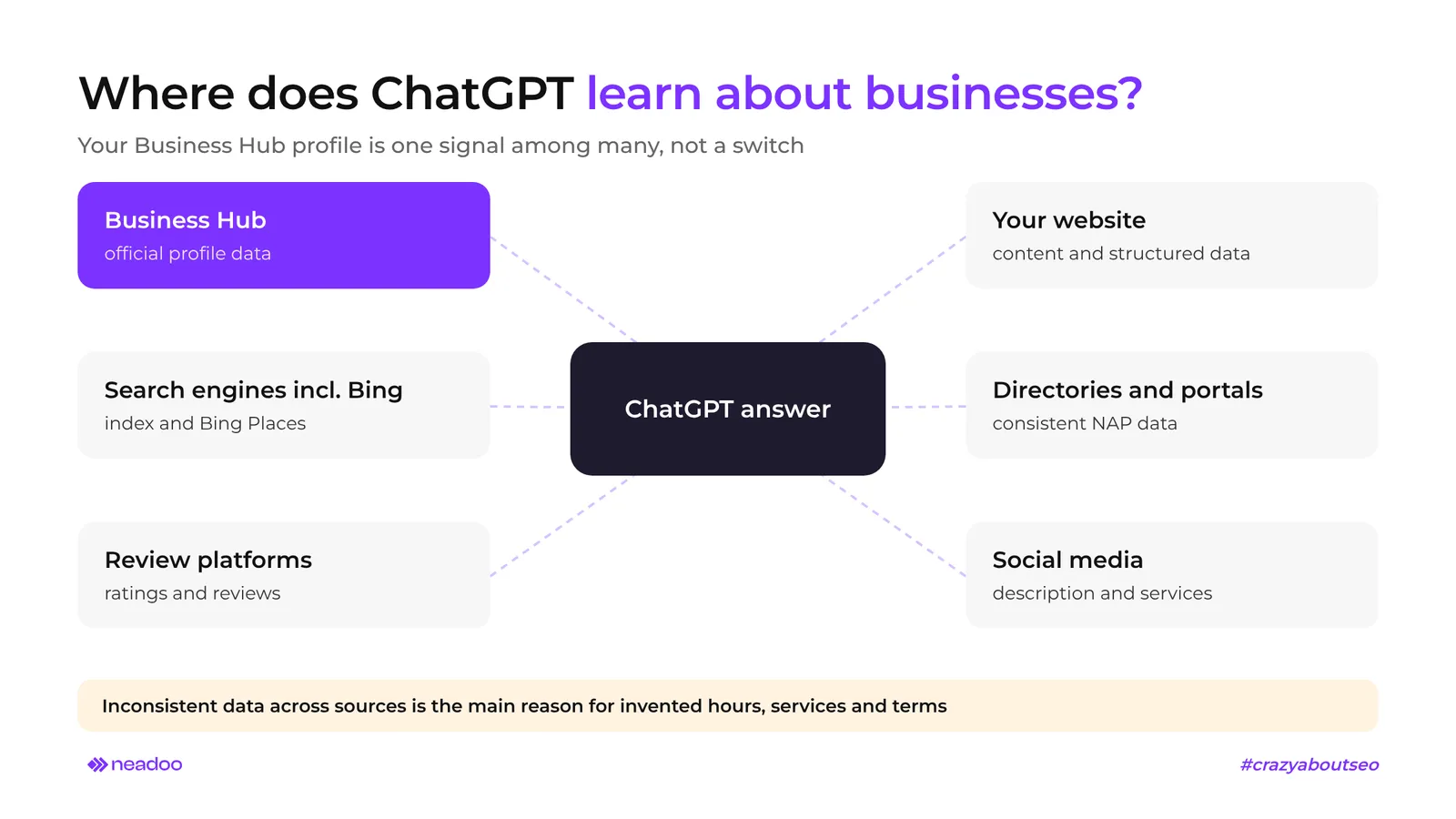
A business profile is not the only source of facts about a brand for ChatGPT. Recommendations are based, among other things, on search results (including from Bing), review platforms, and external resources, and the entry in the dashboard is only one of many signals. ChatGPT optimization therefore begins outside the OpenAI dashboard.
The Role of the Bing Index and Bing Places Profile
ChatGPT relies on external search engines, and Bing is one of its sources for market and local information. If your business is missing from Bing or the listing is outdated, the model receives second-hand data.
What to do:
- Check Bing Webmaster Tools to see if your site is indexed - indexing in Google does not guarantee indexing in Bing.
- Create or claim your listing in Bing Places and align your contact details (NAP - Name, Address, Phone) with your website and Business Hub.
- Add structured data (schema.org) - it helps the model identify your brand more easily.
The Impact of Reviews and Review Aggregators on AI Recommendations
Ratings and reviews on independent aggregator sites are a key signal for generative algorithms to confirm a company's reputation. What matters is not just the average rating, but also consistency: the same specialization, the same scope of services, and the same name across Google, Bing, directories, and review platforms.
Why the Model Hallucinates Company Information and How to Correct Hallucinations
When sources contradict one another, the model fills the gap with predictions: it invents opening hours, service offerings, or commercial terms. The root cause is inconsistent information across the web.
How to fix your data:
- Make a list of places where your business appears: website, Bing Places, Google, directories, review aggregators, social media.
- Compare hours, address, phone number, scope of services, and terms of sale - note any discrepancies.
- Standardize the external knowledge bases from which the model pulls facts, then update your profile in Business Hub.
- Regularly check ChatGPT's answers to questions about your brand. The exact timeline for changes to take effect cannot be predicted in advance.
How to Secure Business Recommendations in ChatGPT
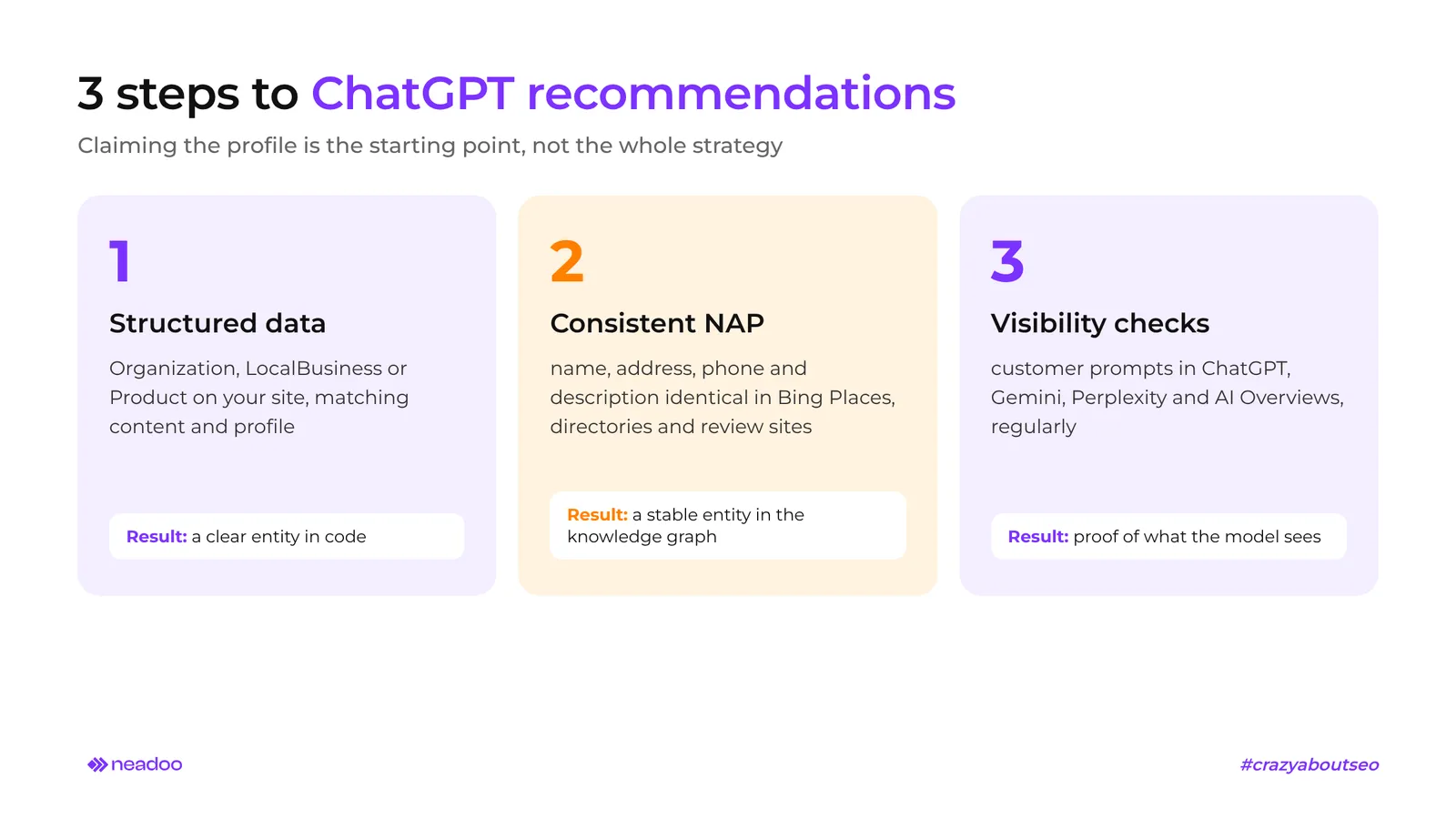
ChatGPT optimization can be structured into three stages: structured data on the website, consistent NAP data across external sources, and regular brand visibility audits. Claiming your profile in Business Hub is merely the starting point - not the entire strategy. The steps below combine the OpenAI dashboard with technical and off-site optimization for generative engines (GEO, Generative Engine Optimization).
| Step | Where you work | Result |
|---|---|---|
| 1 | Your own website | Unambiguous entity in the code |
| 2 | Directories, Bing Places, aggregators | Stable entity in the knowledge graph |
| 3 | Conversational search engines | Proof of what the model actually sees |
Step 1: Implement Schema Structured Data on the Website
Precise Schema.org microdata helps language model crawlers extract organizational entities and related services without ambiguity. Correct markup reduces parsing errors, giving AI models fewer opportunities to guess what your business does.
- Choose the right type for your business. Organization for any company, LocalBusiness for a physical location, Product for an online store with an inventory.
- Align data with your website content. The name, address, and phone number in your tags must match the text visible to users and your Business Hub listing.
- Test your markup. Validate the implementation with the schema.org validator before publishing and after every template change.
Step 2: NAP Data Consistency and Building External Citations
Effective GEO relies on strict NAP data consistency and a brand presence across authoritative sources. Uniform data across directories establishes a stable entity in the model's knowledge graph, facilitating language model indexing and lowering the risk of hallucinations.
- Conduct a NAP (Name, Address, Phone) audit. Compare your website's name, address, and phone formatting with Bing Places, industry directories, and review platforms; fix every discrepancy, including street abbreviations or country calling codes.
- Build AI brand citations at the source. Ensure you have descriptions on trusted industry websites and review portals, as the model relies on them for verification.
- Maintain a single business description. Keep the same specialization and scope of services everywhere.
Step 3: Verifying Brand Visibility in Generative Responses
The process starts and ends with auditing your presence across ChatGPT, Gemini, Perplexity, and Google AI Overviews. Without measurement, you cannot know whether language model optimization (LLM optimization) is working.
- Test intent-based prompts. Enter questions a prospective customer would ask, e.g., "which agency... would you recommend..." for your industry, across each engine separately.
- Monitor reference links. Track whether responses cite your domain, and review results periodically using the same set of prompts.
- Verify accuracy, not just presence. Ask directly about your brand: what it does, what services it provides, where it operates. Compare the answers with data from your own website and Business Hub - any discrepancy is a signal to update your external sources.
FAQ
Is adding a business profile in ChatGPT free?
Yes. OpenAI does not charge any fee to claim or add a profile. You also do not need an advertising account or a ChatGPT Enterprise agreement. You only invest your own time: the initial check and identity verification via the Persona platform.
Does simply claiming the listing guarantee that ChatGPT will start recommending my business?
No. The profile is just one signal - it is not an on/off switch. Recommendations also rely on the Bing index, customer reviews, and consistent data across the web. Claiming the profile only lets you correct your information and access analytics.
What counts as a mention in ChatGPT Business Hub analytics?
According to OpenAI documentation, a mention is recorded only when ChatGPT directly links to the company's website - brand name mentions alone are not counted. This rule applies to online businesses. Supplement your own tracking with prompt testing across ChatGPT, Gemini, and Perplexity, noting whether responses reference your domain.
What should I do if my brick-and-mortar business registration is placed on the waitlist?
Standardize your NAP data, create or claim your Bing Places listing, implement LocalBusiness schema.org markup, and gather customer reviews. These actions will help regardless of when your registration is approved.
How do I connect an online store's catalog with ChatGPT?
One method of pre-verification is integrating with a Shopify store. You can also provide your catalog via a product feed compliant with OpenAI's technical specifications. Make sure product details, shipping terms, and return policies match across the feed, your website, and your profile.
If ChatGPT still overlooks your business or repeats inaccuracies despite consistent data, a technical and off-site audit is required. At Neadoo, we start every AI optimization project with a brand visibility audit across ChatGPT, Gemini, Perplexity, and Google AI Overviews, compared against your competitors - reach out, and we will review it together.
Sources
- OpenAI Announcement from 10/11/2026: Introducing Businesses in ChatGPT
- Terms: Businesses in ChatGPT Terms