
ChatGPT Plugins - Which Ones Are Worth Installing in 2026?
Which ChatGPT plugins will actually speed up your work, and which are just marketing hype? In this article, you will learn how ChatGPT plugins work following the latest directory updates, which ones are useful today for marketing and SEO, and how to calculate the real cost of implementation.
ChatGPT plugins are bundles that expand the model's capabilities beyond text generation: they let you search documents, browse websites, perform advanced calculations, and create or modify data in external services. The extension system has undergone a full evolution - from the original Plugin Store shut down in 2024, through apps and connectors, all the way to today's integrated plugins. On July 9, 2026, OpenAI moved the app directory to the Plugins Directory, making it the primary hub for launching external integrations.
Strategically, choosing the right ChatGPT plugins for a specific process matters far more than simply installing them. Zapier automates workflows across apps, Wolfram handles calculations and charts, Canva prepares graphics for social media publishing, and an SEO plugin in today's terms is an MCP server provided by a visibility data vendor. This guide shows you how to select AI tools tailored to your business goals rather than installing everything listed in the directory.
What ChatGPT plugins are and how they work in practice
Today, a plugin is a capability bundle built for a specific workflow, consisting of three components: apps (connections to external services with read and write permissions), skills (saved instructions for repetitive tasks), and admin configuration templates. The app is what technically links ChatGPT to external data and actions, while the bundle serves as its wrapper. It inherits the app's permission settings, meaning it cannot bypass controls put in place by an administrator.
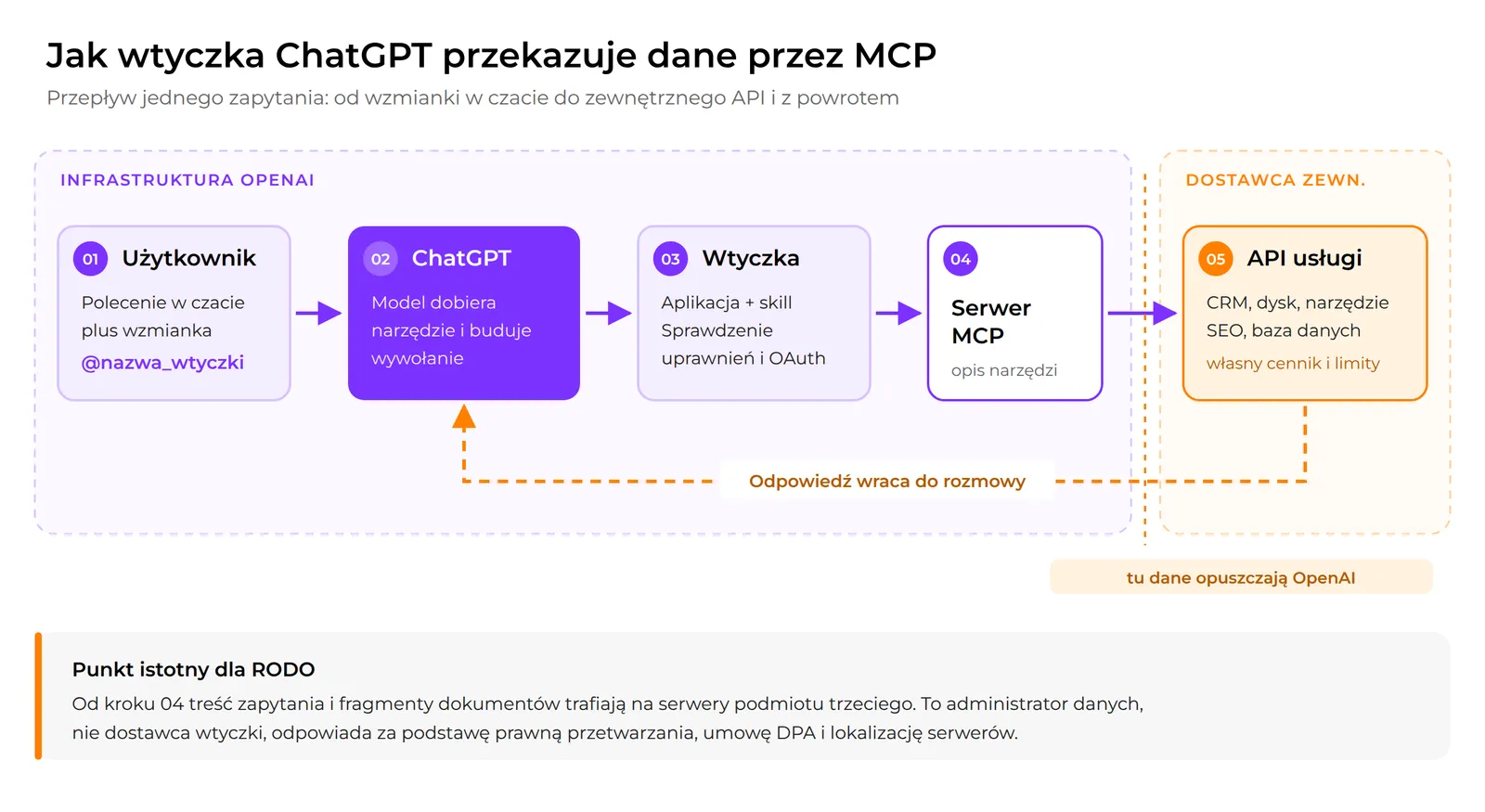
Under the hood runs the Model Context Protocol, an open standard for communication between AI models and external tools, adopted by OpenAI in March 2025 and transferred to the Agentic AI Foundation in December 2025. Since February 22, 2026, ChatGPT has been fully compliant with the MCP Apps specification, and as of March 25, 2026, approved integrations also run as Codex extensions. For the end user, one thing matters most: plugins in ChatGPT connect to external programs in real time, directly inside the conversation.
How you trigger them has changed, too. Modern plugins can call specific tools using mentions: type @, pick the name from the list, and the model works directly with the external resource. This eliminates copying data across browser tabs, which used to consume the most time. New directory features follow the same pattern: fewer clicks, more work done straight from the chat interface.
It helps to know what happened to the integrations still mentioned in older guides. The classic store was shut down in April 2024, and none of those original plugins can be installed today in their initial form.
| Legacy Plugin | What It Did | Modern Alternative |
|---|---|---|
| Link Reader plugin | Summarized content from various sources and formats | Built-in web browsing plus a note-taking app |
| WebPilot | Analyzed URLs and web pages in real time | Built-in web search, available on all plans |
| AskYourPDF | Extracted concise insights from PDF files | Built-in PDF document handling: upload files directly into the chat |
| SEO Assistant | Analyzed keywords for content optimization | An MCP server from an SEO data provider or a custom integration |
| Social Search | Enabled social media content analysis | Official platform apps and analytics tools from the directory |
| Prompt Perfect, Speedy Marketing | Prompt enhancement, blog content ideation | Skills within a bundle (saved instruction sets) |
The difference is qualitative. While Link Reader or Social Search simply added a single function to the model, today's plugin provides access to your company's actual operating systems, complete with write permissions. That means greater leverage, but also greater responsibility.
ChatGPT plugins vs. browser extensions - key differences
ChatGPT plugins and browser extensions differ primarily in where they execute: plugins process queries on OpenAI's servers and connected services, whereas extensions run locally and alter your browser interface. This leads to distinct differences in installation, permissions, and long-term stability.
Extensions are installed through external marketplaces (Chrome Web Store, Firefox Add-ons, Edge Add-ons) independently of your OpenAI account. One example is AIPRM for ChatGPT, which adds a prompt library panel to your browser window. Translation and web page summarization add-ons operate similarly, relying on scripts injected into the webpage rather than direct model integrations.
| Criterion | ChatGPT Plugins | Browser Extensions |
|---|---|---|
| Installation location | Plugins Directory within ChatGPT | Chrome Web Store, Firefox Add-ons, and other stores |
| Execution environment | OpenAI servers and connected service APIs | Locally within the user's browser |
| Account dependency | Requires an OpenAI account; scope depends on plan | Independent of your ChatGPT subscription |
| Trigger method | @ mentions directly from the chat | UI panel or button on the webpage |
| Long-term stability | Dependent on OpenAI and app provider policies | Dependent on updates from the extension developer |
To improve your visibility within model-generated answers, consider exploring AI SEO, which optimizes for AI-powered search engines.
Step-by-step plugin installation and plan availability
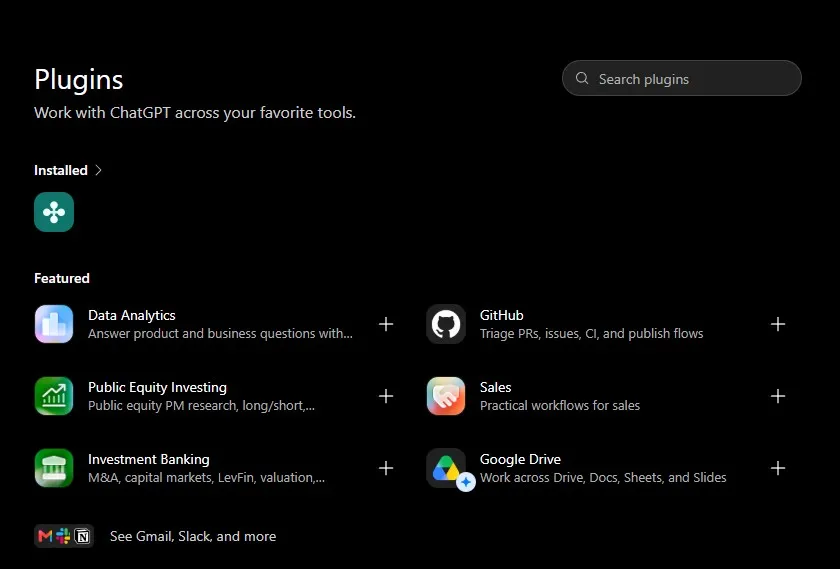
The directory is visible across all ChatGPT plans, but installing and running plugins depends on your subscription tier, region, workspace role, and the capabilities of the apps themselves. Not every listing will be available to every user, which is by design, not an error.
- Open the directory and choose an integration. From the ChatGPT interface, navigate to the Plugins Directory and review the core features outlined on the integration's card.
- Add and connect your account. Click the plus icon next to the selected app, then complete the authorization step, typically via OAuth. An inactive button indicates a regional restriction, workspace policy, or plan limit.
- Call the tool in your conversation. Type @ followed by the app name, and the model can access the specified resource.
- Configure permissions. Since June 12, 2026, you can choose when connected apps must ask for confirmation rather than granting broad upfront access.
In a company setting, this decision does not rest with individual users. Apps are enabled by default on Business plans, but disabled by default on Enterprise and Edu plans. Administrators must enable them from the directory tab and assign access based on user roles. Before designing a workflow for your team, verify what your workspace setup actually permits.
Building a custom integration is another viable path: if your organization relies on internal APIs, you can build an MCP server and connect it as an app. Note that custom MCP apps undergo OpenAI review prior to publishing. This approach suits teams with specialized requirements where ChatGPT can support internal workflows outside the public directory.
Let's check your website's potential
Share your website and email - we'll get back to you with a real analysis, no strings attached.
Top ChatGPT plugins for marketing, SEO, and process automation
The most practical ChatGPT plugins connect the model to the tools your team already relies on daily. The directory includes the tools listed in the table below, which serve as a solid starting point.
Alongside app integrations, OpenAI recommends task-oriented bundles - such as Data Analytics, Sales, or Investment Banking - which do not link a new service, but instead deliver a pre-configured set of instructions tailored to a specific professional role.
| Area | Selected Plugins | Practical Value |
|---|---|---|
| Documents and spreadsheets | Google Drive, Google Sheets, Dropbox, Notion | Search documents, work with PDFs without manual uploads |
| Communication | Gmail, Outlook, Slack, Microsoft Teams, Zoom | Send emails and thread summaries without leaving the chat window |
| Projects and workflows | Asana, Notion, HubSpot | Create tasks, update CRM records, generate status reports |
| Creative | Canva, Figma, Adobe | Graphics and templates for social media, video assets, diagram generation |
| Data and computation | Wolfram Alpha, built-in Advanced Data Analysis | Calculations, charting, deep dataset analysis |
| Automation | Zapier | Connect to over 9,000 apps via Zapier's MCP server |
| Development | GitHub, Supabase, Vercel, Stripe | Manage repositories, databases, and billing from one interface |
I list built-in data analysis separately because it is not a plugin and requires no installation: upload a CSV file or PDFs, and the model executes Python code to return charts. Before searching for an external math or data integration, check whether the native tool already covers your needs. The same applies to pulling content from web pages.
In the SEO space, the situation is less straightforward than older plugin roundups suggest: there is no longer an official SEO plugin like those found in the legacy store. Today, the practical path involves MCP servers from data providers - several analytics platforms (including Ahrefs) offer their own - and connecting Google Search Console via API. This setup allows you to analyze visibility data, monitor search rankings, and cross-reference target keywords with actual organic traffic. Without an external data source, the model has no access to real-time search volumes, yet it will still generate numbers that look convincing. Always verify these metrics, and treat ChatGPT search volume suggestions as working hypotheses rather than facts.
Social media management is another distinct category. Plugins make it easy to track brand mentions, draft post variations, and structure marketing campaigns. However, the scope of these features depends entirely on the respective platform's API permissions - confirm these limits before making commitments to clients. In practice, publishing usually remains in your existing management tool, while plugins handle research, analysis, and social media content drafting.
A framework for mapping plugins to the marketing funnel
Implementing AI effectively requires matching tools to specific funnel stages so they support the customer journey directly rather than serving as disconnected novelties. The core advantage lies in preserving context between research and content creation, streamlining workflows and speeding up decisions.
Top of the Funnel (TOFU): Brand awareness and competitor research
The priority here is market mapping and audience-building content. A model with web access can evaluate heading structures, content depth, and publishing frequency across 5-10 competitors within a single prompt. Pair this with a skill that formats output as a structured table covering "topic, intent, estimated difficulty," and a single session yields an editorial calendar with keywords mapped directly to specific topics.
Middle of the Funnel (MOFU): Consideration and lead generation
The primary goal is turning interest into sales inquiries and routing that data directly into your CRM. A pair of integrations works best here: Zapier routes the lead to the correct email list, while a HubSpot connection updates the customer record. Secondary applications include personalized content matched to buyer segments, such as email sequences, solution comparisons, and case studies. A skill containing your brand voice guidelines and product details ensures consistent messaging across the entire sequence, eliminating the need to restate your brief with every prompt.
Bottom of the Funnel (BOFU): Conversion and sales optimization
Here, transactional data analysis and high-converting sales copy take center stage. Upload your conversion data to receive performance charts for various CTA variants, followed by alternative headlines and product descriptions ready for A/B testing - all informed by the competitor insights gathered during the TOFU stage. The true value does not come from a single add-on, but from multiple stages sharing a single conversation thread. ChatGPT plugins support business operations across many workflows, but AI tools never eliminate the need for human verification.
Total cost of ownership (TCO) and hidden AI toolchain costs
A ChatGPT subscription is just the baseline; your real TCO increases with every plugin you connect. The remaining expenses emerge outside OpenAI's billing dashboard and are frequently underestimated during the planning stage.
| Cost Component | Pricing Model | Example |
|---|---|---|
| ChatGPT subscription | Fixed monthly fee | Directory access, higher usage caps, team workspaces |
| External APIs | Variable, based on calls or token usage | SEO tools, CRM systems, databases |
| Automation platforms | Tiered subscription based on task volume | Zapier, Make as middleware |
| Integration maintenance | IT engineering hours | MCP server hosting, API key rotation, software updates |
| Supplementary SaaS licenses | Separate per-seat tool licenses | Canva, dedicated analytics tools used outside chat |
External API usage typically represents the largest variable expense: every function call is billed directly by the third-party provider, regardless of your ChatGPT plan. Routing leads in real time incurs additional middleware platform fees, while maintaining custom MCP servers and rotating security keys demands ongoing IT labor - an outdated configuration can instantly break an active automation. Your budget must also account for subscription tiers of third-party AI platforms that supply visibility data to the model, which are rarely factored into initial projections.
Technical limitations and performance caps in daily operations
In day-to-day use, ChatGPT plugins face three main bottlenecks: plan message limits, session context limits, and third-party API rate limits. Models execute tasks sequentially rather than concurrently, introducing tangible latency into complex toolchains.
The first limitation involves message rate caps within rolling time windows, which vary by plan. Because plugins operate under the same limits as standard conversations, running intensive content generation or multi-file analysis can exhaust your allocation mid-session.
The second involves data size constraints: the volume and file size of simultaneous uploads are capped, requiring large datasets to be broken into smaller batches. The context window is also finite; once exceeded, the model may lose track of parameters defined earlier, such as a project brief provided at the start of the chat. For lengthy documents, summarizing core agreements in a standalone note is particularly effective.
The third stems from integration architecture: beyond OpenAI's internal limits, each third-party provider enforces its own API rate limits. When a single workflow relies on several connected services, hitting a limit on any one tool breaks the entire chain, even if your ChatGPT message allowance remains untouched. The more integrations involved in a workflow, the greater the chance that the weakest link stalls the process.
Data security and GDPR compliance when using plugins
Sending sensitive company information outside your organization requires reviewing each third-party provider's data processing policies. The mechanism is straightforward, which is precisely why it presents risks: the model forwards your prompt data directly to an external service outside OpenAI's infrastructure. Every query sent through an integration with a CRM, an analytics tool, or a sales database means that prompt contents - and often excerpts of proprietary documents - land on third-party servers.
Under GDPR, the data controller, not the software vendor, is responsible for establishing a lawful basis for processing and confirming that sub-processors maintain adequate safeguards, including valid mechanisms for data transfers outside the EEA. Write permissions raise the stakes further: an app capable of creating and editing data within an external platform can just as easily overwrite or delete it.
Two security risks are routinely overlooked in general guides. The first is prompt injection: data returned by an external tool enters the conversation context, where the model may interpret it as an instruction rather than simple reference material from a webpage or document. When combined with write access, this can trigger unauthorized system actions. The second is data retention: files uploaded as context may be indexed and stored by third-party services. Always review their terms of service to confirm how long your data is retained once a session ends.
To minimize risk before enabling an integration, verify the provider's server locations, execute a Data Processing Agreement (DPA), confirm what gets logged, and configure permissions so the app requests manual approval before executing write operations. Grant access by specific roles rather than across the entire workspace. If you need help building these internal protocols, begin by running a thorough audit of all data leaving your company.
Frequently asked questions
Are ChatGPT plugins free to use?
The directory is visible to users on all plans, including the Free tier, but installing and running plugins depends on your plan, geographic region, and workspace permissions. Integrations themselves may be free or require a paid third-party subscription, and organizational access is managed by your workspace administrator.
What are the best plugins for ChatGPT?
The most effective plugins are those that support a recurring workflow, so the ideal choice depends on your needs: Google Drive and Notion for document management, Gmail and Slack for communication, Zapier for process automation, Wolfram Alpha for advanced math, and Canva or Figma for visual assets. Plugins can streamline SEO, copywriting, and data analysis. Rather than installing dozens at once, pick one integration for a weekly task and expand your setup gradually. Be cautious of older online lists, as many still recommend legacy extensions shut down in 2024.
What are the best SEO plugins for ChatGPT?
Legacy SEO add-ons are completely defunct; their function has been replaced by provider MCP servers (such as Ahrefs) and direct Google Search Console API connections. These allow you to cross-reference target keywords against verified click data. Without an external data source, the model lacks live search metrics and will fabricate figures, leading to costly mistakes in content planning.
How do you use ChatGPT with plugins?
Connect the integration within the directory, then call it using an @ mention and describe your task just as you would to a colleague: specify the source material, desired output format, and scope. You will get the most accurate responses when you combine the objective, input data, and preferred output layout within a single prompt. For research tasks, specify upfront which sources the model should reference.
How do plugins differ from apps and skills?
A plugin is an overall bundle, an app is the live connection to an external software service, and a skill is a saved set of instructions designed for a repeatable task. A single directory listing may combine all three elements and inherits the security permissions of its included apps. Other features, such as document processing or web browsing, are natively built into the platform.
Is using ChatGPT plugins safe for businesses?
It requires caution, as every plugin call sends corporate data to a third-party server. As the data controller, your organization must review each vendor's privacy policy, verify DPA terms, and confirm server hosting locations before integrating plugins into workflows involving personal or sensitive business data.