
Canonical Links (rel="canonical") - What They Are, How They Work, and How to Implement Them Correctly?
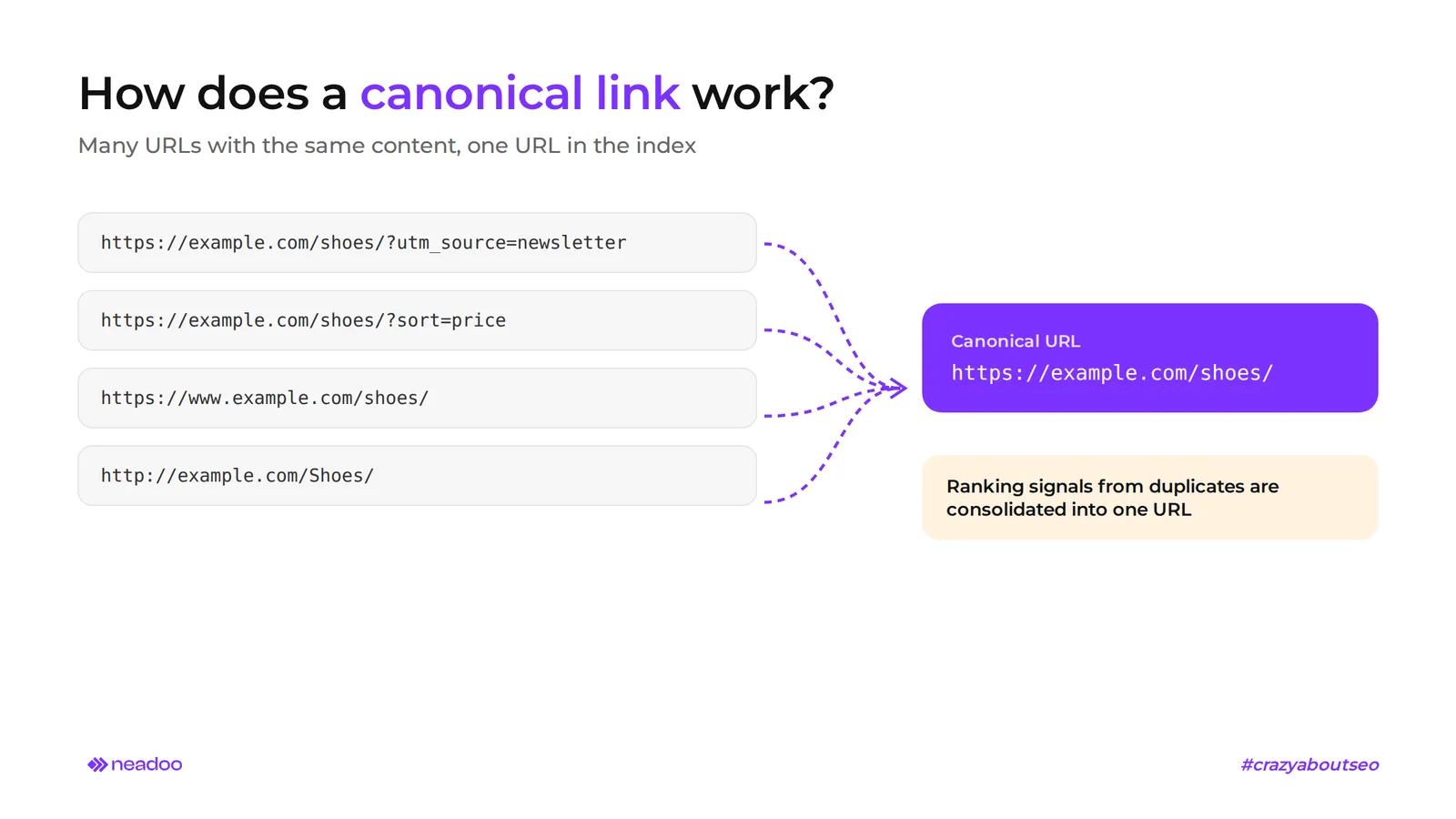
When Google indexes multiple versions of the same subpage, e.g., with sorting parameters, filters, or with and without "www", ranking signals are split among the duplicates, and the search engine decides on its own which version to show in the search results. Canonical links solve this problem, because through them we indicate to the search engine which page URL is the correct one. This is an HTML tag placed in the section that points Google's crawlers to the preferred URL among duplicates. The process of choosing such a version is URL canonicalization. Its result: signals from multiple URLs consolidate into one, and content duplication stops diluting visibility.
The canonical tag is a hint for Google, not a directive. From this article, you will learn how the canonical tag works, how to set up a canonical link according to Google Search Central documentation (including the self-referencing canonical), and how to verify the implementation in practice. We dedicate the most space to using canonical links in online stores, because that is where faceted navigation generates hundreds of nearly identical URLs.
What is a canonical link and why is it crucial for SEO?
A canonical link (canonical) is an element in HTML code that serves to inform search engines of the canonical URL for pages with identical or very similar content. Thanks to it, search engines know which version of the page to index and display in search results. The duplicates still work, but search engines only index the preferred version. It does not describe the content of the page like a title or meta description does. It manages relationships between duplicates. Without this declaration, Google considers the URL it evaluates as the most representative to be the canonical URL, and it sometimes picks a URL with a UTM parameter or a staging version instead of the page on which the company is building its visibility.
Duplicate content disperses ranking signals: incoming links and user behavior data are split across URL variants. The canonical tag consolidates this dispersed link juice and attributes it to the indicated address. Google confirms that the canonical URL is its primary source for assessing content and quality, and it crawls duplicates less frequently. In the case of intentionally duplicated content, e.g., on blogs with printable versions, in stores with filters, and on websites with multiple URL variants, the canonical also protects against keyword cannibalization.
Using canonical links is one of the foundational elements of SEO optimization. Users do not see this tag. However, incorrect canonicalization can reduce the visibility of entire sections of a website, even when the content is good.
How to properly implement the rel="canonical" tag in HTML code?
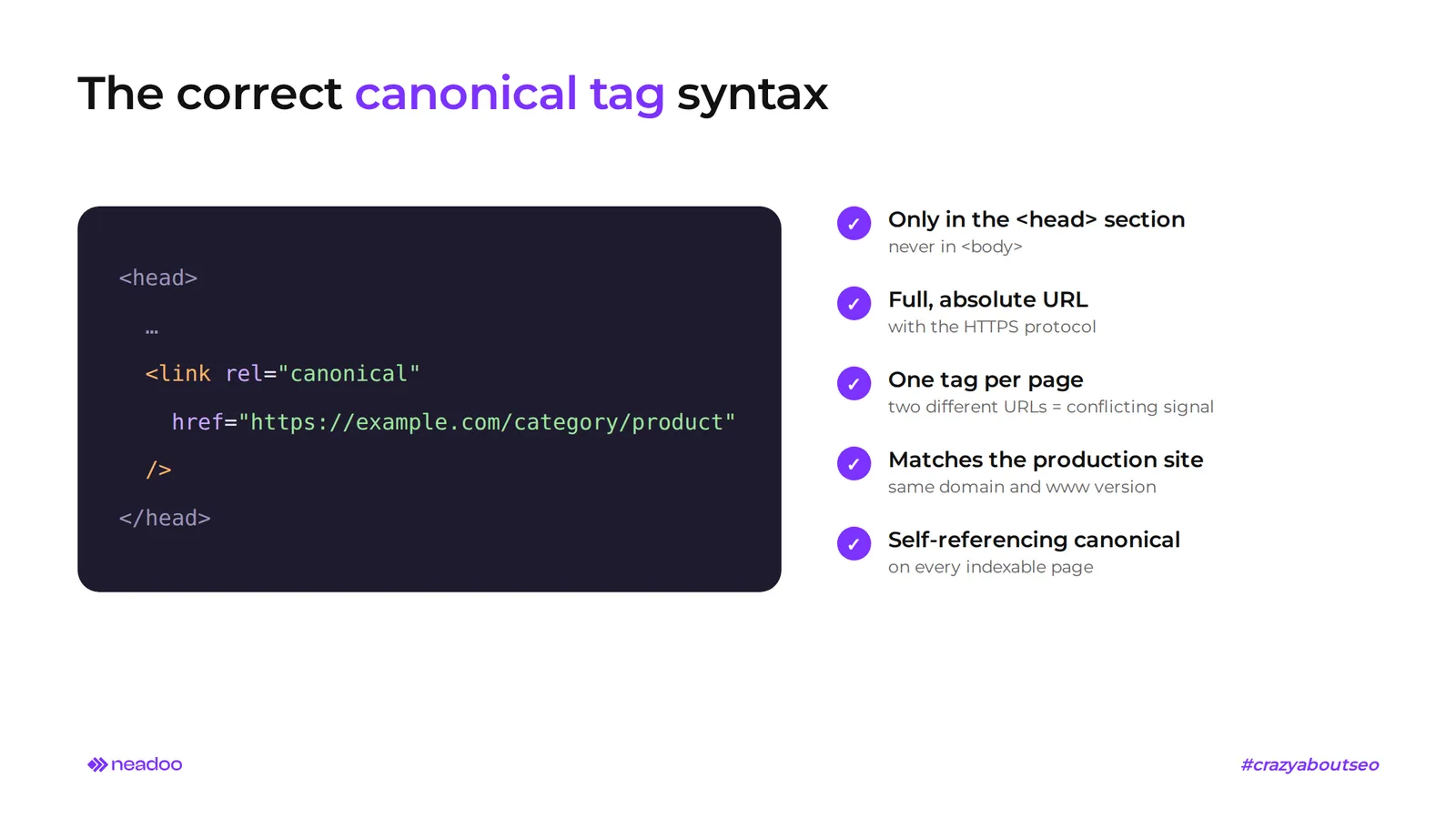
The canonical tag is placed exclusively in the section of the page, as a full, absolute URL with the HTTPS protocol. Whether Google reads the signal at all depends on these two conditions. The correct format looks like this:
<head>
  <link rel="canonical" href="https://przyklad.pl/kategoria/produkt" />
</head>
- Tag location. Google only accepts the element in the head section, never in the . The head section itself must be valid HTML, because an unclosed tag before the canonical can "push" it into the body. PDF files and other documents that cannot contain HTML tags (in the case of this type of content, there is no head section) are canonicalized using an HTTP header (described below).
- One tag per subpage. Each page should have only one canonical URL. Two rel="canonical" declarations with different URLs are a contradictory signal to Google. In such a situation, the search engine usually ignores both and chooses the canonical version on its own.
- Correct attributes. The tag consists of a rel attribute with the value "canonical" and an href attribute where you provide the URL of the reference page. A typo in either of them invalidates the declaration.
- Absolute address. The href contains the protocol, domain, and full path, e.g., https://przyklad.pl/kategoria/produkt. Google technically supports relative paths like /kategoria/produkt, but does not recommend them: if a staging version of the site is indexed by mistake, a relative canonical will point to itself.
- Consistency with the production version. Using absolute URLs is not enough if the address in the href does not match the target website configuration: the same domain, the same HTTPS protocol, the same convention with or without "www".
An error in this single line of code can nullify the effect of well-optimized content, because the wrong URL variant ends up in the index.
Self-referencing canonical links - why does every subpage need them?
Every indexable subpage should contain a canonical link pointing to itself, that is, to the address of the page the user is currently viewing, even when there are no known duplicates. In such a self-referencing canonical, the value of the href attribute is identical to the URL of the page where the tag is located. Example for a blog post:
Google explicitly recommends this practice in its guidelines.
The reason is simple. UTM parameters from campaigns, session IDs, or sorting parameters appended automatically by the system create new URL variants of the same content, often without the administrator's knowledge. A tag pointing to itself settles the matter in advance and leaves no doubt regarding the preferred version of the page: regardless of what parameter gets added to the URL, the preferred URL is already declared on every page.
A self-referencing canonical is not an absolute requirement. Google acknowledges that most websites will manage without any declaration, because the search engine will choose the URL based on other signals, such as the sitemap and internal linking. In our opinion, on large websites with an extensive URL structure, this is not something you should rely on. The cost of adding the tag to a template is close to zero, while the risk of an incorrect choice increases with every new parameter.
Let's check your website's potential
Share your website and email - we'll get back to you with a real analysis, no strings attached.
Canonicalization Signal Hierarchy - How Google Interprets and Weights Hints
Google does not treat all canonicalization hints equally. Search Central documentation lists them in order of strength: redirects are a strong signal that the redirect target should become the canonical version, the rel="canonical" tag is also a strong signal, and presence in a sitemap (sitemap.xml) is a weak signal. These methods add up, so using two or three of them consistently increases the chance that Google will pick the intended address.
The address specified in the canonical tag is the so-called user-declared canonical URL. Google honors it in most cases, but not always. If redirects, internal linking, or the sitemap suggest otherwise, and the algorithm considers another URL more representative, a Google-selected canonical URL is created that differs from the declaration in the page code. That page is then treated as a duplicate, and the search results show the canonical address selected by the algorithm. Internal linking consistency across your site helps: internal links should point to the canonical address, not to its variants.
A sitemap does not replace the canonical tag; it only confirms it. A sitemap should contain only canonical addresses. If sitemap.xml reports a different address than the one in rel="canonical", a conflict arises, and Google explicitly advises against providing different canonical addresses for the same page using different methods. In such a dispute, stronger signals win, and presence in the sitemap settles nothing.
| Canonicalization signal | Signal strength for Google | Nature | Can it be ignored? |
|---|---|---|---|
| 301 redirect | Strong signal (strongest of the three) | Technical, handled at the server level | Rarely, usually in cases of redirect chains or errors |
| rel="canonical" tag (user-declared URL) | Strong signal (hint) | Declaration in the HTML code or HTTP header | Yes, in cases of errors or conflicting signals |
| URL presence in the sitemap (sitemap.xml) | Weak supporting signal | Informational, complementary | Yes, easily overridden by other signals |
No single signal guarantees that Google will choose the intended canonical URL. Effective canonicalization requires consistency across the tag, redirects, sitemap, and internal links.
301 Redirect vs. Canonical Link - When to Use Each Solution?
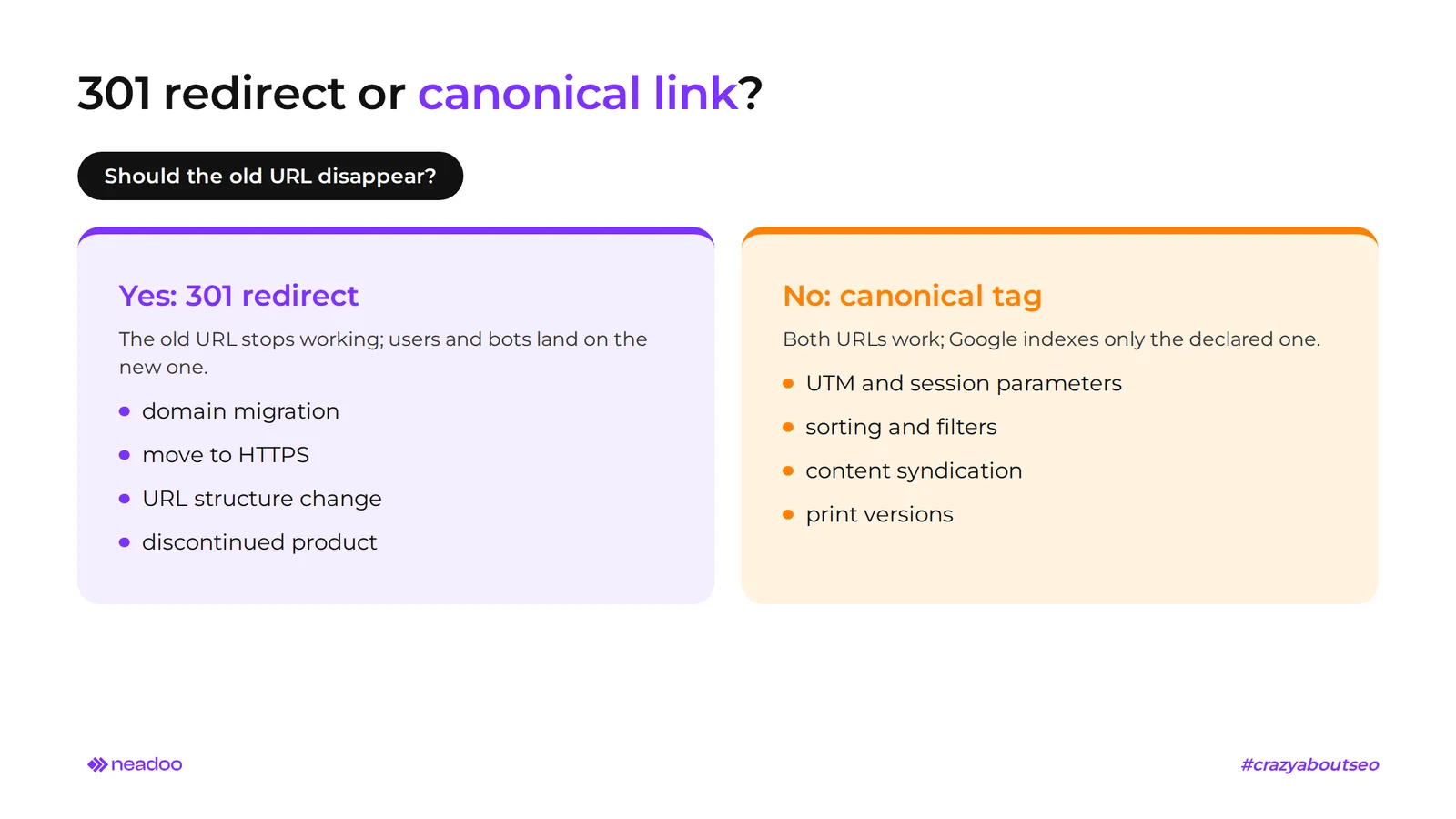
The choice depends on a single question about the future of a specific page: should the old address disappear, or should it remain accessible to users while Google simply needs to know which version to index? A 301 redirect transfers traffic and signals to the new address and eliminates the old one as an access point. A canonical link removes nothing; it merely declares which address is preferred for indexing.
- Migration or permanent page removal. A 301 redirect is used when changing the URL structure, consolidating domains, switching to HTTPS, or replacing a discontinued product with its successor. The old address ceases to be a separate destination for both users and crawlers.
- Both addresses must work. Versions with UTM parameters, session IDs, sorting, or filters in e-commerce are marked with the canonical tag. Users can visit each of them, while Google indexes only the specified one.
- Cross-domain canonicalization. When the same content exists across two domains - for example, in article syndication or after acquiring another brand - the rel="canonical" tag can point to an address on another domain. Both copies stay online, and SEO value flows to the source, even though identical content is available under different URLs.
- Robots.txt. A canonical tag works only if the crawler can fetch the page containing it. An address blocked in the robots.txt file will not be read, so its declaration is lost. Google also advises against using this mechanism as a canonicalization tool, because a blocked URL can still end up in the index, just without content.
- Sitemap. The sitemap should contain only canonical URLs, without redirected variants and without pages pointing to another URL as canonical.
- Non-HTML files. PDFs and other documents without a head section are canonicalized using the HTTP Link header, described in a separate section.
Rule of thumb: 301 where the old address must be gone for good, canonical where both addresses must stay and the search engine only needs to know which one to show.
Using Canonical Links in E-commerce - Filters, Sorting, and Faceted Navigation
Using canonical links in online stores prevents the indexing of thousands of nearly identical pages generated by filters and sorting, funneling signals to the main category. The duplicate content issue affects any faceted navigation where variants differ only by URL parameters (color, size, price, sort order), while the content remains the same.
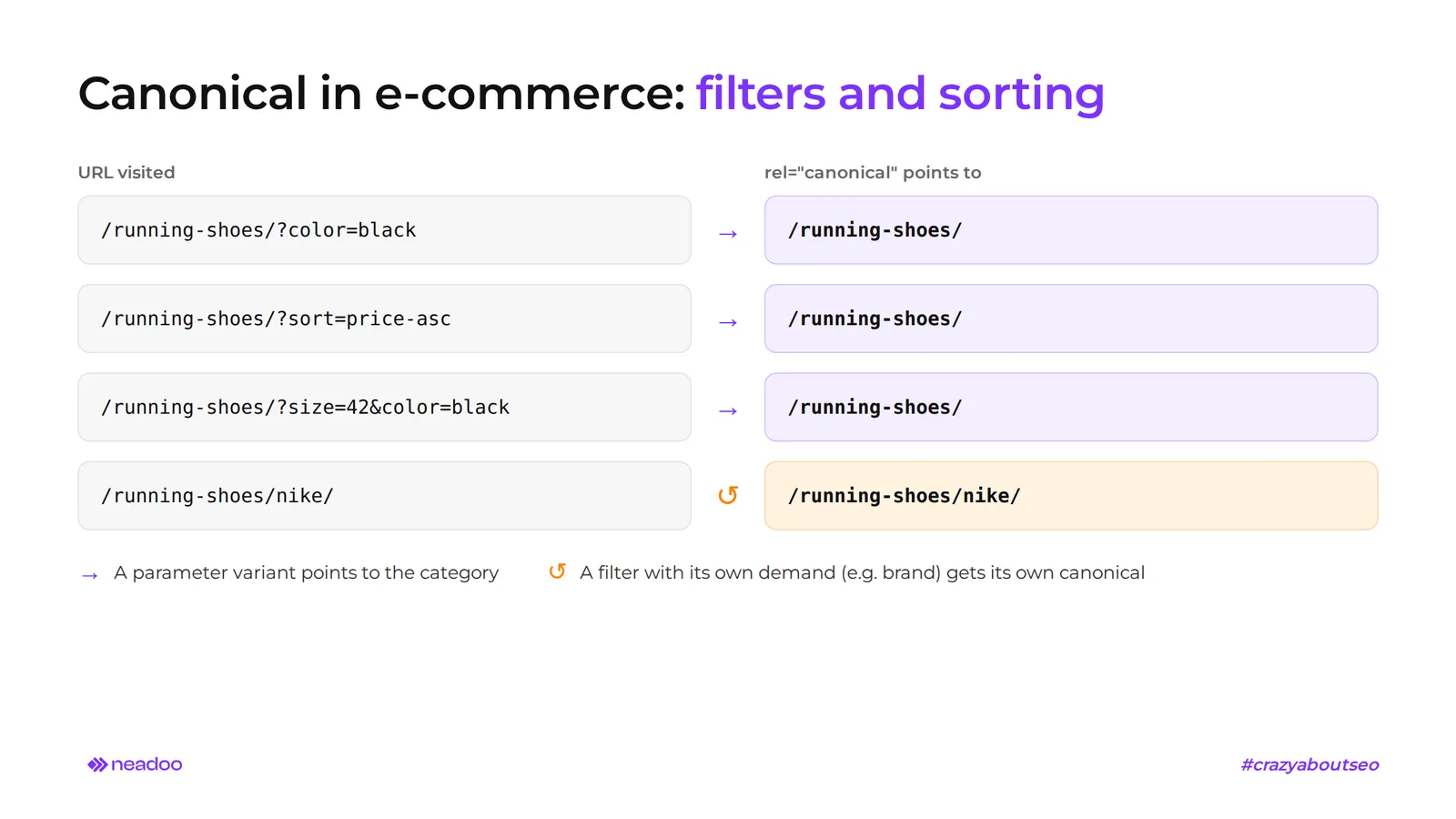
The "athletic shoes" category easily generates variants like ?size=42, ?color=black, ?sort=price-asc, and combinations thereof. To a crawler, each of these looks like a separate page. Without proper markup, hundreds of such URLs enter the crawl queue, leaving the store with classic duplicate content.
The solution is to use canonical links on all parameterized variants so that they point to the category address without filters or sorting. The page /athletic-shoes/?color=black&sort=price contains in its head section:
The canonical address is therefore /athletic-shoes/, even though users can freely use the filtered version and bookmark it.
Not every filter deserves the same treatment. A brand filter in a large category often generates its own search queries with real search volume, such as "nike athletic shoes." It is worth keeping such combinations indexable, with their own canonical URL and unique content, as the page then has a chance to rank for relevant search queries. This decision requires analyzing search volume and catalog structure, which is why it is a standard element of e-commerce SEO. With thousands of combinations, the canonical tag alone is not enough: it is also worth limiting internal links to low-value variants so that the crawler does not discover them in the first place.
Impact of JavaScript Rendering on Canonical Tags
The safest approach is to place the canonical tag in the static HTML code and not modify it via script. This is Google's recommendation for client-side rendered websites. If a canonical tag cannot be added to the source code, Google permits inserting it exclusively via JavaScript, but in that case, the static HTML must not contain any other version.
The problem stems from the two-stage processing of pages built with React, Vue, or Angular. Googlebot first fetches the raw HTML, while the version resulting from JavaScript execution is processed later in the rendering queue. If the static HTML code points to URL A and the script swaps the canonical to URL B, Google receives two conflicting declarations and may choose either one or ignore both.
Most often, this is broken by dynamically overwriting the href attribute based on user sessions, A/B tests, or personalization. What the browser sees then drifts apart from what the bot read during the initial phase. The most reliable solutions are server-side rendering or a fixed canonical entry in the server-side template.
On large JS-driven websites, the rendering queue further delays the moment Google sees the final version of the page. Having the canonical immediately available in the raw HTML eliminates this risk.
Canonicalization of Non-HTML Files Using the HTTP Link Header
Files without HTML code, such as PDFs, are canonicalized using the HTTP Link header sent by the server, as they lack a head section where a rel="canonical" tag could be placed. This mechanism is described in the Web Linking specification, originally RFC 5988, replaced in 2017 by RFC 8288. The "canonical" relation type itself is defined by RFC 6596.
Google treats rel="canonical" in the Link header as an equivalent declaration method. It works for PDF files, Word documents, and other resources without HTML markup. The server includes the following header in its response:
Link: <https://przyklad.pl/dokument.pdf>; rel="canonical"
The URL in angle brackets points to the reference version, and Google applies this method in web search results. On HTML pages, do not combine the header with an in-code tag: Google considers such a combination error-prone, as it is easy to end up with two different URLs.
This method is useful when a single PDF is accessible via different URLs, e.g., across multiple subdomains or at old locations following a file server migration. The header allows you to designate a canonical page - that is, one reference version of the file - while the remaining copies can stay online. Search engine bots then treat them as variants of the remaining URLs rather than separate documents.
Implementation requires server configuration (Apache, Nginx) or a CDN, without editing the file itself. In technical documentation repositories or directories with PDF manuals, this rule is usually configured globally for the entire directory.
How Canonical Links Optimize Crawl Budget
Specifying canonical URLs helps Googlebot focus on the URLs that matter. Google crawls the canonical URL most regularly and its duplicates less frequently. The tag is also supported by other search engines, including Bing. Crawl budget - the number of URLs Googlebot can and wants to visit within a given timeframe - depends on server performance and crawl demand: the popularity of URLs, their freshness, and the total number of discovered URLs.
A fair disclaimer: canonical tags do not block crawling. The bot still visits duplicate URLs, just less often, because it needs to read the declaration. The tag thus cleans up the index and relieves crawl pressure over time, but when dealing with millions of filter combinations, it must be paired with limiting internal links to redundant variants.
Savings are mainly noticeable on large websites: online stores with thousands of product variants and portals with extensive archives. Typical sources of duplicates include session parameters, campaign identifiers, "www" vs. non-"www" versions, and varying letter casing in the path. Google treats /Shoes and /shoes as two separate URLs, so use lowercase in URLs and redirect uppercase variants to the canonical version.
When the bot wastes less time on duplicates, website changes appear in search results much faster: new products, price updates, and fresh articles. For websites dependent on up-to-date content, this provides a genuine competitive edge.
Most Common Mistakes When Implementing rel="canonical" and How to Avoid Them
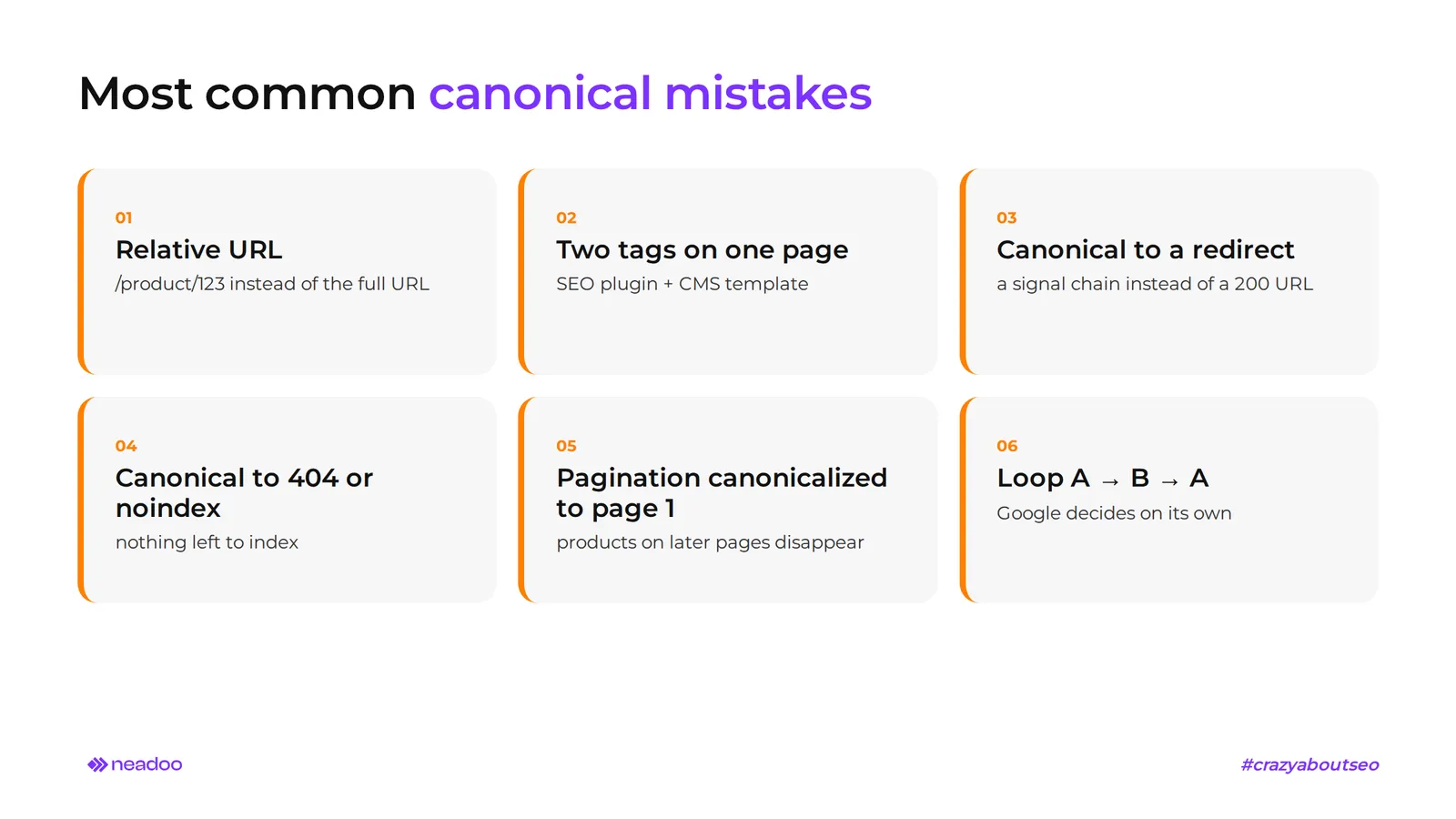
Typical mistakes when implementing rel="canonical" include relative URLs instead of absolute ones, multiple tags in a single head section, and incorrectly combining canonicalization with pagination and hreflang. In all these cases, Google may ignore the declaration and choose the canonical version on its own, often contrary to the website owner's intent. However, more frequent than an erroneous tag is simply the complete absence of canonical tags for duplicate pages. In the case of automatically generated pages, such as internal search results or blog tags, this is a common situation because no one checks whether the CMS adds the tag at all.
- Relative URL. The path /product/123 instead of the full address is especially harmful during domain migrations and with multiple subdomains.
- Two canonical tags on one page. The most common cause is an SEO plugin that adds its own tag alongside the one from the CMS template.
- Canonical pointing to a 301-redirected page. This creates a chain of signals and slows down URL processing. The canonical should lead straight to the target URL returning a 200 code.
- Canonical pointing to a 404 or noindex page. The crawler receives conflicting instructions and has nothing to index. The canonical address must be indexable and return a 200 status code.
- Canonical pointing to another domain without a reason. Example: a template copied from a testing environment points to staging addresses instead of addresses on a single production domain. Google will usually ignore such a declaration, but until the error is detected, some pages may drop out of the index.
Errors in Combining with Pagination and Hreflang Tags
On paginated pages, each subpage should have a self-referencing canonical tag: page 2, 3, or 4 of a product listing points to itself, not to page 1. Canonicalizing an entire series to the first page is a mistake that we do not recommend under any circumstances, because it drops products visible only on subsequent pages from the index.
With hreflang, the principle is analogous: each language version has its own self-referencing canonical, while hreflang communicates language counterparts, not priority. Google recommends that the canonical URL lead to a version in the same language as the page with hreflang. A mistake looks like this: the Polish version has hreflang="de" pointing to the German version, while its canonical points to the English version. The instructions are contradictory, and Google usually indexes only one language version.
Conflicting Signals and Canonical Loops
A canonical loop occurs when page A points to page B as the canonical page, and B points back to A. Google has no basis for making a choice and resolves the conflict on its own, not necessarily in line with your intent.
Contradictions also appear between mechanisms: the canonical link points to one address, while sitemap.xml reports another, or the canonical link points to version A, while the X-Robots-Tag header sets noindex for it. Google advises against using noindex to manage canonical URL selection within a single domain, as this completely blocks the page from search results.
This is why, during SEO audits, we verify canonicalization at the very beginning of organizing the site architecture. Without consistent signals, further optimization of content and links will not yield its full effect.
How to Implement and Check Canonical Links in CMSs and SEO Tools?
Canonical links in popular CMSs are configured in the dashboard or an SEO plugin, and their correctness is verified in Google Search Console and crawlers such as Screaming Frog. Manual editing of the head section is possible, but most website owners rely on the platform's native mechanisms.
Configuration in WordPress, PrestaShop, and Shopify
In popular CMSs, setting up a canonical tag usually does not require editing templates or modifying site configuration.
| CMS | Canonical Configuration Method | Notes |
|---|---|---|
| WordPress | Yoast SEO or All in One SEO plugins, "canonical URL" field in advanced post or page settings | The plugin generates the tag automatically, with the option to manually overwrite it |
| PrestaShop | SEO & URLs settings in the admin panel (including redirection to the canonical URL), tag in the theme or an SEO module | Behavior depends on the version and theme; requires monitoring with filter combinations |
| Shopify | Canonical generated automatically in the theme.liquid file (canonical_url variable), editable in the theme code or via SEO apps | Limited ability to make changes without knowledge of Liquid |
| Custom HTML System | rel="canonical" tag added directly in the template head section | Requires discipline with every URL structure change |
Yoast SEO sets a self-referencing canonical for every post by default, and the edit field allows you to override it, for example, with content intentionally duplicated from another subpage. Simply open the post you want to tag on your site and enter the canonical URL of the source page into the field. All in One SEO works similarly and adds rules for taxonomies and archives. In PrestaShop stores, filter and sorting pages require the most attention, as they must consistently point to the parameter-free version.
Verification in Google Search Console and Screaming Frog
The quickest test to see if canonical links are working on your website requires no tools at all. In Google Chrome, right-click on the page, select "View page source", and search for the string rel="canonical". You will see which URL the tag points to and whether there is only one such tag on the page.
Google Search Console, in turn, shows which address Google actually considers canonical. The URL Inspection tool compares the user-declared canonical URL with the Google-selected canonical URL. The "Page indexing" report groups URLs by duplicate status, for example, when Google selected a different canonical page than the one specified. A discrepancy rarely indicates a search engine error. It usually points to conflicting data in the sitemap, redirects, or internal linking.
Screaming Frog checks canonical tags across the entire website. The crawler compares the address of the scanned page with the href value in its canonical tag and filters, among other things, pages without a canonical, with multiple tags, with relative URLs, or those where the canonical URL itself points further to another address. Crawling a staging environment allows you to catch these errors before publishing changes.
Ahrefs detects duplicate content in its Site Audit module, groups duplicate pages, and checks whether each has a correct canonical tag. These three tools complement each other: Search Console shows Google's decision, Screaming Frog audits the code, and Ahrefs provides an overview of duplication across the entire domain.
FAQ
Does Google always honor the rel="canonical" tag?
No. A canonical link is a strong hint, not a directive. Google may ignore it when the specified page has errors, when other signals contradict it (sitemaps, redirects, internal linking), or when it considers another address more representative.
What is the difference between a canonical link and a 301 redirect?
A canonical link tells crawlers the preferred URL, but the duplicate remains live and accessible to users. A 301 redirect permanently moves users and crawlers to the new address, and the old one is no longer accessible.
Sources
- Google Search Central, "What is URL canonicalization": https://developers.google.com/search/docs/crawling-indexing/canonicalization
- Google Search Central, "How to specify a canonical URL with rel="canonical" and other methods": https://developers.google.com/search/docs/crawling-indexing/consolidate-duplicate-urls
- Google Search Central, "Understand the JavaScript SEO basics": https://developers.google.com/search/docs/crawling-indexing/javascript/javascript-seo-basics
- RFC 6596, The Canonical Link Relation: https://www.rfc-editor.org/rfc/rfc6596
- RFC 8288, Web Linking (obsoletes RFC 5988): https://www.rfc-editor.org/rfc/rfc8288