
Ahrefs: A Comprehensive Guide to Features, Data Analysis, and Visibility in the AI Era
As of: October 12, 2026. Numerical data comes from ahrefs.com/big-data and ahrefs.com/pricing.
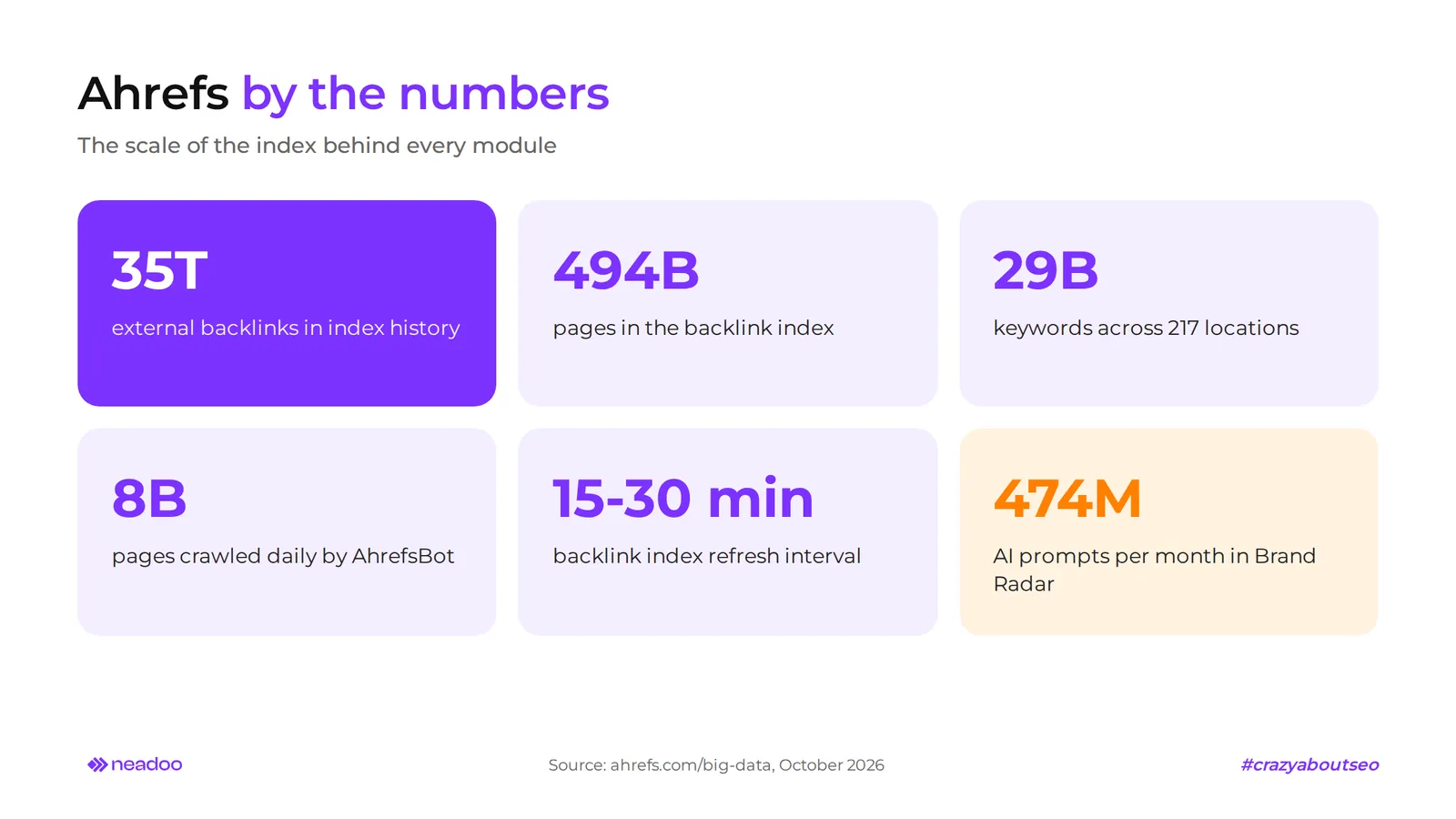
Ahrefs is an all-in-one SEO analytics platform built on a proprietary Big Data web index that has been collecting data on links, keywords, and web content for 16 years. Its backlink index includes the history of 35 trillion external links and 494 billion pages, while its keyword database contains 29 billion filtered phrases across 217 locations. The Site Explorer, Site Audit, and Keywords Explorer modules process data collected directly by AhrefsBot, without third-party intermediaries. Therefore, link analysis, site audits, and keyword research rely on real web measurements rather than estimates from external databases.
It is one of the most popular SEO tools in the world and, in our day-to-day work, one of the most essential tools for website optimization. The platform provides a project management dashboard: login takes place via app.ahrefs.com, and all modules are accessible from a single menu. In this guide, we show how much Ahrefs costs across its individual plans and how it differs from the free Ahrefs Free (formerly Ahrefs Webmaster Tools). We also describe how to use Ahrefs to evaluate your website and competitor activities, including visibility in AI answers, and how to read Domain Rating before deciding whether to invest in a subscription.
What is Ahrefs and how does the AhrefsBot crawler work
Ahrefs is a Big Data analytics platform for analyzing backlink profiles, organic search visibility, competitors, and keywords. At its core is AhrefsBot, a crawler that, according to the vendor, processes up to 8 billion pages per day, or about 5 million pages per minute. The vendor describes it as the most active crawler among SEO tools and one of the most active across the entire internet.
Crawl data feeds into several separate indexes, each powering a different module:
- backlink index (35 trillion historical external links, 494 billion pages, 286 million domains), updated every 15-30 minutes, which means near real-time,
- keyword index (29 billion filtered phrases out of 110 billion ever detected, including about 705 million for Poland),
- content index (23 billion pages), which powers Content Explorer,
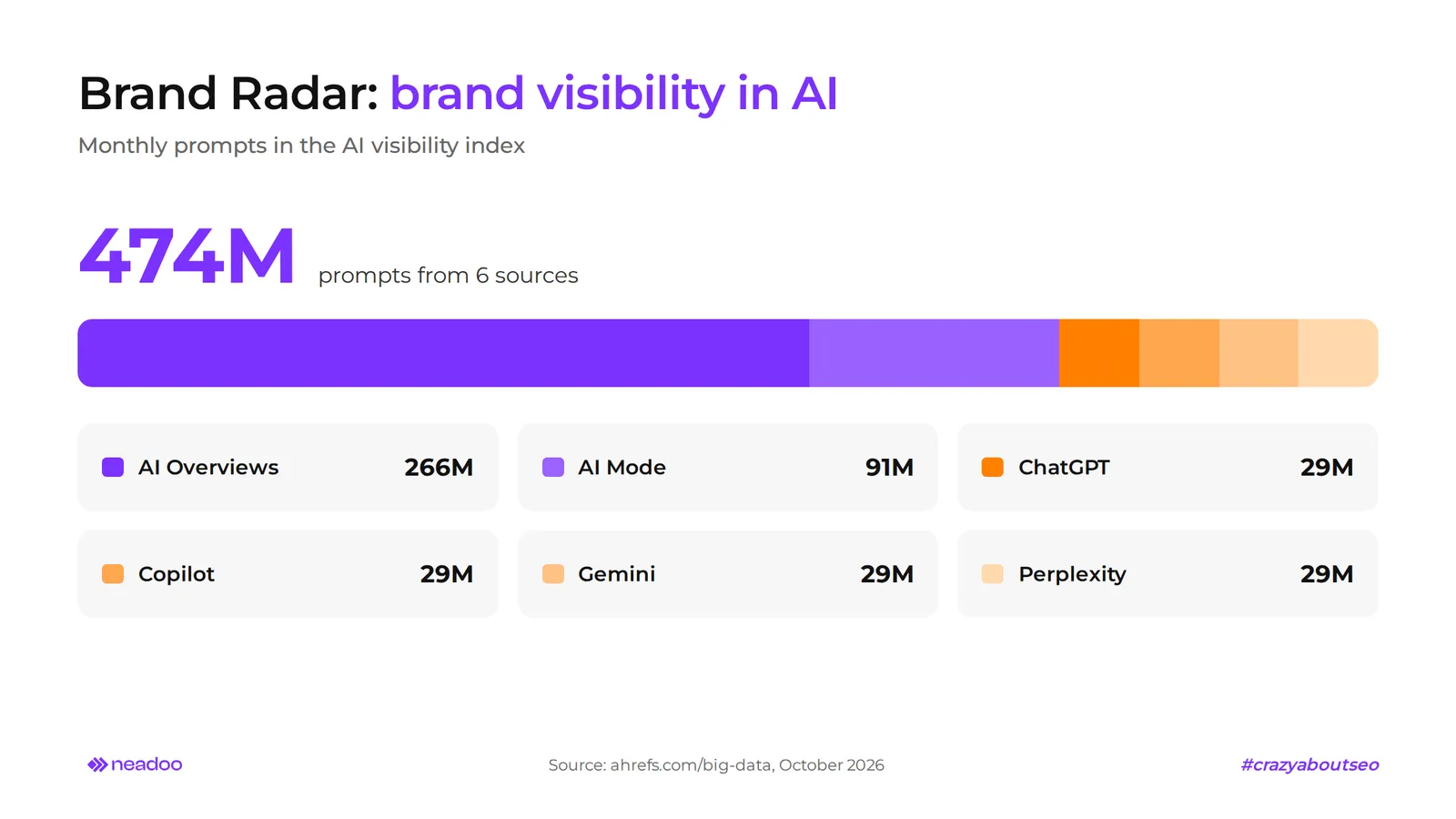
- AI visibility index (474 million prompts per month), powering Brand Radar.
The platform runs on its own server infrastructure rather than in the cloud. According to the vendor, at this database scale, the cloud would cost around $900 million over three years.
Authority metrics in Ahrefs: how to properly interpret DR, UR, and KD
Ahrefs calculates Domain Rating and URL Rating on a logarithmic scale of 0-100, and Keyword Difficulty on a non-linear scale of 0-100. Increasing Domain Rating from 70 to 80 therefore requires disproportionately more links than an increase from 20 to 30. Each metric answers a different question: DR measures the profile strength of an entire domain, UR of a specific URL, and KD estimates how difficult it is to reach the TOP 10 for a given phrase.
| Metric | What It Measures | Scale | Use Case |
|---|---|---|---|
| Domain Rating (DR) | The relative backlink profile strength of an entire domain compared to other websites in the Ahrefs database | 0-100, logarithmic | Quick assessment of competitor authority or your own site |
| URL Rating (UR) | The strength of backlinks pointing to a specific URL | 0-100, logarithmic | Identifying subpages with the highest link potential |
| Keyword Difficulty (KD) | The estimated number of linking domains needed to rank in the top 10 | 0-100, non-linear | Prioritizing keywords in content planning |
| Ahrefs Rank (AR) | A domain's rank among all websites in the index based on backlink strength | the lower the value, the stronger the domain | Comparing domains on a global scale |
Domain Rating is primarily influenced by the number of unique linking domains. The total number of links is of secondary importance. Backlink quality also matters: a link from a domain with a high Domain Rating that links to few other sites boosts the score more than ten links from weak directories. That is why acquiring links from high-value websites delivers more than mass link placement in random places.
With the Domain Rating metric, Ahrefs measures only the relative strength of a domain's link profile, without any guarantee of SERP rankings. A higher DR statistically favors higher rankings in search results, but it says nothing about the relevance of the content to the search query. A domain with DR 80 can lose a query to a page with DR 40 that answers the question better and has a higher URL Rating on that specific page. When evaluating a given page's chances, UR is often more accurate than the entire domain's DR.
Ahrefs Rank orders all domains in the database by Domain Rating. A site with an AR of 1 has the strongest link profile in the entire index, and the value makes sense only in comparison with other sites. Neither AR nor DR directly affects Google rankings, as these are metrics from a third-party tool, not the search engine. For SEO professionals, they serve as a benchmark when evaluating competitors and planning an SEO strategy.
Keyword Difficulty only takes backlink requirements into account. It disregards content quality, intent, and topical authority, so a low KD does not guarantee an easy entry into the TOP 10 when results are dominated by specialized sites. In our work, we treat KD as an initial filter, and the priority of a phrase is determined only after analyzing the search results.
Backlink profile and traffic analysis in Site Explorer
Site Explorer is a module for analyzing any domain or URL: backlinks, organic traffic, paid traffic, and the phrases a site ranks for. Link data comes from the backlink index, and traffic estimates come from an index covering 543 million phrases across 185 locations. The tool allows you to examine both your own domain and any competitor.
You can check a backlink profile in a few steps:
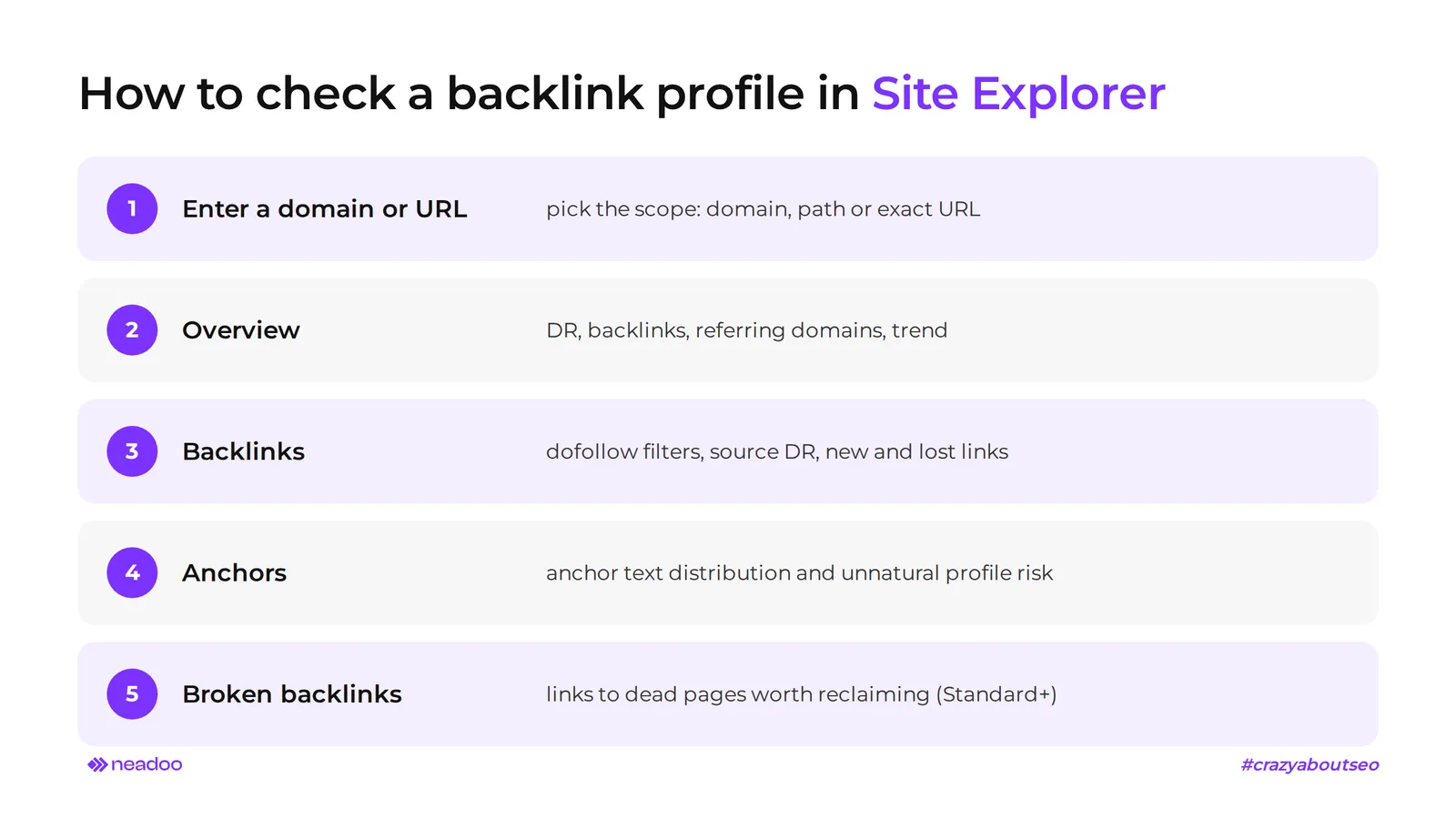
- Enter the website address into Site Explorer and select the scope: entire domain, path prefix, or exact URL.
- In the Overview report, check Domain Rating, the number of backlinks and referring domains, and their growth chart.
- Open the Backlinks report and filter links by type (dofollow, nofollow), source DR, and date. The new and lost backlinks tabs show which links appeared and which disappeared during the selected period.
- In the Anchors report, evaluate anchor text distribution. A dominance of exact-match commercial anchors is a risk signal of an unnatural profile.
- In the Standard plan and above, the Broken backlinks report will highlight links pointing to non-existent pages on your site, which are worth reclaiming via a 301 redirect or by requesting an update to the link placement.
The traffic section displays the estimated organic traffic of a given page, its keywords with ranking positions, and its strongest pages (Top pages), as well as phrases in positions 4-15, where rankings are easiest to improve. The Traffic value metric (organic search traffic value) puts a price tag on this traffic: it indicates how much that same traffic would cost if purchased in Google Ads. This way, the tool shows whether a competitor is capturing valuable commercial phrases or merely cheap informational queries. Organic traffic here is an estimate based on search engine rankings and keyword volumes, so when evaluating your own site, always compare it with data from Google Search Console.
Let's check your website's potential
Share your website and email - we'll get back to you with a real analysis, no strings attached.
Keyword Research in Keywords Explorer
Keywords Explorer analyzes search queries in terms of volume, difficulty, traffic potential, and click-through rates across 217 locations, drawing from a database of 29 billion keywords. It shows how many people search for a given phrase in a search engine and how many of those searches result in a click on a result, allowing you to make informed decisions about which topics to cover.
Volume Analysis, Clicks Metrics, and User Intent
For every keyword, Keywords Explorer displays search volume, Keyword Difficulty, Traffic Potential, and the number of clicks. It allows you to compare the popularity of the same phrase in, for example, Poland and Germany. Traffic Potential is the estimated traffic generated by the top-ranking page from all the keywords it ranks for. According to the developer, it serves as a better measure of a topic's potential than the volume of a single keyword.
Clicks and Clicks Per Search (CPS) show how many clicks a keyword generates and the average number of clicks per single search. They distinguish keywords that drive traffic to websites from those answered directly by featured snippets, knowledge panels, or AI Overviews. According to an Ahrefs study from December 2025, the presence of an AI Overview is associated with an average 58% lower CTR for the first position. A keyword with high volume and low CPS rarely justifies an investment in content.
The tool also groups keywords into clusters based on intent and overlapping SERP results, so you can plan a single comprehensive piece of content for one topic instead of several fragmented articles. The SERP report shows elements accompanying the query (videos, images, related questions), which makes it easier to evaluate intent: informational, transactional, or navigational. Clusters and intent analysis are available starting from the Standard plan. The results of keyword analysis serve as the starting point for planning valuable content and the overall SEO strategy.
Competitor Analysis: Working Techniques with Content Gap and Link Intersect
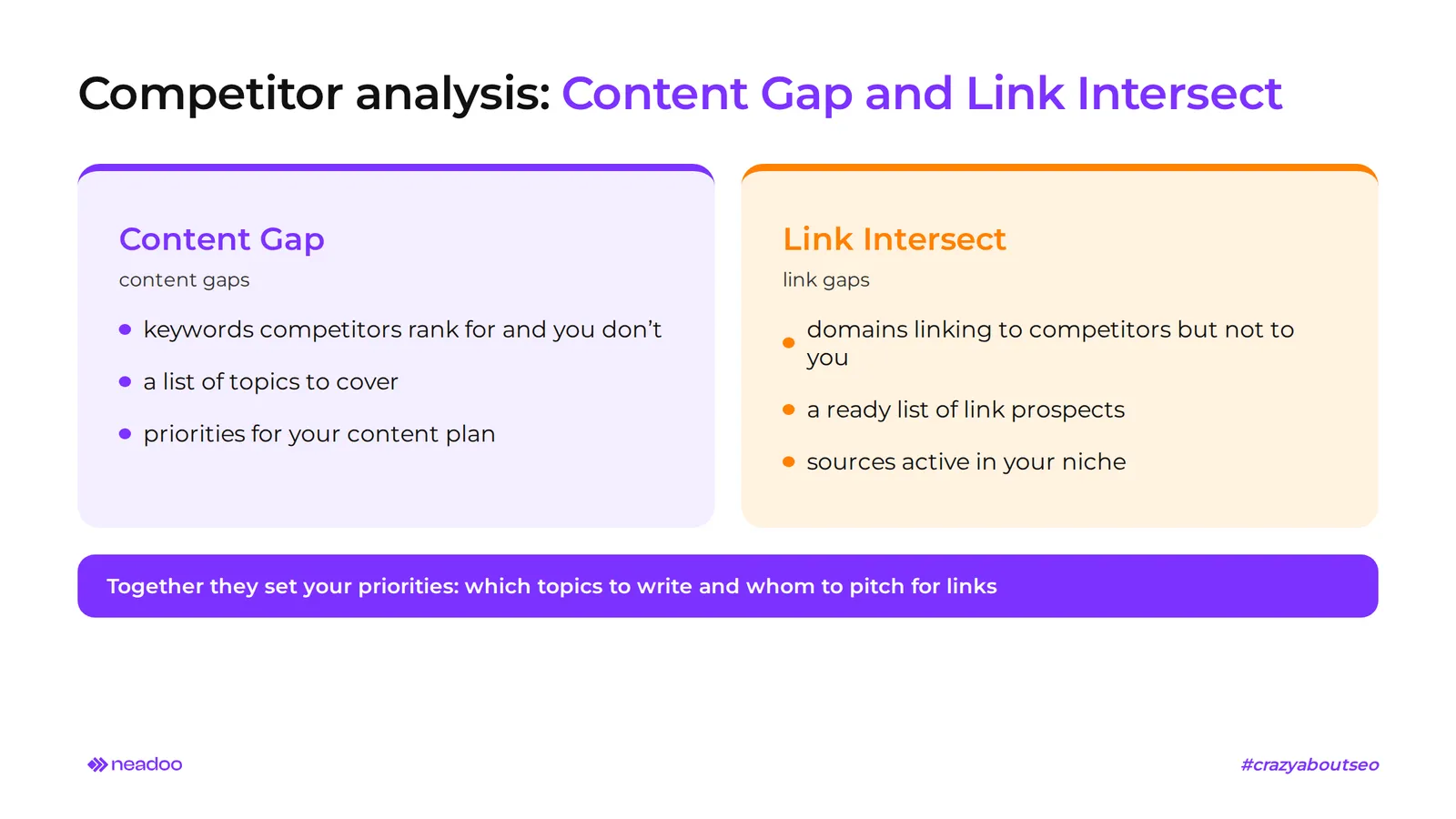
Competitor analysis in this tool relies on two complementary modules: Content Gap detects content gaps, while Link Intersect finds gaps in the backlink profile. Both automate the comparison of dozens of URLs and referring domains, which would manually take days, and help you better understand the effective SEO strategies of rivals in your industry.
- Content Gap analysis compares the visibility of your website with that of selected competitors and identifies keywords that rivals rank for, but for which you hold no position at all. The result is a list of topics that no page on your site covers yet.
- Link Intersect compares backlinks across several domains simultaneously and finds websites that link to some or all of your competitors, but not to you yet. This provides a ready-made list of link placement opportunities: sources that already link within your niche and are willing to collaborate with other websites in the industry.
- Content Explorer searches an index of 23 billion pages by keywords, domains, or dates, sorting results by metrics like organic traffic. It identifies popular content and formats that earn an above-average number of links and traffic in a given industry. Content Explorer is available starting from the Standard plan.
Combining Content Gap and Link Intersect determines your action priorities: which topics to cover first and which domains to target with outreach proposals. Effective content and link building strategies are built on such data. Regular competitor analysis helps you stay ahead of the competition before a gap in content or links turns into a permanent advantage for a rival.
Technical SEO Audit and Website Health Assessment with Site Audit
Ahrefs Site Audit is a cloud-based technical crawler that, according to the developer, checks over 170 types of SEO issues and calculates a Health Score, which is the percentage of URLs without critical errors. This metric shows whether the site is in good health and lets you track the progress of fixes between consecutive crawls. Issues are grouped into errors, warnings, and notices, making it clear what to fix first.
A technical website audit verifies indexing, on-page tags, and page loading speed. It detects errors resulting from robots.txt configuration, noindex tags, or an XML sitemap that does not match the website's structure. A separate group of checks covers canonicalization: missing, conflicting, or incorrect canonical tags that dilute ranking signals across versions of the same URL.
The module checks response codes on all discovered URLs, reports 4xx and 5xx errors, and catches redirect loops and overly long redirect chains that waste crawl budget. It also evaluates site architecture: highlighting orphan pages without internal links, pages nested too deep, and important URLs that receive too few internal links.
Every website technical issue includes an explanation of the cause, a list of affected URLs, and a fix recommendation in the report. The Lite plan allows for 100k crawl credits per month and 25k pages per project, while Standard offers 500k and 50k, respectively. Continuous monitoring through weekly crawls catches regressions following CMS updates, template changes, or migrations before they impact search visibility.
Visibility Monitoring in the AI Era: Brand Radar and Ask Ahrefs
The platform measures brand visibility in AI responses using the Brand Radar module, and speeds up proprietary data analysis with the Ask Ahrefs assistant. The former answers how language models present your brand. The latter lets you ask questions about your account data in plain language.
Brand Radar: Tracking Brand Mentions and Sentiment in Generative Engines (AEO and GEO)
Brand Radar monitors brand mentions, citations, and sentiment in AI-generated answers. It leverages an index of 474 million prompts per month from various sources: Google AI Overviews (266 million), AI Mode (91 million), as well as ChatGPT, Copilot, Gemini, and Perplexity (29 million each). Every plan starting from Lite includes a few custom tracked prompts (5 in Lite, 10 in Standard, 20 in Advanced), while full access to the prompt database starts at $199 per month as an add-on or standalone tool.
The module supports Answer Engine Optimization (AEO) and Generative Engine Optimization (GEO) - optimizing for AI engine responses. These approaches complement traditional SEO rather than replace it, because models most often cite pages that are well-indexed and strong in search engines. Instead of SERP rankings, Brand Radar reports brand share of voice compared to competitors: how often a model mentions or cites a given domain for the same queries. For businesses working on AI visibility, this is the first measurable KPI in this channel.
Ask Ahrefs: Conversational SEO Data Analytics Using Prompts
Ask Ahrefs is a built-in AI assistant that answers questions in plain language based on data from your account. It reads the page you are on, runs API requests, opens the relevant report, and generates charts. For example, you can ask about domain traffic changes over the last quarter or keywords that dropped in rankings, without navigating through successive modules.
The assistant is free in beta for Lite plans and higher. It does not work in Ahrefs Free or the Starter plan, and the vendor will announce pricing ahead of time once the beta ends. A separate feature is the MCP (Model Context Protocol) server, available starting with the Lite plan. It allows external AI assistants, such as Claude or ChatGPT, to pull data directly for custom analyses without manually exporting reports.
Keyword Rank Tracking with Ahrefs Rank Tracker
Rank Tracker monitors keyword rankings on mobile and desktop devices, along with SERP rich features and the Share of Voice metric. It updates rankings weekly across all plans. The tracked keyword limit is 750 in Lite, 2,000 in Standard, and 5,000 in Advanced.
Rank tracking on smartphones and desktop computers is performed separately, because the same keyword may hold different positions across devices due to differing SERP layouts or local results. Discrepancies often reveal issues with the mobile version of a site.
The tool also shows whether a domain captures rich features in search results - featured snippets, local packs, or knowledge panels - and which ones are being lost to competitors. This allows content to be optimized for specific result formats as well.
Share of Voice (SoV) aggregates rankings for all tracked keywords into a single percentage metric of visibility relative to competitors. Across thousands of keywords, such as in e-commerce SEO, analyzing individual rankings becomes impractical, while SoV shows how overall visibility changes across the entire site or specific categories, and whether the chosen strategy works in search engines. Projects and keyword lists are configured in the Rank Tracker dashboard separately for each domain.
SEO Tools Comparison: Ahrefs vs Semrush
The choice between Ahrefs and Semrush depends on your needs: Ahrefs wins on freshness and the scale of backlink data, while Semrush leads in the breadth of features for PPC campaigns. Both tools cover core SEO features, including technical auditing, keyword research, and rank tracking, but differ in module depth and billing models.
| Criterion | Ahrefs | Semrush |
|---|---|---|
| Index and backlink data | 35 trillion historical links, 494 billion pages, updated every 15-30 minutes | Proprietary index, stronger focus on advertising data |
| Keyword database | 29 billion keywords, 217 locations | Broad multi-market database, strong integration with the PPC module |
| Paid search analysis (PPC) | Basic paid reports in Site Explorer | Comprehensive Advertising Research and display ad analysis |
| Social media | Social Media Manager (beta) for scheduling and publishing posts | Mature Social Media Toolkit with analytics |
| AI/GEO visibility | Brand Radar (474 million prompts/mo), Ask Ahrefs (beta, available from Lite) | Proprietary tools for monitoring AI visibility |
| Pricing model | Starter $29, Lite $129, Standard $249, Advanced $449, Enterprise $1,499 per month; unlimited credits starting from Standard | Subscription plans with limits on projects and reports |
The former excels at deep backlink analysis and technical site audits. Semrush shines when a team manages both SEO and paid campaigns from a single dashboard, combining data from multiple sources. For large online stores where the number of keywords and URLs reaches into the thousands, the scale and freshness of backlink data provide an edge. For SEO of companies that simultaneously invest heavily in Google Ads, Semrush is often the preferred choice. Both are powerful tools, and the decision comes down to which digital marketing channel matters most to the business.
Ahrefs Pricing, Credit Mechanics, and Free Tools (Ahrefs Free, Formerly AWT)
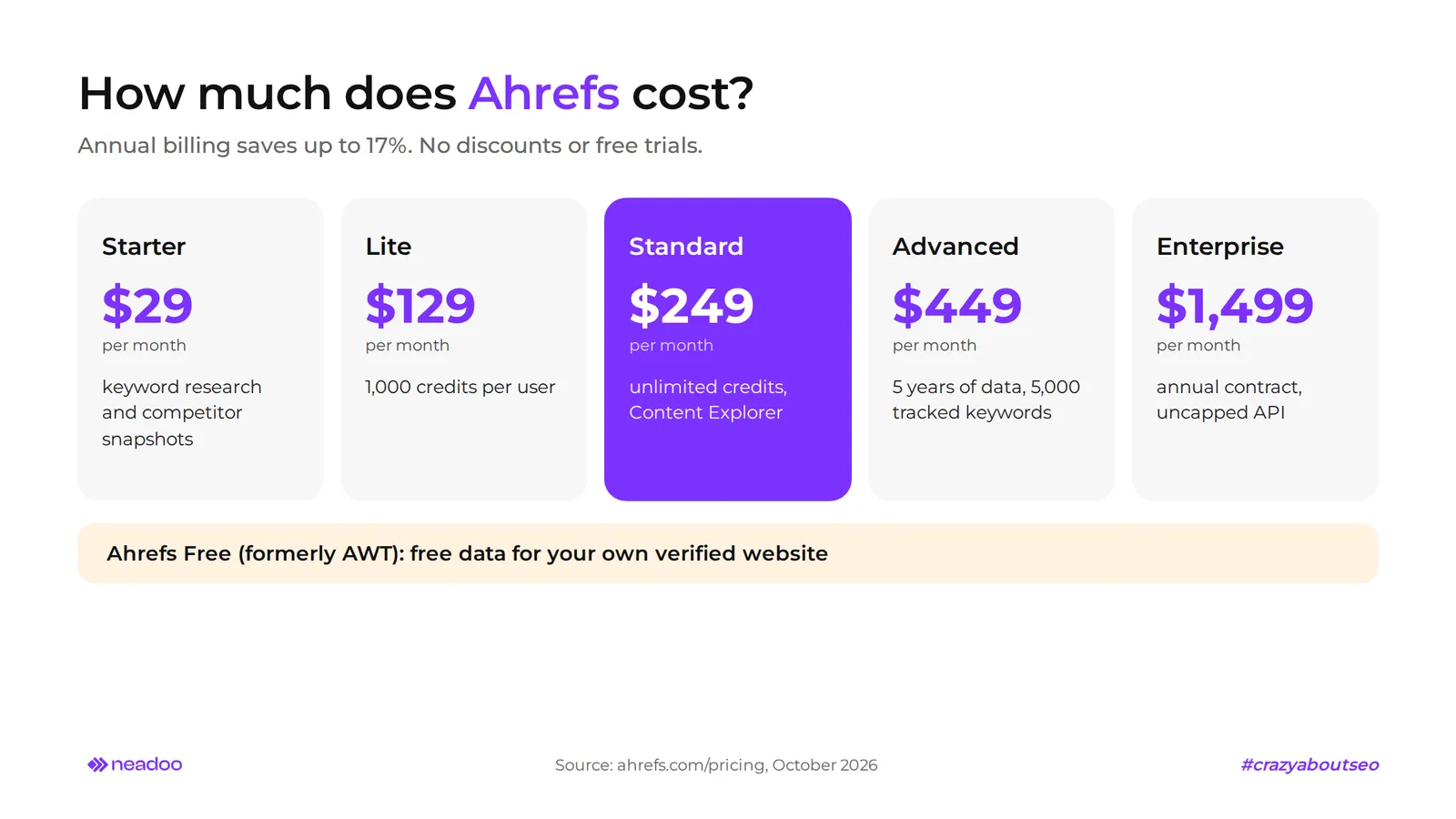
Full functionality requires a subscription, but basic analysis of your own website is free. The provider does not offer promotions or trial periods, and annual billing reduces the price by up to 17%.
Subscription Plans and Rules for Optimizing Analytical Credit Usage
There are five plans to choose from: Starter ($29), Lite ($129), Standard ($249), Advanced ($449), and Enterprise ($1,499 per month, on an annual contract). Starter is used for basic keyword research and competitor previews. Lite is the first full plan for small businesses, while Enterprise serves large teams with unlimited API access.
- The credit system applies only to the Lite plan: each user gets 1,000 credits per month, which are consumed when opening reports and filtering data.
- Unlimited starting from the Standard plan: Standard, Advanced, and Enterprise feature unlimited credits per user, so you do not need to track them in your daily work.
- Optimization in Lite: save filtered views instead of recreating them from scratch, and avoid clicking through multiple reports for the same domain. Additional credits can be purchased on a pay-as-you-go model.
- Ask Ahrefs included: the AI assistant is available for free in beta starting from the Lite plan.
In our opinion, for a single company handling its own SEO, Lite combined with the Free plan is sufficient. Standard only becomes worthwhile when credits run out before the end of the month, you need Content Explorer, or your SEO strategy relies heavily on link building. For beginners, the Free plan and free tools are a better starting point: they let you explore the interface without paying for a wide array of features you will not use yet.
Ahrefs Webmaster Tools (AWT) and the Suite of Free SEO Tools
Ahrefs Free, formerly known as Ahrefs Webmaster Tools (AWT), provides free access to limited Site Explorer and audit data for verified websites. Once a paid subscription ends, the account automatically reverts to this plan. Verification is done via Google Search Console integration, an HTML file, a meta tag, or a DNS record, among other methods.
- Data scope: backlinks pointing to your own domain, keywords your site ranks for, and an audit that detects indexation errors.
- Free tools without logging in: domain authority checker (Domain Rating), keyword generator, backlink checker for a single URL, and AI Visibility Checker.
- Limits: data applies only to verified sites, and Content Gap as well as Link Intersect are unavailable. This is a diagnostic tool, not a substitute for a subscription.
- Use case: a good first step to evaluate how your site performs and its visibility before deciding on a Lite or Standard plan.
FAQ
Ahrefs - What Is This Tool and Who Is It For?
Ahrefs is a platform for analyzing links, keywords, competitors, and the technical health of websites. It is used by agencies, marketing teams, and independent consultants. Many SEO specialists treat it as their primary link data source, while owners of small websites can start with the free Ahrefs Free tier.
What Is the Difference Between Domain Rating (DR) and URL Rating (UR)?
DR evaluates the strength of an entire domain's link profile on a scale of 0-100 relative to other websites in the Ahrefs database. UR measures the same metric for an individual URL and indicates which subpage has the strongest links.
How Much Does Ahrefs Cost?
Plans range from $29 (Starter), $129 (Lite), $249 (Standard), and $449 (Advanced) to $1,499 per month (Enterprise). Annual billing lowers the cost by up to 17%, and basic data on your own website is available for free in Ahrefs Free.
How Does the Credit System Work in Paid Ahrefs Plans?
Credits apply only to the Lite plan: 1,000 per user per month, consumed when opening reports and filtering data. Starting with the Standard plan, credits are unlimited.
What Is Ahrefs Brand Radar and How Does It Support AEO?
It is a module that monitors brand mentions, citations, and sentiment across responses generated by AI Overviews, AI Mode, ChatGPT, Copilot, Gemini, and Perplexity. It displays the brand's share of voice compared to competitors, which is a foundational metric in an Answer Engine Optimization strategy.