
404 Not Found Error - Where It Comes From and How It Affects SEO
The 404 Not Found error is a standard HTTP response status code from the 4xx group. It means the server connected with the browser, but could not find the resource at the specified URL. It most often results from a typo in the address, deleting a subpage without setting up a redirect, a mistake in internal linking, a failed website migration, or a server configuration error.
A single 404 error does not hurt anyone. The problem begins when there are many such URLs: they waste Google bots' crawl budget, cut the website off from link juice, and degrade the user experience. The fix involves detecting the broken URLs (Google Search Console (GSC), Screaming Frog, Ahrefs, server log analysis) and implementing a 301 redirect to a contextually related address.
What does the 404 Not Found error mean and how does it differ from a "server not found" message?
A 404 error is an HTTP code from the 4xx group: the server established a connection with the client, but did not find the requested file or does not want to disclose that it exists. The message then informs that the page was not found. It is classified as a client-side error, as opposed to server errors (5xx) and situations where a connection is not established at all. Across websites, you will encounter various versions of this message: "Error 404", "Page not found", "404 Not Found", or simply "Page missing" or a generic page display error.
The distinction from "server not found" is diagnostically important because it points to a different stage of failure. With a 404, the server responds, it just cannot find the page at the specified URL. "Server not found" (a DNS error, e.g., DNS_PROBE_FINISHED_NXDOMAIN) means that the browser failed to locate the server itself, so no HTTP data exchange takes place at all.
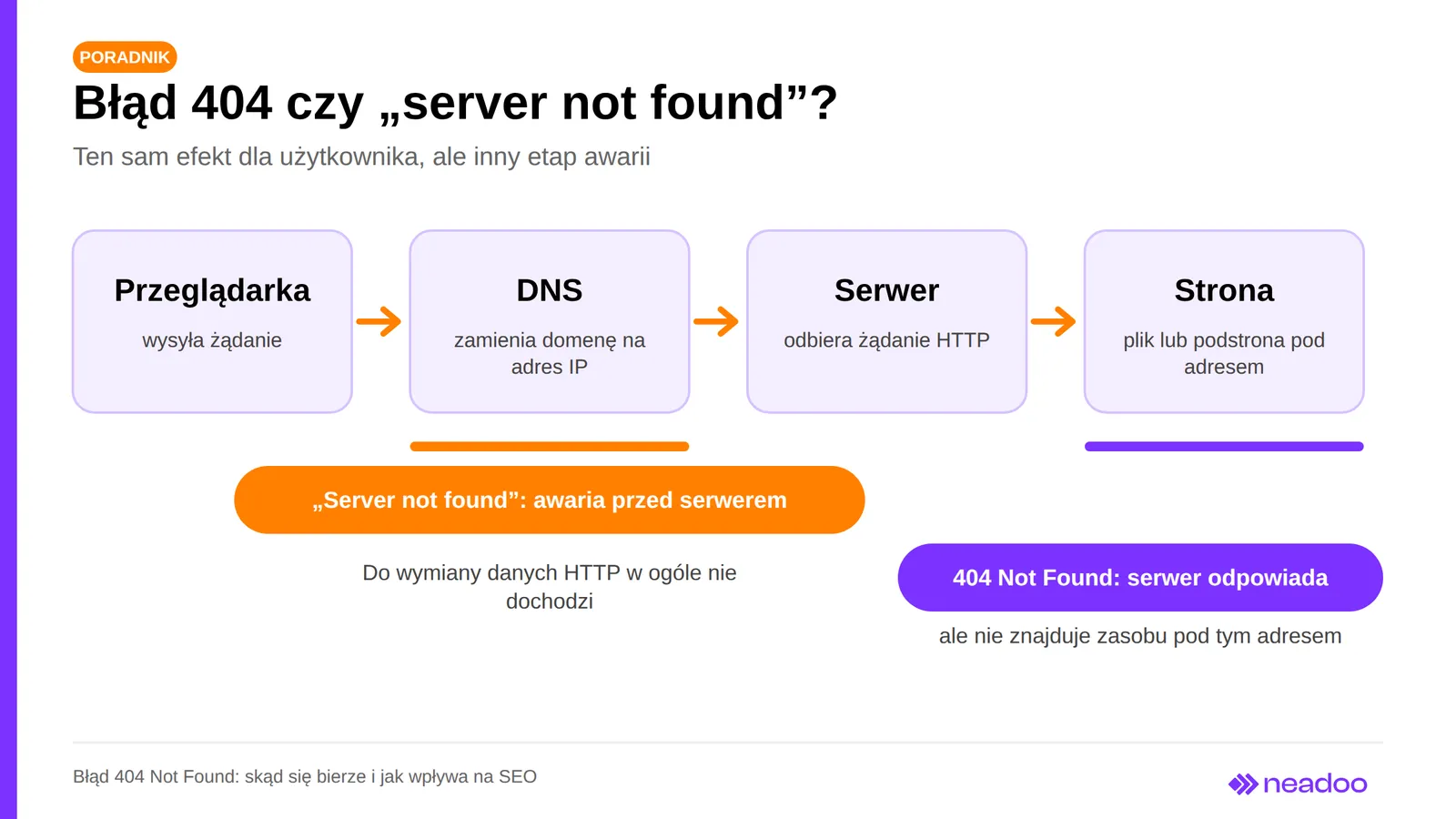
| Parameter | 404 Not Found Error | "Server not found" |
|---|---|---|
| Stage of the issue | After establishing a connection to the server | Before establishing a connection |
| Cause | Resource missing at the given URL (deleted file, typo in link) | Nonexistent domain, DNS error, server offline |
| Typical solution | 301 redirect or 410 code for permanent removal | Checking DNS records and hosting availability |
The 404 code itself is a neutral technical signal. Its impact on SEO on a specific site is determined by the scale and nature of the errors, such as massive broken internal links. Recognizing HTTP errors, including distinguishing a 404 from server availability issues, is part of a broader SEO service because it affects crawl efficiency and user experience.
What causes a 404 error on a website?
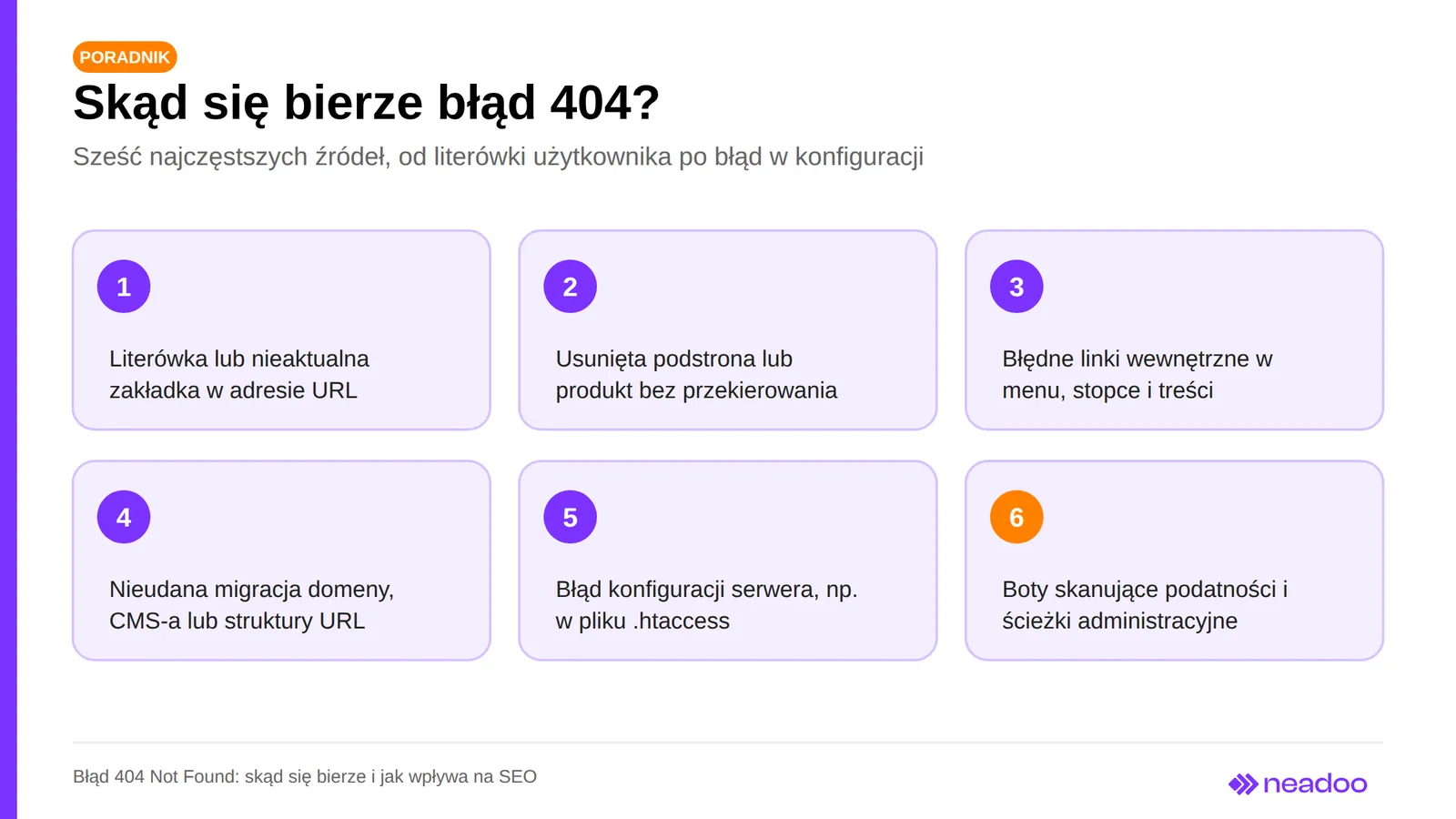
The source of a 404 error on your site depends on who sends the request: a user, a search engine bot, or a vulnerability scanner. The most common and usually one-off cause is an incorrect URL entered by the user: a typo, an outdated bookmark, or a link from an external source pointing to a non-existent page.
Site-side causes typically fall into three categories. The first is deleting a subpage or removing a product without a redirect: every existing link pointing to it becomes broken, and in e-commerce, where product listings expire regularly, the problem snowballs quickly. The second is internal linking errors: outdated links in menus, footers, body content, or the sitemap are encountered by bots on every crawl, not just during an occasional visit by a human. The third is a failed migration: changing the domain, URL structure, or CMS without mapping old URLs to new ones generates mass 404 errors across multiple subpages at once.
Server-side and bot-related causes also occur. A server configuration error, such as a mistake in .htaccess rules or Apache/Nginx settings, can break existing resources, and a single wrong line can trigger errors on dozens of subpages. On the other hand, vulnerability scanning bots probe typical administrative paths (e.g., /wp-admin/backup or /old/config.php) and generate requests for non-existent resources. This is automated traffic that does not reflect real issues on the site, so it does not need to be fixed, just filtered out of reports.
What should you do when you see a 404 error as a user?
First, refresh the page (F5 or Ctrl+R), because simply refreshing sometimes helps when the error was temporary, for instance after server changes were deployed. Next, check the URL in the browser address bar: typos, missing characters, or extra parameters appended to the end are the most common cause. If you still see the 404 error at the given address, you can shorten it down to the domain, go to the homepage, and search for the content you need in the menu or on-site search bar.
If that does not help, type the title of the page or article into Google, as search engines often show the current address where the content has been moved. You can also check if the same link works on a smartphone or on a different network to rule out caching issues or your own internet connection. If the page was removed and you found the link in someone's publication, contact the website administrator. Fixing a broken link takes them only a moment.
Let's check your website's potential
Share your website and email - we'll get back to you with a real analysis, no strings attached.
How do 404 errors affect SEO and user experience?
An excess of 404 errors harms SEO not through their mere presence, but through the scale of the problem: it wastes crawl budget, strips the site of built-up external link authority, and degrades the user experience. Google confirms that isolated or justified 404 errors do not trigger an automatic ranking penalty for the entire domain.
Crawl budget and loss of link juice
Search engines assign every domain a limited crawl budget, and every encounter with a 404 error uses up a portion of it instead of serving to discover high-value subpages. On a small site, budget is rarely a bottleneck, but on an e-commerce store with thousands of URLs, it is. Besides, not every 404 is a problem: for permanently removed content, Google recommends returning a 404 or 410 code, and bots visit such URLs less and less frequently over time.
The real threat comes from two scenarios: broken internal links and soft 404s (described below). A link in a menu or content that leads to a non-existent subpage is detected by a bot on every crawl, generating unnecessary requests. If such an address previously held external link value, that equity is lost unless a 301 redirect to a contextually relevant URL is implemented.
User experience and conversion
A user who lands on an error page after clicking a link from search results, an ad, or another website often leaves the site within seconds, which drives up the bounce rate visible in Google Analytics. The business impact is tangible: in e-commerce, a 404 error on a product page means losing a customer with purchase intent, and on service websites, it breaks the path to a contact form, costing a lead. If you are simultaneously running SEO efforts for that subpage, you also lose the work invested in it. Marketing team members also see this as a wasted budget when an ad points to a non-existent subpage.
The degradation of UX occurs regardless of the impact on rankings, because every session that ends on an error page is a lost conversion and sales opportunity.
What is a soft 404 and why does it mislead Google bots?
A soft 404 is a situation where the server returns a 200 OK code, even though the subpage does not actually contain the requested resource and, for example, displays a "product not found" message or an empty search results page. The user sees a classic 404 error, but the HTTP response code signals to bots that everything is fine.
Google often detects such pages on its own and does not index them, reporting them in Search Console as "Soft 404," separately from the "Not found (404)" status. Before doing so, however, the bot crawls these URLs like full-fledged content and wastes crawl budget on them. The most common sources of soft 404s are discontinued products whose pages still show a category template with a "no results" message, internal search results with no matching records, and misconfigured error pages in a CMS attached to a template without the correct status code.
Google also classifies redirecting all deleted pages to the homepage as a soft 404. The solution is always the same: the proper response code, meaning, depending on the situation, a 404 or 410 for deleted content, or a 301 to an actual equivalent. If the URL is supposed to work, you can restore the real content.
404 error vs. 410 Gone code: when to use which?
A 404 code only says that the server did not find the resource, without resolving whether the condition is temporary or permanent. The 410 Gone code explicitly communicates that the resource has been permanently removed. According to official Search Console help, Google treats 410 the same as 404, and both codes lead to the URL dropping out of the index. Google employees have noted that a 410 is sometimes noticed a few days faster, so it makes sense during deliberate, bulk content deletions, but it is not a method for instant de-indexing.
| Situation | Recommended Code | Justification |
|---|---|---|
| Resource permanently removed, no topical equivalent | 410 Gone (or 404) | Clear signal of permanence; Google treats both codes similarly |
| Status uncertain or resource may return | 404 Not Found | Neutral indication of absence |
| Equivalent or related subpage exists | 301 Moved Permanently | Transfers users and link equity to the correct address |
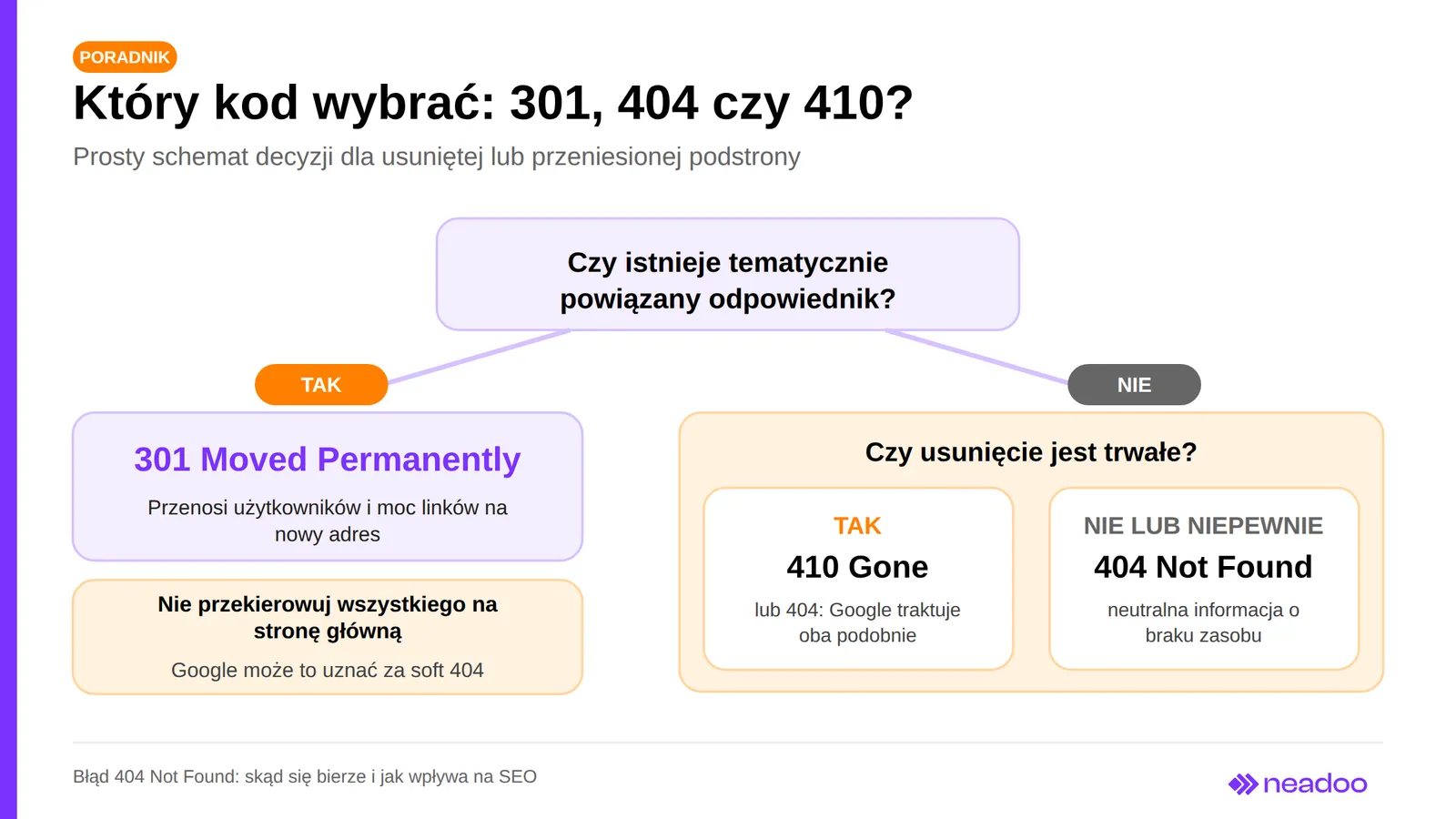
Do not redirect deleted subpages en masse to the homepage just to "get rid of" the error. Such a redirect does not pass real value, and Google may treat it as a soft 404. A 301 code only makes sense when the destination URL actually corresponds to the content of the deleted page.
How to detect 404 errors and broken links?
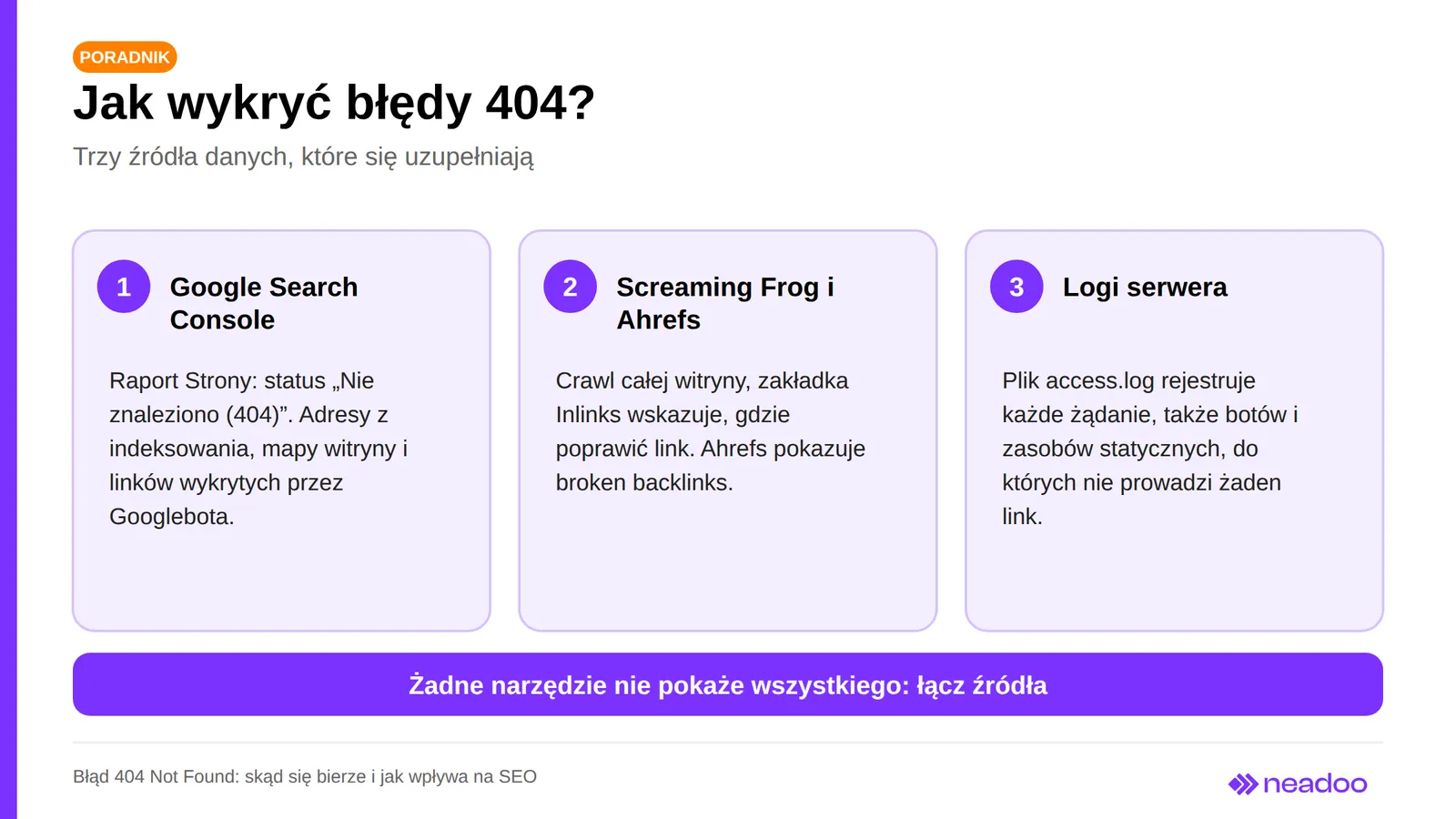
No single tool will show all broken links on your site, which is why it is best to combine free Google data with an SEO crawler and server log analysis.
Google Search Console
This is a free starting point. In the Pages report (Indexing → Pages), you can check the "Not found (404)" status with a list of URLs that the bot determined to be non-existent. The list comes from previous crawling, the sitemap, and links discovered by Googlebot, rather than a real-time audit, and it applies to pages, not images, stylesheets, or scripts.
Screaming Frog and Ahrefs
Screaming Frog SEO Spider crawls the entire site, regardless of whether the URLs have been indexed. In the Response Codes tab, the "Client Error (4xx)" filter shows all 404 URLs, and the Inlinks tab for a selected address indicates the pages linking to it, so you immediately know where to fix the link. You can export the result as a report for the development team.
Ahrefs complements this picture with broken backlinks, which are incoming links from external domains leading to URLs that no longer exist. A local crawler will not show such links, and these are precisely the ones you can reclaim with a redirect.
Server log analysis
The access.log files record every HTTP request, so log analysis provides the most complete picture of 404 errors, including bot traffic. On Apache or Nginx, you can filter entries with a 404 code to catch missing files and directories, outdated links from ad campaigns and social media, and scanning attempts targeting administrative paths. It is also the only way to detect a 404 error on an image or script that has no links pointing to it, which neither GSC nor a crawler will find.
How to fix a 404 error?
A 301 redirect (Moved Permanently) is the standard solution when a deleted or moved page has a thematically relevant equivalent: the server sends the user and the bot elsewhere, to the new address, passing along the accumulated link equity. Setting up a redirect makes sense when a page has changed its URL, a product has been replaced by another from the same category, or an article has been updated under a new URL. When there is no meaningful equivalent, it is better to leave a 404 or return a 410. Keep chains in mind: multiple redirects in sequence (A→B→C) increase response times and weaken link equity transfer, so set the target URL directly. It is worth fixing every detected address or consciously leaving it.
In WordPress, 404 errors most often result from deleting a post, changing the permalink structure, or migrating a domain. You can set up redirects using a plugin (Redirection, Yoast SEO Premium) without editing code, or manually in the .htaccess file via mod_rewrite, which is faster with a large number of rules. After updating a plugin, simply re-saving permalinks in Settings → Permalinks often helps by rebuilding the .htaccess file. After a domain migration, you can check old URLs in bulk (e.g., with Screaming Frog) and prepare a comprehensive redirect map before switching DNS records.
After fixing, check the response code (e.g., using the curl tool) to confirm that the server returns a 301 rather than still a 404 error. In Search Console, within the URL Inspection tool, you can click "Request Indexing," which speeds up the bot's visit. Also, update your sitemap (sitemap.xml) by removing outdated URLs. An indexed URL returning a 404 drops out of the index naturally after re-crawling, so the "Not found (404)" status should clear out over time. If the same URLs remain there permanently, it is a sign of a misconfigured redirect or internal links still pointing to the old URL.
How to Design a User-Friendly 404 Error Page?
A good 404 page keeps the user on your site and turns a moment of frustration into an opportunity for further interaction, unlike a bare page with a default error message. The message should be clear and simple: it informs visitors that the requested resource does not exist, without jargon like "server error" and visible HTTP status codes that are meant for developers, not visitors. The page should retain the header, footer, and main menu so the user knows they are still on the same website. Lighthearted graphics or a brief joke work well, as long as they do not obscure navigation.
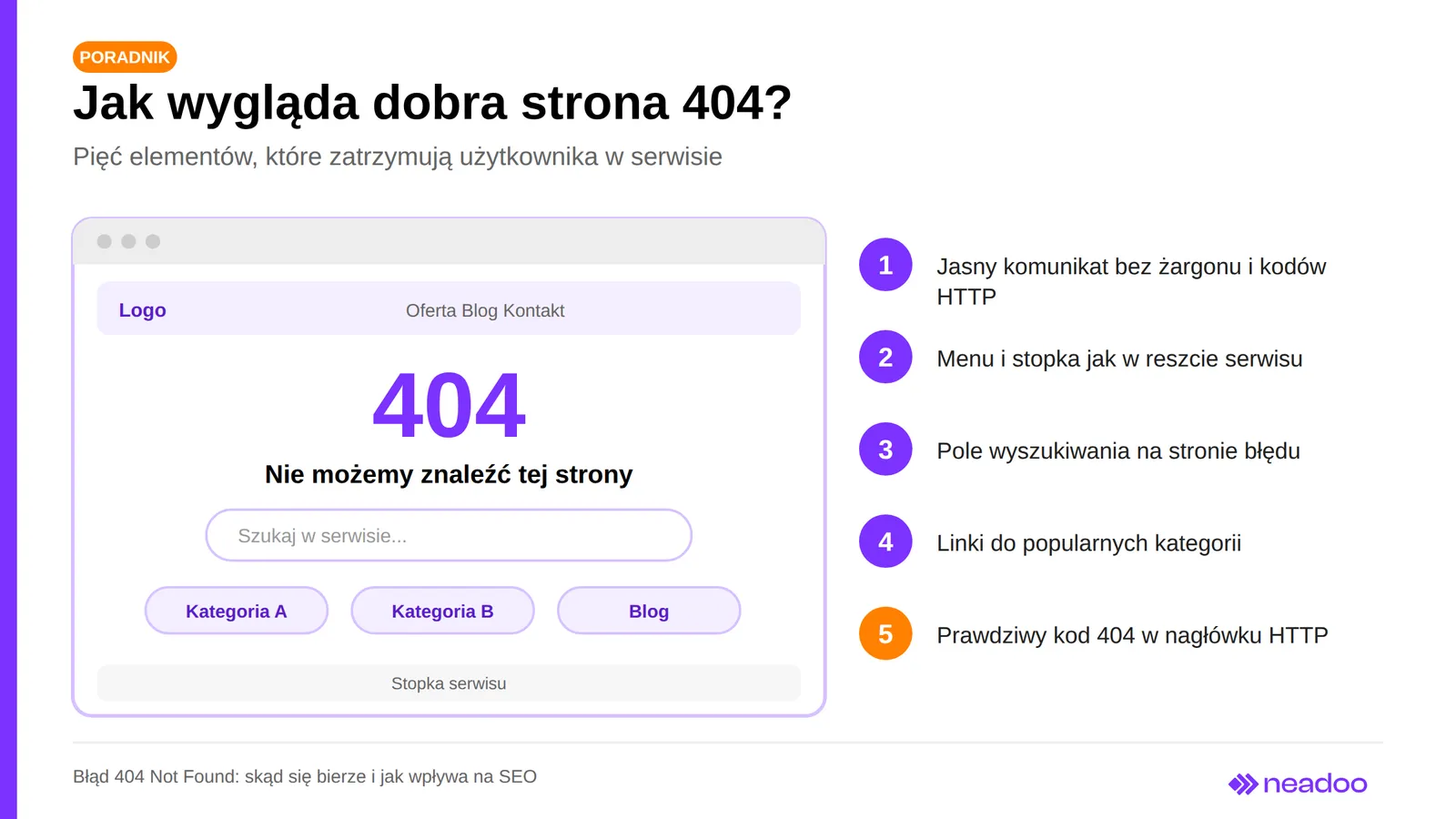
The most important functional element is a search bar, which lets users type a new query without returning to the homepage. Equally important are links to popular categories, blog sections, and the homepage, as well as recommended products in e-commerce. A 404 page should not offer only a "back to homepage" button. You can show several navigation paths. Technically, the most crucial part is for a properly configured server to return an actual 404 status code in the HTTP header, regardless of the visual layer, because failing to do so leads directly to a soft 404.
FAQ: Frequently Asked Questions
Can 404 errors negatively affect the entire domain?
Isolated or justified 404 errors do not trigger an automatic ranking penalty for the entire site. Broken internal links, the loss of high-value URLs, and widespread soft 404s have a far greater impact.
When is it better to use a 301 redirect, and when should you keep a 404 error?
Use a 301 redirect when a relevant, topically related equivalent for the content exists. When a resource has been permanently deleted without a replacement, a 404 is sufficient, while a 410 code is more explicit, though Google treats both similarly.
How quickly does Google remove 404 pages from its search results?
Gradually, as search engine crawlers recrawl the pages, so it does not happen immediately. You can speed up the process by requesting URL indexing in GSC and updating your sitemap.